
Stickynote Command

Quote from rcohen on December 29, 2021, 9:36 pm@hpw,
When we choose "center" checkbox for custom windows and alertboxes, the positioning is correct regardless of the position of the main pub window, which is this case is offscreen to the left to remain hidden. But when you request the same of the sticknote object, this isn't the case, rather it docks to the upper left corner.
Is there any chance that this might be addressed in the next release?
Thanks a bunch. Happy New Year!
@hpw,
When we choose "center" checkbox for custom windows and alertboxes, the positioning is correct regardless of the position of the main pub window, which is this case is offscreen to the left to remain hidden. But when you request the same of the sticknote object, this isn't the case, rather it docks to the upper left corner.
Is there any chance that this might be addressed in the next release?
Thanks a bunch. Happy New Year!
Uploaded files: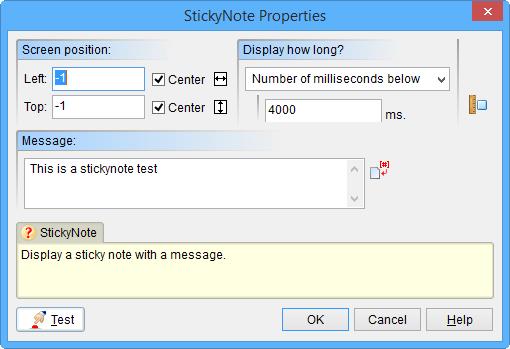

Quote from HPW on December 29, 2021, 11:06 pmHello,
Yes, there is currently a different behaviour.
There were some discussions about this in the past.
But what will be the right behaviour?
In times of multiscreen and big screens is "center to screen" often a bit irritating when a alertbox appears far away from the app-mainscreen.
And any change may break older apps.
So what is the wanted way in the community?
Or are new extened commands a way to go? Like "IfEx" to "If"?
Regards
Hans-Peter
Hello,
Yes, there is currently a different behaviour.
There were some discussions about this in the past.
But what will be the right behaviour?
In times of multiscreen and big screens is "center to screen" often a bit irritating when a alertbox appears far away from the app-mainscreen.
And any change may break older apps.
So what is the wanted way in the community?
Or are new extened commands a way to go? Like "IfEx" to "If"?
Regards
Hans-Peter
Quote from rcohen on December 30, 2021, 3:21 amHi Hans,
Thanks for the reply. I would think that in the name of consistency, that center screen should behave, just as the other items mentioned currently behave. However, extended commands are surely a consideration, just as off screen left was a new addition. Perhaps a checkbox for relative to screen or pub? Having an off screen choice is a cool addition but the way it sits now makes using the stickynote command unrealistic.
Thanks again Hans.
Hi Hans,
Thanks for the reply. I would think that in the name of consistency, that center screen should behave, just as the other items mentioned currently behave. However, extended commands are surely a consideration, just as off screen left was a new addition. Perhaps a checkbox for relative to screen or pub? Having an off screen choice is a cool addition but the way it sits now makes using the stickynote command unrealistic.
Thanks again Hans.

Quote from Vadim on December 30, 2021, 8:47 am@hpw
@rcohen
The behavior of stickynote doesn't seem like a problem to me. It's just a feature of the command. If you want a more customizable message window, you can always make it absolutely anything by using a container.
At the same time, additional features always push the boundaries of creativity.
It seems to me that a new extended StickynoteEx command would be a good solution to maintain compatibility with older projects. In addition to the options for screen position (taking into account two or more monitors), you could add the ability to change the color of the stickynote fill, maybe even with a gradient.But after all, even now this can be achieved using a container. Probably now it will be difficult to set on which of the monitors to display the message (on the primary or secondary, if there are two monitors; and on which of them, if there are more than two). I just haven't tried it. But it's unlikely to be a common problem.
The behavior of stickynote doesn't seem like a problem to me. It's just a feature of the command. If you want a more customizable message window, you can always make it absolutely anything by using a container.
At the same time, additional features always push the boundaries of creativity.
It seems to me that a new extended StickynoteEx command would be a good solution to maintain compatibility with older projects. In addition to the options for screen position (taking into account two or more monitors), you could add the ability to change the color of the stickynote fill, maybe even with a gradient.
But after all, even now this can be achieved using a container. Probably now it will be difficult to set on which of the monitors to display the message (on the primary or secondary, if there are two monitors; and on which of them, if there are more than two). I just haven't tried it. But it's unlikely to be a common problem.
Quote from rcohen on December 30, 2021, 10:35 am@Vadim,
While that's a valid point (creating anything with containers), it still doesn't solve the problem of the stickynote not being usable with off screen main windows. It would be a shame to not have access to such a basic command in order to use off screen methods. As mentioned, the other objects work fine in this case?
If I had to build them manually I of course would, but had hoped not to have to with later builds ;-0
While that's a valid point (creating anything with containers), it still doesn't solve the problem of the stickynote not being usable with off screen main windows. It would be a shame to not have access to such a basic command in order to use off screen methods. As mentioned, the other objects work fine in this case?
If I had to build them manually I of course would, but had hoped not to have to with later builds ;-0
Quote from HPW on December 30, 2021, 4:06 pmHello Robert,
Just a thought about your wanted use of a Stickynote.
Wasn't it designed to make a note on your own GUI in your app?
So for what do you want it to use with a hidden app outside left off screen?
Paradox? ;-)
Regards
Hans-Peter
Hello Robert,
Just a thought about your wanted use of a Stickynote.
Wasn't it designed to make a note on your own GUI in your app?
So for what do you want it to use with a hidden app outside left off screen?
Paradox? ;-)
Regards
Hans-Peter
Quote from rcohen on December 30, 2021, 11:05 pmHi @hpw,
I understand the point... but can't the same argument be made for alertboxes and custom windows ?
Understand I'm not sitting at the edge of my seat for this improvement... I can work around it need be. I just figured that it might be nice for these things to all work the same way ;-0 I also figured it would likely be an easy fix, IF you were working on it anyway. Surely not worth dropping everything to go fix, but if you're already under the hood, then .... perhaps it won't take much effort ;-)
Hey, have a great New Years Hans... and thank you MUCH for your continued effort for our community.
Hi @hpw,
I understand the point... but can't the same argument be made for alertboxes and custom windows ?
Understand I'm not sitting at the edge of my seat for this improvement... I can work around it need be. I just figured that it might be nice for these things to all work the same way ;-0 I also figured it would likely be an easy fix, IF you were working on it anyway. Surely not worth dropping everything to go fix, but if you're already under the hood, then .... perhaps it won't take much effort ;-)
Hey, have a great New Years Hans... and thank you MUCH for your continued effort for our community.

Quote from PaulJonestindall on January 7, 2022, 7:27 pmJust a quick thought here... It seems to me that the function and even the color of the StickyNote is really a relic of early Windows. Kind of like that little paperclip guy in Microsoft Word 20 years ago. I mean, it was a nice and convenient feature when Windows display graphics weren't as, shall we say, as mature as they are now. I expect at the time, it was a very light resource intensive means to "pop up" some relevant information.
I'm actually kind of surprised the feature hasn't actually gone away, but then again, I don't suppose it costs anybody anything just to leave it. I still use it on occasion when its simple function is all I need. But frankly, I think it's an aesthetic whose time had past.
If it were to be revived and revised, I would suggest actually eliminating it in favor of a more customizable form of the AlertBox or MessageBox but easier than having to build a CustomWindow.
Just a quick thought here... It seems to me that the function and even the color of the StickyNote is really a relic of early Windows. Kind of like that little paperclip guy in Microsoft Word 20 years ago. I mean, it was a nice and convenient feature when Windows display graphics weren't as, shall we say, as mature as they are now. I expect at the time, it was a very light resource intensive means to "pop up" some relevant information.
I'm actually kind of surprised the feature hasn't actually gone away, but then again, I don't suppose it costs anybody anything just to leave it. I still use it on occasion when its simple function is all I need. But frankly, I think it's an aesthetic whose time had past.
If it were to be revived and revised, I would suggest actually eliminating it in favor of a more customizable form of the AlertBox or MessageBox but easier than having to build a CustomWindow.
Quote from rcohen on January 7, 2022, 11:18 pmHi @pauljonestindall,
I completely agree with you. I think it should be revamped, but at least it works when you don't move off screen with the mother ship. A simple switch near the coordinates input in the wizard that reads "relative to screen" would solve the problem at last for now. The point is, with the alertbox and other like commands, they are all working properly, so I know it's possible. And that was what this post was about.... just a minor fix that is already present in the other popups. There are many places in Visual Neo that would benefit from a more modern implementation, and now that the SDK is open to Delphi 10 perhaps we'll start seeing some of those, but for now, what we have is usable.
There are plugins, I am aware that also offer more robust stickynote types of notifications, but I'm always in favor of using what's in house, before turning to more plugins. If Hans can apply the quick fix to this next update, then I'll still use the sticknote as it serves the purpose. And if not, then I'll just avoid using it for those off screen projects.
Thanks for the dialog Paul.
I completely agree with you. I think it should be revamped, but at least it works when you don't move off screen with the mother ship. A simple switch near the coordinates input in the wizard that reads "relative to screen" would solve the problem at last for now. The point is, with the alertbox and other like commands, they are all working properly, so I know it's possible. And that was what this post was about.... just a minor fix that is already present in the other popups. There are many places in Visual Neo that would benefit from a more modern implementation, and now that the SDK is open to Delphi 10 perhaps we'll start seeing some of those, but for now, what we have is usable.
There are plugins, I am aware that also offer more robust stickynote types of notifications, but I'm always in favor of using what's in house, before turning to more plugins. If Hans can apply the quick fix to this next update, then I'll still use the sticknote as it serves the purpose. And if not, then I'll just avoid using it for those off screen projects.
Thanks for the dialog Paul.

Quote from fkapnist on January 10, 2022, 11:26 pmThis will always display the stickynote at the center of your screen, even if you drag the app offscreen
StickyNote "[ScreenWidth]/2-[WindowLeft]" "[ScreenHeight]/2-[WindowTop]" "hello" "0"
This will always display the stickynote at the center of your screen, even if you drag the app offscreen
StickyNote "[ScreenWidth]/2-[WindowLeft]" "[ScreenHeight]/2-[WindowTop]" "hello" "0"
Quote from rcohen on January 11, 2022, 4:11 amHi @fkapnist
I actually tried that and it did not work for me. I did it slightly differently (doing the math first) so perhaps that was it.
Thanks, I'll give this a shot.
Hi @fkapnist
I actually tried that and it did not work for me. I did it slightly differently (doing the math first) so perhaps that was it.
Thanks, I'll give this a shot.
Quote from rcohen on January 11, 2022, 4:11 amHi @fkapnist
I actually tried that and it did not work for me. I did it slightly differently (doing the math first) so perhaps that was it.
Thanks, I'll give this a shot.
This does work great. Thank you!
Hi @fkapnist
I actually tried that and it did not work for me. I did it slightly differently (doing the math first) so perhaps that was it.
Thanks, I'll give this a shot.
This does work great. Thank you!