StrParse & Arrays

Quote from PaulJonestindall on December 21, 2021, 8:18 pmHello All,
I've been using NeoBook/VisualNeo Win for 20+ years and I'm now trying out the Web version.
I'm trying to understand most all of this but my first question today is about StrParse and variable arrays.I'm using the neoScan sample here, I scan a QR code and I do get the [scanedData] variable correctly. The data is a string delimited by semicolons (;) so...
[scanedData] = 31409;SP-001;2021/10/11-316-2Here's my code:
CreateEmptyArray [BcD]
StrParse "[scannedData]" ";" [BcD]
But it is not returning anything in [BcD(0)] [BcD(1)] or [BcD(2)] which should be 31409 and SP-001 and 2021/10/11-316-2
What am I not understanding here? And where/when does the create array come in?
Thanks.
Hello All,
I've been using NeoBook/VisualNeo Win for 20+ years and I'm now trying out the Web version.
I'm trying to understand most all of this but my first question today is about StrParse and variable arrays.
I'm using the neoScan sample here, I scan a QR code and I do get the [scanedData] variable correctly. The data is a string delimited by semicolons (;) so...
[scanedData] = 31409;SP-001;2021/10/11-316-2
Here's my code:
CreateEmptyArray [BcD]
StrParse "[scannedData]" ";" [BcD]
But it is not returning anything in [BcD(0)] [BcD(1)] or [BcD(2)] which should be 31409 and SP-001 and 2021/10/11-316-2
What am I not understanding here? And where/when does the create array come in?
Thanks.

Quote from luishp on December 21, 2021, 9:24 pm@pauljonestindall this works perfectly for me. Result is printed on the Console (Web Browser F12):
SetVar "[scannedData]" "one;two;three;four"
StrParse "[scannedData]" ";" [BcD]
Consolelog [BcD]
Please take a look at how to display Array values on screen:
https://webhelp.visualneo.com/VariableArrays.htmlRegards.
@pauljonestindall this works perfectly for me. Result is printed on the Console (Web Browser F12):
SetVar "[scannedData]" "one;two;three;four"
StrParse "[scannedData]" ";" [BcD]
Consolelog [BcD]
Please take a look at how to display Array values on screen:
https://webhelp.visualneo.com/VariableArrays.html
Regards.
Quote from PaulJonestindall on December 22, 2021, 10:46 am@luishp
As I say, I'm using the neoScan sample app and modifying the Scan QR PushButton The text in the container below the button is where I'm trying to display my parsed variables with no success. I've been looking through other sample apps to get a better idea of how the button code works. My assumption was that the button script would execute similar to a button in the Win version but it seems I'm having difficulty. If I "Run from Start" I get a syntax error in zxing.js and other errors. When I open in Web Browser the console gives me errors.
I guess I have some learning to do. This isn't exactly NeoBook.
Thanks.
As I say, I'm using the neoScan sample app and modifying the Scan QR PushButton The text in the container below the button is where I'm trying to display my parsed variables with no success. I've been looking through other sample apps to get a better idea of how the button code works. My assumption was that the button script would execute similar to a button in the Win version but it seems I'm having difficulty. If I "Run from Start" I get a syntax error in zxing.js and other errors. When I open in Web Browser the console gives me errors.
I guess I have some learning to do. This isn't exactly NeoBook.
Thanks.
Quote from PaulJonestindall on December 22, 2021, 11:58 amAnd I get errors like this:
DevTools failed to load source map: Could not load content for file:///C:/ProgramData/SinLios/VisualNeoWeb/js/neoDevice/current-device.min.js.map: System error: net::ERR_FILE_NOT_FOUND
DevTools failed to load source map: Could not load content for file:///C:/ProgramData/SinLios/VisualNeoWeb/js/neoscan/index.js.map: System error: net::ERR_FILE_NOT_FOUND
And I get errors like this:
DevTools failed to load source map: Could not load content for file:///C:/ProgramData/SinLios/VisualNeoWeb/js/neoDevice/current-device.min.js.map: System error: net::ERR_FILE_NOT_FOUND
DevTools failed to load source map: Could not load content for file:///C:/ProgramData/SinLios/VisualNeoWeb/js/neoscan/index.js.map: System error: net::ERR_FILE_NOT_FOUND
Quote from luishp on December 22, 2021, 12:30 pm@pauljonestindall source map errors have no importance, unless you want to debug AngularJS or BootStrap. They will not appear once the application is compiled. Anyway I will see how to disable those warnings on the next version.
By now you can disable them by changing Chrome Config:
Buttons works very similar than they do in NeoBook.
If you share your source code we can help you understand whats happening.Best regards.
@pauljonestindall source map errors have no importance, unless you want to debug AngularJS or BootStrap. They will not appear once the application is compiled. Anyway I will see how to disable those warnings on the next version.
By now you can disable them by changing Chrome Config:

Buttons works very similar than they do in NeoBook.
If you share your source code we can help you understand whats happening.
Best regards.
Quote from PaulJonestindall on December 22, 2021, 12:42 pmI've tried many variations of this but the basic thing is I cannot see anywhere the variables in the parsed array.
Here's my current code in the Scan QR button:
neoWebcamGetJpg "Container1" 0.8 [result]
SetObjectAttribute "Image1" "src" [result]
Wait 100
  neoScanQr "Image1" [scanedData]

CreateEmptyArray [BcD]
StrParse "[scanedData]" ";" [BcD]
ConsoleLog [BcD]

SetVar [Job] "[BcD(0)]"
SetVar [Piece] "[BcD(1)]"
SetVar [DateTime] "[NAB.DateShort]-[NAB.Time]"

LoadJSON "http://task.tindall.loc/task/api/marks/?site=300&project=[Job]&mark_name=[Piece]&format=json" [taskvar]

SetVar [jobnum] [taskvar('project_number')]
SetVar [piecemark] [taskvar('name')]
SetVar [regid] [taskvar('id')]
AlertBox "JSON values:" "Job: [jobnum], Piecemark: [piecemark], Id: [regid]" ""

LoadHTML "Container3" "[SC('shop_card')]"
GotoPage "NewPage1"
EndWait
And what I've added to the Container below the button:
The [scanedData] & sometimes the [DateTime] displays but no parsed data.
I've tried many variations of this but the basic thing is I cannot see anywhere the variables in the parsed array.
Here's my current code in the Scan QR button:
neoWebcamGetJpg "Container1" 0.8 [result]
SetObjectAttribute "Image1" "src" [result]
Wait 100
  neoScanQr "Image1" [scanedData]

CreateEmptyArray [BcD]
StrParse "[scanedData]" ";" [BcD]
ConsoleLog [BcD]

SetVar [Job] "[BcD(0)]"
SetVar [Piece] "[BcD(1)]"
SetVar [DateTime] "[NAB.DateShort]-[NAB.Time]"

LoadJSON "http://task.tindall.loc/task/api/marks/?site=300&project=[Job]&mark_name=[Piece]&format=json" [taskvar]

SetVar [jobnum] [taskvar('project_number')]
SetVar [piecemark] [taskvar('name')]
SetVar [regid] [taskvar('id')]
AlertBox "JSON values:" "Job: [jobnum], Piecemark: [piecemark], Id: [regid]" ""

LoadHTML "Container3" "[SC('shop_card')]"
GotoPage "NewPage1"
EndWait
And what I've added to the Container below the button:
The [scanedData] & sometimes the [DateTime] displays but no parsed data.
Uploaded files: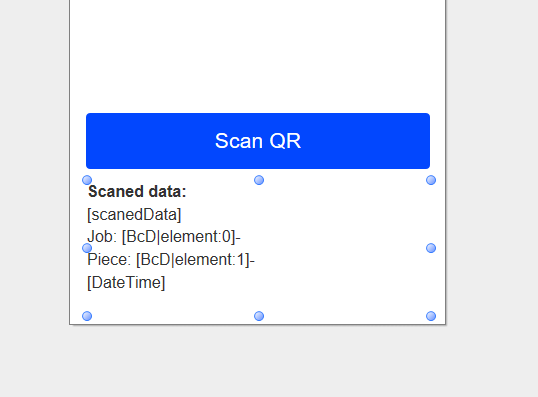
Quote from luishp on December 22, 2021, 1:41 pm@pauljonestindall you need to narrow the problem. Please use this code and take a look at the console while testing it:
neoWebcamGetJpg "Container1" 0.8 [result]
SetObjectAttribute "Image1" "src" [result]
Wait 100
  neoScanQr "Image1" [scanedData]
  ConsoleLog "scanedData: [scanedData]"
  CreateEmptyArray [BcD]
  StrParse "[scanedData]" ";" [BcD]
  ConsoleLog "Parsed array: [BcD]"
  SetVar [Job] "[BcD(0)]"
  ConsoleLog "Job: [Job]"
  SetVar [Piece] "[BcD(1)]"
  ConsoleLog "Piece: [Piece]"
  SetVar [DateTime] "[NAB.DateShort]-[NAB.Time]"
  ConsoleLog "Time: [DateTime]"
  LoadJSON "http://task.tindall.loc/task/api/marks/?site=300&project=[Job]&mark_name=[Piece]&format=json" [taskvar]
  SetVar [jobnum] [taskvar('project_number')]
  ConsoleLog "Job num: [jobnum]"
  SetVar [piecemark] [taskvar('name')]
  ConsoleLog "Piece mark: [piecemark]"
  SetVar [regid] [taskvar('id')]
  ConsoleLog "Reg id: [regid]"
  .AlertBox "JSON values:" "Job: [jobnum], Piecemark: [piecemark], Id: [regid]" ""
  LoadHTML "Container3" "[SC('shop_card')]"
  .GotoPage "NewPage1"
EndWait
I have just included some more Consolelog commands to check the exact point where the data fails.
I have also commented the AlertBox and the GotoPage commands.Regards.
@pauljonestindall you need to narrow the problem. Please use this code and take a look at the console while testing it:
neoWebcamGetJpg "Container1" 0.8 [result]
SetObjectAttribute "Image1" "src" [result]
Wait 100
  neoScanQr "Image1" [scanedData]
  ConsoleLog "scanedData: [scanedData]"
  CreateEmptyArray [BcD]
  StrParse "[scanedData]" ";" [BcD]
  ConsoleLog "Parsed array: [BcD]"
  SetVar [Job] "[BcD(0)]"
  ConsoleLog "Job: [Job]"
  SetVar [Piece] "[BcD(1)]"
  ConsoleLog "Piece: [Piece]"
  SetVar [DateTime] "[NAB.DateShort]-[NAB.Time]"
  ConsoleLog "Time: [DateTime]"
  LoadJSON "http://task.tindall.loc/task/api/marks/?site=300&project=[Job]&mark_name=[Piece]&format=json" [taskvar]
  SetVar [jobnum] [taskvar('project_number')]
  ConsoleLog "Job num: [jobnum]"
  SetVar [piecemark] [taskvar('name')]
  ConsoleLog "Piece mark: [piecemark]"
  SetVar [regid] [taskvar('id')]
  ConsoleLog "Reg id: [regid]"
  .AlertBox "JSON values:" "Job: [jobnum], Piecemark: [piecemark], Id: [regid]" ""
  LoadHTML "Container3" "[SC('shop_card')]"
  .GotoPage "NewPage1"
EndWait
I have just included some more Consolelog commands to check the exact point where the data fails.
I have also commented the AlertBox and the GotoPage commands.
Regards.
Quote from PaulJonestindall on December 22, 2021, 2:33 pmNot quite working out for me unless I'm looking at the wrong thing in the console because I see no variable data there anywhere. It scans my QR code as it should. I see the [scanedData] variable in the browser. I get no parsed variables. I'm not even concerned about the JSON portion at this point.
Not quite working out for me unless I'm looking at the wrong thing in the console because I see no variable data there anywhere. It scans my QR code as it should. I see the [scanedData] variable in the browser. I get no parsed variables. I'm not even concerned about the JSON portion at this point.
Uploaded files: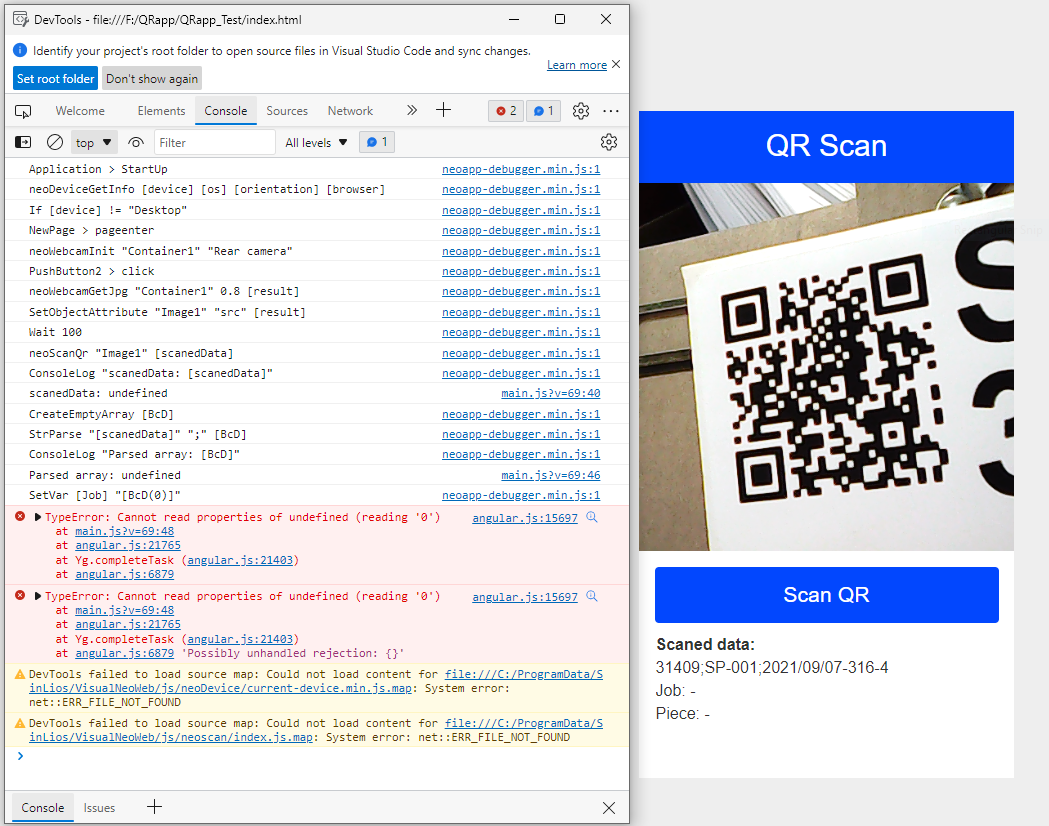
Quote from PaulJonestindall on December 22, 2021, 4:07 pm@luishp
I think I'm on to something here. It has to do with the slashes in the QR code data. If I SetVar [scanedData] "31409;SP-001;2021-09-07-316-4" removing the slashes for the date portion of the third parsed variable, it works.
However, my next issue is StrReplace. It won't work to replace the slashes with dashes. How do we force this to recognize the slashes? Because, I will have to replace those programmatically anyway. Does the "!" exclamation point work with variables here like it does in the Win version?
I think I'm on to something here. It has to do with the slashes in the QR code data. If I SetVar [scanedData] "31409;SP-001;2021-09-07-316-4" removing the slashes for the date portion of the third parsed variable, it works.
However, my next issue is StrReplace. It won't work to replace the slashes with dashes. How do we force this to recognize the slashes? Because, I will have to replace those programmatically anyway. Does the "!" exclamation point work with variables here like it does in the Win version?
Quote from luishp on December 22, 2021, 4:25 pm@pauljonestindall perhaps I'm missing something. This works for me:
SetVar [date] "31409;SP-001;2021/10/11-316-2"
StrReplace "[date]" "/" "-" [date2] ""
AlertBox "Result:" "[date2]" ""
You can't use "!" in VisualNEO Web as you do in VisualNEO Win. Use "\" instead.
By the way, in your Console screenshot scanedData is undefined (no value).
@pauljonestindall perhaps I'm missing something. This works for me:
SetVar [date] "31409;SP-001;2021/10/11-316-2"
StrReplace "[date]" "/" "-" [date2] ""
AlertBox "Result:" "[date2]" ""
You can't use "!" in VisualNEO Web as you do in VisualNEO Win. Use "\" instead.
By the way, in your Console screenshot scanedData is undefined (no value).
Quote from PaulJonestindall on December 22, 2021, 4:59 pm@luishp
Ok, so here's what puzzles me. You'll see that the variable data [scanedData] is in the screenshot to the right, under the Scan QR button. At what point is the neoScanQr "Image1" [scanedData] populating the variable? Is it continuing to the next lines of code before neoScanQr returns anything?
neoWebcamGetJpg "Container1" 0.8 [result]
SetObjectAttribute "Image1" "src" [result]
Wait 100
  neoScanQr "Image1" [scanedDatax]
  ConsoleLog "scanedData: [scanedDatax]"
  .SetVar [scanedDatax] "31409;SP-001;2021/09/07-316-4"
  StrReplace "[scanedDatax]" "/" "-" [scanedData] ""
  CreateEmptyArray [Bcd]
  StrParse "[scanedData]" ";" [Bcd]
  ConsoleLog "Parsed array: [Bcd]"
  SetVar [Job] "[Bcd(0)]"
  ConsoleLog "Job: [Job]"
  SetVar [Piece] "[Bcd(1)]"
  ConsoleLog "Piece: [Piece]"
  SetVar [CastDate] "[Bcd(2)]"
  ConsoleLog "Cast Date: [CastDate]"
  SetVar [DateTime] "[NAB.DateShort]-[NAB.Time]"
  ConsoleLog "Time: [DateTime]"
  .LoadJSON "http://task.tindall.loc/task/api/marks/?site=300&project=[Job]&mark_name=[Piece]&format=json" [taskvar]
  .SetVar [jobnum] [taskvar('project_number')]
  .ConsoleLog "Job num: [jobnum]"
  .SetVar [piecemark] [taskvar('name')]
  .ConsoleLog "Piece mark: [piecemark]"
  .SetVar [regid] [taskvar('id')]
  .ConsoleLog "Reg id: [regid]"
  .AlertBox "JSON values:" "Job: [jobnum], Piecemark: [piecemark], Id: [regid]" ""
  .LoadHTML "Container3" "[SC('shop_card')]"
  .GotoPage "NewPage1"
EndWait
If I SetVar it works fine. But my source needs to be neoScanQr. It's as though it's not reading the QR fast enough.
Ok, so here's what puzzles me. You'll see that the variable data [scanedData] is in the screenshot to the right, under the Scan QR button. At what point is the neoScanQr "Image1" [scanedData] populating the variable? Is it continuing to the next lines of code before neoScanQr returns anything?
neoWebcamGetJpg "Container1" 0.8 [result]
SetObjectAttribute "Image1" "src" [result]
Wait 100
  neoScanQr "Image1" [scanedDatax]
  ConsoleLog "scanedData: [scanedDatax]"
  .SetVar [scanedDatax] "31409;SP-001;2021/09/07-316-4"
  StrReplace "[scanedDatax]" "/" "-" [scanedData] ""
  CreateEmptyArray [Bcd]
  StrParse "[scanedData]" ";" [Bcd]
  ConsoleLog "Parsed array: [Bcd]"
  SetVar [Job] "[Bcd(0)]"
  ConsoleLog "Job: [Job]"
  SetVar [Piece] "[Bcd(1)]"
  ConsoleLog "Piece: [Piece]"
  SetVar [CastDate] "[Bcd(2)]"
  ConsoleLog "Cast Date: [CastDate]"
  SetVar [DateTime] "[NAB.DateShort]-[NAB.Time]"
  ConsoleLog "Time: [DateTime]"
  .LoadJSON "http://task.tindall.loc/task/api/marks/?site=300&project=[Job]&mark_name=[Piece]&format=json" [taskvar]
  .SetVar [jobnum] [taskvar('project_number')]
  .ConsoleLog "Job num: [jobnum]"
  .SetVar [piecemark] [taskvar('name')]
  .ConsoleLog "Piece mark: [piecemark]"
  .SetVar [regid] [taskvar('id')]
  .ConsoleLog "Reg id: [regid]"
  .AlertBox "JSON values:" "Job: [jobnum], Piecemark: [piecemark], Id: [regid]" ""
  .LoadHTML "Container3" "[SC('shop_card')]"
  .GotoPage "NewPage1"
EndWait
If I SetVar it works fine. But my source needs to be neoScanQr. It's as though it's not reading the QR fast enough.
Quote from luishp on December 22, 2021, 6:04 pm@pauljonestindall change wait 100 to wait 1000 and see what happens. I think the problem is there.
@pauljonestindall change wait 100 to wait 1000 and see what happens. I think the problem is there.
Quote from PaulJonestindall on December 22, 2021, 6:06 pm@luishp
I take the neoScanQr out of the Wait/EndWait and increase the Wait to 1000 and I get my variable but then I get this.
I take the neoScanQr out of the Wait/EndWait and increase the Wait to 1000 and I get my variable but then I get this.
Uploaded files: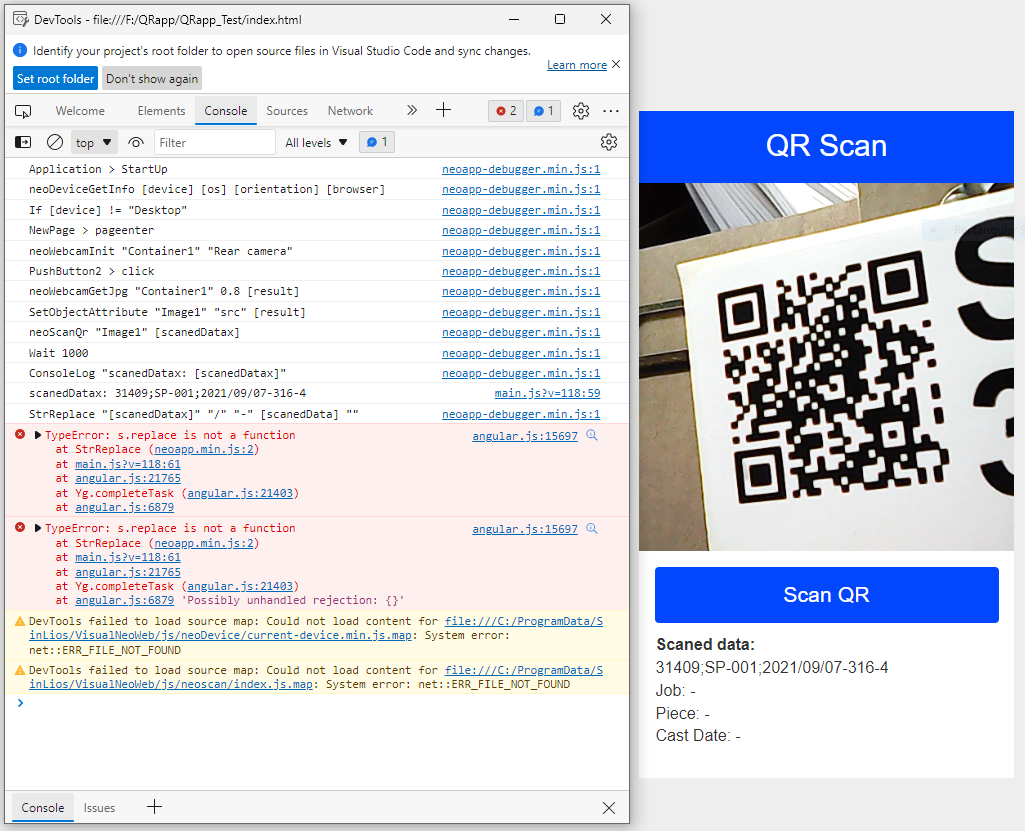
Quote from luishp on December 22, 2021, 6:06 pm@pauljonestindall also use LoadJsonAsync to be sure the content has been downloaded correctly (LoadJSON is a bit deprecated).
@pauljonestindall also use LoadJsonAsync to be sure the content has been downloaded correctly (LoadJSON is a bit deprecated).
Quote from luishp on December 22, 2021, 6:10 pmI take the neoScanQr out of the Wait/EndWait and increase the Wait to 1000 and I get my variable but then I get this.
It's very difficult to help you from here but I think the data is not interpreted as a String. Try using StringifyJSON to parse the data from the QR code before using StrReplace.
I take the neoScanQr out of the Wait/EndWait and increase the Wait to 1000 and I get my variable but then I get this.
It's very difficult to help you from here but I think the data is not interpreted as a String. Try using StringifyJSON to parse the data from the QR code before using StrReplace.
Quote from PaulJonestindall on December 22, 2021, 6:11 pm@luishp
Yeah, I thought about that, LoadAsyncJSON, but there is no definition in the help. How am I supposed to handle it in the Subroutine?
Yeah, I thought about that, LoadAsyncJSON, but there is no definition in the help. How am I supposed to handle it in the Subroutine?
Quote from PaulJonestindall on December 22, 2021, 7:31 pm@luishp
Here's how I finally got it to work:
neoWebcamGetJpg "Container1" 0.8 [result]
SetObjectAttribute "Image1" "src" [result]
neoScanQr "Image1" [scanedDataxx]
Wait 1000
  .neoScanQr "Image1" [scanedDatax]
  ConsoleLog "scanedDataxx: [scanedDataxx]"
  .SetVar [scanedDatax] "31409;SP-001;2021/09/07-316-4"
  SetVar [scanedDatax] "-[scanedDataxx]-"
  ConsoleLog "scanedDatax: [scanedDatax]"
  StrReplace "[scanedDatax]" "/" "-" [scanedData] ""
  CreateEmptyArray [Bcd]
  StrParse "[scanedData]" ";" [Bcd]
  ConsoleLog "Parsed array: [Bcd]"
  StrDel "[Bcd(0)]" 0 1 [Job]
  .SetVar [Job] "[Bcd(0)]"
  ConsoleLog "Job: [Job]"
  SetVar [Piece] "[Bcd(1)]"
  ConsoleLog "Piece: [Piece]"
  StrLen "[Bcd(2)]" [bcdlen]
  Math "[bcdlen]-1" 0 [bcdlen]
  StrDel "[Bcd(2)]" [bcdlen] 1 [CastDate]
  .SetVar [CastDate] "[Bcd(2)]"
  ConsoleLog "Cast Date: [CastDate]"
  SetVar [DateTime] "[NAB.DateShort]-[NAB.Time]"
  ConsoleLog "Time: [DateTime]"
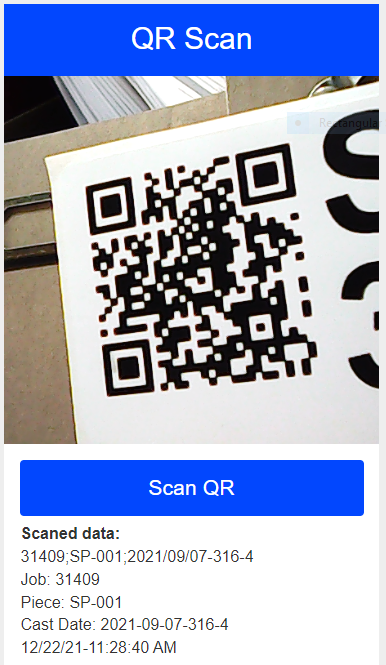
Thank you very much for your help. Now on to the JSON stuff!
Here's how I finally got it to work:
neoWebcamGetJpg "Container1" 0.8 [result]
SetObjectAttribute "Image1" "src" [result]
neoScanQr "Image1" [scanedDataxx]
Wait 1000
  .neoScanQr "Image1" [scanedDatax]
  ConsoleLog "scanedDataxx: [scanedDataxx]"
  .SetVar [scanedDatax] "31409;SP-001;2021/09/07-316-4"
  SetVar [scanedDatax] "-[scanedDataxx]-"
  ConsoleLog "scanedDatax: [scanedDatax]"
  StrReplace "[scanedDatax]" "/" "-" [scanedData] ""
  CreateEmptyArray [Bcd]
  StrParse "[scanedData]" ";" [Bcd]
  ConsoleLog "Parsed array: [Bcd]"
  StrDel "[Bcd(0)]" 0 1 [Job]
  .SetVar [Job] "[Bcd(0)]"
  ConsoleLog "Job: [Job]"
  SetVar [Piece] "[Bcd(1)]"
  ConsoleLog "Piece: [Piece]"
  StrLen "[Bcd(2)]" [bcdlen]
  Math "[bcdlen]-1" 0 [bcdlen]
  StrDel "[Bcd(2)]" [bcdlen] 1 [CastDate]
  .SetVar [CastDate] "[Bcd(2)]"
  ConsoleLog "Cast Date: [CastDate]"
  SetVar [DateTime] "[NAB.DateShort]-[NAB.Time]"
  ConsoleLog "Time: [DateTime]"
Thank you very much for your help. Now on to the JSON stuff!
Uploaded files: