
StrSearch & CreateArray errors

Quote from smartmedia on December 29, 2022, 12:02 amHi..
In online help as you see in the photo in explanation of StrSearch it says that it returns 0 when nothing is found which is wrong. It rerurns -1. Please update those information.
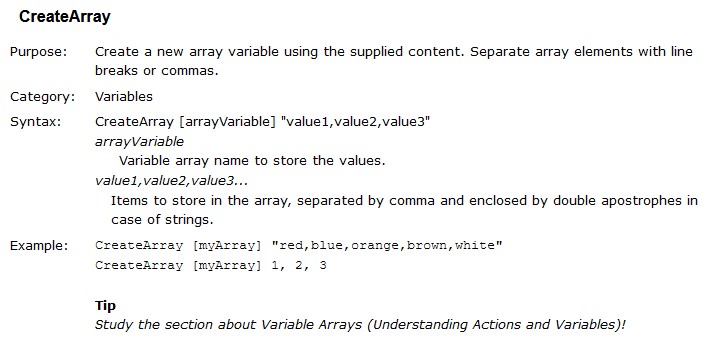
In createArray in description it says that you can use commas or line breaks, i have test it with commas and it does not work. It replace the commas with , and after that the app is not loads in web broswer. Any solution in that ?
Hi..
In online help as you see in the photo in explanation of StrSearch it says that it returns 0 when nothing is found which is wrong. It rerurns -1. Please update those information.
In createArray in description it says that you can use commas or line breaks, i have test it with commas and it does not work. It replace the commas with , and after that the app is not loads in web broswer. Any solution in that ?
Uploaded files: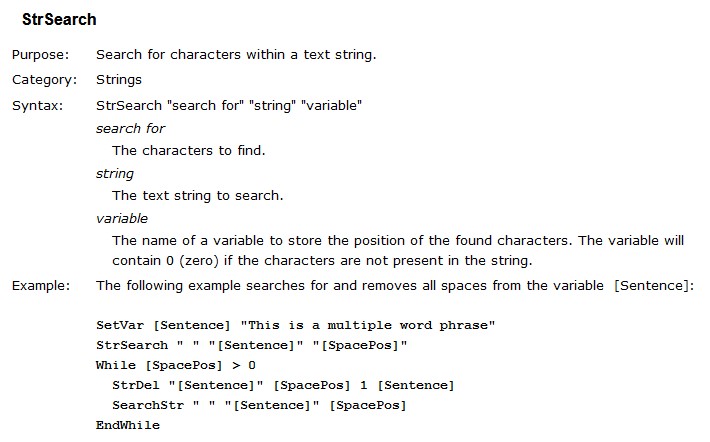


Quote from luishp on December 29, 2022, 9:03 amHi @smartmedia, both commands were added by Dave and I have not touched them. I will check them and let you know whats going on.
Thank you!
Hi @smartmedia, both commands were added by Dave and I have not touched them. I will check them and let you know whats going on.
Thank you!
Quote from luishp on December 29, 2022, 10:42 am@smartmedia, I think the problem comes from the way the commas are replaced from the wizard window.
If you use the wizard window just be sure to separate items by a carriage return. I will update the documentation so this is more clear.
This works perfectly:CreateArray [myArray1] "one,two,three,four,five" CreateArray [myArray2] 1,2,3,4,5 Consolelog [myArray1] Consolelog [myArray2]You can also use this:
SetVar [myvar] "one,two,three,four,five" StrParse "[myvar]" "," [myArray] Consolelog [myArray]This way you can use any character as an item separator, not only commas.
Regards.
@smartmedia, I think the problem comes from the way the commas are replaced from the wizard window.
If you use the wizard window just be sure to separate items by a carriage return. I will update the documentation so this is more clear.
This works perfectly:
CreateArray [myArray1] "one,two,three,four,five"
CreateArray [myArray2] 1,2,3,4,5
Consolelog [myArray1]
Consolelog [myArray2]
You can also use this:
SetVar [myvar] "one,two,three,four,five"
StrParse "[myvar]" "," [myArray]
Consolelog [myArray]
This way you can use any character as an item separator, not only commas.
Regards.
Quote from smartmedia on December 29, 2022, 11:41 amHi @luishp
I test this
CreateArray [SearchArray] [ProSearchResultProID]
ArraySearch [SearchArray] "[ProId]" [ArrayResult]
If [ArrayResult] == "-1"
SetVar [ProSearchResultProID] "[ProSearchResultProID],[ProId]"
else
AlertBox "Ενημέρωση" "Έχετε ήδη πάρει τα στοιχεία επικοινωνίας" ""
endif
The [ProSearchResultProID] has already this values (10,30,42) and when i run the code i get in console that the variable is not defined and i don't get any result in [ArrayResult]
Hi @luishp
I test this
CreateArray [SearchArray] [ProSearchResultProID]
ArraySearch [SearchArray] "[ProId]" [ArrayResult]
If [ArrayResult] == "-1"
SetVar [ProSearchResultProID] "[ProSearchResultProID],[ProId]"
else
AlertBox "Ενημέρωση" "Έχετε ήδη πάρει τα στοιχεία επικοινωνίας" ""
endif
The [ProSearchResultProID] has already this values (10,30,42) and when i run the code i get in console that the variable is not defined and i don't get any result in [ArrayResult]
Uploaded files: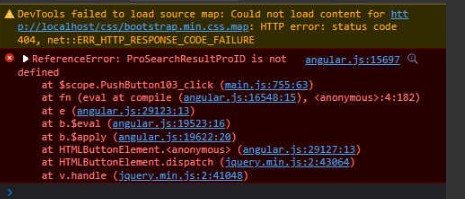
Quote from luishp on December 29, 2022, 11:44 am@smartmedia please attach a complete sample app showing the isolated problem and I will check it.
Thank you!
@smartmedia please attach a complete sample app showing the isolated problem and I will check it.
Thank you!
Quote from smartmedia on December 29, 2022, 11:51 am@luishp
I Solved, in the CreateArray [SearchArray] [ProSearchResultProID] he wanted quotes in "[ProSearchResultProID]"
Is a little bit mesh with those quotes on every command, by definition the program is not putting them, the same goes to setvar, he treats everything like numeric.
Again, thanks for your time and quick response.
I Solved, in the CreateArray [SearchArray] [ProSearchResultProID] he wanted quotes in "[ProSearchResultProID]"
Is a little bit mesh with those quotes on every command, by definition the program is not putting them, the same goes to setvar, he treats everything like numeric.
Again, thanks for your time and quick response.
Quote from luishp on December 29, 2022, 12:36 pm@smartmedia note that most wizard windows allow selecting among numeric or string values.
@smartmedia note that most wizard windows allow selecting among numeric or string values.
Uploaded files: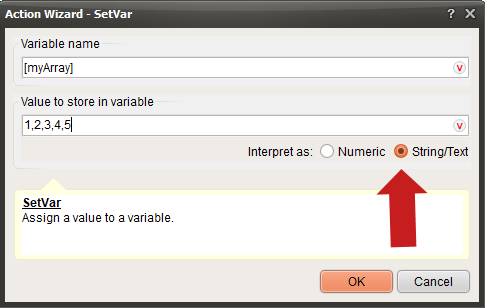
Quote from smartmedia on December 29, 2022, 12:58 pm@luishp
I thrilled before and i thought i solved but no. if i put the quotes in "[ProSearchResultProID]" i keep receive -1 as result.
The same happens if i try to add item in array. I created a demo app.
I thrilled before and i thought i solved but no. if i put the quotes in "[ProSearchResultProID]" i keep receive -1 as result.
The same happens if i try to add item in array. I created a demo app.
Uploaded files:Quote from luishp on December 29, 2022, 1:27 pm@smartmedia, please try this instead:
SetVar [itemsInArray] "12,18,22,33,20"
StrParse "[itemsInArray]" "," [SearchArray]
ArraySearch [SearchArray] "18" [ArrayResult]
ArrayAddItem [SearchArray] 8
Consolelog [SearchArray]
I think CreateArray can't be filled with content from a variable. It's just for manually entered data.
Regards.
@smartmedia, please try this instead:
SetVar [itemsInArray] "12,18,22,33,20"
StrParse "[itemsInArray]" "," [SearchArray]
ArraySearch [SearchArray] "18" [ArrayResult]
ArrayAddItem [SearchArray] 8
Consolelog [SearchArray]
I think CreateArray can't be filled with content from a variable. It's just for manually entered data.
Regards.
Quote from smartmedia on December 29, 2022, 1:49 pm@luishp
Thats very bad news, is not useful for me, i need the array to take some data from my database. what is the purpose to take only hardcore data then ?
I could use StrSearch but he cant tell the difference between 12 and 120 in a string.
I check your solusion with the stringparse.
Thanks again.
Thats very bad news, is not useful for me, i need the array to take some data from my database. what is the purpose to take only hardcore data then ?
I could use StrSearch but he cant tell the difference between 12 and 120 in a string.
I check your solusion with the stringparse.
Thanks again.
Quote from luishp on December 29, 2022, 2:04 pmThats very bad news, is not useful for me, i need the array to take some data from my database.
@smartmedia not so bad, you have many alternatives.
what is the purpose to take only hardcore data then ?
Not sure, I didn't create this command.
I could use StrSearch but he cant tell the difference between 12 and 120 in a string.
Please use StrParse or JSON data from your database instead.
Let me know if you need additional information.
Thats very bad news, is not useful for me, i need the array to take some data from my database.
@smartmedia not so bad, you have many alternatives.
what is the purpose to take only hardcore data then ?
Not sure, I didn't create this command.
I could use StrSearch but he cant tell the difference between 12 and 120 in a string.
Please use StrParse or JSON data from your database instead.
Let me know if you need additional information.
Quote from smartmedia on December 29, 2022, 2:05 pm@luishp
The solution with the string parse and search array have worked and i get the right results. Well done mate.
The solution with the string parse and search array have worked and i get the right results. Well done mate.