[SOLVED] Persian Calendar Date

Quote from noyzen on September 2, 2019, 5:06 pmHello
in VisualNEO Win we have 2 functions called DateToNum and NumToDate.
they are very useful but VisualNEO Web doesn't have themi could easily convert Calendar to Persian Calendar system using this lines in VisualNEO win:
DateToNum "[DateShort]" "Default" "[mdate]"
Math "[mdate]-226894" "0" "[pdate]"
NumToDate "[pdate]" "yyyy/m/d" "[pdate]"
But i don't know how to do it in VisualNEO Web.
i think they are easy functions and it will be nice if you can add them to VisualNEO Web :)Thank you, Regards.
Hello
in VisualNEO Win we have 2 functions called DateToNum and NumToDate.
they are very useful but VisualNEO Web doesn't have them
i could easily convert Calendar to Persian Calendar system using this lines in VisualNEO win:
DateToNum "[DateShort]" "Default" "[mdate]"
Math "[mdate]-226894" "0" "[pdate]"
NumToDate "[pdate]" "yyyy/m/d" "[pdate]"
But i don't know how to do it in VisualNEO Web.
i think they are easy functions and it will be nice if you can add them to VisualNEO Web :)
Thank you, Regards.

Quote from Gaev on September 2, 2019, 5:51 pm@noyzen
I believe there are plans to develop a plugin that will allow all sorts of date/time conversion/addition/subtraction.
If you are familiar with Javascript, you can use its rich set of date/time functionality; you can learn all about them here ... https://www.w3schools.com/js/js_date_methods.asp
If you don't know Javascript, and can not wait for the plugin, let us know, and code to perform the two tasks can be be posted here.
I believe there are plans to develop a plugin that will allow all sorts of date/time conversion/addition/subtraction.
If you are familiar with Javascript, you can use its rich set of date/time functionality; you can learn all about them here ... https://www.w3schools.com/js/js_date_methods.asp
If you don't know Javascript, and can not wait for the plugin, let us know, and code to perform the two tasks can be be posted here.
Quote from noyzen on September 2, 2019, 6:31 pm@gaev
No i cant use Java Script (but i will look at the link and try to see if i can use it)
it's Ok i will wait for plugin or next update
i may find a way to do it using custom scripts in VisualNEO Web but i think it's good suggestion anyways to add that functions they are useful :)
No i cant use Java Script (but i will look at the link and try to see if i can use it)
it's Ok i will wait for plugin or next update
i may find a way to do it using custom scripts in VisualNEO Web but i think it's good suggestion anyways to add that functions they are useful :)

Quote from luishp on September 2, 2019, 8:41 pm@noizen I have edited the already existing Date/Time plugin and added a new command to transform any date into a locale format:
dtLocalDate 2019 03 06 [mydate] "fa-IR"Just replace the existing plugin with the attached one.
Does it work for you?
@noizen I have edited the already existing Date/Time plugin and added a new command to transform any date into a locale format:
dtLocalDate 2019 03 06 [mydate] "fa-IR"
Just replace the existing plugin with the attached one.
Does it work for you?
Quote from noyzen on September 2, 2019, 9:10 pmHi! Thank you this is awesome, with one single command i can convert date now.
But there is some miscalculation in this command
today is: 1398-6-11
In Persian CalendarBut when i convert date: 2019-09-02 (today) to Persian it shows:
1398-7-10 Which is wrong.
Hi! Thank you this is awesome, with one single command i can convert date now.
But there is some miscalculation in this command
today is: 1398-6-11
In Persian Calendar
But when i convert date: 2019-09-02 (today) to Persian it shows:
1398-7-10 Which is wrong.
Quote from luishp on September 3, 2019, 10:01 amGood morning @noyzen,
Thats quite strange. This is the whole code used inside the plugin:function dtLocalDate(year,month,day,locale){ var thedate = new Date(year,month,day); returnvar=thedate.toLocaleDateString(locale); return returnvar; };The toLocaleDateString is part of JavaScript language and it makes all the calculations.
Does it happen in all the browsers?
Good morning @noyzen,
Thats quite strange. This is the whole code used inside the plugin:
function dtLocalDate(year,month,day,locale){
  var thedate  = new Date(year,month,day);
  returnvar=thedate.toLocaleDateString(locale);
  return returnvar;
};
The toLocaleDateString is part of JavaScript language and it makes all the calculations.
Does it happen in all the browsers?
Quote from luishp on September 3, 2019, 10:27 amI have added a modification to include the hour but can't check your problem as I don't understand persian characters:
function dtLocalDate(year,month,day,locale){
  var today  = new Date(year,month,day,12,30,30,30);
  returnvar=today.toLocaleDateString(locale);
  return returnvar;
};
Please, let me know if this fix the problem
I have added a modification to include the hour but can't check your problem as I don't understand persian characters:
function dtLocalDate(year,month,day,locale){
  var today  = new Date(year,month,day,12,30,30,30);
  returnvar=today.toLocaleDateString(locale);
  return returnvar;
};
Please, let me know if this fix the problem
Uploaded files:Quote from noyzen on September 3, 2019, 10:40 amThank you Luis but Nope :(
i installed new plugin file but result is still same as before.
Thank you Luis but Nope :(
i installed new plugin file but result is still same as before.
Quote from noyzen on September 3, 2019, 1:10 pmChrome Firefox Opera i have tested, yes same result.
yea sure just use the command in any app any browser and if u are doing today the Persian Date is:
1398-6-12
anything i can do to help please let me know.
(my app is offline local and in Persian but if it help's i can give you access to my PC using remove connection with AnyDesk)
Chrome Firefox Opera i have tested, yes same result.
yea sure just use the command in any app any browser and if u are doing today the Persian Date is:
1398-6-12
anything i can do to help please let me know.
(my app is offline local and in Persian but if it help's i can give you access to my PC using remove connection with AnyDesk)
Quote from Gaev on September 3, 2019, 3:53 pm@noyzen @luishp
Using w3schools's facility, I tried ...
var d = new Date(2019,09,03);... and it returned ..
Thu Oct 03 2019 00:00:00 GMT-0400 (Eastern Daylight Time)
But when I tried ...
var d = new Date(2019,08,03);... it returned ...
Tue Sep 03 2019 00:00:00 GMT-0400 (Eastern Daylight Time)
Looks like you have to enter month in zero-based format i.e. Jan=0, Feb=1 etc.
Using w3schools's facility, I tried ...
var d = new Date(2019,09,03);
... and it returned ..
Thu Oct 03 2019 00:00:00 GMT-0400 (Eastern Daylight Time)
But when I tried ...
var d = new Date(2019,08,03);
... it returned ...
Tue Sep 03 2019 00:00:00 GMT-0400 (Eastern Daylight Time)
Looks like you have to enter month in zero-based format i.e. Jan=0, Feb=1 etc.
Quote from luishp on September 3, 2019, 4:11 pm@noyzen, can you confirm @gaev information?
Is everything fine just substracting 1 to the current month?
If so, I can just substract 1 to the month number inside the plugin.
If I try:dtLocalDate 2019 09 03 [mydate] "fa-IR"I get: ۱۱/۰۷/۱۳۹۸
Persian numbers?
@noyzen, can you confirm @gaev information?
Is everything fine just substracting 1 to the current month?
If so, I can just substract 1 to the month number inside the plugin.
If I try:
dtLocalDate 2019 09 03 [mydate] "fa-IR"
I get: ۱۱/۰۷/۱۳۹۸
Persian numbers?
Quote from noyzen on September 3, 2019, 9:18 pmSorry for delay @gaev @luishp
I get: ۱۱/۰۷/۱۳۹۸
Persian numbers?yes right now is 1398-06-12
i think it's 1 month and 1 day, but i'm not sure if we subtract we will be fine in future...
so i will test and give you result here
I get: ۱۱/۰۷/۱۳۹۸
Persian numbers?
yes right now is 1398-06-12
i think it's 1 month and 1 day, but i'm not sure if we subtract we will be fine in future...
so i will test and give you result here
Quote from noyzen on September 3, 2019, 9:26 pmNo Sorry, you were right it's just 1 month:
Math "[NAB.MonthNum]-1" 0 [my_month]
dtLocalDate [NAB.Year] [my_month] [NAB.DayNum] [mydate] "fa-IR"
AlertBox "" "[mydate]" ""
this one seems working fine.
also you can check code of commands i told you before in VisualNEO Win and see how they convert date to number and convert it back.
No Sorry, you were right it's just 1 month:
Math "[NAB.MonthNum]-1" 0 [my_month]
dtLocalDate [NAB.Year] [my_month] [NAB.DayNum] [mydate] "fa-IR"
AlertBox "" "[mydate]" ""
this one seems working fine.
also you can check code of commands i told you before in VisualNEO Win and see how they convert date to number and convert it back.
Quote from luishp on September 4, 2019, 12:04 pmI have updated the plugin so it's not necessary to substract 1 to the month.
See attached file.
Regards.
I have updated the plugin so it's not necessary to substract 1 to the month.
See attached file.
Regards.

Quote from luishp on March 7, 2023, 11:44 amHow can I use the DateTime plugin in visualneowin?
@s7shanbe VisualNEO Web pligins have no compatibility with VisualNEO Win.
Sorry.
How can I use the DateTime plugin in visualneowin?
@s7shanbe VisualNEO Web pligins have no compatibility with VisualNEO Win.
Sorry.
Quote from tilesoft on October 19, 2024, 2:36 amHi there,
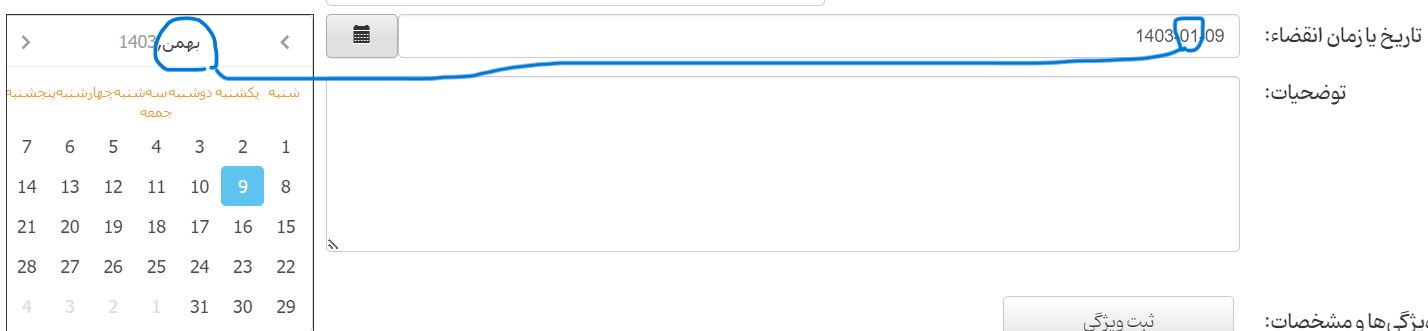
When using this plugin, the numerical value of solar months does not match with their names. For example, in this photo, the month "Bahman - بهمن" should be number 11, while 1 is recorded.
Hi there,
When using this plugin, the numerical value of solar months does not match with their names. For example, in this photo, the month "Bahman - بهمن" should be number 11, while 1 is recorded.
Uploaded files: