
Surprise invalid report format

Quote from CSSystems on March 18, 2023, 7:12 pmI was updating a Report File. It comes up in the Report Designer ok. Runs when testing with Designer.
Now when I run my Program in test mode and run the report I get "Invalid Report file format".
I modified an existing report and renamed it to make changes then named it back to the original name.
Now I get this error. I seems the problem is not with the file but accessing the report from my software.
I used the customary: dbpPreviewReport "YouRdb" "InvitedLetter.dbr" "DisplayMode=FitPage;InitialPage=1"
A bit puzzled right now. Any ideas for me?
I was updating a Report File. It comes up in the Report Designer ok. Runs when testing with Designer.
Now when I run my Program in test mode and run the report I get "Invalid Report file format".
I modified an existing report and renamed it to make changes then named it back to the original name.
Now I get this error. I seems the problem is not with the file but accessing the report from my software.
I used the customary: dbpPreviewReport "YouRdb" "InvitedLetter.dbr" "DisplayMode=FitPage;InitialPage=1"
A bit puzzled right now. Any ideas for me?
Quote from CSSystems on March 19, 2023, 5:23 pmInteresting investigation.
The DBPro Report Designer does not like RTF although the option is there to use it.
Took a closer look at the Screen in the help file and there is no RTF button or HTML.
I started out using Memo field for text, but wanted to Format / bold some text which I can't do in Memo field.
Then I noticed the RTF option in the designer. Spend a lot of time formatting the text i.e. bolding the words I wanted to bold.
I thought I found my formatting solution. The designer accepts the format when previewing, but when I access it from my software I get this "invalid report file format" error.
An obvious problem that needs to be fixed. I was so pleased to discover that there was a possibility to use formatting in my reports.
Really feel let down. Is there a hope that this can be corrected???
Interesting investigation.
The DBPro Report Designer does not like RTF although the option is there to use it.
Took a closer look at the Screen in the help file and there is no RTF button or HTML.
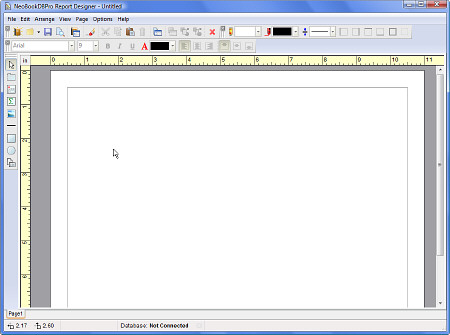
I started out using Memo field for text, but wanted to Format / bold some text which I can't do in Memo field.
Then I noticed the RTF option in the designer. Spend a lot of time formatting the text i.e. bolding the words I wanted to bold.
I thought I found my formatting solution. The designer accepts the format when previewing, but when I access it from my software I get this "invalid report file format" error.
An obvious problem that needs to be fixed. I was so pleased to discover that there was a possibility to use formatting in my reports.
Really feel let down. Is there a hope that this can be corrected???

Quote from Vadim on March 21, 2023, 11:22 am@cssystems
I don't understand what your difficulty is yet. I use the Text object to create bold text. You can assemble your report from many different objects. Below is an example of a report that my program generates.
https://reportdesignerhelp.visualneo.com/StylePalettes.html
P.S.: I'm still using the non-RTF version.
I don't understand what your difficulty is yet. I use the Text object to create bold text. You can assemble your report from many different objects. Below is an example of a report that my program generates.
https://reportdesignerhelp.visualneo.com/StylePalettes.html
P.S.: I'm still using the non-RTF version.
Uploaded files:- You need to login to have access to uploads.
Quote from CSSystems on March 21, 2023, 9:06 pmI want a whole paragraph with Bolding like this screen does.
The object tool of RTF doesn't work.
see attached.
Doesn't show RTF in the help file.
I want a whole paragraph with Bolding like this screen does.
The object tool of RTF doesn't work.
see attached.
Doesn't show RTF in the help file.
Uploaded files:- You need to login to have access to uploads.
Quote from Vadim on March 23, 2023, 7:37 pm@cssystems
I haven't tried using RTF in the report generator because I'm using an earlier version of the plugin.
But there are other ways.
Maybe you can get the right result with EditorsToolbox 1.75 plugin (C. Giebel). This is a powerful plugin which works with RTF.
You can also create a template file with any formatting in MS Word and fill it with necessary data from the program using vlWord plugin. Or generate such a file on the fly. But for the program to work on the user's computer must be installed MS Word.
I haven't tried using RTF in the report generator because I'm using an earlier version of the plugin.
But there are other ways.
Maybe you can get the right result with EditorsToolbox 1.75 plugin (C. Giebel). This is a powerful plugin which works with RTF.
You can also create a template file with any formatting in MS Word and fill it with necessary data from the program using vlWord plugin. Or generate such a file on the fly. But for the program to work on the user's computer must be installed MS Word.
Quote from CSSystems on March 24, 2023, 9:48 pmThanks for taking the time to answer me and for your thoughts.
Hopefully the developers are looking at my comments and will let me know if there are improvements.
I have continued the app report using plain Text field, but bolding the whole field.
Thanks for taking the time to answer me and for your thoughts.
Hopefully the developers are looking at my comments and will let me know if there are improvements.
I have continued the app report using plain Text field, but bolding the whole field.