
Table Row Highlight Colour

Quote from paultomo on August 27, 2022, 11:57 amI am using a Table with a black background and white text, when a row is selected, it's light grey with white text, so impossible to read.
I have added the following to Styles.
tr:hover {
          background-color: red;
    }
But it only changes the colour of the Top/Header Row for some reason.
Sample app uploaded.
Any suggestions to fix this appreciated.
I am using a Table with a black background and white text, when a row is selected, it's light grey with white text, so impossible to read.
I have added the following to Styles.
tr:hover {
          background-color: red;
    }
But it only changes the colour of the Top/Header Row for some reason.
Sample app uploaded.
Any suggestions to fix this appreciated.
Uploaded files: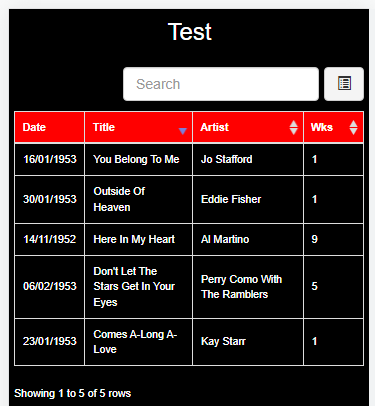
Quote from paultomo on August 27, 2022, 1:49 pmUPDATE
Okay, I have found a temporary fix and away to make this work by making a permanent edit to the "bootstrap.min.css" file tr:hover background-color: before compiling, as the bootstrap file was overriding what I had added in Project Styles.
Although this has got the app doing what I wanted, it's not the best way to do things by editing a main system file and then removing the edit again after compiling the app....
So if there are any other fixes for this issue or suggestions, that would still be appreciated.
UPDATE
Okay, I have found a temporary fix and away to make this work by making a permanent edit to the "bootstrap.min.css" file tr:hover background-color: before compiling, as the bootstrap file was overriding what I had added in Project Styles.
Although this has got the app doing what I wanted, it's not the best way to do things by editing a main system file and then removing the edit again after compiling the app....
So if there are any other fixes for this issue or suggestions, that would still be appreciated.

Quote from asmat on August 27, 2022, 3:33 pmTry this:
tr:hover {
   background-color: red !important;
}
Try this:
tr:hover {
   background-color: red !important;
}

Quote from luishp on August 27, 2022, 5:06 pm@paultomo I was about to suggest the exact same code than @asmat.
It will work for sure :)
@paultomo I was about to suggest the exact same code than @asmat.
It will work for sure :)
Quote from paultomo on August 27, 2022, 6:40 pmMany Thanks and as always help is never to far away.
Just to confirm, Yes that worked perfectly.
Many Thanks and as always help is never to far away.
Just to confirm, Yes that worked perfectly.