
taskkill and tasklist commands not working

Quote from Bagon on August 12, 2023, 4:01 pmThere is a program without a GUI that needs to be included in the project of a new program being created. This process can only be controlled externally, starting and killing the process. When creating, I encountered the problem of killing this process using the taskkill cmd command, the program is not killed due to insufficient rights, although my project is launched as an administrator and the checkbox requires administrator rights is checked in the VisualNEO properties. The created program at startup does not require administrator rights and does not terminate the process, it creates an endless loop of attempts to terminate the process. task list | find /i "notepad.exe" && taskkill /f /t /im "notepad.exe" the command used works as a bat file but doesn't work properly in VisualNEO. How to make it work, or suggest other options for solving the problem.
There is a program without a GUI that needs to be included in the project of a new program being created. This process can only be controlled externally, starting and killing the process. When creating, I encountered the problem of killing this process using the taskkill cmd command, the program is not killed due to insufficient rights, although my project is launched as an administrator and the checkbox requires administrator rights is checked in the VisualNEO properties. The created program at startup does not require administrator rights and does not terminate the process, it creates an endless loop of attempts to terminate the process. task list | find /i "notepad.exe" && taskkill /f /t /im "notepad.exe" the command used works as a bat file but doesn't work properly in VisualNEO. How to make it work, or suggest other options for solving the problem.

Quote from DaviddeArgentina on August 12, 2023, 5:18 pm@bagonWelcome to the forum.
The NeoKill plugin has 3 different ways to close a program:
a) Based on the handle created with the Run action of VNWin / NeoBook
b) knowing the title of the program window
c) knowing the name of the program.It is very easy to integrate with VNWin / NeoBook and comes with an example that uses all the actions.
Welcome to the forum.
The NeoKill plugin has 3 different ways to close a program:
a) Based on the handle created with the Run action of VNWin / NeoBook
b) knowing the title of the program window
c) knowing the name of the program.
It is very easy to integrate with VNWin / NeoBook and comes with an example that uses all the actions.
Uploaded files: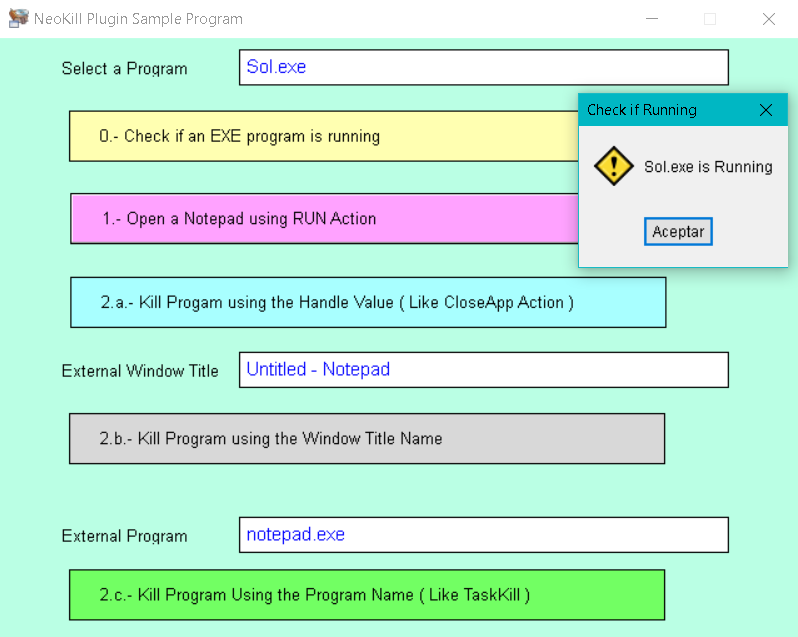
Quote from emileu on August 28, 2023, 12:34 pmhi
i always use this command and it work all the time did u test this ?
DOSCommand "taskkill" "/IM myapp.exe /T /F" "LoadComplete+Hidden"
hi
i always use this command and it work all the time did u test this ?
DOSCommand "taskkill" "/IM myapp.exe /T /F" "LoadComplete+Hidden"

Quote from Naomi on September 29, 2023, 11:39 pmHi, how are you.
This is a late reply but I found your code works with this.
DOSCommand "taskkill" " /f /t /im [#34]notepad.exe[#34]" "RunOnce+Wait+LoadComplete+Minimized+Hidden"
Hi, how are you.
This is a late reply but I found your code works with this.
DOSCommand "taskkill" " /f /t /im [#34]notepad.exe[#34]" "RunOnce+Wait+LoadComplete+Minimized+Hidden"