
Text inside a Headline or paragraph objet

Quote from rocote on April 20, 2020, 8:49 pmIf you put text in an object like Headline or Paragraph, how to make sure that the text will appear in full for a computer or on a tablet.
I noticed that parts of the text I wrote in an object headline or paragraph, did not appear in full when this text was viewed on a tablet.Is there a way or a command which would make sure that the text is displayed in full as much for a tablet as for a computer?
If anyone has a solution, you are welcome.
Thank you
If you put text in an object like Headline or Paragraph, how to make sure that the text will appear in full for a computer or on a tablet.
I noticed that parts of the text I wrote in an object headline or paragraph, did not appear in full when this text was viewed on a tablet.
Is there a way or a command which would make sure that the text is displayed in full as much for a tablet as for a computer?
If anyone has a solution, you are welcome.
Thank you

Quote from luishp on April 20, 2020, 10:31 pmHi @rocote, would like to see how your app looks on desktop and on a tablet to better understand the problem.
Anyway, are you using any of the app scale commands to fit your app to the screen size?
Note that in a very recent version was introduced the command FitAppToScreen that should help to avoid the problem you describe (If you are going to try it please be sure to uncheck Project > Properties > Size > Auto-size options).
Best regards.
Hi @rocote, would like to see how your app looks on desktop and on a tablet to better understand the problem.
Anyway, are you using any of the app scale commands to fit your app to the screen size?
Note that in a very recent version was introduced the command FitAppToScreen that should help to avoid the problem you describe (If you are going to try it please be sure to uncheck Project > Properties > Size > Auto-size options).
Best regards.
Quote from rocote on April 20, 2020, 10:41 pmLuis: Are you using any of the app scale commands to fit your app to the screen size?
Roger: Sorry, I don't know about that.
Luis: Note that in a very recent version was introduced the command FitAppToScreen that should help to avoid the problem you describe
No, i never used this option before. I will try that. This is a cool option.
I thought there must be something that existed for this kind of problem.
As a beginner, I build my application and solve the problems as I meet them in order to speed up the process.
Thanks
Luis: Are you using any of the app scale commands to fit your app to the screen size?
Roger: Sorry, I don't know about that.
Luis: Note that in a very recent version was introduced the command FitAppToScreen that should help to avoid the problem you describe
No, i never used this option before. I will try that. This is a cool option.
I thought there must be something that existed for this kind of problem.
As a beginner, I build my application and solve the problems as I meet them in order to speed up the process.
Thanks
Quote from rocote on April 20, 2020, 10:43 pmI forgot to ask: Where do you put this command FitAppToScreen into the App?
into the Enter Page?
I forgot to ask: Where do you put this command FitAppToScreen into the App?
into the Enter Page?
Quote from luishp on April 20, 2020, 10:54 pm@rocote
I forgot to ask: Where do you put this command FitAppToScreen into the App?
Usually into Project > Events > Start-up
Note that there are some more similar commands you can test in the PowerApp plugin:
slScaleAppLetterBox
slScaleAppLetterBoxMax
slScaleAppDeform
slScaleAppFitWidth...Regards.
I forgot to ask: Where do you put this command FitAppToScreen into the App?
Usually into Project > Events > Start-up
Note that there are some more similar commands you can test in the PowerApp plugin:
slScaleAppLetterBox
slScaleAppLetterBoxMax
slScaleAppDeform
slScaleAppFitWidth...
Regards.
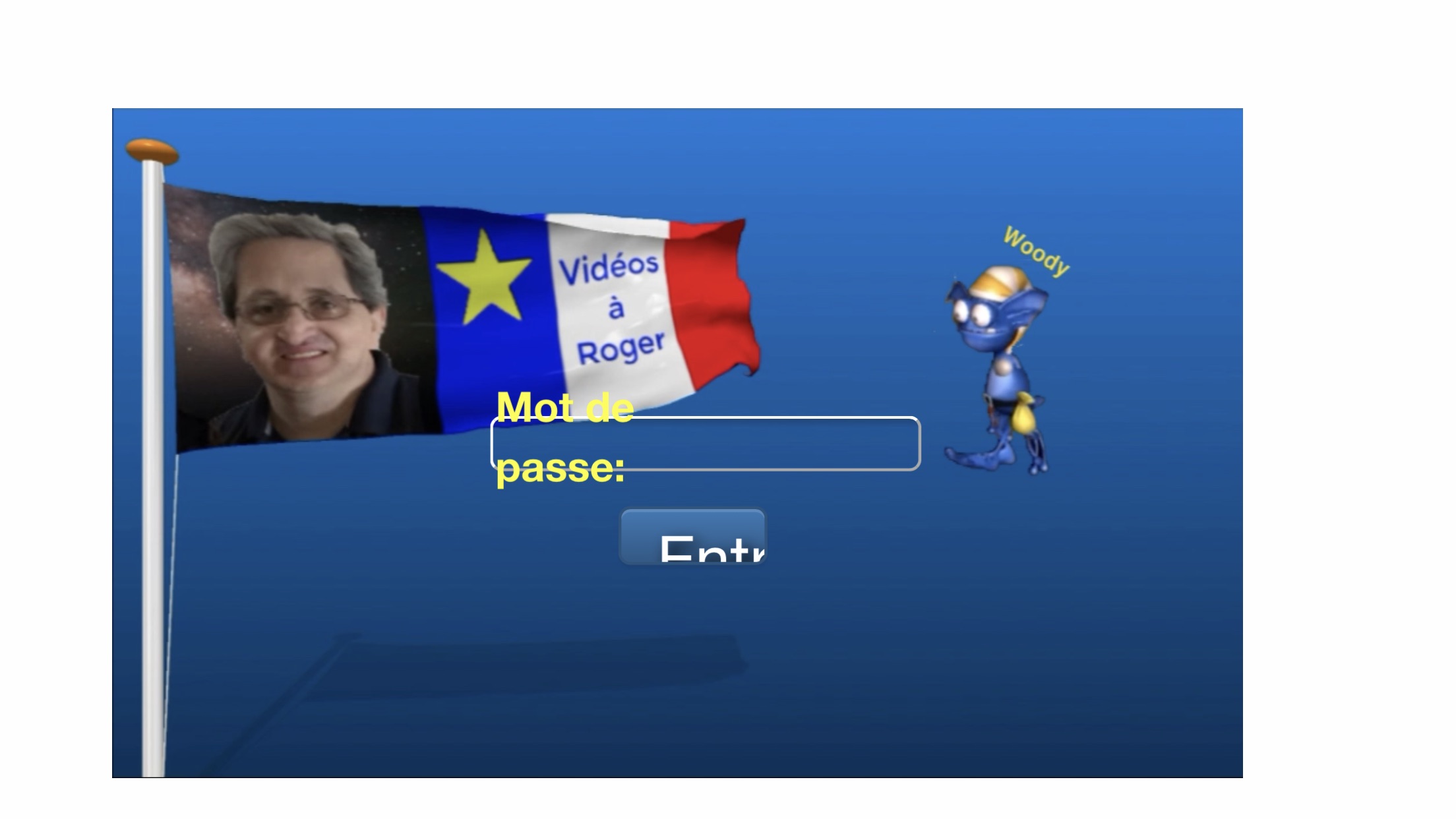
Quote from rocote on April 21, 2020, 2:52 amHere is a picture (iPhone 8 Plus) with error and a video (desktop) that shows how the application should look like.
Like you can see on the picture, the text that has moved completely from its place. It is suppose to be like on the video.
When people enter their password into the little square, they press the button ENTER (Entré in French).
As you can see on the phone, there is two problem.
1 - Mot de passe: (password) is out of space
2 - The text on the button is also to big and out of space.
Note: The video is from my desktop.
I also try the command FitAppToScreen like you told me, but it didn't change anything.
Any idea?
Thanks!
Here is a picture (iPhone 8 Plus) with error and a video (desktop) that shows how the application should look like.
Like you can see on the picture, the text that has moved completely from its place. It is suppose to be like on the video.
When people enter their password into the little square, they press the button ENTER (Entré in French).
As you can see on the phone, there is two problem.
1 - Mot de passe: (password) is out of space
2 - The text on the button is also to big and out of space.
Note: The video is from my desktop.
I also try the command FitAppToScreen like you told me, but it didn't change anything.
Any idea?
Thanks!
Uploaded files:
Quote from luishp on April 21, 2020, 11:37 am@rocote it's the first time I see that behaviour. Could you please share here a .neoapp file with only that page (it's not necessary to include the video). I need to see how it has been done and reproduce the problem myself in order to find a solution.
Thank you!
@rocote it's the first time I see that behaviour. Could you please share here a .neoapp file with only that page (it's not necessary to include the video). I need to see how it has been done and reproduce the problem myself in order to find a solution.
Thank you!
Quote from rocote on April 21, 2020, 2:57 pmHere is what you ask for Luis.
I also sent you the opening video (ouverture3b.mp4). I cut it to make it smaller so I could send it to you.
Roger
Here is what you ask for Luis.
I also sent you the opening video (ouverture3b.mp4). I cut it to make it smaller so I could send it to you.
Roger
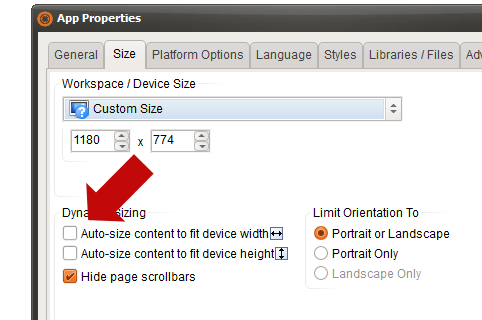
Quote from rocote on April 21, 2020, 4:59 pmYou're right, it worked but it still added other more serious problems.
Text and videos are no longer in the right place.
Everything is now out of place. So I checked again the boxes you asked me to uncheck and I will be obliged to find another solution for my opening page.
Thanks anyway.
Roger
You're right, it worked but it still added other more serious problems.
Text and videos are no longer in the right place.
Everything is now out of place. So I checked again the boxes you asked me to uncheck and I will be obliged to find another solution for my opening page.
Thanks anyway.
Roger
Quote from rocote on April 21, 2020, 7:58 pmHello Luis ...
Here is how I was able to settle my situation at around 98%.
I realized that the HTML code and the graphic (video) do not mix well together.
So I made two images to represent the text that was in default.However, I must say that text or graphics are not always well placed on a telephone. It also depends on how you place the phone.
When it is standing, the text and graphics are really badly placed. It also depends on the resolution of the phone probably. But it's better I would say 80% when the phone is lying (landscape).
So, I would say that you really have to adapt your application for the Desktop or for the phone.
My application was designed to work well on a desktop computer. But according to PWA data, my app should work on a phone as well. But, maybe I am not right or it is too early for VisualNeo Web to be fully functional as it is supposed to do with PWA?Roger
Hello Luis ...
Here is how I was able to settle my situation at around 98%.
I realized that the HTML code and the graphic (video) do not mix well together.
So I made two images to represent the text that was in default.
However, I must say that text or graphics are not always well placed on a telephone. It also depends on how you place the phone.
When it is standing, the text and graphics are really badly placed. It also depends on the resolution of the phone probably. But it's better I would say 80% when the phone is lying (landscape).
So, I would say that you really have to adapt your application for the Desktop or for the phone.
My application was designed to work well on a desktop computer. But according to PWA data, my app should work on a phone as well. But, maybe I am not right or it is too early for VisualNeo Web to be fully functional as it is supposed to do with PWA?
Roger
Quote from luishp on April 22, 2020, 12:08 pmHi @rocote. I'm very sorry but can't reproduce the problem here.
Of course you need to design your app so it can adapt to diferent screen resolutions and / or orientations.
VisualNEO Web has some commands and options to help scaling the content but there are really a lot of combinations. Even it allows to have diferent entry pages for each device (desktop, tablet or mobile by using SetResponsivePages). The web browser you are using to run your app can make a big difference (specially Internet Explorer and Safari).
For example, the Virus Killer Game is designed to adapt to any screen resolution but only on landscape orientation, so it's fixed once installed as a PWA.
Another observation: if you are using a Container to host a Headline object or any other one, do not use the same Container to host a video using CreateVideoPlayer because they can conflict.Regards.
Hi @rocote. I'm very sorry but can't reproduce the problem here.
Of course you need to design your app so it can adapt to diferent screen resolutions and / or orientations.
VisualNEO Web has some commands and options to help scaling the content but there are really a lot of combinations. Even it allows to have diferent entry pages for each device (desktop, tablet or mobile by using SetResponsivePages). The web browser you are using to run your app can make a big difference (specially Internet Explorer and Safari).
For example, the Virus Killer Game is designed to adapt to any screen resolution but only on landscape orientation, so it's fixed once installed as a PWA.
Another observation: if you are using a Container to host a Headline object or any other one, do not use the same Container to host a video using CreateVideoPlayer because they can conflict.
Regards.

Quote from rocote on April 22, 2020, 3:47 pmLuis: Another observation: if you are using a Container to host a Headline object or any other one, do not use the same Container to host a video using CreateVideoPlayer because they can conflict.
Roger: I think it is the problem. I did realize this also. In the future, I will pay attention to this matter.
Thanks!
Luis: Another observation: if you are using a Container to host a Headline object or any other one, do not use the same Container to host a video using CreateVideoPlayer because they can conflict.
Roger: I think it is the problem. I did realize this also. In the future, I will pay attention to this matter.
Thanks!