
Texto en el evento mouse enter , mouse leave.

Quote from JoaquinFDEZ on April 11, 2020, 3:10 pmHola a todos, tengo una necesidad con visualneoweb y no sé como solucionarla, es muy simple ,lo se, pero estoy aprendiendo a
manejarme con el programa y no encuentro una solución en ningún tutorial que tenéis publicado.
La necesidad es que quiero que sobre un pictograma que no tiene una localización fija porque irá cambiando la posición , al pasar el puntero del ratón por encima del pictograma aparezca un texto informativo.
por ejemplo "pictograma casa" que será una imagen al pasar el puntero aparezca CASA y cuando salga del pictograma desaparezca el texto informativo.
He intentado utilizar las herramientas que me ofrece visualNeoweb pero no doy con la solución.
Nota : Intento hacer un programita para un niño autista. gracias.
Hola a todos, tengo una necesidad con visualneoweb y no sé como solucionarla, es muy simple ,lo se, pero estoy aprendiendo a
manejarme con el programa y no encuentro una solución en ningún tutorial que tenéis publicado.
La necesidad es que quiero que sobre un pictograma que no tiene una localización fija porque irá cambiando la posición , al pasar el puntero del ratón por encima del pictograma aparezca un texto informativo.
por ejemplo "pictograma casa" que será una imagen al pasar el puntero aparezca CASA y cuando salga del pictograma desaparezca el texto informativo.
He intentado utilizar las herramientas que me ofrece visualNeoweb pero no doy con la solución.
Nota : Intento hacer un programita para un niño autista. gracias.
Quote from Gaev on April 11, 2020, 4:30 pm@joaquinfdez
I am reading your post in English (translated by Google) ... so I hope I fully understood your requirement.
The general design of a solution would be to have a single Image object that is normally hidden from the user (e.g. placing it outside the boundaries of your page).
Each of the informative texts would be contained in a separate Container object
The mouse-enter section of each of these Container objects would have commands to ...
- fetch the co-ordinates of its top-left corner (GetObjectInfo with left and top)
- move the Image object to this position (MoveObject)
- replace the image within the Image object with the one that related to the underlying Container's text
- for good measure, move the Image object to the front (ObjectToFront)... this will cover the Container object.
The mouse-leave section of the Image object would have commands to move the Image object back to an out of view location (which should reveal the underlying Container object again.
In order to prevent the mouse-enter code 9for the underlying Container) from being triggered when the mouse pointer leaves the Image object, I would suggest that the Image object be slightly bigger than the Container object(s) it covers.
Note that if there are not many (i.e. manageable) number of such Containers, you could also consider a design where there is a specific Image object (pre-populated with appropriate image) for each Container object (instead of re-populating the same Image object with a different image).
If you need detail (clarity) on any of the steps, post here.
I am reading your post in English (translated by Google) ... so I hope I fully understood your requirement.
The general design of a solution would be to have a single Image object that is normally hidden from the user (e.g. placing it outside the boundaries of your page).
Each of the informative texts would be contained in a separate Container object
The mouse-enter section of each of these Container objects would have commands to ...
- fetch the co-ordinates of its top-left corner (GetObjectInfo with left and top)
- move the Image object to this position (MoveObject)
- replace the image within the Image object with the one that related to the underlying Container's text
- for good measure, move the Image object to the front (ObjectToFront)
... this will cover the Container object.
The mouse-leave section of the Image object would have commands to move the Image object back to an out of view location (which should reveal the underlying Container object again.
In order to prevent the mouse-enter code 9for the underlying Container) from being triggered when the mouse pointer leaves the Image object, I would suggest that the Image object be slightly bigger than the Container object(s) it covers.
Note that if there are not many (i.e. manageable) number of such Containers, you could also consider a design where there is a specific Image object (pre-populated with appropriate image) for each Container object (instead of re-populating the same Image object with a different image).
If you need detail (clarity) on any of the steps, post here.
Quote from JoaquinFDEZ on April 11, 2020, 6:24 pmHi ! Thanks you for your generosity in answering me but I find it very difficult to understand you.
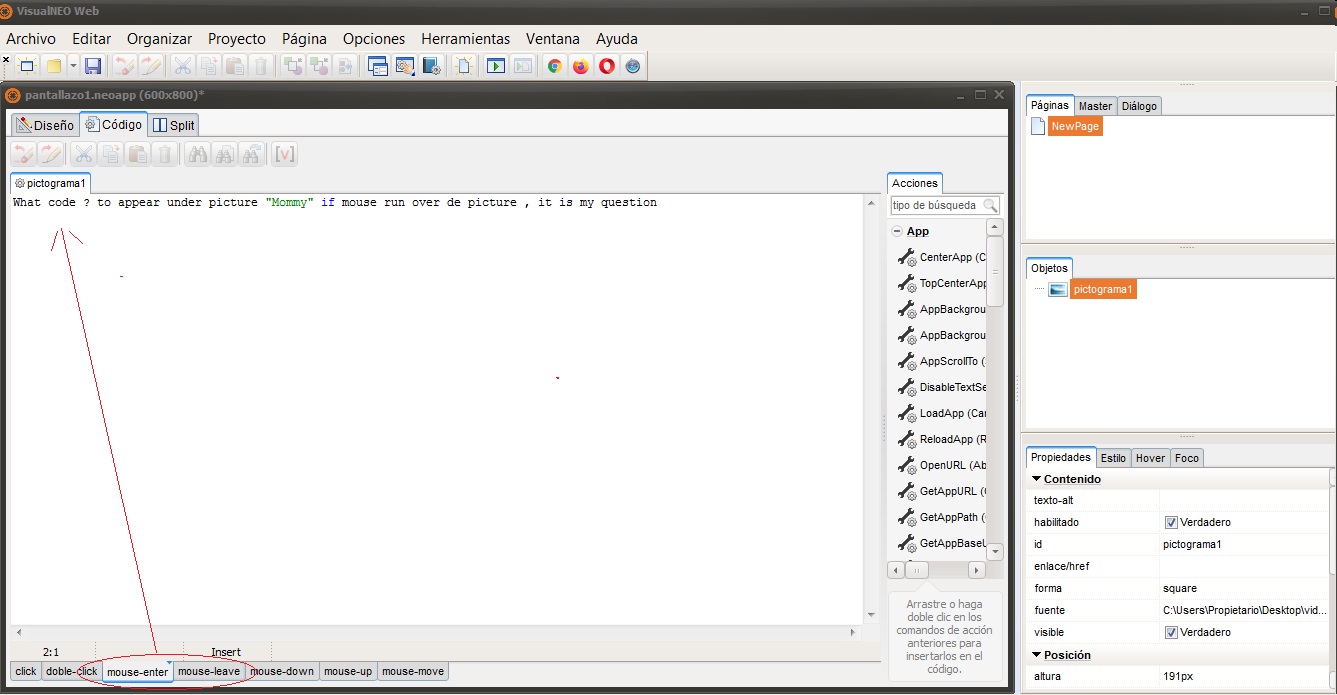
Look at my drawings so you have an idea what I´m trying to do.
Hi ! Thanks you for your generosity in answering me but I find it very difficult to understand you.
Look at my drawings so you have an idea what I´m trying to do.
Uploaded files: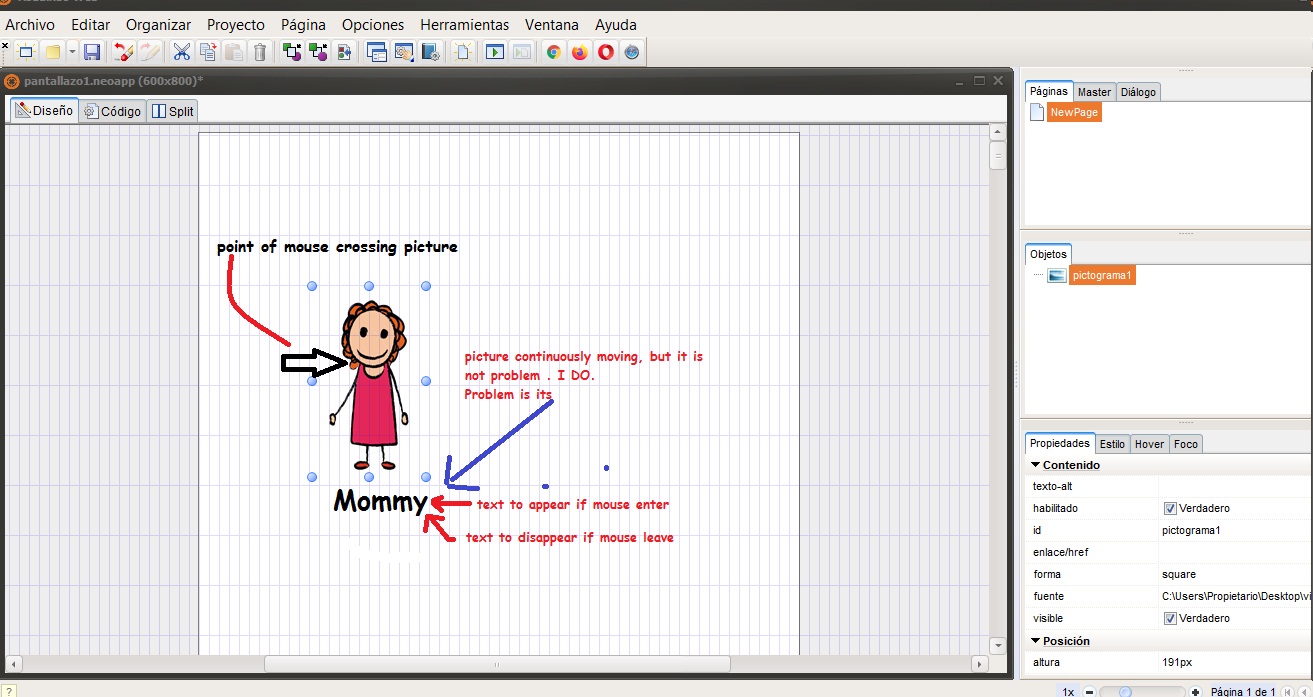
Quote from Gaev on April 11, 2020, 8:29 pm@joaquinfdez
Thank you for the images ... I understand your objective ... much easier to implement than my previous understanding.
a) At Design time, set the visible property of the Container showing the text to False
b) in the mouse-enter code section of the Image object ...
ShowObject "object name" "effect" speed... where the "object name" is the Container housing the associated text
See this online Help page for details https://webhelp.visualneo.com/Objects.html
c) in the mouse-exit code section of the Image object ...
HideObject "object name" "effect" speed
Thank you for the images ... I understand your objective ... much easier to implement than my previous understanding.
a) At Design time, set the visible property of the Container showing the text to False
b) in the mouse-enter code section of the Image object ...
ShowObject "object name" "effect" speed
... where the "object name" is the Container housing the associated text
See this online Help page for details https://webhelp.visualneo.com/Objects.html
c) in the mouse-exit code section of the Image object ...
HideObject "object name" "effect" speed