
The new VisualNEO Modern Plug-in Collections are now available - Page 2 - Forum
The new VisualNEO Modern Plug-in Collections are now available

Quote from Sinesi Giuseppe on August 19, 2026, 5:45 pmHi, yesterday with the old version it didn't happen, now it gives me an error too.
Hi, yesterday with the old version it didn't happen, now it gives me an error too.
Quote from Sinesi Giuseppe on August 19, 2026, 5:57 pmQuote from Sinesi Giuseppe on August 19, 2026, 5:45 pmHi, yesterday with the old version it didn't happen, now it gives me an error too.
It only gives me an error on neoinputnumber, can I have clarification on neocolor but is it not possible to create a variable for the chosen color in order to change the color of the neoshape figures or toggle switch buttons?
Quote from Sinesi Giuseppe on August 19, 2026, 5:45 pmHi, yesterday with the old version it didn't happen, now it gives me an error too.
It only gives me an error on neoinputnumber, can I have clarification on neocolor but is it not possible to create a variable for the chosen color in order to change the color of the neoshape figures or toggle switch buttons?

Quote from luishp on August 19, 2026, 6:13 pm@sinesi-giuseppe please check the included sample apps and let me know.
Thank you!
@sinesi-giuseppe please check the included sample apps and let me know.
Thank you!
Quote from luishp on August 19, 2026, 6:27 pm@sinesi-giuseppe , @anthony-latorre
Please reproduce the error, close VisualNEO Win, and attach these two files:
%LOCALAPPDATA%\VisualNeoWin\Logs\VisualNeoWin.startup.log
and%LOCALAPPDATA%\VisualNeoWin\Logs\VisualNeoWin.log.
Please also attach a screenshot of Options > Modern Plug-Ins showing the plugin status.Thank you!
@sinesi-giuseppe , @anthony-latorre
Please reproduce the error, close VisualNEO Win, and attach these two files:
%LOCALAPPDATA%\VisualNeoWin\Logs\VisualNeoWin.startup.log
and %LOCALAPPDATA%\VisualNeoWin\Logs\VisualNeoWin.log.
Please also attach a screenshot of Options > Modern Plug-Ins showing the plugin status.
Thank you!

Quote from Anthony LaTorre on August 19, 2026, 6:54 pmLuis, I have attached the log files as you requested... And also a screenshot of the Modern Plugins Manager...
Luis, I have attached the log files as you requested... And also a screenshot of the Modern Plugins Manager...
Uploaded files: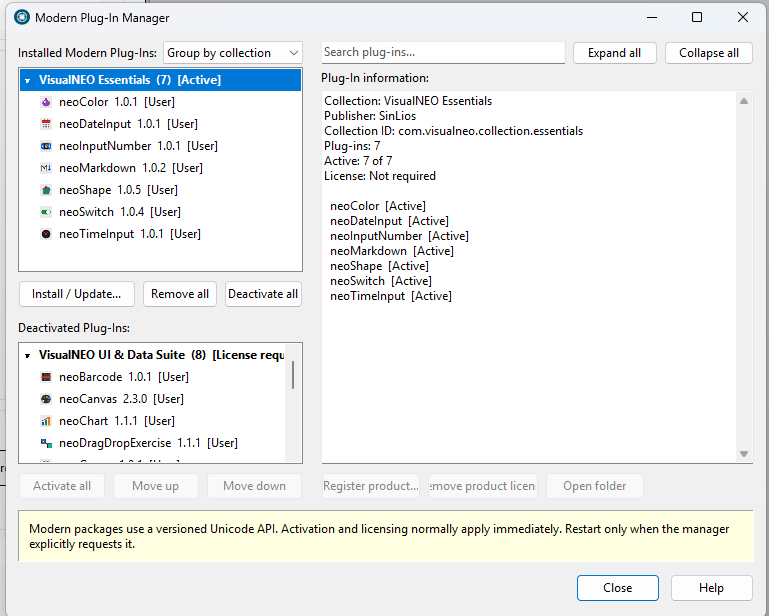
Quote from luishp on August 19, 2026, 8:37 pmI think some sample projects contain incomplete action commands as they were designed for previous plugins testing versions.
If you complete the command information, probably the errors will desappear.
By the way, I will be some days out, meanwhile please kkep posting any problem you find.
Thank you!
I think some sample projects contain incomplete action commands as they were designed for previous plugins testing versions.
If you complete the command information, probably the errors will desappear.
By the way, I will be some days out, meanwhile please kkep posting any problem you find.
Thank you!
Quote from Anthony LaTorre on August 19, 2026, 8:45 pmLuis, Claude AI figured out the problem and got it working I uploaded the corrected Demo pub and Claude AI's explanation below:
Why the sample file failed:
The .pub file's version line was written as
NeoBookVer=5,80(decimal comma) instead ofNeoBookVer=5.80(decimal dot). The file was generated outside the IDE, and the comma is a locale formatting artifact.The design-time editor doesn't validate this field, so everything looked normal — the Modern Plugin control rendered and its commands appeared in the code editor. But the runtime compiler apparently parses
NeoBookVerto decide which features to enable."5,80"doesn't parse as a valid version, so the compiler fell back to treating the pub as an older-format file and never loaded the Modern Plugin command table. Result:neoShapeSetShapeand friends triggered "I don't recognize that command" at runtime, even though design time was fine.Fix: Change
NeoBookVer=5,80toNeoBookVer=5.80in the .pub file (plain text editor).Suggestion for the devs: The IDE should normalize or reject a malformed
NeoBookVeron load, so design time and compile time can't disagree about the file format version.
Luis, Claude AI figured out the problem and got it working I uploaded the corrected Demo pub and Claude AI's explanation below:
Why the sample file failed:
The .pub file's version line was written as NeoBookVer=5,80 (decimal comma) instead of NeoBookVer=5.80 (decimal dot). The file was generated outside the IDE, and the comma is a locale formatting artifact.
The design-time editor doesn't validate this field, so everything looked normal — the Modern Plugin control rendered and its commands appeared in the code editor. But the runtime compiler apparently parses NeoBookVer to decide which features to enable. "5,80" doesn't parse as a valid version, so the compiler fell back to treating the pub as an older-format file and never loaded the Modern Plugin command table. Result: neoShapeSetShape and friends triggered "I don't recognize that command" at runtime, even though design time was fine.
Fix: Change NeoBookVer=5,80 to NeoBookVer=5.80 in the .pub file (plain text editor).
Suggestion for the devs: The IDE should normalize or reject a malformed NeoBookVer on load, so design time and compile time can't disagree about the file format version.
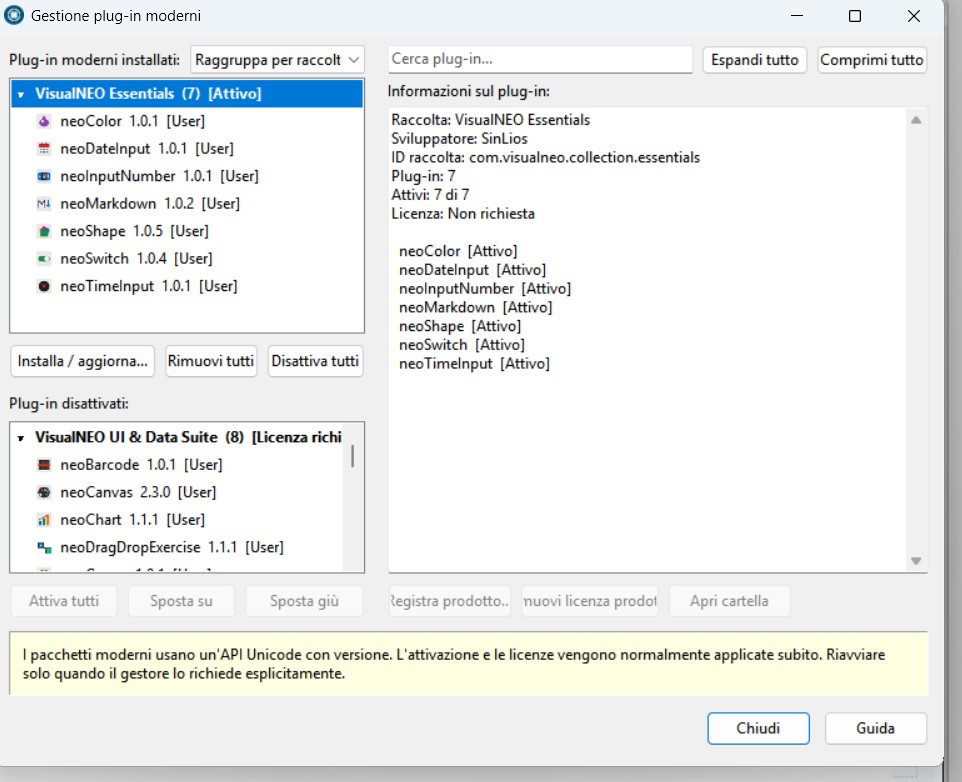
Quote from Sinesi Giuseppe on August 19, 2026, 9:08 pmQuote from luishp on August 19, 2026, 6:27 pm@sinesi-giuseppe , @anthony-latorre
Please reproduce the error, close VisualNEO Win, and attach these two files:
%LOCALAPPDATA%\VisualNeoWin\Logs\VisualNeoWin.startup.log
and%LOCALAPPDATA%\VisualNeoWin\Logs\VisualNeoWin.log.
Please also attach a screenshot of Options > Modern Plug-Ins showing the plugin status.Thank you!
Quote from luishp on August 19, 2026, 6:27 pm@sinesi-giuseppe , @anthony-latorre
Please reproduce the error, close VisualNEO Win, and attach these two files:
%LOCALAPPDATA%\VisualNeoWin\Logs\VisualNeoWin.startup.log
and%LOCALAPPDATA%\VisualNeoWin\Logs\VisualNeoWin.log.
Please also attach a screenshot of Options > Modern Plug-Ins showing the plugin status.Thank you!
Uploaded files:
Quote from luishp on August 19, 2026, 9:23 pm@anthony-latorre yes, it's possible.
Most samples have been generated using AI.
It's strange because I have tested most of them.@mishem has also noticed some projects fail because they try to compile into appdata folder (protected one).
In that case it's enough to change the compilation path to anywhere else. Just set a different path into App > Compile.
@anthony-latorre yes, it's possible.
Most samples have been generated using AI.
It's strange because I have tested most of them.
@mishem has also noticed some projects fail because they try to compile into appdata folder (protected one).
In that case it's enough to change the compilation path to anywhere else. Just set a different path into App > Compile.
Quote from mishem on August 19, 2026, 9:46 pmOr simply save the project to a different folder. The compilation path will automatically change to the location where you save the project. And everything will work.
Save to a location your system allows access to. Be careful with the desktop; some users may not be able to launch from there either.
Or simply save the project to a different folder. The compilation path will automatically change to the location where you save the project. And everything will work.
Save to a location your system allows access to. Be careful with the desktop; some users may not be able to launch from there either.
Quote from Anthony LaTorre on August 19, 2026, 10:53 pmI had Claude AI fix all the Essentials Plugins Sample Apps. Test them before you replace the one's in the samples folder...
I tested them and they all work, but it's best if you test them yourself...
I had Claude AI fix all the Essentials Plugins Sample Apps. Test them before you replace the one's in the samples folder...
I tested them and they all work, but it's best if you test them yourself...
Quote from no1g8tor96 on August 23, 2026, 4:48 amHere is an interesting question i just thought of. Will we be able to create our own "modern plugins" Maybe i missed something where it is if we can. Please let me know as I have some i would like to try to create.
Thanks
Here is an interesting question i just thought of. Will we be able to create our own "modern plugins" Maybe i missed something where it is if we can. Please let me know as I have some i would like to try to create.
Thanks
Quote from luishp on August 27, 2026, 8:58 amI have updated all the installers with fixed samples.
Please confirm all of them work now as expected.
Sorry for the inconveniences.
I have updated all the installers with fixed samples.
Please confirm all of them work now as expected.
Sorry for the inconveniences.