
The new VisualNEO Modern Plug-in Collections are now available

Quote from luishp on August 17, 2026, 6:39 pmWe are delighted to announce the release of the first four Modern Plug-in Collections for VisualNEO Win.
Together they add 27 modern plug-ins for user interfaces, data visualization, interactive learning, multimedia, online services, artificial intelligence, files, security and Windows automation.
These collections have been created for the new Modern Plug-in platform introduced with VisualNEO Win 26.8.8. They integrate directly with the tool palette, action editor, variables, events, property panels and compiled VisualNEO applications.
VisualNEO Essentials
A completely free collection of seven modern controls for everyday projects.
- neoColor — visual color selection, palettes, harmonies and contrast.
- neoDateInput — modern date input and calendar selection.
- neoInputNumber — validated numeric input with spinner controls.
- neoMarkdown — display, edit and export Markdown content.
- neoShape — antialiased vector shapes with events and programmable styles.
- neoSwitch — animated modern on/off switches.
- neoTimeInput — validated time entry with 12-hour and 24-hour formats.
Learn more about VisualNEO Essentials
VisualNEO UI & Data Suite
Eight professional plug-ins for dashboards, structured data, interactive learning and advanced visual interfaces.
- Charts, gauges and editable data grids.
- QR codes and common barcode formats.
- A fast 2D canvas with sprites, collisions, particles and sound.
- Interactive quizzes, hotspots and drag-and-drop exercises.
Includes neoBarcode, neoCanvas, neoChart, neoDragDropExercise, neoGauge, neoGrid, neoHotspots and neoQuizEngine.
Learn more about the VisualNEO UI & Data Suite
VisualNEO Media Suite
Five professional plug-ins for modern image, audio, video, camera and screen-capture applications.
- Modern image formats, transparency, zoom and transformations.
- Native audio and video playback.
- Camera preview, photography and MP4 recording.
- Screen and window capture with recording capabilities.
Includes neoAudio, neoCamera, neoImage, neoScreenCapture and neoVideo.
Learn more about the VisualNEO Media Suite
VisualNEO Automation & AI Suite
Seven professional plug-ins for connected applications, artificial intelligence, security and automation.
- AI chat, vision, structured output, embeddings and media generation.
- HTTP, REST APIs, downloads, uploads and WebSockets.
- HTML and text email with attachments.
- Advanced file operations and ZIP or GZip archives.
- Encryption, hashing, secure data and Windows system automation.
Includes neoAI, neoCrypto, neoFile, neoHTTP, neoMail, neoSystem and neoZip.
Learn more about the VisualNEO Automation & AI Suite
Get every collection with the Complete Bundle
The VisualNEO Complete Modern Plug-ins Bundle brings all four collections and all 27 plug-ins together at a reduced price.
It is the best option for developers who want the complete modern VisualNEO toolkit without purchasing each commercial suite separately.
See the VisualNEO Complete Modern Plug-ins Bundle
Easy installation and licensing
- Each collection has a single installer for all its plug-ins, examples and documentation.
- The installers work with standard Windows user accounts and do not require administrator privileges.
- VisualNEO Essentials is free and requires no activation.
- Each commercial collection uses one signed collection license to activate all its included plug-ins.
- The commercial collections can be purchased separately or together in the discounted bundle.
Download the collection installers
Documentation, examples and plug-in explorer
Every collection includes manuals and practical VisualNEO Win example projects. You can also explore all available plug-ins, controls and actions in the new online help center:
Open the VisualNEO Modern Plug-ins Help Center
Requirements
- A current VisualNEO Win edition with Modern Plug-in support.
- Windows 10 or Windows 11.
- An internet connection and third-party credentials may be required for online, email or AI services.
Thank you
These collections are the result of the modernization work carried out with the help of the VisualNEO community. Thank you to everyone who tested the new platform, reported problems, suggested improvements and helped us create more useful tools.
We hope these new plug-ins help you create richer, more modern and more ambitious VisualNEO Win applications. Please continue sharing your projects, ideas and feedback in the forum.
We are delighted to announce the release of the first four Modern Plug-in Collections for VisualNEO Win.
Together they add 27 modern plug-ins for user interfaces, data visualization, interactive learning, multimedia, online services, artificial intelligence, files, security and Windows automation.
These collections have been created for the new Modern Plug-in platform introduced with VisualNEO Win 26.8.8. They integrate directly with the tool palette, action editor, variables, events, property panels and compiled VisualNEO applications.
VisualNEO Essentials
A completely free collection of seven modern controls for everyday projects.
- neoColor — visual color selection, palettes, harmonies and contrast.
- neoDateInput — modern date input and calendar selection.
- neoInputNumber — validated numeric input with spinner controls.
- neoMarkdown — display, edit and export Markdown content.
- neoShape — antialiased vector shapes with events and programmable styles.
- neoSwitch — animated modern on/off switches.
- neoTimeInput — validated time entry with 12-hour and 24-hour formats.
Learn more about VisualNEO Essentials
VisualNEO UI & Data Suite
Eight professional plug-ins for dashboards, structured data, interactive learning and advanced visual interfaces.
- Charts, gauges and editable data grids.
- QR codes and common barcode formats.
- A fast 2D canvas with sprites, collisions, particles and sound.
- Interactive quizzes, hotspots and drag-and-drop exercises.
Includes neoBarcode, neoCanvas, neoChart, neoDragDropExercise, neoGauge, neoGrid, neoHotspots and neoQuizEngine.
Learn more about the VisualNEO UI & Data Suite
VisualNEO Media Suite
Five professional plug-ins for modern image, audio, video, camera and screen-capture applications.
- Modern image formats, transparency, zoom and transformations.
- Native audio and video playback.
- Camera preview, photography and MP4 recording.
- Screen and window capture with recording capabilities.
Includes neoAudio, neoCamera, neoImage, neoScreenCapture and neoVideo.
Learn more about the VisualNEO Media Suite
VisualNEO Automation & AI Suite
Seven professional plug-ins for connected applications, artificial intelligence, security and automation.
- AI chat, vision, structured output, embeddings and media generation.
- HTTP, REST APIs, downloads, uploads and WebSockets.
- HTML and text email with attachments.
- Advanced file operations and ZIP or GZip archives.
- Encryption, hashing, secure data and Windows system automation.
Includes neoAI, neoCrypto, neoFile, neoHTTP, neoMail, neoSystem and neoZip.
Learn more about the VisualNEO Automation & AI Suite
Get every collection with the Complete Bundle
The VisualNEO Complete Modern Plug-ins Bundle brings all four collections and all 27 plug-ins together at a reduced price.
It is the best option for developers who want the complete modern VisualNEO toolkit without purchasing each commercial suite separately.
See the VisualNEO Complete Modern Plug-ins Bundle
Easy installation and licensing
- Each collection has a single installer for all its plug-ins, examples and documentation.
- The installers work with standard Windows user accounts and do not require administrator privileges.
- VisualNEO Essentials is free and requires no activation.
- Each commercial collection uses one signed collection license to activate all its included plug-ins.
- The commercial collections can be purchased separately or together in the discounted bundle.
Download the collection installers
Documentation, examples and plug-in explorer
Every collection includes manuals and practical VisualNEO Win example projects. You can also explore all available plug-ins, controls and actions in the new online help center:
Open the VisualNEO Modern Plug-ins Help Center
Requirements
- A current VisualNEO Win edition with Modern Plug-in support.
- Windows 10 or Windows 11.
- An internet connection and third-party credentials may be required for online, email or AI services.
Thank you
These collections are the result of the modernization work carried out with the help of the VisualNEO community. Thank you to everyone who tested the new platform, reported problems, suggested improvements and helped us create more useful tools.
We hope these new plug-ins help you create richer, more modern and more ambitious VisualNEO Win applications. Please continue sharing your projects, ideas and feedback in the forum.

Quote from alangonzalez91 on August 18, 2026, 1:39 amExcelente! poder puro! esperamos el SDK!!
Excelente! poder puro! esperamos el SDK!!

Quote from dglojnar on August 18, 2026, 10:26 am@luishp
One question, maybe i'm getting old or stupid ?
So,I installed the latest version of VisualNeo Win, free modern plugin collection and UI data modern plugin, but in the list of actions I only see these free plugins?
Does UI data only work when registered?
If not, how can I try the UI data plugin, it's a bit confusing for me...
What am I doing wrong?Thanks in advance for your answer!
Cheers!
@luishp
One question, maybe i'm getting old or stupid ?
So,I installed the latest version of VisualNeo Win, free modern plugin collection and UI data modern plugin, but in the list of actions I only see these free plugins?
Does UI data only work when registered?
If not, how can I try the UI data plugin, it's a bit confusing for me...
What am I doing wrong?
Thanks in advance for your answer!
Cheers!
Quote from luishp on August 18, 2026, 10:40 am@dglojnar you are not doing anything wrong.
Right now, modern commercial plugins require a license to work.
Free modern plugins work right away.
I will probably find a simple way to offer them as shareware in the near future.
We are improving the platform as fast as we can.
Sorry for the inconveniences.
@dglojnar you are not doing anything wrong.
Right now, modern commercial plugins require a license to work.
Free modern plugins work right away.
I will probably find a simple way to offer them as shareware in the near future.
We are improving the platform as fast as we can.
Sorry for the inconveniences.
Quote from dglojnar on August 18, 2026, 11:38 am@luishp
No inconveniences at all :-)
Thank You for Your quick response, I really appreciate it :-)
I assumed it was something like that, but it's better to ask the author :-)Thank you very much, Your work to improve our beloved Neobook/VisualNeo Win is really stunning :-)
Cheers!
@luishp
No inconveniences at all :-)
Thank You for Your quick response, I really appreciate it :-)
I assumed it was something like that, but it's better to ask the author :-)
Thank you very much, Your work to improve our beloved Neobook/VisualNeo Win is really stunning :-)
Cheers!

Quote from Anthony LaTorre on August 18, 2026, 2:21 pmLuis, I was going to test the new Audio and Video plugins in the Media Suite. I clicked the register button in the Modern Plugin Manager, but all it does is open my Documents folder. I am assuming that the plugin registration process is not functional yet...
Here is what is confusing: I am running the neoShape Tutorial that's part of the Essential Plugins package .... Before a run the pub, I see the new commands and they all respond when I attempt to configure them in the script editor... No problems here:
neoShapeSetShape "ShapeDemo" "hexagon"
neoShapeSetFillColor "ShapeDemo" "#10B981"
neoShapeSetCaption "ShapeDemo" "Hexagon"
The problem I am having is when I run the pub from start, then I click any shape button I get an Error: "I don't understand this command" and all the shape plugin commands are grayed out. It seams the script editor recognizes the plugin commands at design-time, but the compiled pub doesn't at run time...
Maybe I'm doing something wrong... but I wanted to report this behavior anyway...
Thanks for all the work you put into this... It's greatly appreciated...
Luis, I was going to test the new Audio and Video plugins in the Media Suite. I clicked the register button in the Modern Plugin Manager, but all it does is open my Documents folder. I am assuming that the plugin registration process is not functional yet...
Here is what is confusing: I am running the neoShape Tutorial that's part of the Essential Plugins package .... Before a run the pub, I see the new commands and they all respond when I attempt to configure them in the script editor... No problems here:
neoShapeSetShape "ShapeDemo" "hexagon"
neoShapeSetFillColor "ShapeDemo" "#10B981"
neoShapeSetCaption "ShapeDemo" "Hexagon"
The problem I am having is when I run the pub from start, then I click any shape button I get an Error: "I don't understand this command" and all the shape plugin commands are grayed out. It seams the script editor recognizes the plugin commands at design-time, but the compiled pub doesn't at run time...
Maybe I'm doing something wrong... but I wanted to report this behavior anyway...
Thanks for all the work you put into this... It's greatly appreciated...

Quote from Sinesi Giuseppe on August 18, 2026, 3:28 pmHi, I wanted some clarification. For the neodateinput plugin, the select date variable does not take into account the chosen date format but always returns the YYYY/MM/DD format. Is this intentional?
Hi, I wanted some clarification. For the neodateinput plugin, the select date variable does not take into account the chosen date format but always returns the YYYY/MM/DD format. Is this intentional?
Quote from luishp on August 18, 2026, 4:23 pm@anthony-latorre
Hi Anthony,
Thank you for testing the new plug-ins and for the detailed report.
The Register button is working as intended, although the new process may not be obvious. Modern plug-ins no longer use an alphanumeric registration code. The customer receives a
.vnlicensefile, normally inside a ZIP attachment. You must extract that file, click Register in the Modern Plug-In Manager, and select the.vnlicensefile from the file dialog.The Media Suite is a commercial collection, so its Audio and Video plug-ins require a valid Media Suite license. The Essentials collection, including neoShape, is free and does not require registration.
Regarding neoShape: what you describe is not expected and you are not doing anything wrong. If the commands are available in the editor but produce “I don’t understand this command” at runtime, it means the runtime has not loaded the neoShape package correctly. Modern plug-ins referenced by a project should also be available in test mode and embedded automatically in compiled applications.
Please make sure neoShape is shown as active in the Modern Plug-In Manager and restart VisualNEO Win once. If the problem continues, please tell me the exact VisualNEO Win version/build you installed. I am treating this as a possible runtime packaging/loading issue and will investigate it.
Thank you again for the report and for your kind words. Reports with clear reproduction steps like this are extremely helpful.
@sinesi-giuseppe Hi Giuseppe,
Yes, that behavior is intentional.
The selected display format controls how the date is shown to the user, but the associated variable and
neoDateInputGetValuereturn a normalized ISO date. This provides a stable, language-independent value for comparisons, databases and scripts, regardless of the regional display format.The canonical value should be:
YYYY-MM-DDFor example, the control may display
18/08/2026, while its variable contains2026-08-18.However, if you are actually receiving
YYYY/MM/DDwith slashes instead ofYYYY-MM-DDwith hyphens, please confirm it with an example because that would be a small bug rather than the intended format.We may also consider adding a separate option or action for retrieving the date already formatted for display.
Hi Anthony,
Thank you for testing the new plug-ins and for the detailed report.
The Register button is working as intended, although the new process may not be obvious. Modern plug-ins no longer use an alphanumeric registration code. The customer receives a .vnlicense file, normally inside a ZIP attachment. You must extract that file, click Register in the Modern Plug-In Manager, and select the .vnlicense file from the file dialog.
The Media Suite is a commercial collection, so its Audio and Video plug-ins require a valid Media Suite license. The Essentials collection, including neoShape, is free and does not require registration.
Regarding neoShape: what you describe is not expected and you are not doing anything wrong. If the commands are available in the editor but produce “I don’t understand this command” at runtime, it means the runtime has not loaded the neoShape package correctly. Modern plug-ins referenced by a project should also be available in test mode and embedded automatically in compiled applications.
Please make sure neoShape is shown as active in the Modern Plug-In Manager and restart VisualNEO Win once. If the problem continues, please tell me the exact VisualNEO Win version/build you installed. I am treating this as a possible runtime packaging/loading issue and will investigate it.
Thank you again for the report and for your kind words. Reports with clear reproduction steps like this are extremely helpful.
@sinesi-giuseppe Hi Giuseppe,
Yes, that behavior is intentional.
The selected display format controls how the date is shown to the user, but the associated variable and neoDateInputGetValue return a normalized ISO date. This provides a stable, language-independent value for comparisons, databases and scripts, regardless of the regional display format.
The canonical value should be:
YYYY-MM-DD
For example, the control may display 18/08/2026, while its variable contains 2026-08-18.
However, if you are actually receiving YYYY/MM/DD with slashes instead of YYYY-MM-DD with hyphens, please confirm it with an example because that would be a small bug rather than the intended format.
We may also consider adding a separate option or action for retrieving the date already formatted for display.
Quote from luishp on August 18, 2026, 4:26 pmPlease note you can find working sample apps within this folder:
MyDocuments\VisualNeoWin\Sample Apps\Modern Plugin Collections\
Regards.
Please note you can find working sample apps within this folder:
MyDocuments\VisualNeoWin\Sample Apps\Modern Plugin Collections\
Regards.
Quote from Anthony LaTorre on August 18, 2026, 4:46 pmHello Luis thanks for the prompt reply...
I am using NVW Version: 26.8.8.
I am still having problems with the compiler recognizing the VisualNeo Essentials Commands... Any time I run a sample app, I get an: "I don't understand this command" error and all the commands are grayed out in the run-time compiler, but work fine in the design-time script editor... This happens with all the essentials plugins...Another issue I am having is... I restarted my computer in an attempt to get the plugs working. Now the neoShape plugin is in the Deactivated Plugins tab... When I attempted to activate it I got an error: "This modern plugin could not be loaded. It's package may be invalid or incompatible with this version of VisualNeo Win." I attempted to reinstall the Essentials plugins, but the neoShape plugin is still in the Deactivated tab...
Hope this helps...
Hello Luis thanks for the prompt reply...
I am using NVW Version: 26.8.8.
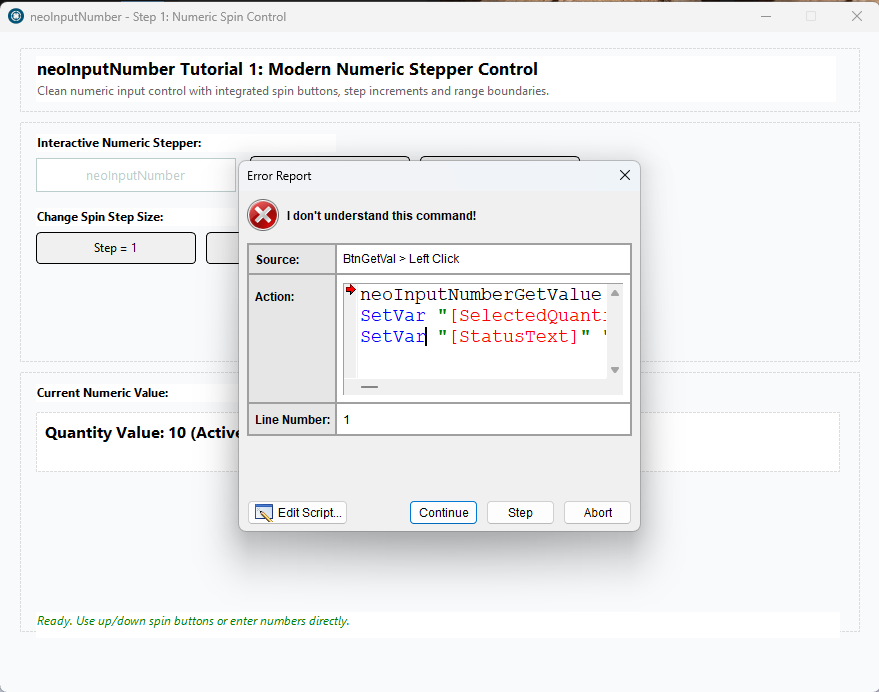
I am still having problems with the compiler recognizing the VisualNeo Essentials Commands... Any time I run a sample app, I get an: "I don't understand this command" error and all the commands are grayed out in the run-time compiler, but work fine in the design-time script editor... This happens with all the essentials plugins...
Another issue I am having is... I restarted my computer in an attempt to get the plugs working. Now the neoShape plugin is in the Deactivated Plugins tab... When I attempted to activate it I got an error: "This modern plugin could not be loaded. It's package may be invalid or incompatible with this version of VisualNeo Win." I attempted to reinstall the Essentials plugins, but the neoShape plugin is still in the Deactivated tab...
Hope this helps...
Quote from luishp on August 18, 2026, 5:12 pm@anthony-latorre Hi Anthony,
Thank you. This additional information is very useful.
I have tested the same Essentials samples here and they work correctly both in design mode and at runtime.
Although your version number is 26.8.8, we have released several maintenance builds under that same version number while correcting initial issues. You may therefore be running an earlier build.Please open Help > About VisualNEO or press F2 and tell me the complete build date displayed there.
This is more precise than the version number alone.The symptoms suggest that your editor, runtime player or installed Essentials packages may belong to different revisions:
- The actions are visible at design time.
- The runtime does not recognize them.
- neoShape is subsequently reported as incompatible when activated.
Please do not manually delete anything yet. Once I know the build date, I can confirm whether you only need to download and reinstall the latest VisualNEO Win 26.8.8 build.
Also, the Essentials collection is free and does not require a license. The Register button is intended for commercial collections and opens a file selector because registration now uses an attached
.vnlicensefile instead of an alphanumeric code.Thank you again for helping us diagnose this.
@anthony-latorre Hi Anthony,
Thank you. This additional information is very useful.
I have tested the same Essentials samples here and they work correctly both in design mode and at runtime.
Although your version number is 26.8.8, we have released several maintenance builds under that same version number while correcting initial issues. You may therefore be running an earlier build.
Please open Help > About VisualNEO or press F2 and tell me the complete build date displayed there.
This is more precise than the version number alone.
The symptoms suggest that your editor, runtime player or installed Essentials packages may belong to different revisions:
- The actions are visible at design time.
- The runtime does not recognize them.
- neoShape is subsequently reported as incompatible when activated.
Please do not manually delete anything yet. Once I know the build date, I can confirm whether you only need to download and reinstall the latest VisualNEO Win 26.8.8 build.
Also, the Essentials collection is free and does not require a license. The Register button is intended for commercial collections and opens a file selector because registration now uses an attached .vnlicense file instead of an alphanumeric code.
Thank you again for helping us diagnose this.
Quote from Anthony LaTorre on August 18, 2026, 6:03 pmLuis, the build date is 2026-08-18.
I took some screenshots of the script editor at design time and the pub at runtime... I an running the "neoInputNumber Tutorial "
Luis, the build date is 2026-08-18.
I took some screenshots of the script editor at design time and the pub at runtime... I an running the "neoInputNumber Tutorial "
Uploaded files: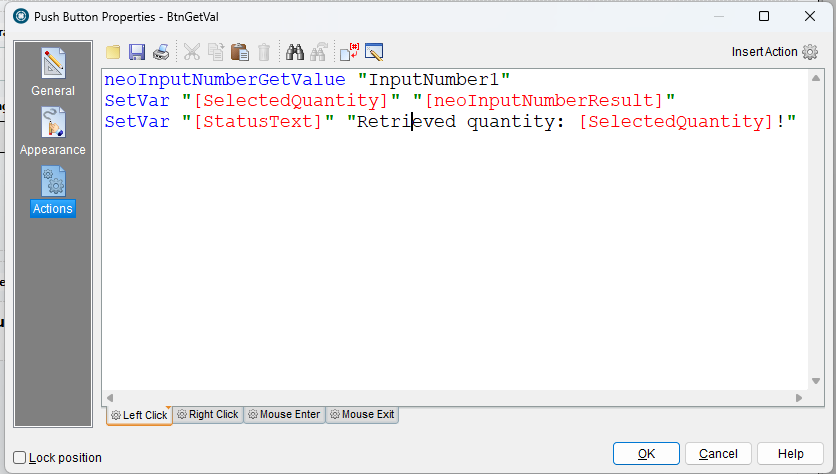
Quote from Sinesi Giuseppe on August 18, 2026, 6:27 pmQuote from luishp on August 18, 2026, 4:23 pm@anthony-latorre
Hi Anthony,
Thank you for testing the new plug-ins and for the detailed report.
The Register button is working as intended, although the new process may not be obvious. Modern plug-ins no longer use an alphanumeric registration code. The customer receives a
.vnlicensefile, normally inside a ZIP attachment. You must extract that file, click Register in the Modern Plug-In Manager, and select the.vnlicensefile from the file dialog.The Media Suite is a commercial collection, so its Audio and Video plug-ins require a valid Media Suite license. The Essentials collection, including neoShape, is free and does not require registration.
Regarding neoShape: what you describe is not expected and you are not doing anything wrong. If the commands are available in the editor but produce “I don’t understand this command” at runtime, it means the runtime has not loaded the neoShape package correctly. Modern plug-ins referenced by a project should also be available in test mode and embedded automatically in compiled applications.
Please make sure neoShape is shown as active in the Modern Plug-In Manager and restart VisualNEO Win once. If the problem continues, please tell me the exact VisualNEO Win version/build you installed. I am treating this as a possible runtime packaging/loading issue and will investigate it.
Thank you again for the report and for your kind words. Reports with clear reproduction steps like this are extremely helpful.
@sinesi-giuseppe Hi Giuseppe,
Yes, that behavior is intentional.
The selected display format controls how the date is shown to the user, but the associated variable and
neoDateInputGetValuereturn a normalized ISO date. This provides a stable, language-independent value for comparisons, databases and scripts, regardless of the regional display format.The canonical value should be:
YYYY-MM-DDFor example, the control may display
18/08/2026, while its variable contains2026-08-18.However, if you are actually receiving
YYYY/MM/DDwith slashes instead ofYYYY-MM-DDwith hyphens, please confirm it with an example because that would be a small bug rather than the intended format.We may also consider adding a separate option or action for retrieving the date already formatted for display.
It would be really handy to display the chosen date format in a variable, unless there's an action that does that. Thanks, Luise.
Quote from luishp on August 18, 2026, 4:23 pmHi Anthony,
Thank you for testing the new plug-ins and for the detailed report.
The Register button is working as intended, although the new process may not be obvious. Modern plug-ins no longer use an alphanumeric registration code. The customer receives a
.vnlicensefile, normally inside a ZIP attachment. You must extract that file, click Register in the Modern Plug-In Manager, and select the.vnlicensefile from the file dialog.The Media Suite is a commercial collection, so its Audio and Video plug-ins require a valid Media Suite license. The Essentials collection, including neoShape, is free and does not require registration.
Regarding neoShape: what you describe is not expected and you are not doing anything wrong. If the commands are available in the editor but produce “I don’t understand this command” at runtime, it means the runtime has not loaded the neoShape package correctly. Modern plug-ins referenced by a project should also be available in test mode and embedded automatically in compiled applications.
Please make sure neoShape is shown as active in the Modern Plug-In Manager and restart VisualNEO Win once. If the problem continues, please tell me the exact VisualNEO Win version/build you installed. I am treating this as a possible runtime packaging/loading issue and will investigate it.
Thank you again for the report and for your kind words. Reports with clear reproduction steps like this are extremely helpful.
@sinesi-giuseppe Hi Giuseppe,
Yes, that behavior is intentional.
The selected display format controls how the date is shown to the user, but the associated variable and
neoDateInputGetValuereturn a normalized ISO date. This provides a stable, language-independent value for comparisons, databases and scripts, regardless of the regional display format.The canonical value should be:
YYYY-MM-DDFor example, the control may display
18/08/2026, while its variable contains2026-08-18.However, if you are actually receiving
YYYY/MM/DDwith slashes instead ofYYYY-MM-DDwith hyphens, please confirm it with an example because that would be a small bug rather than the intended format.We may also consider adding a separate option or action for retrieving the date already formatted for display.
It would be really handy to display the chosen date format in a variable, unless there's an action that does that. Thanks, Luise.
Quote from luishp on August 19, 2026, 8:20 am@anthony-latorre please download and install again both: VisualNEO Win and Essenctials Plugin Collection.
Let me know if that solves the problem.
Thank you!
@anthony-latorre please download and install again both: VisualNEO Win and Essenctials Plugin Collection.
Let me know if that solves the problem.
Thank you!
Quote from luishp on August 19, 2026, 12:21 pmI have updated all plugins collections intallers so they now show Russian correctly.
I have also recompiled neoShape plugin (par of the free Essentials Suite Plugin Collection)
I have updated all plugins collections intallers so they now show Russian correctly.
I have also recompiled neoShape plugin (par of the free Essentials Suite Plugin Collection)
Quote from Anthony LaTorre on August 19, 2026, 1:32 pmLuis, I reinstalled both VNW and the Essentials collections... It did not solve my problem...
I still get the "I don't recognize this command error" when running the sample pub.I clicked the "Edit Script" button on the error dialog and it produced the Alertbox screen shot I uploaded below.
Thank you for trying to resolve this issue...
Luis, I reinstalled both VNW and the Essentials collections... It did not solve my problem...
I still get the "I don't recognize this command error" when running the sample pub.
I clicked the "Edit Script" button on the error dialog and it produced the Alertbox screen shot I uploaded below.
Thank you for trying to resolve this issue...
Uploaded files: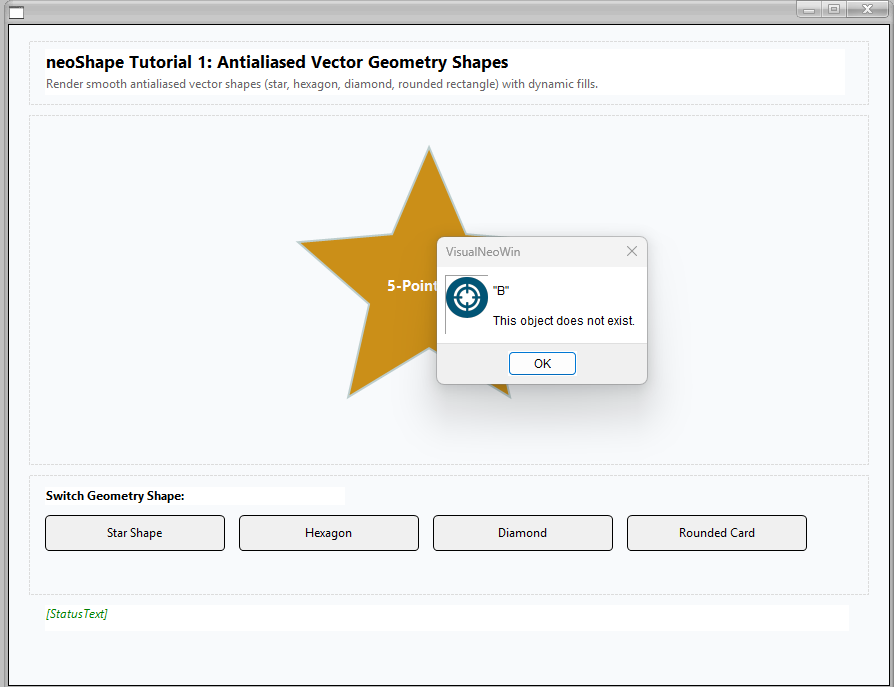
Quote from luishp on August 19, 2026, 1:49 pm@anthony-latorre do you have the same problem with other plugins aside of neoShape?
Note I have published a new version just an hour ago fixing exactly that plugin.
Anyone has the same problem?
@anthony-latorre do you have the same problem with other plugins aside of neoShape?
Note I have published a new version just an hour ago fixing exactly that plugin.
Anyone has the same problem?
Quote from Anthony LaTorre on August 19, 2026, 1:53 pmYes, all the essential plugins...
Yes, all the essential plugins...
Quote from luishp on August 19, 2026, 4:15 pm@anthony-latorre it's strange, I can't reproduce the problem here.
And no one else has complained about it...
I will take a look anyway.
@anthony-latorre it's strange, I can't reproduce the problem here.
And no one else has complained about it...
I will take a look anyway.
Quote from Anthony LaTorre on August 19, 2026, 4:49 pmJust my luck...
Thanks for looking into it... Maybe I have to do a complete reinstall and delete the VNW Registration files... That will be a pain but might be my only option.Thanks again Luis.
Just my luck...
Thanks for looking into it... Maybe I have to do a complete reinstall and delete the VNW Registration files... That will be a pain but might be my only option.
Thanks again Luis.