Thermal Printer Output

Quote from rcohen on September 30, 2021, 3:23 amHiya,
I'm trying to finish up a project that needs to print to the POS58/HSPOS printer. It needs a width of 48mm. The page it's printing is a rtf file with [variables] embedded. It works fine on my full size printer, but the client says it's not printing well at all on his thermal printer.
I don't see a way to "size" an rtf and the client tells me there is no "fit media to page" function on his printer software /twain.
I am thinking there is no way to format an rtf on that thermal printer, but before I give up on the rtf formatting and go with plain asci, I figured I'd ask the guru's of the forum what they might know.
Thanks
Hiya,
I'm trying to finish up a project that needs to print to the POS58/HSPOS printer. It needs a width of 48mm. The page it's printing is a rtf file with [variables] embedded. It works fine on my full size printer, but the client says it's not printing well at all on his thermal printer.
I don't see a way to "size" an rtf and the client tells me there is no "fit media to page" function on his printer software /twain.
I am thinking there is no way to format an rtf on that thermal printer, but before I give up on the rtf formatting and go with plain asci, I figured I'd ask the guru's of the forum what they might know.
Thanks

Quote from PaulJonestindall on September 30, 2021, 7:41 pmOk, so I gotta ask, what are you using to generate your RTF?
There is coding to set your page size. RTFs are such horrible files in my opinion.
Ok, so I gotta ask, what are you using to generate your RTF?
There is coding to set your page size. RTFs are such horrible files in my opinion.

Quote from Vadim on September 30, 2021, 8:01 pm@rcohen
Good time!
You can use plugins to work with RTF:
EditorsToolbox 1.75 (C. Giebel)
vlWord 1.0 (Vadim Ljovkin)In addition, since the RTF format is a text format with its own control words and symbols (similar to HTML), it is possible to study its specification and edit it using VisualNEO Win directly (VisualNEO Win can work with regular expressions).
A similar question is addressed here:
https://www.sparxsystems.com/forums/smf/index.php?topic=12143.0And this is a link to specification of RTF format (PDF ~70mb): https://interoperability.blob.core.windows.net/files/Archive_References/%5bMSFT-RTF%5d.pdf
Good time!
You can use plugins to work with RTF:
EditorsToolbox 1.75 (C. Giebel)
vlWord 1.0 (Vadim Ljovkin)
In addition, since the RTF format is a text format with its own control words and symbols (similar to HTML), it is possible to study its specification and edit it using VisualNEO Win directly (VisualNEO Win can work with regular expressions).
A similar question is addressed here:
https://www.sparxsystems.com/forums/smf/index.php?topic=12143.0
And this is a link to specification of RTF format (PDF ~70mb): https://interoperability.blob.core.windows.net/files/Archive_References/%5bMSFT-RTF%5d.pdf
Quote from rcohen on September 30, 2021, 8:20 pmI used NB to generate the rtf, and did not see sizing options (I did look). Did I overlook it?
BUT the fact of the matter is, I only used RTF because I wanted a graphical header. But between the less than two inch size requirement (width) and the graphic, we (the client and I) decided to scrap it for an asci output instead.
He asked if I could arrange this so the twain software doesn't pop up, but rather prints straight away after engaging it. Does anyone know how that works? I haven't coded many things that used printing.... so I'm pretty much green ;-)
As always, thank you for your time guys. I hope to come back up to speed soon.. it's been three years or more. And so I'll be asking newbie questions for a while ;-}
rcohen
I used NB to generate the rtf, and did not see sizing options (I did look). Did I overlook it?
BUT the fact of the matter is, I only used RTF because I wanted a graphical header. But between the less than two inch size requirement (width) and the graphic, we (the client and I) decided to scrap it for an asci output instead.
He asked if I could arrange this so the twain software doesn't pop up, but rather prints straight away after engaging it. Does anyone know how that works? I haven't coded many things that used printing.... so I'm pretty much green ;-)
As always, thank you for your time guys. I hope to come back up to speed soon.. it's been three years or more. And so I'll be asking newbie questions for a while ;-}
rcohen
Quote from Vadim on September 30, 2021, 8:31 pm@rcohen
Take another look at this topic:
https://visualneo.com/forum/topic/visualneo-win-rft-text-and-accessI left there an example of creating an RTF using VisualNEO Win code.
Take another look at this topic:
I left there an example of creating an RTF using VisualNEO Win code.
Quote from rcohen on October 1, 2021, 5:09 am@vadim Thanks a bunch. I actually did read that thread a few days back, thanks.
The issue is that the thermal printer just doesn't like the RTF at all. So we decided to use plain ascii instead.
I'm much appreciate you lookin out for me ;-) Thanks again.
rcohen
@vadim Thanks a bunch. I actually did read that thread a few days back, thanks.
The issue is that the thermal printer just doesn't like the RTF at all. So we decided to use plain ascii instead.
I'm much appreciate you lookin out for me ;-) Thanks again.
rcohen
Quote from Vadim on October 1, 2021, 6:05 am@rcohen
He asked if I could arrange this so the twain software doesn't pop up, but rather prints straight away after engaging it. Does anyone know how that works? I haven't coded many things that used printing.... so I'm pretty much green ;-)
Yes, you can prevent the window from popping up and execute commands directly from the tray.
This has been discussed in this thread:
https://visualneo.com/forum/topic/tray-application-active-immediately
I suggest discussing it further there if the solution found there does not work for you. So that each question has its own forum topic (this will make it easier to find answers later).I am sure that everything will work out for you! Everything is possible in VisualNEO Win except creating mobile applications and coffee :)
He asked if I could arrange this so the twain software doesn't pop up, but rather prints straight away after engaging it. Does anyone know how that works? I haven't coded many things that used printing.... so I'm pretty much green ;-)
Yes, you can prevent the window from popping up and execute commands directly from the tray.
This has been discussed in this thread:
I suggest discussing it further there if the solution found there does not work for you. So that each question has its own forum topic (this will make it easier to find answers later).
I am sure that everything will work out for you! Everything is possible in VisualNEO Win except creating mobile applications and coffee :)
Quote from PaulJonestindall on October 1, 2021, 12:35 pmOddly enough I was also looking into how to get rich text into an Access memo field but my aim was to have it show in the grid.
But more on topic, if you look at the RTF file in this zip, and you'll have to open it in Notepad, you'll see somewhere in this monstrosity after the first empty line there are several bits of code.
\pgwsxn2721\pghsxn8504
This is apparently what sets your page width and height. And, you'll see it more than once along with margins and a header. This file I set to 48mm x 150mm with a header, I think, of 5mm. I created this using Open Office. Whatever you do, DO NOT use any Microsoft products to edit this like Word or WordPad. Word will produce hundreds of worthless lines and WordPad will remove any and all formatting including page dimensions.
In your case perhaps, what I might do is read/write this file line by line, replacing any text with your NB variable and see if it works. In fact, I may use this technique to print 4x6 labels on a thermal printer I have.
Thanks for the exercise. You may have helped me out too.
Oddly enough I was also looking into how to get rich text into an Access memo field but my aim was to have it show in the grid.
But more on topic, if you look at the RTF file in this zip, and you'll have to open it in Notepad, you'll see somewhere in this monstrosity after the first empty line there are several bits of code.
\pgwsxn2721\pghsxn8504
This is apparently what sets your page width and height. And, you'll see it more than once along with margins and a header. This file I set to 48mm x 150mm with a header, I think, of 5mm. I created this using Open Office. Whatever you do, DO NOT use any Microsoft products to edit this like Word or WordPad. Word will produce hundreds of worthless lines and WordPad will remove any and all formatting including page dimensions.
In your case perhaps, what I might do is read/write this file line by line, replacing any text with your NB variable and see if it works. In fact, I may use this technique to print 4x6 labels on a thermal printer I have.
Thanks for the exercise. You may have helped me out too.
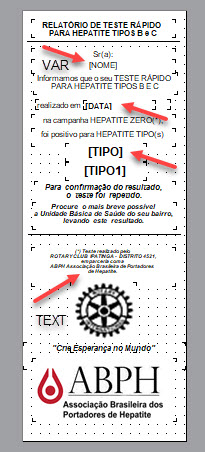
Uploaded files:Quote from UBIRAJARA FERNANDES VALLADARES on November 5, 2023, 9:34 pmHello. I was able to print text with formatting variables with the command (example): dbpPrintReport "HEPATITIS" "[Embedded]ETIQUETA.dbr" "PrintDialog=Yes;StartPage=;EndPage=;Copies=1" I create a file with Report Designer, with a width of 2.29. The length you set to fit the content, in dbreport properties page. In File properties in dbreport, I chose the poser58 printer.
Hello.
I was able to print text with formatting variables with the command (example): dbpPrintReport "HEPATITIS" "[Embedded]ETIQUETA.dbr" "PrintDialog=Yes;StartPage=;EndPage=;Copies=1"
I create a file with Report Designer, with a width of 2.29. The length you set to fit the content, in dbreport properties page.
In File properties in dbreport, I chose the poser58 printer.