
Unable to connect to MariaDB

Quote from AtariRiot on April 23, 2022, 1:20 pmHi there,
I tried the Youtube tutorial: (2) Creating a web database application step by step - YouTube
For that, I installed XAMPP on my Windows 10 machine. It comes with MariaDB 10.4.24, PHP 7.4.29 and Apache 2.4.53. The document root of my apache server is the folder where my application is compiled (tut-Web). Apache and MariaDB are running just fine, when entering 127.0.0.1 in my browser I can see my application. So I did everything like in the video with SQLight und all is working perfectly with a local db, like in the video. In Video 7 of the series there is explained how to use a mysql database, so I tried that, but after hours of trying I never get any data.
Please take a look at the attached picture for settings / details.
I guess its something about the connection to the mysql server itself. I tried different things in the config.php under $dbServerNames[1]="" like 127.0.0.1, 127.0.0.1:3306, localhost, localhost:3306, 192.168.x.x, 192.168.x.x:3306 but I never receive any data from the server. If someone could help it would be appreciated.
Regards
Hi there,
I tried the Youtube tutorial: (2) Creating a web database application step by step - YouTube
For that, I installed XAMPP on my Windows 10 machine. It comes with MariaDB 10.4.24, PHP 7.4.29 and Apache 2.4.53. The document root of my apache server is the folder where my application is compiled (tut-Web). Apache and MariaDB are running just fine, when entering 127.0.0.1 in my browser I can see my application. So I did everything like in the video with SQLight und all is working perfectly with a local db, like in the video. In Video 7 of the series there is explained how to use a mysql database, so I tried that, but after hours of trying I never get any data.
Please take a look at the attached picture for settings / details.
I guess its something about the connection to the mysql server itself. I tried different things in the config.php under $dbServerNames[1]="" like 127.0.0.1, 127.0.0.1:3306, localhost, localhost:3306, 192.168.x.x, 192.168.x.x:3306 but I never receive any data from the server. If someone could help it would be appreciated.
Regards
Uploaded files: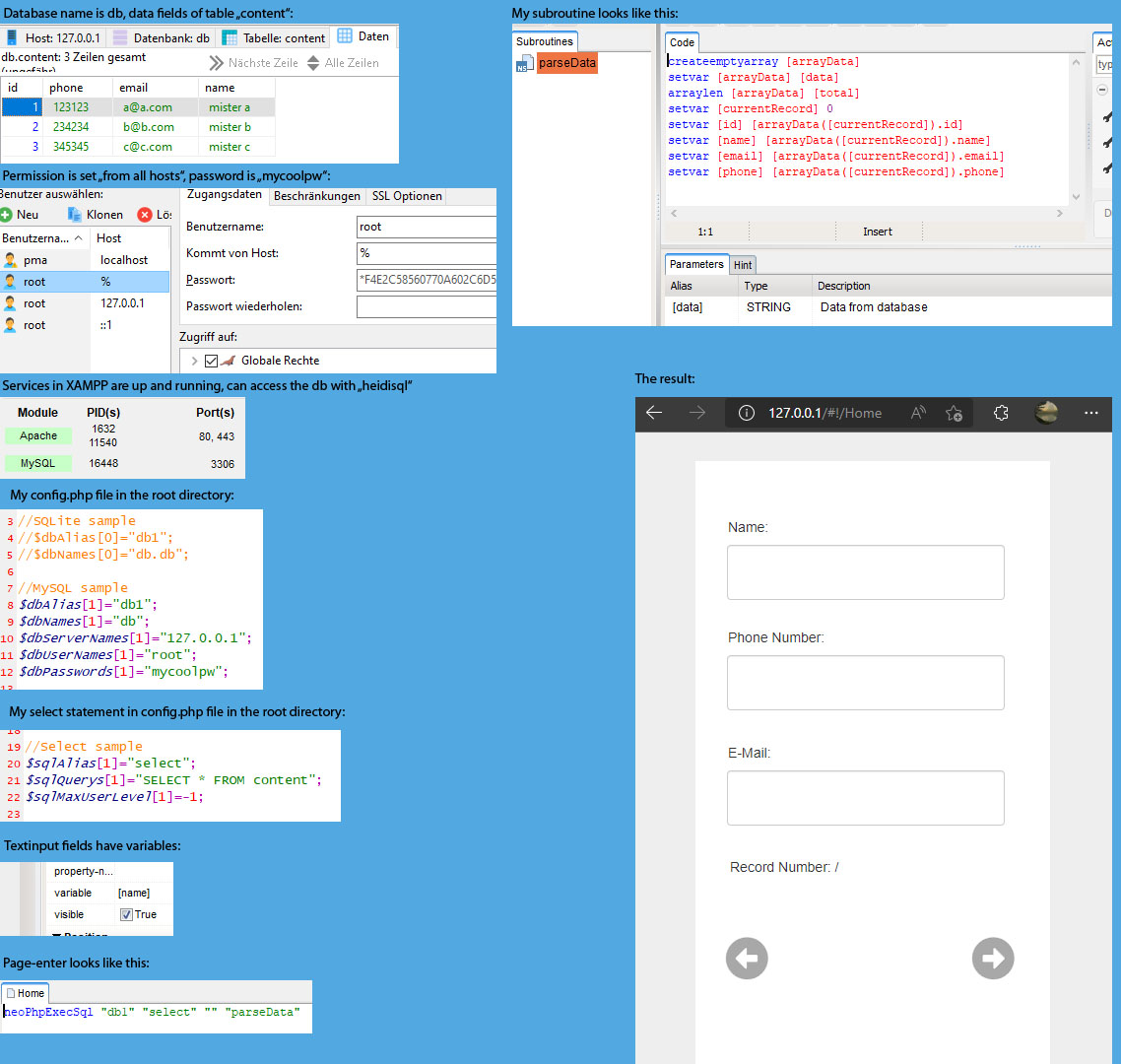

Quote from luishp on April 23, 2022, 1:53 pm@fabian-grabowski I don't see anything evident here. All seems to be ok. Just be sure your XAMP installation includes all the required PHP libraries: PDO and MySQL PDO.Missing libraries is the only problem I can think off.
Also take a look at the web browser Console (F12) when running the application as any error will be displayed there.
Regards.
@fabian-grabowski I don't see anything evident here. All seems to be ok. Just be sure your XAMP installation includes all the required PHP libraries: PDO and MySQL PDO.Missing libraries is the only problem I can think off.
Also take a look at the web browser Console (F12) when running the application as any error will be displayed there.
Regards.
Quote from AtariRiot on April 23, 2022, 2:11 pm@luishp
Quote from luishp on April 23, 2022, 1:53 pmJust be sure your XAMP installation includes all the required PHP libraries: PDO and MySQL PDO.Missing libraries is the only problem I can think off.
I turned the apache server off and tried with neoPHP server. Same result.
Quote from luishp on April 23, 2022, 1:53 pmAlso take a look at the web browser Console (F12) when running the application as any error will be displayed there.
I did that. there is indeed an error message with "http://localhost/css/bootstrap.min.css.map" it doesnt find a file. Opening that link directly in the browser states "The requested resource
/css/bootstrap.min.css.mapwas not found on this server." See attached picture.Regards
Quote from luishp on April 23, 2022, 1:53 pmJust be sure your XAMP installation includes all the required PHP libraries: PDO and MySQL PDO.Missing libraries is the only problem I can think off.
I turned the apache server off and tried with neoPHP server. Same result.
Quote from luishp on April 23, 2022, 1:53 pmAlso take a look at the web browser Console (F12) when running the application as any error will be displayed there.
I did that. there is indeed an error message with "http://localhost/css/bootstrap.min.css.map" it doesnt find a file. Opening that link directly in the browser states "The requested resource /css/bootstrap.min.css.map was not found on this server." See attached picture.
Regards
Uploaded files:
Quote from luishp on April 23, 2022, 6:11 pm@fabian-grabowski you can ignore bootstrap.min.css.map warning message.
I think the problem could be that you are starting the array index in 1 instead of 0.
Try this:$dbAlias[0]="db1";
$dbNames[0]="db";
$dbServerNames[0]="127.0.0.1";
$dbUserNames[0]="root";
$dbPasswords[0]="mycoolpw";
@fabian-grabowski you can ignore bootstrap.min.css.map warning message.
I think the problem could be that you are starting the array index in 1 instead of 0.
Try this:
$dbAlias[0]="db1";
$dbNames[0]="db";
$dbServerNames[0]="127.0.0.1";
$dbUserNames[0]="root";
$dbPasswords[0]="mycoolpw";
Quote from AtariRiot on April 23, 2022, 7:43 pm@luishp
Quote from luishp on April 23, 2022, 6:11 pm$dbAlias[0]="db1";
$dbNames[0]="db";
$dbServerNames[0]="127.0.0.1";
$dbUserNames[0]="root";
$dbPasswords[0]="mycoolpw";and... this did the trick! Thank you so much for the great support.
ʘ‿ʘ
Quote from luishp on April 23, 2022, 6:11 pm$dbAlias[0]="db1";
$dbNames[0]="db";
$dbServerNames[0]="127.0.0.1";
$dbUserNames[0]="root";
$dbPasswords[0]="mycoolpw";
and... this did the trick! Thank you so much for the great support.
ʘ‿ʘ