
Uninstall latest update

Quote from Ronnie on March 13, 2020, 5:14 pmHi @luishp, I've been using the earlier version and work on a project that requires extensive lines (from the Tools box) drawn on the container. I did a family-tree like showing text and images. It was OK and perfect all the while.
I've just decided to download 20.3.9 an hour ago, and all my lines are haywired to the top, at 0,0 location.
I have 2 options - install 20.3.9 in a different folder, different from the earlier 20.1.x.
I know it sounds weird. I reinstall the 20.1.13 and i could see the lines correctly displayed in Proj1_1, but not Proj1_2 and Proj1_3. But the latter 2 Proj1_2 and Proj1_3 were OK earlier before I update to 20.3.9. Fortunately, I do frequent version control backup... I then installed 20.3.9 and could load Proj1_1 correctly, but not the latter 2 with proper lines set at specific locations. something is not right...
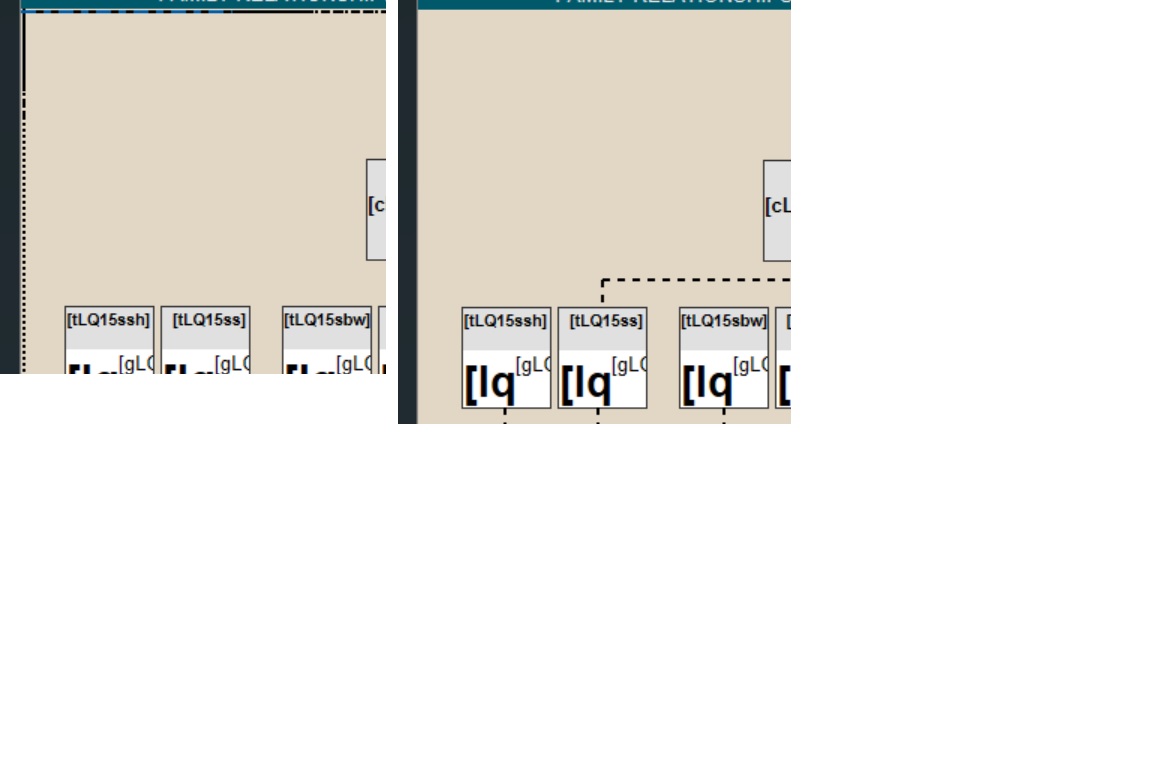
Below is a screenshot.. the left was loaded with v20.3.9 while the right was Ok with v20.1.x
One way to reproduce is to create a simple layout with diff pages, and use the line tool (from Tools) and draw a fewlines as u can, with different thickness. ... save it, and close the file. open it and go to other pages, and then to the line page... and at times you might encounter the lines being changed to be at top and left 0,0,200,212 instead of say, 140,180,200,212
Hi @luishp, I've been using the earlier version and work on a project that requires extensive lines (from the Tools box) drawn on the container. I did a family-tree like showing text and images. It was OK and perfect all the while.
I've just decided to download 20.3.9 an hour ago, and all my lines are haywired to the top, at 0,0 location.
I have 2 options - install 20.3.9 in a different folder, different from the earlier 20.1.x.
I know it sounds weird. I reinstall the 20.1.13 and i could see the lines correctly displayed in Proj1_1, but not Proj1_2 and Proj1_3. But the latter 2 Proj1_2 and Proj1_3 were OK earlier before I update to 20.3.9. Fortunately, I do frequent version control backup... I then installed 20.3.9 and could load Proj1_1 correctly, but not the latter 2 with proper lines set at specific locations. something is not right...
Below is a screenshot.. the left was loaded with v20.3.9 while the right was Ok with v20.1.x
One way to reproduce is to create a simple layout with diff pages, and use the line tool (from Tools) and draw a fewlines as u can, with different thickness. ... save it, and close the file. open it and go to other pages, and then to the line page... and at times you might encounter the lines being changed to be at top and left 0,0,200,212 instead of say, 140,180,200,212
Uploaded files:
Quote from Ronnie on March 13, 2020, 6:04 pmHi @luishp, all is not lost in my Proj1_2 and Proj1_3...
I used my 'old trick' by loading up the Proj1_1 source to NotePadd++, and then load Proj1_3 to another tab in NotePad++. I then search for the container name in Proj1_1 and copied entire section. Then I searched for same container name in Proj1_3 and pasted that section. I then loaded the file into 20.3.9, and it's working.
Am using the same approach for the container "misplaced" issue I reported earlier...
Fortunately, the source file .neoapp is in in XML format... and knowing the section start-end and then paste them to its rightful location, is valuable...
Hi @luishp, all is not lost in my Proj1_2 and Proj1_3...
I used my 'old trick' by loading up the Proj1_1 source to NotePadd++, and then load Proj1_3 to another tab in NotePad++. I then search for the container name in Proj1_1 and copied entire section. Then I searched for same container name in Proj1_3 and pasted that section. I then loaded the file into 20.3.9, and it's working.
Am using the same approach for the container "misplaced" issue I reported earlier...
Fortunately, the source file .neoapp is in in XML format... and knowing the section start-end and then paste them to its rightful location, is valuable...

Quote from luishp on March 13, 2020, 6:10 pmHi @ronnie, it's very strange.
Current version is almost identical to previous one. No changes on rendering nor editing capabilities.
Can't think on a reason to explain your problem.
Do you still need a link to the previous version?Regards.
Hi @ronnie, it's very strange.
Current version is almost identical to previous one. No changes on rendering nor editing capabilities.
Can't think on a reason to explain your problem.
Do you still need a link to the previous version?
Regards.
Quote from Ronnie on March 14, 2020, 2:50 amHi @luishp, yes I hv the v20.1.3 copy. It was a weird experience that challenged me and my thinkings. Although I don’t suggest others to use my workaround method thru text editor like NotePad++ to copy/paste sections to rightful location, it’s the best way for me occasionally. Anyway, i’m Now on v20.3.9 since the little issues I had were just minor.
A few observations (again, not sure if it’s isolated to me only)
1) had Container1 with y-scroll set to “Scroll”. option was left blank when I loaded to v20.3.9. Not sure of the reasons, but just a small matter.
2) This one happened for earlier version too... i have Container1 set as parent, with Container2 set as child. Container2 width is set to 1000px to allow y-scroll. All is fine, and I could scroll to view the layout of objects placed on it. When I set the width to 3000px, the horizontal scroll bar of the workspace is missing, and I could not scroll to the right edge of Container2 view objects set at say, 2500px location. The only workaround (again) I did was to set the page properties to custom at 3000 x 768, to allow me to view entire Container2 width.
3) I use slOpenModal and slCloseModal to display menu options, to go to page2 and Page 3. It was fine on v20.1.3 and I could access Page 2/3. but with v20.3.9, I noticed the modal window background remains when entering into the page 2/3. This means I could not touch/access anything on the page. I have to set the page2/3 ‘s as fadeIn when entering page, to resolve the issue.
Hi @luishp, yes I hv the v20.1.3 copy. It was a weird experience that challenged me and my thinkings. Although I don’t suggest others to use my workaround method thru text editor like NotePad++ to copy/paste sections to rightful location, it’s the best way for me occasionally. Anyway, i’m Now on v20.3.9 since the little issues I had were just minor.
A few observations (again, not sure if it’s isolated to me only)
1) had Container1 with y-scroll set to “Scroll”. option was left blank when I loaded to v20.3.9. Not sure of the reasons, but just a small matter.
2) This one happened for earlier version too... i have Container1 set as parent, with Container2 set as child. Container2 width is set to 1000px to allow y-scroll. All is fine, and I could scroll to view the layout of objects placed on it. When I set the width to 3000px, the horizontal scroll bar of the workspace is missing, and I could not scroll to the right edge of Container2 view objects set at say, 2500px location. The only workaround (again) I did was to set the page properties to custom at 3000 x 768, to allow me to view entire Container2 width.
3) I use slOpenModal and slCloseModal to display menu options, to go to page2 and Page 3. It was fine on v20.1.3 and I could access Page 2/3. but with v20.3.9, I noticed the modal window background remains when entering into the page 2/3. This means I could not touch/access anything on the page. I have to set the page2/3 ‘s as fadeIn when entering page, to resolve the issue.
Quote from luishp on March 14, 2020, 11:20 amHi @ronnie,
Please provide a sample app source code so I can test what's happening.
Thank you!
Hi @ronnie,
Please provide a sample app source code so I can test what's happening.
Thank you!
Quote from luishp on March 14, 2020, 8:23 pmHi @ronnie,
I have opened the sample wit no problems, then closed and opened again: no problem.
I have even saved a copy with a new name and reloaded it, but can't reproduce the problem.
Using Windows 10 updated with Internet Explorer 11.Sorry!
Hi @ronnie,
I have opened the sample wit no problems, then closed and opened again: no problem.
I have even saved a copy with a new name and reloaded it, but can't reproduce the problem.
Using Windows 10 updated with Internet Explorer 11.
Sorry!
Quote from Ronnie on March 15, 2020, 4:57 amHi @luishp, No worries as I understand it's difficult to reproduce without having the actual complete project source.
BTW, the lines reset happened again on other pages when i launched it this morning. It was OK when I saved it and went to sleep. Again, using NotePad++ to copy/paste the section does the job. As stated in my email to you, it's not a major showstopper but an inconvenience to me which is not so bad as I've my workaround to restore. Furthermore, the sample I gave was very basic... whereas my actual project has abt 5 pages, with each page having multiple sub-containers in parent containers. For an indication, the source .neoapp is about 1306kb...
Let's put this line reset issue on hold (until you/more people experienced it much later) as you have other better areas or newer features to add... 8))
BTW, since you have my tree/org sample, set the width to 3000. Notice that the workspace horizontal scrollbar don't allow accessing objects on the far right. Seems like there is a limit. My workaround is to change the project's page properties to width 3000 so that I can access/adjust the objects around the 2000-3000px area...
Hi @luishp, No worries as I understand it's difficult to reproduce without having the actual complete project source.
BTW, the lines reset happened again on other pages when i launched it this morning. It was OK when I saved it and went to sleep. Again, using NotePad++ to copy/paste the section does the job. As stated in my email to you, it's not a major showstopper but an inconvenience to me which is not so bad as I've my workaround to restore. Furthermore, the sample I gave was very basic... whereas my actual project has abt 5 pages, with each page having multiple sub-containers in parent containers. For an indication, the source .neoapp is about 1306kb...
Let's put this line reset issue on hold (until you/more people experienced it much later) as you have other better areas or newer features to add... 8))
BTW, since you have my tree/org sample, set the width to 3000. Notice that the workspace horizontal scrollbar don't allow accessing objects on the far right. Seems like there is a limit. My workaround is to change the project's page properties to width 3000 so that I can access/adjust the objects around the 2000-3000px area...
Quote from luishp on March 15, 2020, 12:09 pmBTW, since you have my tree/org sample, set the width to 3000. Notice that the workspace horizontal scrollbar don't allow accessing objects on the far right. Seems like there is a limit. My workaround is to change the project's page properties to width 3000 so that I can access/adjust the objects around the 2000-3000px area...
The working area is mostly vertical as it is more usual for a web site to grow vertically.
Increasing horizontal working area will require more memory consumption and it's difficult to know how big it should be.
I will think about this.
BTW, since you have my tree/org sample, set the width to 3000. Notice that the workspace horizontal scrollbar don't allow accessing objects on the far right. Seems like there is a limit. My workaround is to change the project's page properties to width 3000 so that I can access/adjust the objects around the 2000-3000px area...
The working area is mostly vertical as it is more usual for a web site to grow vertically.
Increasing horizontal working area will require more memory consumption and it's difficult to know how big it should be.
I will think about this.