
upload multiple files

Quote from Phil78 on January 30, 2023, 8:36 pmHello, I have found this script on the web, but when I use it with VNW I have an error and I don't understand why ? Can someone help me ?
https://www.geeksforgeeks.org/how-to-select-and-upload-multiple-files-with-html-and-php-using-http-post/
Array ( [files] => Array ( [name] => A330.jpg [type] => image/jpeg [tmp_name] => C:\Users\PhAla\AppData\Local\Temp\phpCF8.tmp [error] => 0 [size] => 7864 ) ) A330.jpg
Warning: array_filter() expects parameter 1 to be array, string given in E:\Philippe\Documents\VisualNeoWeb\Projets\Diapo-Web\file_upload.php on line 17
No files selected.line 17 = if(!empty(array_filter($_FILES['files']['name']))) {...
Hello, I have found this script on the web, but when I use it with VNW I have an error and I don't understand why ? Can someone help me ?
Array ( [files] => Array ( [name] => A330.jpg [type] => image/jpeg [tmp_name] => C:\Users\PhAla\AppData\Local\Temp\phpCF8.tmp [error] => 0 [size] => 7864 ) ) A330.jpg
Warning: array_filter() expects parameter 1 to be array, string given in E:\Philippe\Documents\VisualNeoWeb\Projets\Diapo-Web\file_upload.php on line 17
No files selected.
line 17 = if(!empty(array_filter($_FILES['files']['name']))) {...

Quote from susan on January 30, 2023, 10:44 pmThis is a total guess because I don't know much about PHP, but is your form set to have the multipart encoding?
This is a total guess because I don't know much about PHP, but is your form set to have the multipart encoding?
Uploaded files: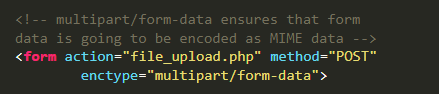
Quote from Phil78 on January 31, 2023, 4:06 pmOf course @Susan I copied the entire HTML and PHP into VNW, and I tested $_FILES which contains the data wells
Of course @Susan I copied the entire HTML and PHP into VNW, and I tested $_FILES which contains the data wells
Quote from susan on February 1, 2023, 4:07 am@phil78 I am trying to learn more about PHP, so if you have a small project file with the problem, I am happy to be a second set of eyes.
@phil78 I am trying to learn more about PHP, so if you have a small project file with the problem, I am happy to be a second set of eyes.
Quote from Phil78 on February 3, 2023, 6:06 pmHi @susan Here is the files. the target folder name you have to create is : uploads
Hi @susan Here is the files. the target folder name you have to create is : uploads
Uploaded files:Quote from susan on February 5, 2023, 1:46 pm@phil78 Thanks for the files to play with. I have discovered why the multiple upload is not working, but I don't know enough to suggest how to fix it.
The first image is the code produced by VisualNEO Web as shown with the View Page Source of the browser, and there the name of the input includes the [] to indicate an array of values which is important!
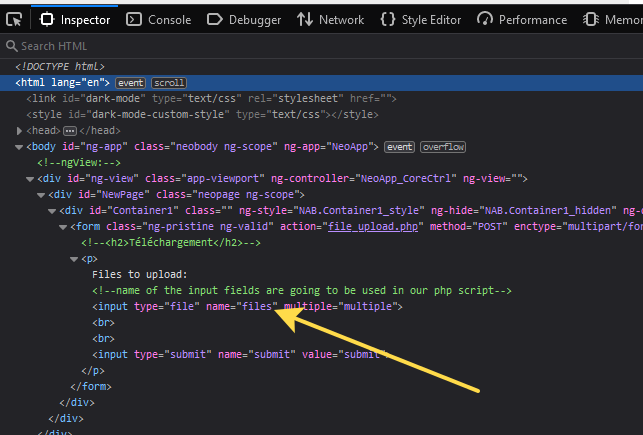
But in the second image compare the input name in the Code Inspector of the browser developer tools and the square brackets are missing, and so only the last file of the selection is sent to your PHP code because it is the array needed for multiple files.
Why does this happen? I have no idea, but maybe there is some AngularJS interaction going on that is modifying the HTML input tags?
@phil78 Thanks for the files to play with. I have discovered why the multiple upload is not working, but I don't know enough to suggest how to fix it.
The first image is the code produced by VisualNEO Web as shown with the View Page Source of the browser, and there the name of the input includes the [] to indicate an array of values which is important!
But in the second image compare the input name in the Code Inspector of the browser developer tools and the square brackets are missing, and so only the last file of the selection is sent to your PHP code because it is the array needed for multiple files.
Why does this happen? I have no idea, but maybe there is some AngularJS interaction going on that is modifying the HTML input tags?
Uploaded files: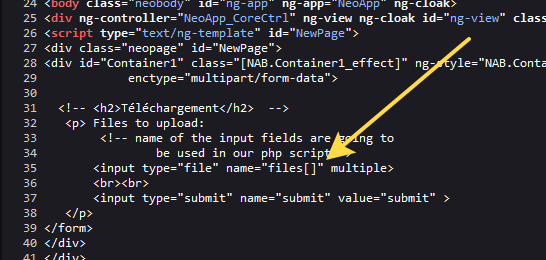

Quote from luishp on February 5, 2023, 2:27 pm@susan @phil78 if you need to use brackets in your HTML code just use this special css class (Properties Panel > Advanced) in the Container:
ng-non-bindableThis will tell AngularJS not to process brackets as if they were part of a variable.
The change should solve the problem.Please take a look here:
https://visualneo.com/forum/topic/displaying-variable-names-in-a-containerRegards.
@susan @phil78 if you need to use brackets in your HTML code just use this special css class (Properties Panel > Advanced) in the Container:
ng-non-bindable
This will tell AngularJS not to process brackets as if they were part of a variable.
The change should solve the problem.
Please take a look here:
https://visualneo.com/forum/topic/displaying-variable-names-in-a-container
Regards.
Quote from Phil78 on February 7, 2023, 6:43 pmthank you @susan and @luishp , I confirm also, you are a guru !
One other question, If I try to do the same thing with a VNW form and a VNW file input, files[] is not filled and it seems not to call file_upload.php ?
thank you @susan and @luishp , I confirm also, you are a guru !
One other question, If I try to do the same thing with a VNW form and a VNW file input, files[] is not filled and it seems not to call file_upload.php ?
Uploaded files: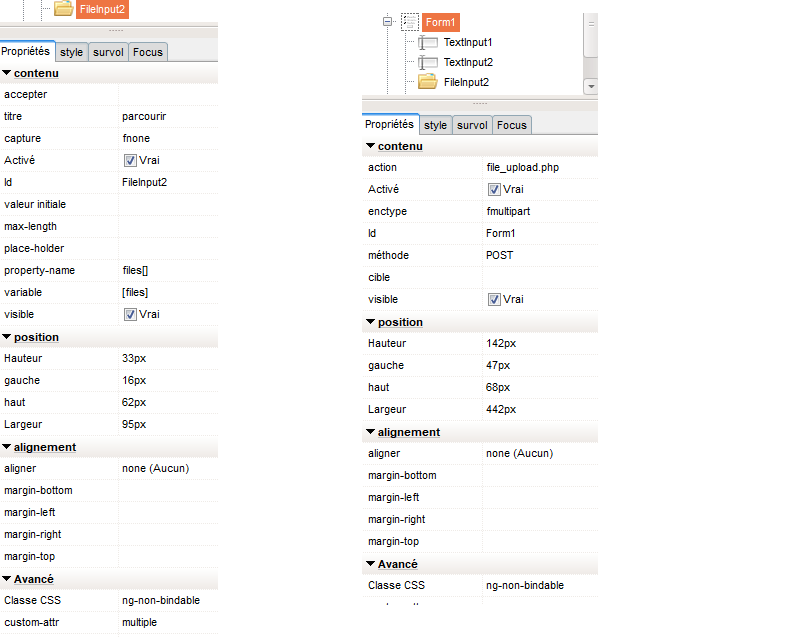
Quote from luishp on February 7, 2023, 7:52 pm@phil78 multiple file uploads are not curretly supported by the default Form Object. Sorry.
@phil78 multiple file uploads are not curretly supported by the default Form Object. Sorry.

Quote from AsleyCruz on February 16, 2023, 5:48 am@luishp @phil78 @susan
Hi guys
Take a look at the demo of the plugin that we are working on
with optional image preview (customizable preview size).
It will include php file and demo ready to compile.Tested locally using "neoPHP Server" and my server online.
More demo plugins for VisualNeoWeb: https://acplugins.com/vnweb
Suggestions are welcome.
Hi guys
Take a look at the demo of the plugin that we are working on
with optional image preview (customizable preview size).
It will include php file and demo ready to compile.
Tested locally using "neoPHP Server" and my server online.
More demo plugins for VisualNeoWeb: https://acplugins.com/vnweb
Suggestions are welcome.

Quote from luishp on February 16, 2023, 11:57 am@asleycruz wow! you are doing quite interesting plugins.
I can't wait :)
@asleycruz wow! you are doing quite interesting plugins.
I can't wait :)
Quote from AsleyCruz on February 17, 2023, 6:45 pm@luishp @phil78 @susan & coders
You can already take a look at the new images of
acImageUploader plugin at: https://acplugins.com/vnwebPlugins for VisualNEOWeb are now available to purchase via PayPal.
Any problem let me know. Best regards :)
@luishp @phil78 @susan & coders
You can already take a look at the new images of
acImageUploader plugin at: https://acplugins.com/vnweb
Plugins for VisualNEOWeb are now available to purchase via PayPal.
Any problem let me know. Best regards :)
Quote from Phil78 on February 26, 2023, 8:23 pmif you remember I use a container for my form and submit. It works well, now but after loading the report is displayed on a new page file_upload.php, and I need to go back manually.
Is it possible to get the report and stay in my app ?
if you remember I use a container for my form and submit. It works well, now but after loading the report is displayed on a new page file_upload.php, and I need to go back manually.
Is it possible to get the report and stay in my app ?
Quote from luishp on February 27, 2023, 3:48 pm@phil78 please check this link:
https://stackoverflow.com/questions/6877759/submit-a-form-in-the-backgroundRegards.
@phil78 please check this link:
https://stackoverflow.com/questions/6877759/submit-a-form-in-the-background
Regards.