
Using Apache Cordova Plugins and Cordova Build APK

Quote from shahram on February 11, 2021, 5:20 pmQuote from shahram on February 11, 2021, 4:46 pmQuote from farhad2008 on February 11, 2021, 1:56 pmHi,
Please up a Compiled Apk with Cordova
Thank You
Hi Farhad
here you go...
Minimum android Version: 5.1
Quote from shahram on February 11, 2021, 4:46 pmQuote from farhad2008 on February 11, 2021, 1:56 pmHi,
Please up a Compiled Apk with Cordova
Thank You
Hi Farhad
here you go...
Minimum android Version: 5.1

Quote from farhad2008 on February 11, 2021, 7:50 pmThank You
Thank You

Quote from CDY@44 on February 26, 2021, 3:22 pmHi @darbdenral,
I followed the procedure precisely and it works very well, thank you.
I get my apk file. However, I have a problem. In my app I use the neoWebCam plugin to take pictures. It works very well in PWA export, but when I install the apk file on my ANDROID smartphone, the "photo" function does not work. Do you have a beginning of a track I can search on? Thank you!
Best regards,
Hi @darbdenral,
I followed the procedure precisely and it works very well, thank you.
I get my apk file. However, I have a problem. In my app I use the neoWebCam plugin to take pictures. It works very well in PWA export, but when I install the apk file on my ANDROID smartphone, the "photo" function does not work. Do you have a beginning of a track I can search on? Thank you!
Best regards,

Quote from Jlash on March 6, 2021, 11:20 pmHola, me estoy volviendo loco.
He instalado :
android-studio-ide-201.7042882-windows
jdk-8u281-windows-x64
Git-2.30.1-64-bit
node-v14.15.0-x64
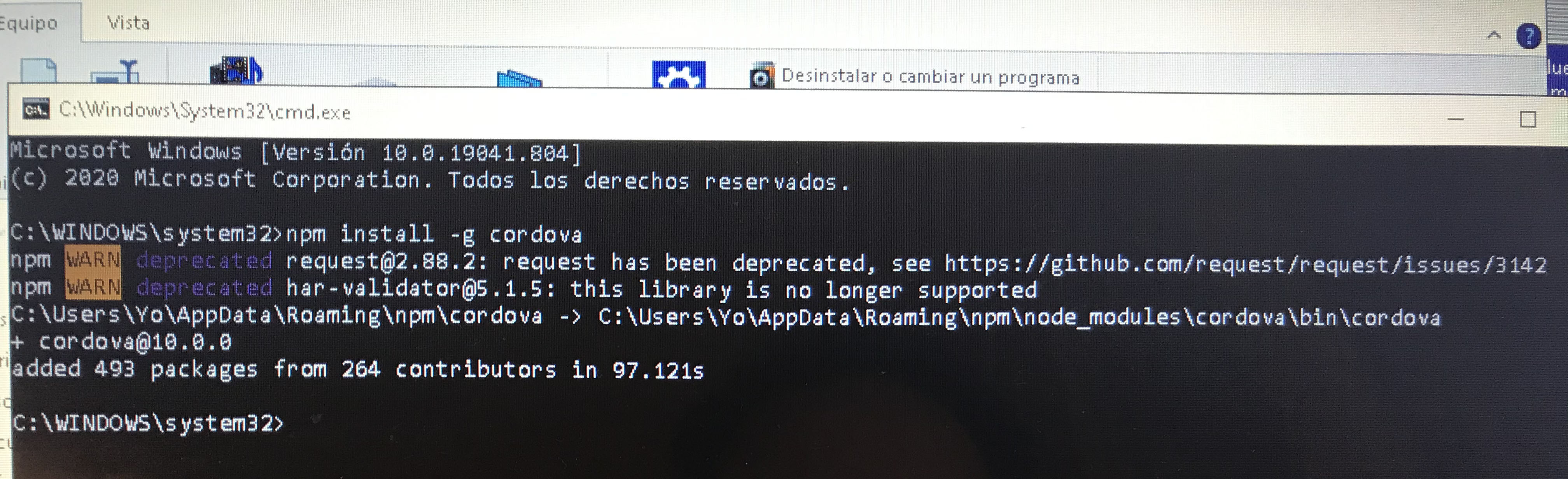
gradle-6.8.3-binCuando llego a npm install -g cordova me sale estos errores (adjunto foto)
mpm WARN deprecated request@2.88.2:mpm request has been deprecated,
npm WARN deprecated har-validator@5.1.5: this library is no longer supported
Puede ser por alguna versión de lo que he instalado que no sea la correcta? estoy muy perdido
Un saludo. Gracias!
Hola, me estoy volviendo loco.
He instalado :
android-studio-ide-201.7042882-windows
jdk-8u281-windows-x64
Git-2.30.1-64-bit
node-v14.15.0-x64
gradle-6.8.3-bin
Cuando llego a npm install -g cordova me sale estos errores (adjunto foto)
mpm WARN deprecated request@2.88.2:mpm request has been deprecated,
npm WARN deprecated har-validator@5.1.5: this library is no longer supported
Puede ser por alguna versión de lo que he instalado que no sea la correcta? estoy muy perdido
Un saludo. Gracias!
Uploaded files:
Quote from shahram on March 7, 2021, 4:10 amQuote from Jlash on March 6, 2021, 11:20 pmHola, me estoy volviendo loco.
He instalado :
android-studio-ide-201.7042882-windows
jdk-8u281-windows-x64
Git-2.30.1-64-bit
node-v14.15.0-x64
gradle-6.8.3-binCuando llego a npm install -g cordova me sale estos errores (adjunto foto)
mpm WARN deprecated request@2.88.2:mpm request has been deprecated,
npm WARN deprecated har-validator@5.1.5: this library is no longer supported
Puede ser por alguna versión de lo que he instalado que no sea la correcta? estoy muy perdido
Un saludo. Gracias!
Hola
A veces, puede recibir estos mensajes. Pero no habrá problema. Escriba la siguiente frase para asegurarse de que Cordova esté instalado.
Cordova -v
Si Cordova está instalado correctamente, se mostrará la versión instalada. por ejemplo:
Cordova@10.0.0
Y al parecer, según la imagen enviada, Cordova está instalado para ti.
Quote from Jlash on March 6, 2021, 11:20 pmHola, me estoy volviendo loco.
He instalado :
android-studio-ide-201.7042882-windows
jdk-8u281-windows-x64
Git-2.30.1-64-bit
node-v14.15.0-x64
gradle-6.8.3-binCuando llego a npm install -g cordova me sale estos errores (adjunto foto)
mpm WARN deprecated request@2.88.2:mpm request has been deprecated,
npm WARN deprecated har-validator@5.1.5: this library is no longer supported
Puede ser por alguna versión de lo que he instalado que no sea la correcta? estoy muy perdido
Un saludo. Gracias!
Hola
A veces, puede recibir estos mensajes. Pero no habrá problema. Escriba la siguiente frase para asegurarse de que Cordova esté instalado.
Cordova -v
Si Cordova está instalado correctamente, se mostrará la versión instalada. por ejemplo:
Cordova@10.0.0
Y al parecer, según la imagen enviada, Cordova está instalado para ti.
Quote from shahram on March 7, 2021, 4:25 pmQuote from Jlash on March 7, 2021, 3:08 pmcordova y gradle si me sale version, java -v me da error
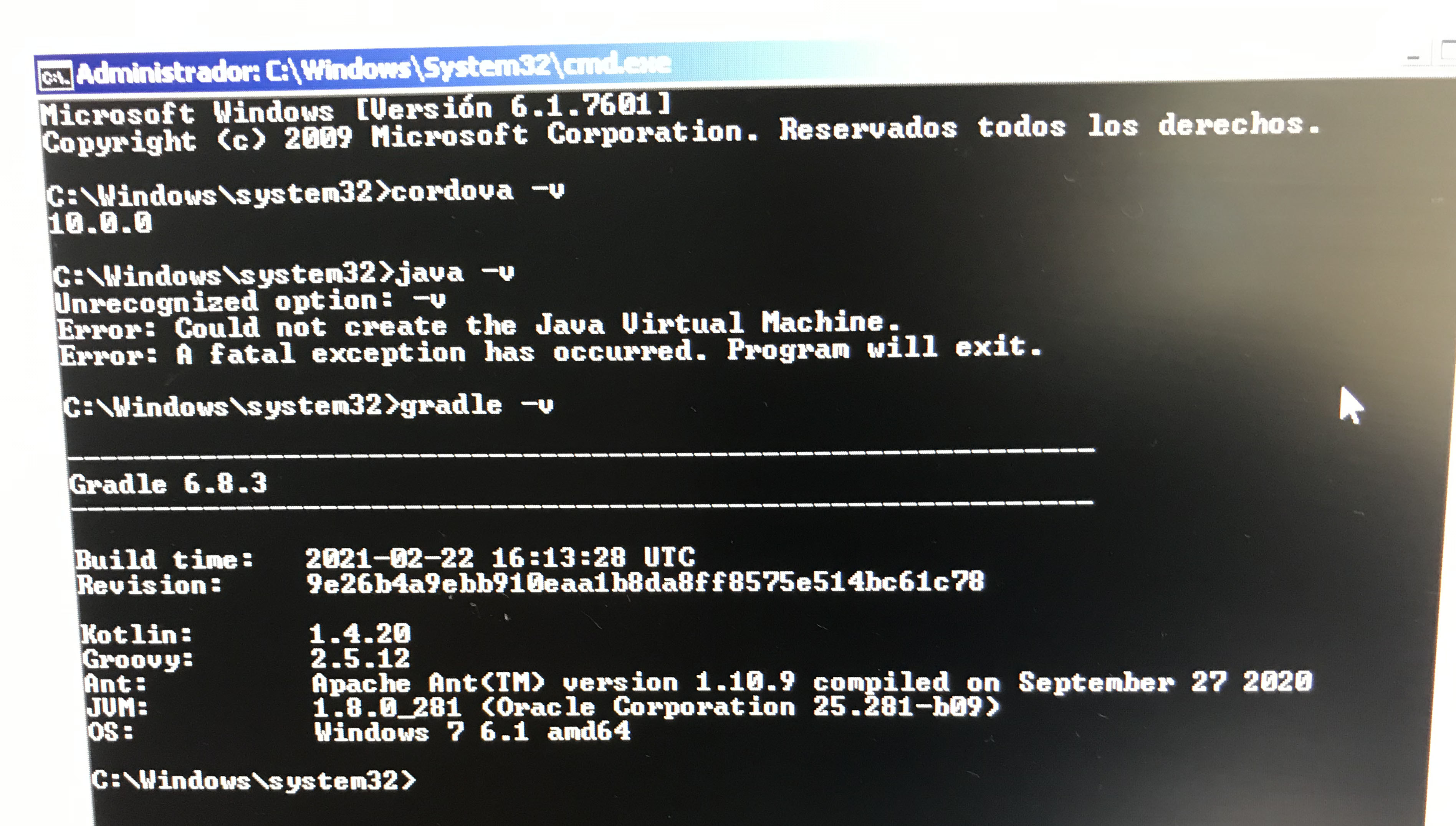
Para Java, utilice el comando Java -version
Quote from Jlash on March 7, 2021, 3:08 pmcordova y gradle si me sale version, java -v me da error
Para Java, utilice el comando Java -version
Quote from CDY@44 on March 7, 2021, 6:05 pmHi @shahram,
The process to create an apk file works perfectely. But in my app, I need to access the camera of the smartphone.
I modifiy the compile.bat to load cordova plugin camera, but it doesn't work...Have you an idea how to solve the problem ?
Best regards,
Hi @shahram,
The process to create an apk file works perfectely. But in my app, I need to access the camera of the smartphone.
I modifiy the compile.bat to load cordova plugin camera, but it doesn't work...
Have you an idea how to solve the problem ?
Best regards,
Uploaded files: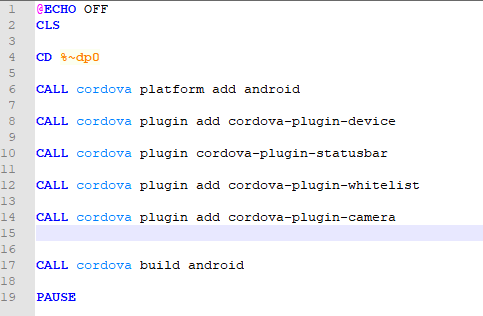
Quote from shahram on March 7, 2021, 6:30 pmQuote from CDY@44 on March 7, 2021, 6:05 pmHi @shahram,
The process to create an apk file works perfectely. But in my app, I need to access the camera of the smartphone.
I modifiy the compile.bat to load cordova plugin camera, but it doesn't work...Have you an idea how to solve the problem ?
Best regards,
Hi CDY@44
Do you add require codes in your project to get access to camera? As you may know, you need to prepare your project to access the camera and take picture or other camera related operations.
So, you have to add require code blocks between the BeginJs and EndJs using cordova Camera documentation.take a look at below link, please.
In fact, adding a camera plugin alone can not be used.
Quote from CDY@44 on March 7, 2021, 6:05 pmHi @shahram,
The process to create an apk file works perfectely. But in my app, I need to access the camera of the smartphone.
I modifiy the compile.bat to load cordova plugin camera, but it doesn't work...Have you an idea how to solve the problem ?
Best regards,
Hi CDY@44
Do you add require codes in your project to get access to camera? As you may know, you need to prepare your project to access the camera and take picture or other camera related operations.
So, you have to add require code blocks between the BeginJs and EndJs using cordova Camera documentation.
take a look at below link, please.
In fact, adding a camera plugin alone can not be used.
Quote from CDY@44 on March 7, 2021, 7:03 pmHi @shahram,
Thank you. In fact, I am using the neoWebCam plugin. Everything is ok when I compile as a PWA, installed on my smartphone. The app takes pictures. It's only when I create an apk file that problem start...
With all your precedent advices, I have made a real step ahead in comprehension of apk generating process ! Things are clearer in my mind about this. Thank you !
Remains the questions about the correct uses of plugins :)
Best regards,
Hi @shahram,
Thank you. In fact, I am using the neoWebCam plugin. Everything is ok when I compile as a PWA, installed on my smartphone. The app takes pictures. It's only when I create an apk file that problem start...
With all your precedent advices, I have made a real step ahead in comprehension of apk generating process ! Things are clearer in my mind about this. Thank you !
Remains the questions about the correct uses of plugins :)
Best regards,
Quote from shahram on March 7, 2021, 7:47 pmQuote from CDY@44 on March 7, 2021, 7:03 pmHi @shahram,
Thank you. In fact, I am using the neoWebCam plugin. Everything is ok when I compile as a PWA, installed on my smartphone. The app takes pictures. It's only when I create an apk file that problem start...
With all your precedent advices, I have made a real step ahead in comprehension of apk generating process ! Things are clearer in my mind about this. Thank you !
Remains the questions about the correct uses of plugins :)
Best regards,
Okay, I got it :)
Note that PWA applications are different from APKs. Progressive applications do not have access to the hardware and many sensors of smart devices. I do not know much about PWA applications, but obviously these programs are written using only html, css and javascript and are more complete using server-side languages. However, some PWA programs without an Internet connection may not work. (If I'm wrong, ignore my boldness because of insufficient information.) Cordova plugins provide the necessary access to smart device sensors and their hardware.
So you should not expect plugins written for Cordova to work in PWA applications.
I hope I understood what you meant and guided you correctly.
Quote from CDY@44 on March 7, 2021, 7:03 pmHi @shahram,
Thank you. In fact, I am using the neoWebCam plugin. Everything is ok when I compile as a PWA, installed on my smartphone. The app takes pictures. It's only when I create an apk file that problem start...
With all your precedent advices, I have made a real step ahead in comprehension of apk generating process ! Things are clearer in my mind about this. Thank you !
Remains the questions about the correct uses of plugins :)
Best regards,
Okay, I got it :)
Note that PWA applications are different from APKs. Progressive applications do not have access to the hardware and many sensors of smart devices. I do not know much about PWA applications, but obviously these programs are written using only html, css and javascript and are more complete using server-side languages. However, some PWA programs without an Internet connection may not work. (If I'm wrong, ignore my boldness because of insufficient information.) Cordova plugins provide the necessary access to smart device sensors and their hardware.
So you should not expect plugins written for Cordova to work in PWA applications.
I hope I understood what you meant and guided you correctly.
Quote from CDY@44 on March 7, 2021, 9:04 pmHi @shahram
In fact, I'm quite interested in creating apk files, with the possibility to access the phone's sensors (camera, accelerometer, GPS, etc... ).
I thought that using plugins such as neoWebCam would allow me to easily access the camera, but I realized that I was wrong. If people on the forum have such knowledge that allow them to make accessible tutorials (by accessible, I mean easily understandable for beginners like me. I think other people would be interested).
I use PWA export for certain types of applications (I really find PWAs great!) and I'd like to be able to easily create apk apps to send them to the Play Store.
Have a nice end of day to you!
Best regards,
Hi @shahram
In fact, I'm quite interested in creating apk files, with the possibility to access the phone's sensors (camera, accelerometer, GPS, etc... ).
I thought that using plugins such as neoWebCam would allow me to easily access the camera, but I realized that I was wrong. If people on the forum have such knowledge that allow them to make accessible tutorials (by accessible, I mean easily understandable for beginners like me. I think other people would be interested).
I use PWA export for certain types of applications (I really find PWAs great!) and I'd like to be able to easily create apk apps to send them to the Play Store.
Have a nice end of day to you!
Best regards,

Quote from luishp on March 7, 2021, 9:09 pm@shahram @cdy44-2 cordova was developed to allow JavaScript access to device functionality otherwise imposible when cordova was launched. PhoneGap was the "easy way" to use cordova.
Web standars are evolving very quickly and PhoneGap (in fact Adobe) decided to close its services due to the improvements in PWA's to access device capabilities and the progressive lack of interest on hybrid apps.
Right now PWA's seems to be the future of development, much more than cordova or even some native alternatives. Just open this website in your smartphone to check what's possible today using just client side JavaScript technologies:
The differences between a PWA and a native or hybrid app are becoming more and more narrow each day.
@shahram @cdy44-2 cordova was developed to allow JavaScript access to device functionality otherwise imposible when cordova was launched. PhoneGap was the "easy way" to use cordova.
Web standars are evolving very quickly and PhoneGap (in fact Adobe) decided to close its services due to the improvements in PWA's to access device capabilities and the progressive lack of interest on hybrid apps.
Right now PWA's seems to be the future of development, much more than cordova or even some native alternatives. Just open this website in your smartphone to check what's possible today using just client side JavaScript technologies:
The differences between a PWA and a native or hybrid app are becoming more and more narrow each day.
Quote from shahram on March 7, 2021, 10:24 pmQuote from luishp on March 7, 2021, 9:09 pm@shahram @cdy44-2 cordova was developed to allow JavaScript access to device functionality otherwise imposible when cordova was launched. PhoneGap was the "easy way" to use cordova.
Web standars are evolving very quickly and PhoneGap (in fact Adobe) decided to close its services due to the improvements in PWA's to access device capabilities and the progressive lack of interest on hybrid apps.
Right now PWA's seems to be the future of development, much more than cordova or even some native alternatives. Just open this website in your smartphone to check what's possible today using just client side JavaScript technologies:
The differences between a PWA and a native or hybrid app are becoming more and more narrow each day.
Dear @luishp
Thank you very much for the information you provided. At your suggestion, I took a look at the website. It seems that PWA's will have a bright future. However, they also have disadvantages that in some cases may not be a good alternative to native applications. It is unlikely that current limits will not be lifted in the future though.
But now the choice between PAW or Cordova development methods, etc. depends on the ultimate goal of the content produced and its application.
Quote from luishp on March 7, 2021, 9:09 pm@shahram @cdy44-2 cordova was developed to allow JavaScript access to device functionality otherwise imposible when cordova was launched. PhoneGap was the "easy way" to use cordova.
Web standars are evolving very quickly and PhoneGap (in fact Adobe) decided to close its services due to the improvements in PWA's to access device capabilities and the progressive lack of interest on hybrid apps.
Right now PWA's seems to be the future of development, much more than cordova or even some native alternatives. Just open this website in your smartphone to check what's possible today using just client side JavaScript technologies:
The differences between a PWA and a native or hybrid app are becoming more and more narrow each day.
Dear @luishp
Thank you very much for the information you provided. At your suggestion, I took a look at the website. It seems that PWA's will have a bright future. However, they also have disadvantages that in some cases may not be a good alternative to native applications. It is unlikely that current limits will not be lifted in the future though.
But now the choice between PAW or Cordova development methods, etc. depends on the ultimate goal of the content produced and its application.
Quote from shahram on March 7, 2021, 10:30 pmQuote from CDY@44 on March 7, 2021, 9:04 pmHi @shahram
In fact, I'm quite interested in creating apk files, with the possibility to access the phone's sensors (camera, accelerometer, GPS, etc... ).
I thought that using plugins such as neoWebCam would allow me to easily access the camera, but I realized that I was wrong. If people on the forum have such knowledge that allow them to make accessible tutorials (by accessible, I mean easily understandable for beginners like me. I think other people would be interested).
I use PWA export for certain types of applications (I really find PWAs great!) and I'd like to be able to easily create apk apps to send them to the Play Store.
Have a nice end of day to you!
Best regards,
I'm interested in reading more about PWA's. But for now, if you have any questions about building Android apps with Cordova, ask me. If I know, I will definitely guide :)
Quote from CDY@44 on March 7, 2021, 9:04 pmHi @shahram
In fact, I'm quite interested in creating apk files, with the possibility to access the phone's sensors (camera, accelerometer, GPS, etc... ).
I thought that using plugins such as neoWebCam would allow me to easily access the camera, but I realized that I was wrong. If people on the forum have such knowledge that allow them to make accessible tutorials (by accessible, I mean easily understandable for beginners like me. I think other people would be interested).
I use PWA export for certain types of applications (I really find PWAs great!) and I'd like to be able to easily create apk apps to send them to the Play Store.
Have a nice end of day to you!
Best regards,
I'm interested in reading more about PWA's. But for now, if you have any questions about building Android apps with Cordova, ask me. If I know, I will definitely guide :)
Quote from CDY@44 on March 9, 2021, 12:15 amThank you @shahram,
I am really curious to know how to access smartphone sensors (camera for example) with VisualNeo Web and Cordova.
I have understood the necessity of using JavScript ( I guess...).
If you can make small examples on how to use camera, how to use GPS, etc... that I can use when creating apk.
I would like to know how to interact between NV Web and JavScript (variables, subroutines,...)
Best regards,
Thank you @shahram,
I am really curious to know how to access smartphone sensors (camera for example) with VisualNeo Web and Cordova.
I have understood the necessity of using JavScript ( I guess...).
If you can make small examples on how to use camera, how to use GPS, etc... that I can use when creating apk.
I would like to know how to interact between NV Web and JavScript (variables, subroutines,...)
Best regards,
Quote from shahram on March 9, 2021, 5:49 pmQuote from CDY@44 on March 9, 2021, 12:15 amThank you @shahram,
I am really curious to know how to access smartphone sensors (camera for example) with VisualNeo Web and Cordova.
I have understood the necessity of using JavScript ( I guess...).
If you can make small examples on how to use camera, how to use GPS, etc... that I can use when creating apk.
I would like to know how to interact between NV Web and JavScript (variables, subroutines,...)
Best regards,Hi @cdy44-2
This can be easily done in Visual Neo.
For example, we want to turn the mobile Flashlight on and off using the Cordova plugin and Visual Neo commands.
For this:
1. Add a button to the page.
2. Double-click the button and place the following commands in the click event.(Actions>Advanced)
BeginJS
EndJS
3. Based on the Cordova-plugin-flashlight documentation, you can use the following codes to turn the flashlight on and off. So, Just add this code block between BeginJS and EndJS. For Example:BeginJS window.plugins.flashlight.toggle( function() {}, // optional success callback function() {}, // optional error callback {intensity: 0.3} // optional as well, used on iOS when switching on ); EndJS
4. Compile your project to mobile platform.5. As I mentioned in this post, (number 5) add below line in *.bat file:CALL cordova plugin cordova-plugin-flashlight6. Now Compile your project to apk file. That's it :)
Quote from CDY@44 on March 9, 2021, 12:15 amThank you @shahram,
I am really curious to know how to access smartphone sensors (camera for example) with VisualNeo Web and Cordova.
I have understood the necessity of using JavScript ( I guess...).
If you can make small examples on how to use camera, how to use GPS, etc... that I can use when creating apk.
I would like to know how to interact between NV Web and JavScript (variables, subroutines,...)
Best regards,
Hi @cdy44-2
This can be easily done in Visual Neo.
For example, we want to turn the mobile Flashlight on and off using the Cordova plugin and Visual Neo commands.
For this:
1. Add a button to the page.
2. Double-click the button and place the following commands in the click event.(Actions>Advanced)
BeginJS
EndJS
3. Based on the Cordova-plugin-flashlight documentation, you can use the following codes to turn the flashlight on and off. So, Just add this code block between BeginJS and EndJS. For Example:
BeginJS
window.plugins.flashlight.toggle(
  function() {}, // optional success callback
  function() {}, // optional error callback
  {intensity: 0.3} // optional as well, used on iOS when switching on
);
EndJS