Undefined variables?

Quote from AsleyCruz on March 1, 2023, 6:32 pmHi @luishp
This is a curious case... it seems like variables are 'undefined' before typing on text input and text area. It suppose that the variables must be empty on starting the app. Demo file is attached if you want to give it a try and let me know. I haven't check out all the others controls. Tested on latest VisualNEOWeb version.
Are they missing the attribute? ng-init="$root.TheInputVar='' "
Please, take a look at the gif:
Hi @luishp
This is a curious case... it seems like variables are 'undefined' before typing on text input and text area. It suppose that the variables must be empty on starting the app. Demo file is attached if you want to give it a try and let me know. I haven't check out all the others controls. Tested on latest VisualNEOWeb version.
Are they missing the attribute? ng-init="$root.TheInputVar='' "
Please, take a look at the gif:


Quote from fkapnist on March 1, 2023, 8:31 pm@asleycruz
I think all your variables are empty or blank until the user inputs something. You can use the "SetVar" action to store a value for each variable name at: Project > Events > start-up... or at: Page > Code > page-enter. I am not sure just what your example is supposed to do however.
.
I think all your variables are empty or blank until the user inputs something. You can use the "SetVar" action to store a value for each variable name at: Project > Events > start-up... or at: Page > Code > page-enter. I am not sure just what your example is supposed to do however.
.
Quote from AsleyCruz on March 1, 2023, 8:47 pmHi @fkapnist
I already know that I can use SetVar to initialize X variable, But it is not necessary to use SetVar if the input text has a variable AND the initial-value property is empty.
All I know (in my opinion) that the variable must be initialized on starting the app WITHOUT using SetVar.
I already tested and think the solution is initializing the variables with a missing attribute ng-init="$root.var=''" but must be fixed in a VisualNeoWeb update.
Hi @fkapnist
I already know that I can use SetVar to initialize X variable, But it is not necessary to use SetVar if the input text has a variable AND the initial-value property is empty.
All I know (in my opinion) that the variable must be initialized on starting the app WITHOUT using SetVar.
I already tested and think the solution is initializing the variables with a missing attribute ng-init="$root.var=''" but must be fixed in a VisualNeoWeb update.
Quote from fkapnist on March 1, 2023, 9:23 pmQuote from AsleyCruz on March 1, 2023, 8:47 pmHi @fkapnist
I already know that I can use SetVar to initialize X variable, But it is not necessary to use SetVar if the input text has a variable AND the initial-value property is empty.
All I know (in my opinion) that the variable must be initialized on starting the app WITHOUT using SetVar.
I already tested and think the solution is initializing the variables with a missing attribute ng-init="$root.var=''" but must be fixed in a VisualNeoWeb update.
Your example reports NOT EMPTY even though the field is empty. I wonder why?
But if I enter some text and then delete it, your example reports empty. Is there a hidden value?
.
Quote from AsleyCruz on March 1, 2023, 8:47 pmHi @fkapnist
I already know that I can use SetVar to initialize X variable, But it is not necessary to use SetVar if the input text has a variable AND the initial-value property is empty.
All I know (in my opinion) that the variable must be initialized on starting the app WITHOUT using SetVar.
I already tested and think the solution is initializing the variables with a missing attribute ng-init="$root.var=''" but must be fixed in a VisualNeoWeb update.
Your example reports NOT EMPTY even though the field is empty. I wonder why?
But if I enter some text and then delete it, your example reports empty. Is there a hidden value?
.
Quote from AsleyCruz on March 1, 2023, 9:42 pm@fkapnist
That's the point, the variable hasn't been initialized yet on start the app.
I know these two missing ways to initialize them without using SetVarIn main.js:
$App.myVar = "";In html Angular attribute:
ng-init="$root.myVar = ''"This job is suppose to be done automatically by VisualNeoWeb, but it could be fixed in a new update :)
That's the point, the variable hasn't been initialized yet on start the app.
I know these two missing ways to initialize them without using SetVar
In main.js:
$App.myVar = "";In html Angular attribute:
ng-init="$root.myVar = ''"
This job is suppose to be done automatically by VisualNeoWeb, but it could be fixed in a new update :)

Quote from susan on March 2, 2023, 6:54 amI have come across the Undefined variables, and just assumed that was the way it was supposed to work. Where this is an issue, I use SetVar to make sure those variables are set to a default values in the page-enter event.
I have come across the Undefined variables, and just assumed that was the way it was supposed to work. Where this is an issue, I use SetVar to make sure those variables are set to a default values in the page-enter event.
Quote from AsleyCruz on March 2, 2023, 7:04 amHi @susan
Yes, that is what @fkapnist said and it works.
BUT, what if you have a lot of text input? One SetVar for each text input?No, don't worry, I think this must be fixed in a coming update, because the variable $App.myVar="";
does not exist in main.js when 'initial-value' is empty, otherwise it exists.Regards.
Hi @susan
Yes, that is what @fkapnist said and it works.
BUT, what if you have a lot of text input? One SetVar for each text input?
No, don't worry, I think this must be fixed in a coming update, because the variable $App.myVar="";
does not exist in main.js when 'initial-value' is empty, otherwise it exists.
Regards.

Quote from luishp on March 2, 2023, 10:16 amThank you @asleycruz! I have already fixed the custom attribute issue. I think this will be easy to fix too.
Thanks again.Luis.
Thank you @asleycruz! I have already fixed the custom attribute issue. I think this will be easy to fix too.
Thanks again.
Luis.
Quote from AsleyCruz on March 3, 2023, 7:42 amHi @luishp
Please, check out these two little bugs on plugin maker.
1- If I use ENUMLIST and :: (I use this as separator) the label text is split on the action form in VisualNEOWeb (See attached image)
2- Add "List items" to ENUMLIST, then press OK, then open the parameter again and press CANCEL, all items disappear after cancelling the window.
-
ADDITION: Can you please add an option to "parameter type" in plugin maker, called "FUNCTIONNAME"? (I need the function name, BUT with the dropdown list of all functions) is similar to VARNAME. It would be so useful for some of my plugins.
Regards
Hi @luishp
Please, check out these two little bugs on plugin maker.
1- If I use ENUMLIST and :: (I use this as separator) the label text is split on the action form in VisualNEOWeb (See attached image)
2- Add "List items" to ENUMLIST, then press OK, then open the parameter again and press CANCEL, all items disappear after cancelling the window.
-
ADDITION: Can you please add an option to "parameter type" in plugin maker, called "FUNCTIONNAME"? (I need the function name, BUT with the dropdown list of all functions) is similar to VARNAME. It would be so useful for some of my plugins.
Regards
Uploaded files: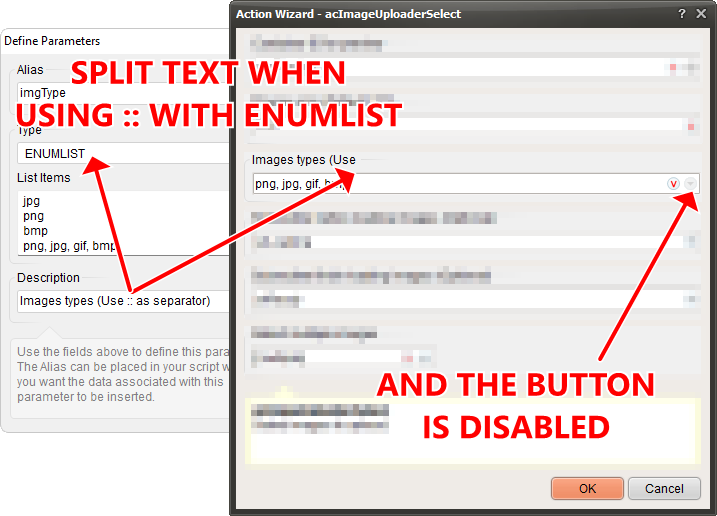
Quote from luishp on March 3, 2023, 8:44 am@asleycruz "::" is used internally as a separator too, please choose a different one.
@asleycruz "::" is used internally as a separator too, please choose a different one.
Quote from AsleyCruz on March 4, 2023, 7:27 pmThanks @luishp
I will use a new separator, BUT you must always fix this in plugin maker:
2- Add "List items" to ENUMLIST, then press OK, then open the parameter again and press CANCEL, all items disappear after cancelling the window.
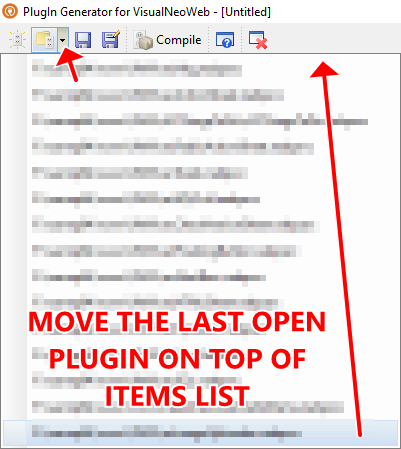
3- and the last open plugin must be the first item in the history drop down of plugin maker, not the last one. (Attached image)
Regards.
Thanks @luishp
I will use a new separator, BUT you must always fix this in plugin maker:
2- Add "List items" to ENUMLIST, then press OK, then open the parameter again and press CANCEL, all items disappear after cancelling the window.
3- and the last open plugin must be the first item in the history drop down of plugin maker, not the last one. (Attached image)
Regards.
Uploaded files: