
VisualNEO Web. Version 21.11.27 released

Quote from luishp on November 22, 2021, 1:17 pmMINOR VERSION UPDATE
Free update for previous version VisualNEO Web users.
Software: VisualNEO Web
Version:21.11.27
This is a minor version update with important enhancements.
Core updates:
- New core commands
- ConsoleTable (Print an array or object variable to the Console as a table)
- Base64ToLocalFile (Save Base64 enconded content into a local file)
- SvgToBase64Jpg (Encode a SVG inline image located into a Container into Base64 JPG format)
- SvgToBase64Png (Encode a SVG inline image located into a Container into Base64 PNG format)
- ImgToBase64Jpg (Encode a Image object into Base64 JPG format. Requieres secure context)
- ImgToBase64Png (Encode a Image object into Base64 PNG format. Requieres secure context)
Download from:
https://visualneo.com/downloadWith these new commands we will have much more possibilities when working with images as we can use Base64 encoded images to render them using plugins as neoPdf or FabricJs, or to be stored easily in a remote database.
Note that we can design a SVG file using an external editor as Affinity Designer and include text with variables like [myvar] within it. Then we can embed the resulting SVG code inside a Container and see any variable value directly into the SVG image text. Now it's even possible to convert the SVG to Base64 and then render it to a PDF, so you can design very rich reports.Let me know if you encounter any issue or have any questions.
EDITED ON 2021/11/25
A minor fix regarding ArrayShuffle command has been publishedThank you!
MINOR VERSION UPDATE
Free update for previous version VisualNEO Web users.
Software: VisualNEO Web
Version: 21.11.27
This is a minor version update with important enhancements.
Core updates:
- New core commands
- ConsoleTable (Print an array or object variable to the Console as a table)
- Base64ToLocalFile (Save Base64 enconded content into a local file)
- SvgToBase64Jpg (Encode a SVG inline image located into a Container into Base64 JPG format)
- SvgToBase64Png (Encode a SVG inline image located into a Container into Base64 PNG format)
- ImgToBase64Jpg (Encode a Image object into Base64 JPG format. Requieres secure context)
- ImgToBase64Png (Encode a Image object into Base64 PNG format. Requieres secure context)
Download from:
https://visualneo.com/download
With these new commands we will have much more possibilities when working with images as we can use Base64 encoded images to render them using plugins as neoPdf or FabricJs, or to be stored easily in a remote database.
Note that we can design a SVG file using an external editor as Affinity Designer and include text with variables like [myvar] within it. Then we can embed the resulting SVG code inside a Container and see any variable value directly into the SVG image text. Now it's even possible to convert the SVG to Base64 and then render it to a PDF, so you can design very rich reports.
Let me know if you encounter any issue or have any questions.
EDITED ON 2021/11/25
A minor fix regarding ArrayShuffle command has been published
Thank you!


Quote from roccocogliano on November 22, 2021, 1:35 pmBetter and better =)
Great
A thousand thanks Luis
Better and better =)
Great
A thousand thanks Luis

Quote from luishp on November 25, 2021, 9:58 amI have published a minor fix regarding ArrayShuffle command.
When the target array was different than the original one, the command failed.This is a working sample once fixed:
CreateArray [numbers] "zero,one,two,three"
CreateEmptyArray [numbers2]
ArrayShuffle [numbers] [numbers2]
ConsoleLog [numbers]
ConsoleLog [numbers2]
Thank you!
I have published a minor fix regarding ArrayShuffle command.
When the target array was different than the original one, the command failed.
This is a working sample once fixed:
CreateArray [numbers] "zero,one,two,three"
CreateEmptyArray [numbers2]
ArrayShuffle [numbers] [numbers2]
ConsoleLog [numbers]
ConsoleLog [numbers2]
Thank you!

Quote from Phil78 on November 25, 2021, 1:01 pmThank you so much Luis, a very quick repair for ArrayShuffle ! I like also ConsoleTable.
Regards
Thank you so much Luis, a very quick repair for ArrayShuffle ! I like also ConsoleTable.
Regards
Quote from luishp on November 27, 2021, 1:52 pmI have published a minor fix regarding ArrayCopy command. It failed when trying to copy an Array from the first item (position 0), Thank you @phil78 for reporting the problem!
I have published a minor fix regarding ArrayCopy command. It failed when trying to copy an Array from the first item (position 0), Thank you @phil78 for reporting the problem!
Quote from Phil78 on November 27, 2021, 5:06 pmThanks again @luishp you are really too fast !
It works fine for me now !
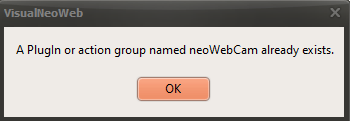
I would like to know why I have always this message when running neoweb after installation ?
Regards
Thanks again @luishp you are really too fast !
It works fine for me now !
I would like to know why I have always this message when running neoweb after installation ?
Regards
Uploaded files:
Quote from luishp on November 27, 2021, 5:12 pmI would like to know why I have always this message when running neoweb after installation ?
@phil78 that's due to an old version error during install. Just unistall and reinstall instead of simply installing to fix it.
Regards.
I would like to know why I have always this message when running neoweb after installation ?
@phil78 that's due to an old version error during install. Just unistall and reinstall instead of simply installing to fix it.
Regards.

Quote from Neal Stone on November 30, 2021, 4:16 amI am excited to see such new developments in my absence. I had major open heart surgery to have a valve replaced and was groggily monitoring fav development platform as often as I could.
I see a new plugin coming and can't wait to play with it as it might just perfectly fit into a current project I am working on.
Nothing worse than being bed ridden, sore, unable to sleep while all my ideas kept flowing through my head. I think not being able to work on my projects was by far the worst part.
But now, with some time off to recover, I am ready to get back into my projects. Missed you all.
And just for the record, my mom was one of the first 400 people to ever have open heart surgery in the 60s and was a pioneer of what we have today. She is 83 and still kicking!!!! Once you ave a working and growing legacy, you just gotta keep moving forward and that my friends is VisualNeo and this company.
Thank you so much for keeping this platform alive!
I am excited to see such new developments in my absence. I had major open heart surgery to have a valve replaced and was groggily monitoring fav development platform as often as I could.
I see a new plugin coming and can't wait to play with it as it might just perfectly fit into a current project I am working on.
Nothing worse than being bed ridden, sore, unable to sleep while all my ideas kept flowing through my head. I think not being able to work on my projects was by far the worst part.
But now, with some time off to recover, I am ready to get back into my projects. Missed you all.
And just for the record, my mom was one of the first 400 people to ever have open heart surgery in the 60s and was a pioneer of what we have today. She is 83 and still kicking!!!! Once you ave a working and growing legacy, you just gotta keep moving forward and that my friends is VisualNeo and this company.
Thank you so much for keeping this platform alive!
Quote from luishp on November 30, 2021, 7:51 am@neal-stone I wish you a very quick recovery and all the best!
I can't repeat enough how great this community is :)
@neal-stone I wish you a very quick recovery and all the best!
I can't repeat enough how great this community is :)
Quote from CDY@44 on November 30, 2021, 9:07 amHi @neal-stone ,
I wish you all the best !
Hi @neal-stone ,
I wish you all the best !
Quote from Neal Stone on November 30, 2021, 7:11 pmDoing well and yes, this is an amazing community.
Doing well and yes, this is an amazing community.