Quote from
luishp on April 6, 2021, 8:12 pm
MINOR VERSION UPDATE
Free update for previous version VisualNEO Web users.
Software: VisualNEO Web
Version:
This is a minor version update with some improvements:
New App property:
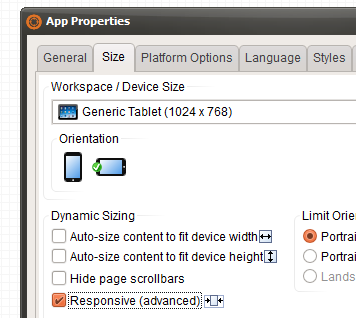
This new property, makes app size responsive with a max-width equal to the selected App width size.
No need to add additional CSS, just select "Responsive" and use BootStrap classes like "row" and "col-*-*" to easily design your responsive layout. I will publish a video tutorial as soon as possible. Meanwhile please take a look at this BootStrap grid tutorial.
Change in default CSS:
- Fixed some minor errors on new responsive design functionality.
- New class: "flow" makes objects to flow with design using static instead of absolute positioning.
Responsive sample app source code updated:
https://visualneo.com/tutorials/responsive
Download from:
https://visualneo.com/download
MINOR VERSION UPDATE
Free update for previous version VisualNEO Web users.
Software: VisualNEO Web
Version:
This is a minor version update with some improvements:
New App property:
This new property, makes app size responsive with a max-width equal to the selected App width size.
No need to add additional CSS, just select "Responsive" and use BootStrap classes like "row" and "col-*-*" to easily design your responsive layout. I will publish a video tutorial as soon as possible. Meanwhile please take a look at this BootStrap grid tutorial.
Change in default CSS:
- Fixed some minor errors on new responsive design functionality.
- New class: "flow" makes objects to flow with design using static instead of absolute positioning.
Responsive sample app source code updated:
https://visualneo.com/tutorials/responsive
Download from:
https://visualneo.com/download
Vadim, farhad2008 and 5 other users have reacted to this post.
Vadimfarhad2008CDY@44asmatnoyzenindraynroccocogliano


