
VisualNEO Web. Version 22.8.6 released (minor version)

Quote from luishp on August 5, 2022, 7:21 pmMINOR VERSION UPDATE
Free update for previous version VisualNEO Web users.
Software: VisualNEO Web
Version:22.8.6
This is a minor version update with some important bug fix and and two new plugins.
Core bug fixes:
- File Input now opens folders correctly in mobile devices instead of the camera.
Core new functionalities:
- Now VisualNEO Web supports modern JavaScript modules (as included files or within plugins)
<script type="module"...>
To be sure VisualNEO Web compiles the module files correctly include ".module." into the JavaScript file name (ie: myscript.module.min.js)New plugins:
- neoColorPicker (Color Picker with transparency scrollbar. More info here)
- neoSort (Plugin for reorderable drag-and-drop elements. More info here)
- neoBackground (Plugin to add image, single color, gradients and animated gradients backgrounds. More info here)
Updated plugins:
- neo3dModel
- Original JavaScript library updated to the lastest version.
- Fixed neo3dModelGetCameraOrbit command.
- FabricJS
- Original JavaScript library updated to the lastest version (5.0.0).
- New: Double click an image to crop it!!
- New commands:
- fabNewTextEx (Adds a new text with background color and padding)
- fabNewInteractiveTextEx (Adds a new interactive (user editable) text with background color and padding)
- fabLoadLocalMainImage (Load an local image file and resize the canvas to its size
- fabLoadMainImage (Load an image from URL and resize the canvas to its size.)
- fabSetControls (Set default controls colors and size)
- fabGetCanvasWidth
- fabGetCanvasHeight
- fabNewPolyline (double click a Polyline to edit its nodes!! Drag and drop nodes, right click to delete node, double click to add node)
CreateEmptyArray [myArray]
ArrayAddItem [myArray] {x:30,y:30}
ArrayAddItem [myArray] {x:150,y:30}
ArrayAddItem [myArray] {x:150,y:150}
ArrayAddItem [myArray] {x:30,y:150}
ArrayAddItem [myArray] {x:30,y:30}
fabNewPolyline "ContainerFab" "" [myArray] "[theColor]" 0 "[thePathStrokeColor]"
Download from:
https://visualneo.com/downloadLet me know if you have any issues.
Thank you!
MINOR VERSION UPDATE
Free update for previous version VisualNEO Web users.
Software: VisualNEO Web
Version: 22.8.6
This is a minor version update with some important bug fix and and two new plugins.
Core bug fixes:
- File Input now opens folders correctly in mobile devices instead of the camera.
Core new functionalities:
- Now VisualNEO Web supports modern JavaScript modules (as included files or within plugins)
<script type="module"...>
To be sure VisualNEO Web compiles the module files correctly include ".module." into the JavaScript file name (ie: myscript.module.min.js)
New plugins:
- neoColorPicker (Color Picker with transparency scrollbar. More info here)
- neoSort (Plugin for reorderable drag-and-drop elements. More info here)
- neoBackground (Plugin to add image, single color, gradients and animated gradients backgrounds. More info here)
Updated plugins:
- neo3dModel
- Original JavaScript library updated to the lastest version.
- Fixed neo3dModelGetCameraOrbit command.
- FabricJS
- Original JavaScript library updated to the lastest version (5.0.0).
- New: Double click an image to crop it!!
- New commands:
- fabNewTextEx (Adds a new text with background color and padding)
- fabNewInteractiveTextEx (Adds a new interactive (user editable) text with background color and padding)
- fabLoadLocalMainImage (Load an local image file and resize the canvas to its size
- fabLoadMainImage (Load an image from URL and resize the canvas to its size.)
- fabSetControls (Set default controls colors and size)
- fabGetCanvasWidth
- fabGetCanvasHeight
- fabNewPolyline (double click a Polyline to edit its nodes!! Drag and drop nodes, right click to delete node, double click to add node)
CreateEmptyArray [myArray]
ArrayAddItem [myArray] {x:30,y:30}
ArrayAddItem [myArray] {x:150,y:30}
ArrayAddItem [myArray] {x:150,y:150}
ArrayAddItem [myArray] {x:30,y:150}
ArrayAddItem [myArray] {x:30,y:30}
fabNewPolyline "ContainerFab" "" [myArray] "[theColor]" 0 "[thePathStrokeColor]"
Download from:
https://visualneo.com/download
Let me know if you have any issues.
Thank you!
Quote from luishp on August 6, 2022, 12:44 pmAlthough yesterday I published the 22.8.5 version I have updated the update to 22.8.6 :)
The reason is I have discovered an easy way to include modern JavaScript modules into VisualNEO Web.
I have also included a new interesting plugin (neoBackground) to simplify using CSS backgrounds.
Sorry for the inconveniences!
Although yesterday I published the 22.8.5 version I have updated the update to 22.8.6 :)
The reason is I have discovered an easy way to include modern JavaScript modules into VisualNEO Web.
I have also included a new interesting plugin (neoBackground) to simplify using CSS backgrounds.
Sorry for the inconveniences!

Quote from CDY@44 on August 6, 2022, 1:40 pmHi @luishp,
On download page we have "VisualNEO Web 22.6.20".... But the downloaded file is correct !
Best regards,
Hi @luishp,
On download page we have "VisualNEO Web 22.6.20".... But the downloaded file is correct !
Best regards,

Quote from Neal Stone on August 8, 2022, 12:43 amThis is greate but am not seeing the Neobackground plugin. I do see neobackgroundS, but that is the animation background. By the way my fav plugin so far.
This is greate but am not seeing the Neobackground plugin. I do see neobackgroundS, but that is the animation background. By the way my fav plugin so far.
Quote from luishp on August 8, 2022, 11:36 am@neal-stone it comes with the latest version. Anyway it's attached here too :)
Regards.
@neal-stone it comes with the latest version. Anyway it's attached here too :)
Regards.
Quote from Neal Stone on August 8, 2022, 11:35 pmThank you. For whatever reason it wasn't showing on my system so have added it now.
Thank you. For whatever reason it wasn't showing on my system so have added it now.

Quote from noyzen on August 18, 2022, 1:20 pmThanks for update
VisualNEO became a big advanced software,
I know i have asked before, but if there is any way to apply a more modern skin and ui i think we should go for it!
Thanks for update
VisualNEO became a big advanced software,
I know i have asked before, but if there is any way to apply a more modern skin and ui i think we should go for it!

Quote from Gary Chike on August 24, 2022, 10:49 pmNice!
Nice!

Quote from roccocogliano on September 23, 2022, 12:57 pmHi @luishp,
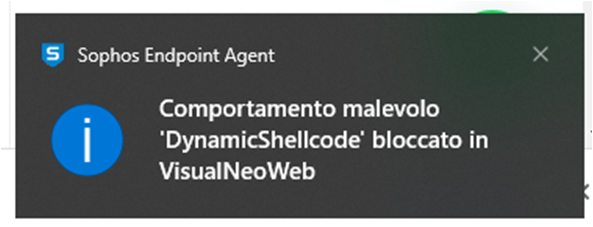
I have installed the version of visualneo web 22.8.6 whose release I had missed. After installation, my antivirus no longer allows VNweb to run. I cannot uninstall the antivirus from the pc because it is a pc of the institute where I work. How can I solve? I could install it on another pc temporarily, but how do I do it? Do I need another license?
The message I receive is the one in the attached image.
Greetings
Rocco
Hi @luishp,
I have installed the version of visualneo web 22.8.6 whose release I had missed. After installation, my antivirus no longer allows VNweb to run. I cannot uninstall the antivirus from the pc because it is a pc of the institute where I work. How can I solve? I could install it on another pc temporarily, but how do I do it? Do I need another license?
The message I receive is the one in the attached image.
Greetings
Rocco
Quote from luishp on September 23, 2022, 1:33 pmHi @roccocogliano, usually you can tell the antivirus to bypass certain software. If this is not possible, you can ask me for a new license. Just send my the new SystemID by email and I will send you back the registration key.
Regards.
Hi @roccocogliano, usually you can tell the antivirus to bypass certain software. If this is not possible, you can ask me for a new license. Just send my the new SystemID by email and I will send you back the registration key.
Regards.
Quote from roccocogliano on September 23, 2022, 2:34 pm@luishp I asked the network administrator to insert an exception for VisualNeo web.
I will let you know.thanks for now
Rocco
Ps: what exactly does 'DynamicShellCode' do in visualneo web? In case they ask me
@luishp I asked the network administrator to insert an exception for VisualNeo web.
I will let you know.
thanks for now
Rocco
Ps: what exactly does 'DynamicShellCode' do in visualneo web? In case they ask me
Quote from roccocogliano on September 24, 2022, 7:34 pm@luishp I solved.
thank you so much.Rocco
@luishp I solved.
thank you so much.
Rocco