
VisualNEO Web's built-in Run Simulator Fails

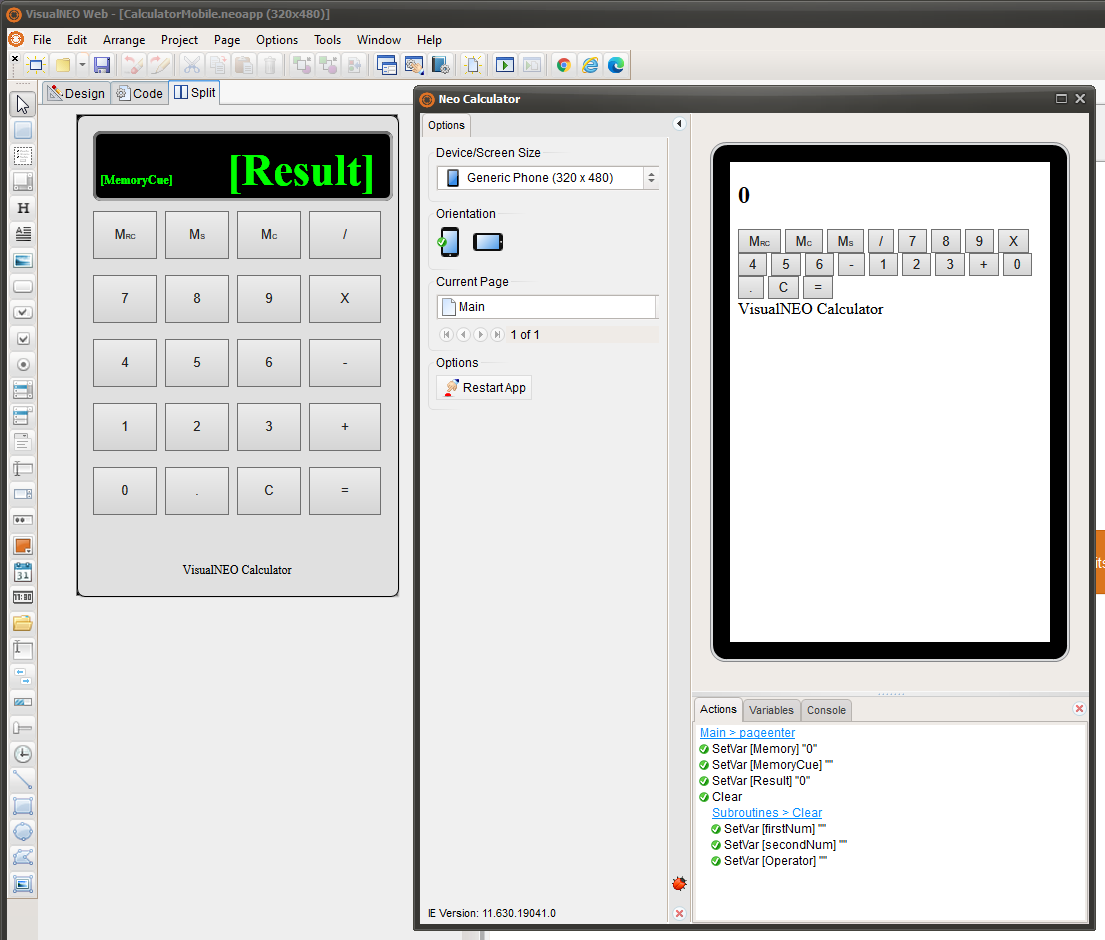
Quote from paultomo on January 22, 2021, 9:16 pmNew to VisualNEO Web version and on the 30 day trial with the intention of purchasing but I've found the test apps created can’t be tested directly within the the software as the layout will not display correctly in the VisualNEO Web's built-in Run Simulator. (See Screenshot)
I am able to make it work in Run Simulator If I open the index.html file in the test folder once the app is running, remove the <!DOCTYPE html> tag, save and then Restart the app via App Restart Button, it then runs in the built in test mode just fine.
Strange as I had the same issue on NeoAppBuilder Beta too when that was being tested but though it was just a software bug due to it being a Beta version.
I know it is something to do with the IE11 as VisualNEO Web's built-in Run Simulator uses IE: 11.630.1904.0 to open and run the apps in the VisualNEO Web test area.
It's been suggested I just use the Chrome option to test, as it works okay there but before I commit to purchasing the software I was wondered if any forum users were aware of the issue or seen it and if there an easy fix I can use to get VisualNEO Web's built-in Run Simulator working properly when testing the app’s?
New to VisualNEO Web version and on the 30 day trial with the intention of purchasing but I've found the test apps created can’t be tested directly within the the software as the layout will not display correctly in the VisualNEO Web's built-in Run Simulator. (See Screenshot)
I am able to make it work in Run Simulator If I open the index.html file in the test folder once the app is running, remove the <!DOCTYPE html> tag, save and then Restart the app via App Restart Button, it then runs in the built in test mode just fine.
Strange as I had the same issue on NeoAppBuilder Beta too when that was being tested but though it was just a software bug due to it being a Beta version.
I know it is something to do with the IE11 as VisualNEO Web's built-in Run Simulator uses IE: 11.630.1904.0 to open and run the apps in the VisualNEO Web test area.
It's been suggested I just use the Chrome option to test, as it works okay there but before I commit to purchasing the software I was wondered if any forum users were aware of the issue or seen it and if there an easy fix I can use to get VisualNEO Web's built-in Run Simulator working properly when testing the app’s?

Quote from CDY@44 on January 22, 2021, 10:00 pmDear Paultomo,
Personally I don't use the simulator to test what I do with VisualNeo Web; I launch the app directly in Chrome.
I'm sure Luis will be able to give you an answer.
I'm not an expert, but the only thing I'm sure is that VisualNeo Web is a great tool and I'm looking forward to the next version which will contain great plugins !The VisualNeo community is very efficient, and Luis is someone who really deserves to be known ! He's really listening and he's very reactive !
Best regards,
Denis
Dear Paultomo,
Personally I don't use the simulator to test what I do with VisualNeo Web; I launch the app directly in Chrome.
I'm sure Luis will be able to give you an answer.
I'm not an expert, but the only thing I'm sure is that VisualNeo Web is a great tool and I'm looking forward to the next version which will contain great plugins !
The VisualNeo community is very efficient, and Luis is someone who really deserves to be known ! He's really listening and he's very reactive !
Best regards,
Denis
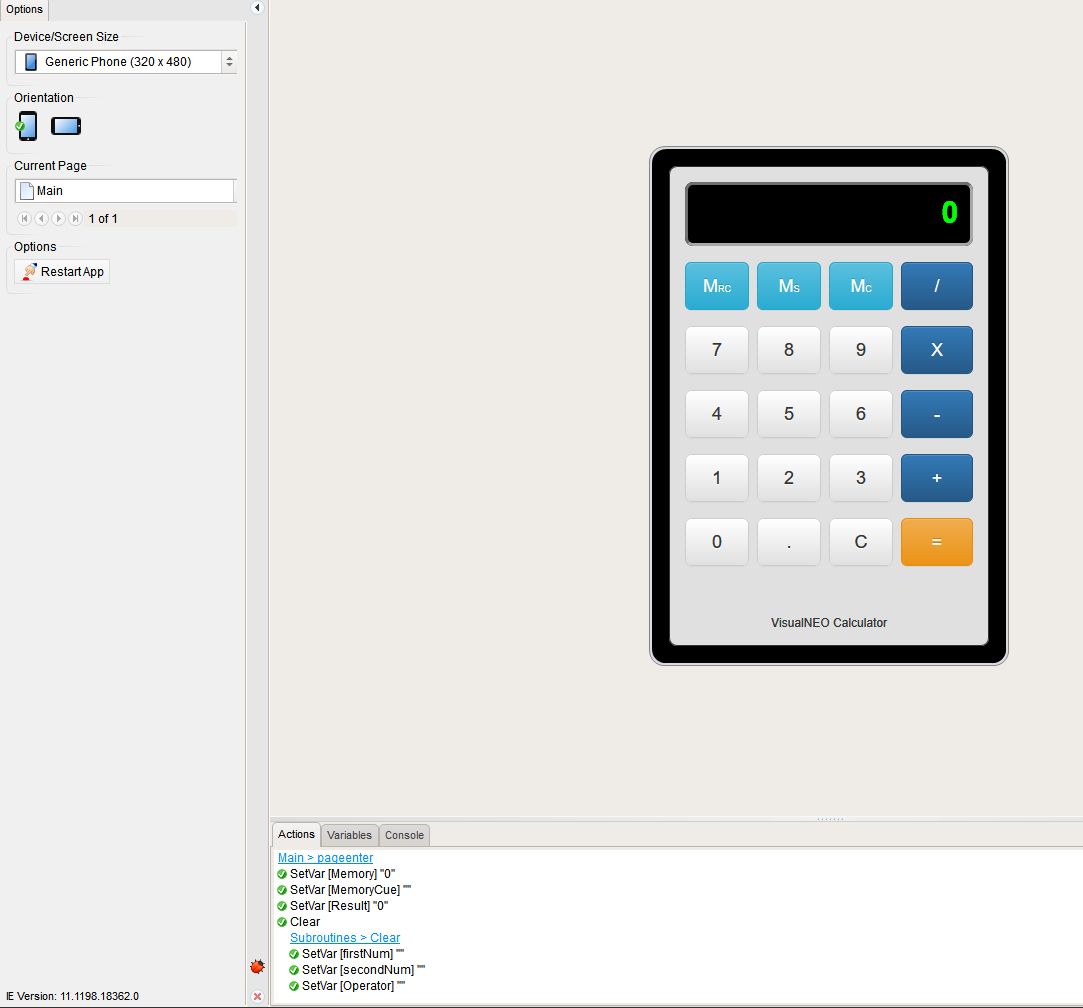
Quote from paultomo on January 22, 2021, 10:22 pmYes, thanks, that's what I was expecting to see.
There must be a setting or issue with IE on my PC that is preventing the apps to display correctly.
Any ideas on what to check appreciated
Yes, thanks, that's what I was expecting to see.
There must be a setting or issue with IE on my PC that is preventing the apps to display correctly.
Any ideas on what to check appreciated

Quote from luishp on January 23, 2021, 8:58 am@paultomo I think your Internet Explorer has CSS rules disabled. Do you have any accessibility plugin installed? Check Internet Explorer configuration to see if it is blocking CSS. Anyway keep in mind you will miss a lot of VisualNEO Web advanced functionalities if you use the built-in simulator instead of a modern web browser. A web server (like the included neoPhp Server) will be necessary too in some cases.
More information about CSS in Internet Explorer here:
https://www.betterhostreview.com/disable-css-ie-windows-10-computer.html
Best regards.
@paultomo I think your Internet Explorer has CSS rules disabled. Do you have any accessibility plugin installed? Check Internet Explorer configuration to see if it is blocking CSS. Anyway keep in mind you will miss a lot of VisualNEO Web advanced functionalities if you use the built-in simulator instead of a modern web browser. A web server (like the included neoPhp Server) will be necessary too in some cases.
More information about CSS in Internet Explorer here:
Best regards.
Quote from paultomo on January 23, 2021, 1:04 pmTook me a while but I've now worked out the cause of why VisualNEO Web's built-in Run Simulator was not working properly. It turns out that when the browser requests the css file, the Content Type returned by the server was wrong, causing IE11 to think that it was incorrect, so the css file is not loaded for rendering.
It turned out to be a registry setting and for some reason the Key HKEY_LOCAL_MACHINE\SOFTWARE\Classes\.css was set to "application/x-css" on my PC, when it needs to be set to "text/css".
Once the Key value was changed and the PC restarted, the Run Simulator then worked as it should, so my problem is now solved.
Horray!
I fully take on board your advice on using a web browser in future Luis and will do so but I just wanted to understand why I saw a bug that others didn't and wanted to fix it.....
Anyway, I'm sure there will be other questions and problems to solve in the future, so Thanks to all for your help on this.
Paul
Took me a while but I've now worked out the cause of why VisualNEO Web's built-in Run Simulator was not working properly. It turns out that when the browser requests the css file, the Content Type returned by the server was wrong, causing IE11 to think that it was incorrect, so the css file is not loaded for rendering.
It turned out to be a registry setting and for some reason the Key HKEY_LOCAL_MACHINE\SOFTWARE\Classes\.css was set to "application/x-css" on my PC, when it needs to be set to "text/css".
Once the Key value was changed and the PC restarted, the Run Simulator then worked as it should, so my problem is now solved.
Horray!
I fully take on board your advice on using a web browser in future Luis and will do so but I just wanted to understand why I saw a bug that others didn't and wanted to fix it.....
Anyway, I'm sure there will be other questions and problems to solve in the future, so Thanks to all for your help on this.
Paul