
VisualNEO Win - Small Improvements

Quote from noyzen on May 25, 2024, 1:13 pmHi there,
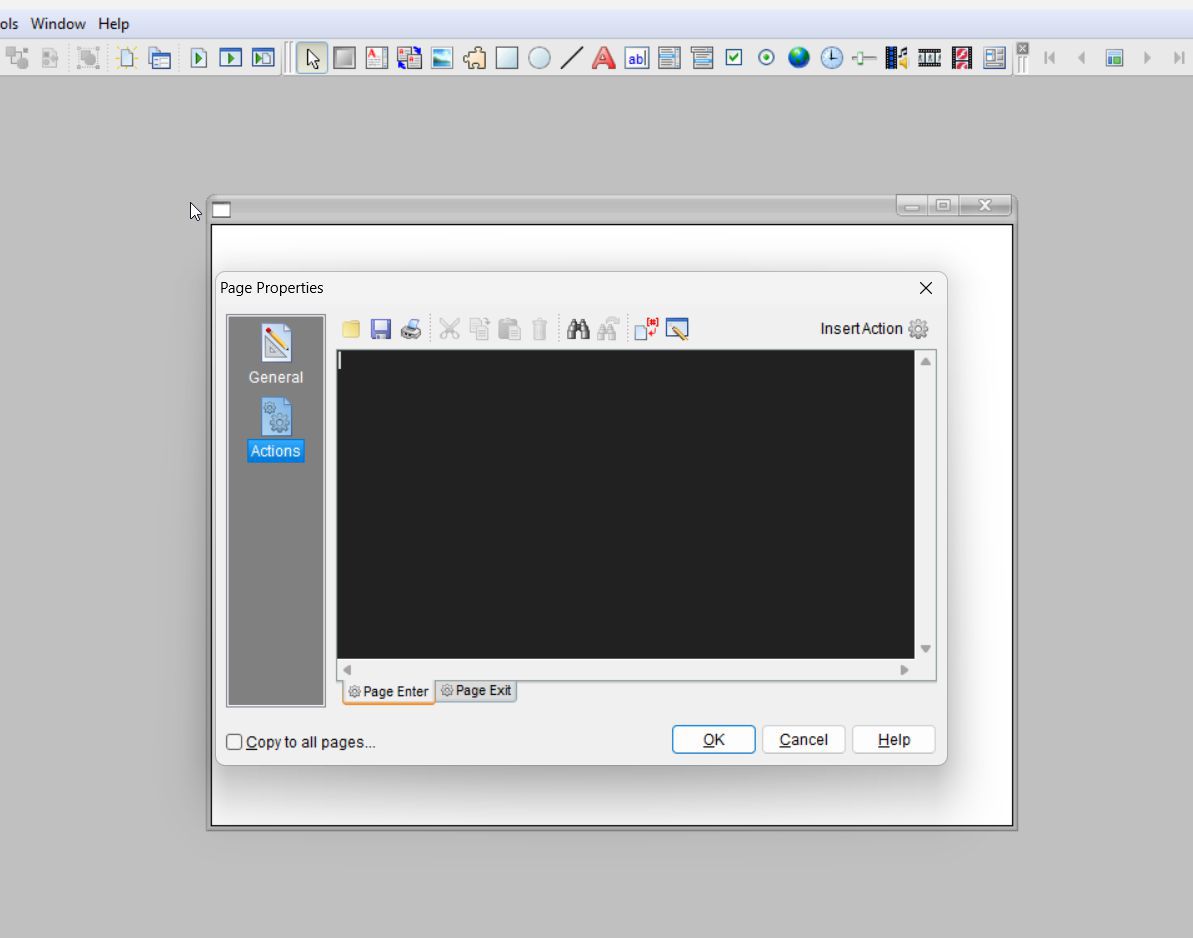
hmmm look at uploaded picture, I wonder if we can resize this dialog or give maximize button for it and save it's size... (I know there is a fullscreen editor button which opens another window with exactly what i need)
I know it's not important but even with such small changes we can make VisualNEO Win better. this is just a suggestion...
There are a lot more, for example a dark theme could be awesome!
Hi there,
hmmm look at uploaded picture, I wonder if we can resize this dialog or give maximize button for it and save it's size... (I know there is a fullscreen editor button which opens another window with exactly what i need)
I know it's not important but even with such small changes we can make VisualNEO Win better. this is just a suggestion...
There are a lot more, for example a dark theme could be awesome!
Uploaded files:

Quote from Vadim on May 26, 2024, 10:39 am@noyzen
These are good suggestions. The code editor window is indeed small now (although it was once a normal size, on older monitors). But since these suggestions don't fundamentally change anything, there's no point in diverting Luis's or Hans-Peter's resources to these changes. My thinking.
These are good suggestions. The code editor window is indeed small now (although it was once a normal size, on older monitors). But since these suggestions don't fundamentally change anything, there's no point in diverting Luis's or Hans-Peter's resources to these changes. My thinking.
Quote from noyzen on May 26, 2024, 11:22 amThat's right @vadim but it bother me so much so I made an app to monitor and detect that window and resize it LOL!
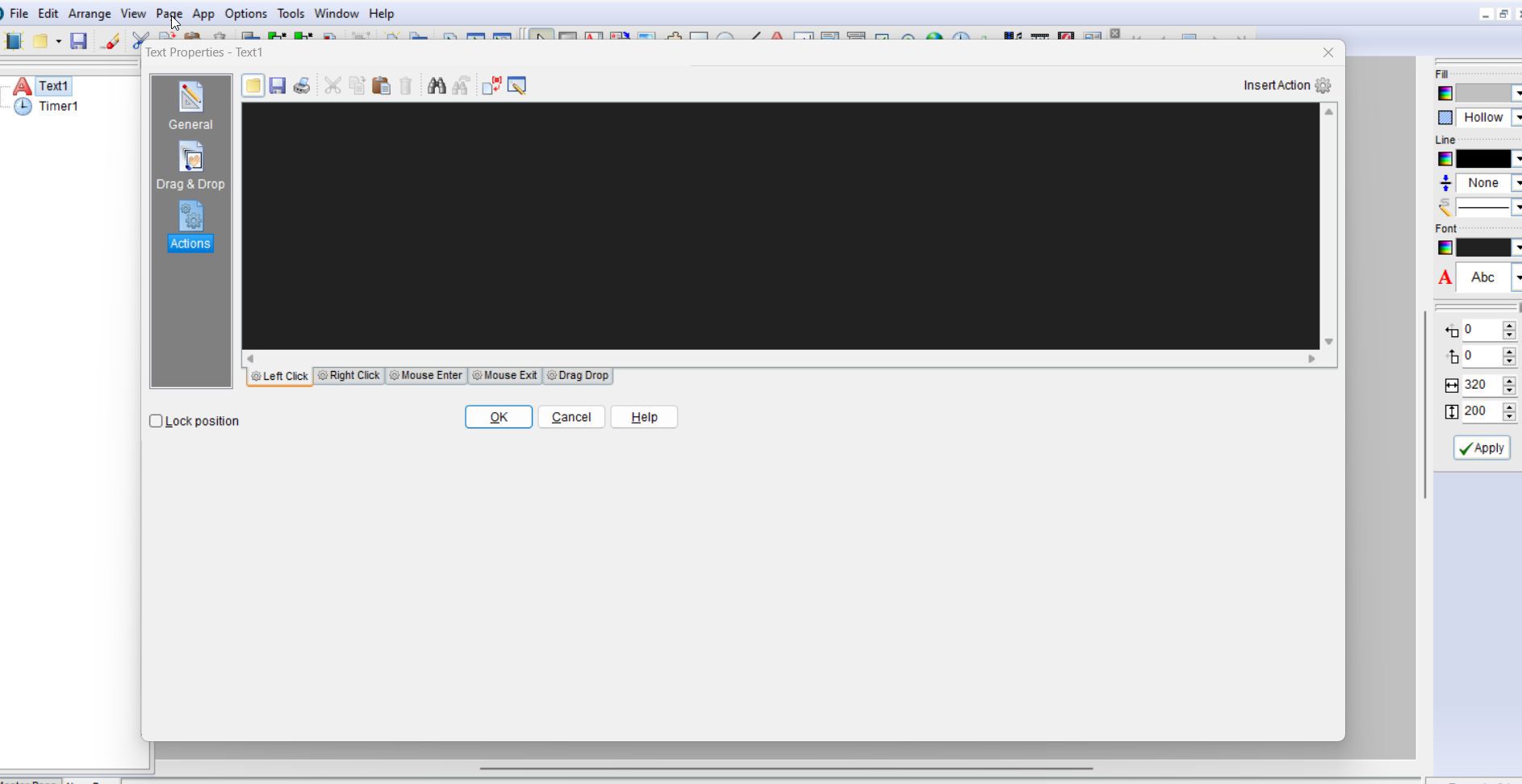
But I failed because it's not good to just resize window by force...
as you can see here:
That's right @vadim but it bother me so much so I made an app to monitor and detect that window and resize it LOL!
But I failed because it's not good to just resize window by force...
as you can see here:
Uploaded files:

Quote from alangonzalez91 on May 28, 2024, 2:35 pmWhy don't you use the tool included in the toolbar to enlarge the window?
Why don't you use the tool included in the toolbar to enlarge the window?
Uploaded files: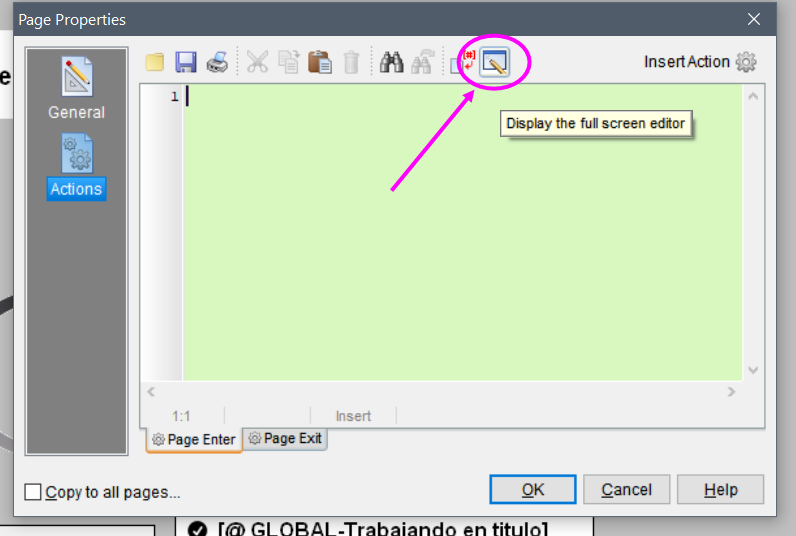
Quote from alangonzalez91 on May 28, 2024, 2:40 pmHowever, it is urgent to expand the coding window of the SQL editor, since it really does not have any method to resize it.
However, it is urgent to expand the coding window of the SQL editor, since it really does not have any method to resize it.
Uploaded files: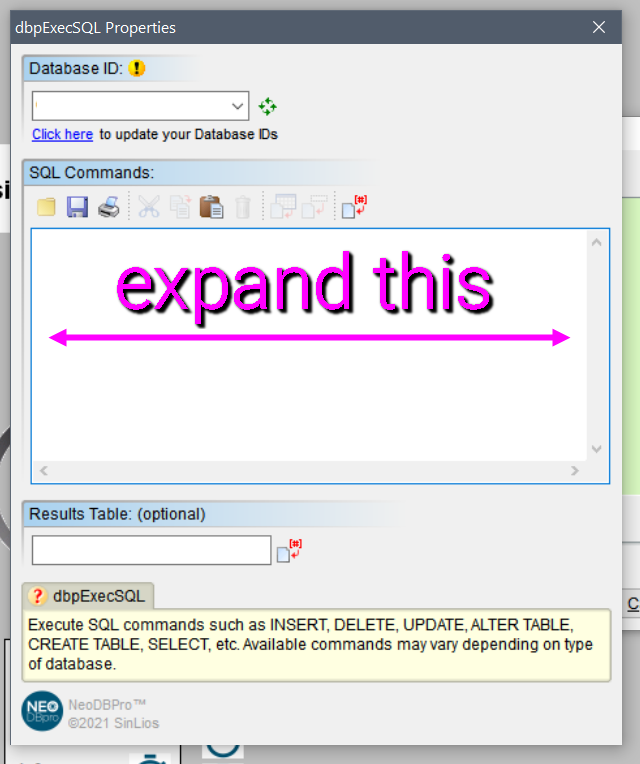
Quote from noyzen on May 28, 2024, 4:23 pmQuote from alangonzalez91 on May 28, 2024, 2:40 pmHowever, it is urgent to expand the coding window of the SQL editor, since it really does not have any method to resize it.
As I said, I know about that and I use that.
but that an extra Click, It's a lot faster to code in first window if that one was resizable...
Quote from alangonzalez91 on May 28, 2024, 2:40 pmHowever, it is urgent to expand the coding window of the SQL editor, since it really does not have any method to resize it.
As I said, I know about that and I use that.
but that an extra Click, It's a lot faster to code in first window if that one was resizable...
Quote from alangonzalez91 on May 28, 2024, 11:42 pmSorry, I hadn't read correctly.
Sorry, I hadn't read correctly.

Quote from mishem on May 30, 2024, 12:26 am@noyzen
Do you want something like this?
This can be done using the rlFunctions plugin.
Or using the cmdow program.
https://github.com/ritchielawrence/cmdow
But antiviruses do not like this program.
Do you want something like this?
This can be done using the rlFunctions plugin.
Or using the cmdow program.
https://github.com/ritchielawrence/cmdow
But antiviruses do not like this program.
Uploaded files: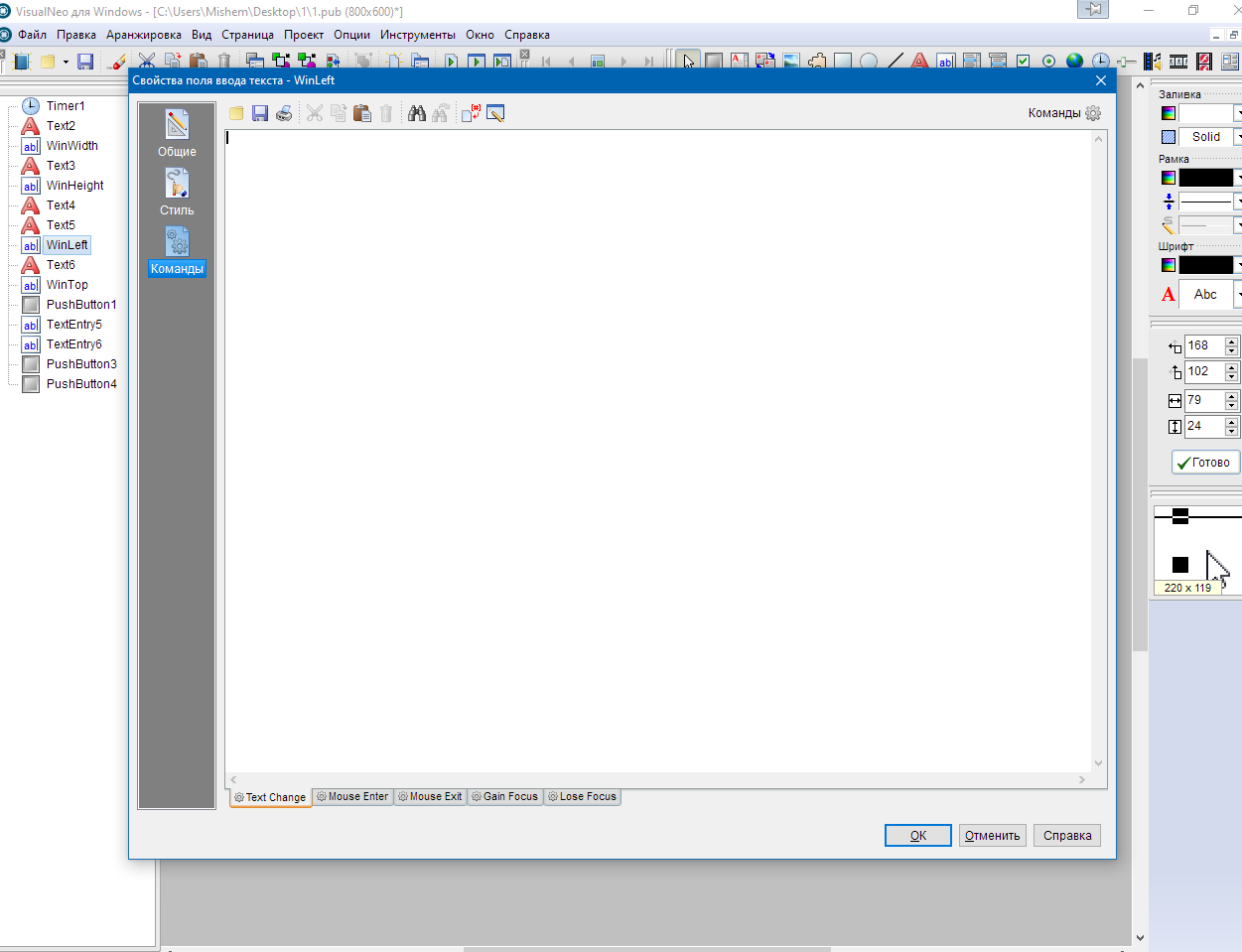
Quote from mishem on May 30, 2024, 12:30 amThere is one more problem. When you move the Lock position, its width and height automatically become 0. i.e. Lock position is no longer displayed. If this is not critical for you, then you can try to implement it.
There is one more problem. When you move the Lock position, its width and height automatically become 0. i.e. Lock position is no longer displayed. If this is not critical for you, then you can try to implement it.
Quote from mishem on May 30, 2024, 1:33 amI tried different ones. Both are working options. Both can be used. To make some tasks easier I used zmFunctions. For example, searching for a window by part of its title. Just enter Properties and it will find all windows regardless of the length of the title. But zmFunctions cannot resize child windows, rlFunctions and cmdow handled this. cmdow can display handles and sizes of all windows including hidden ones. But cmdow displays the window handle in hexadecimal mode, and plugins work with decimal value. Therefore, either write your own function, or use a plugin to convert the descriptor value. Try it. You'll gradually figure it out. :) The main thing is that it can be implemented. If only for yourself, then you can use some resource editor, for example Radialix, Sisulizer, etc. resize windows and use. ;) Go for it. All in your hands. :)
I tried different ones. Both are working options. Both can be used. To make some tasks easier I used zmFunctions. For example, searching for a window by part of its title. Just enter Properties and it will find all windows regardless of the length of the title. But zmFunctions cannot resize child windows, rlFunctions and cmdow handled this. cmdow can display handles and sizes of all windows including hidden ones. But cmdow displays the window handle in hexadecimal mode, and plugins work with decimal value. Therefore, either write your own function, or use a plugin to convert the descriptor value. Try it. You'll gradually figure it out. :) The main thing is that it can be implemented. If only for yourself, then you can use some resource editor, for example Radialix, Sisulizer, etc. resize windows and use. ;) Go for it. All in your hands. :)
Quote from noyzen on May 30, 2024, 10:27 amLoL!
Look at this:
http://www.digitallis.co.uk/pc/ResizeEnable/This tool is awesome, it make any window resiable and it will auto adjust element inside it!!!!
Woha, cool... they only problem is that it cant save the resized window and every time yo have to resize it again :/
LoL!
Look at this:
http://www.digitallis.co.uk/pc/ResizeEnable/
This tool is awesome, it make any window resiable and it will auto adjust element inside it!!!!
Woha, cool... they only problem is that it cant save the resized window and every time yo have to resize it again :/
Quote from mishem on May 30, 2024, 7:47 pmThe antivirus may swear because it is accessing windows. I don't swear. The project was not published. There are 4 plugins, a lot of links to provide. Some are in Russian, some have no documentation. If you want to finalize something yourself, I can send you the project. The program is in the system tray. By default I made the window 800 by 600, you can set your sizes, but every time. I didn't remember the settings. Laziness. :) You'll figure it out.
The antivirus may swear because it is accessing windows. I don't swear. The project was not published. There are 4 plugins, a lot of links to provide. Some are in Russian, some have no documentation. If you want to finalize something yourself, I can send you the project. The program is in the system tray. By default I made the window 800 by 600, you can set your sizes, but every time. I didn't remember the settings. Laziness. :) You'll figure it out.
Quote from mishem on May 30, 2024, 7:52 pmAlthough... Below is the project. Plugins are copied to the Temp folder when the application is launched. You can get it from there, rename it, install it, and you’ll be happy.
Plugins
alStartup
zmFunctions
zmBullshit
rlFunctions
Although... Below is the project. Plugins are copied to the Temp folder when the application is launched. You can get it from there, rename it, install it, and you’ll be happy.
Plugins
alStartup
zmFunctions
zmBullshit
rlFunctions
Quote from noyzen on May 31, 2024, 2:09 amThanks @mishem nothing important, but now that you give files and I will be happy to try them tomorrow!
good job :)
Thanks @mishem nothing important, but now that you give files and I will be happy to try them tomorrow!
good job :)
Quote from noyzen on May 31, 2024, 4:41 pmHi @mishem
Life is easier now with that damn tiny tool, it works perfectly for me!
Source is hard I don't know about "Regex" and how you managed to resize child elements!But it's working and I have something new to learn :p
Hi @mishem
Life is easier now with that damn tiny tool, it works perfectly for me!
Source is hard I don't know about "Regex" and how you managed to resize child elements!
But it's working and I have something new to learn :p
Quote from mishem on May 31, 2024, 5:24 pm@noyzen
Just replace the code between Loop and EndLoop with this one. I later saw that the Action button is not displayed with the theme code.
Loop "1" "[ListWinNum]" "[i]"
    StrRegexList "(?i)TNeoBookBitBtn|TNeoBookIconBar" "[ListWin[i]]" "" "[NameOb]"
    StrRegexList "\d{4,}" "[ListWin[i]]" "" "[HWND_Ob]"

    If "[NameOb]" "=" "TNeoBookIconBar"
        .Изменить размер TNeoBookIconBar
        zmGetWindowRectangle "[HWND_Ob]" "[HWND_ObLeft]" "[HWND_ObTop]" "[HWND_ObWidth]" "[HWND_ObHeight]" ""

.        SetVar "[Width]" "[HWND_ObWidth]+([WinWidth]-[HWNDWidth])"
        SetVar "[Height]" "[HWND_ObHeight]+([WinHeight]-[HWNDHeight])"

        rlSetWindowPosition "[HWND_Ob]" "NOTOPMOST" "0" "0" "" "[Height]" ""
    EndIf

    If "[NameOb]" "=" "TNeoBookBitBtn"
        .Изменить размер кнопок ОК, Отменить и Справка
        zmGetWindowRectangle "[HWND_Ob]" "[HWND_ObLeft]" "[HWND_ObTop]" "[HWND_ObWidth]" "[HWND_ObHeight]" "ClientSize"
        SetVar "[Left]" "[HWND_ObLeft]+([WinWidth]-[HWNDWidth])-8"
        SetVar "[Top]" "[HWND_ObTop]+([WinHeight]-[HWNDHeight]-[HWND_ObHeight])-8"

        rlSetWindowPosition "[HWND_Ob]" "NOTOPMOST" "[Left]" "[Top]" "[HWND_ObWidth]" "[HWND_ObHeight]" ""
    EndIf

EndLoop
Or comment out the line
SetVar "[Width]" "[HWND_ObWidth]+([WinWidth]-[HWNDWidth])"
This code changes the position of the buttons.
If "[NameOb]" "=" "TNeoBookBitBtn" .Изменить размер кнопок ОК, Отменить и Справка zmGetWindowRectangle "[HWND_Ob]" "[HWND_ObLeft]" "[HWND_ObTop]" "[HWND_ObWidth]" "[HWND_ObHeight]" "ClientSize" SetVar "[Left]" "[HWND_ObLeft]+([WinWidth]-[HWNDWidth])-8" SetVar "[Top]" "[HWND_ObTop]+([WinHeight]-[HWNDHeight]-[HWND_ObHeight])-8" rlSetWindowPosition "[HWND_Ob]" "NOTOPMOST" "[Left]" "[Top]" "[HWND_ObWidth]" "[HWND_ObHeight]" "" EndIfThis changes the height of the container in which the editor is located.
If "[NameOb]" "=" "TNeoBookIconBar" .Изменить размер TNeoBookIconBar zmGetWindowRectangle "[HWND_Ob]" "[HWND_ObLeft]" "[HWND_ObTop]" "[HWND_ObWidth]" "[HWND_ObHeight]" "" . SetVar "[Width]" "[HWND_ObWidth]+([WinWidth]-[HWNDWidth])" SetVar "[Height]" "[HWND_ObHeight]+([WinHeight]-[HWNDHeight])" rlSetWindowPosition "[HWND_Ob]" "NOTOPMOST" "0" "0" "" "[Height]" "" EndIfAnything above simply determines which window is currently on top.
There's a lot that still needs to be improved. I just quickly threw it in and tested it separately.
Just replace the code between Loop and EndLoop with this one. I later saw that the Action button is not displayed with the theme code.
Loop "1" "[ListWinNum]" "[i]"
    StrRegexList "(?i)TNeoBookBitBtn|TNeoBookIconBar" "[ListWin[i]]" "" "[NameOb]"
    StrRegexList "\d{4,}" "[ListWin[i]]" "" "[HWND_Ob]"

    If "[NameOb]" "=" "TNeoBookIconBar"
        .Изменить размер TNeoBookIconBar
        zmGetWindowRectangle "[HWND_Ob]" "[HWND_ObLeft]" "[HWND_ObTop]" "[HWND_ObWidth]" "[HWND_ObHeight]" ""

.        SetVar "[Width]" "[HWND_ObWidth]+([WinWidth]-[HWNDWidth])"
        SetVar "[Height]" "[HWND_ObHeight]+([WinHeight]-[HWNDHeight])"

        rlSetWindowPosition "[HWND_Ob]" "NOTOPMOST" "0" "0" "" "[Height]" ""
    EndIf

    If "[NameOb]" "=" "TNeoBookBitBtn"
        .Изменить размер кнопок ОК, Отменить и Справка
        zmGetWindowRectangle "[HWND_Ob]" "[HWND_ObLeft]" "[HWND_ObTop]" "[HWND_ObWidth]" "[HWND_ObHeight]" "ClientSize"
        SetVar "[Left]" "[HWND_ObLeft]+([WinWidth]-[HWNDWidth])-8"
        SetVar "[Top]" "[HWND_ObTop]+([WinHeight]-[HWNDHeight]-[HWND_ObHeight])-8"

        rlSetWindowPosition "[HWND_Ob]" "NOTOPMOST" "[Left]" "[Top]" "[HWND_ObWidth]" "[HWND_ObHeight]" ""
    EndIf

EndLoop
Or comment out the line
SetVar "[Width]" "[HWND_ObWidth]+([WinWidth]-[HWNDWidth])"
This code changes the position of the buttons.
If "[NameOb]" "=" "TNeoBookBitBtn" .Изменить размер кнопок ОК, Отменить и Справка zmGetWindowRectangle "[HWND_Ob]" "[HWND_ObLeft]" "[HWND_ObTop]" "[HWND_ObWidth]" "[HWND_ObHeight]" "ClientSize" SetVar "[Left]" "[HWND_ObLeft]+([WinWidth]-[HWNDWidth])-8" SetVar "[Top]" "[HWND_ObTop]+([WinHeight]-[HWNDHeight]-[HWND_ObHeight])-8" rlSetWindowPosition "[HWND_Ob]" "NOTOPMOST" "[Left]" "[Top]" "[HWND_ObWidth]" "[HWND_ObHeight]" "" EndIf
This changes the height of the container in which the editor is located.
If "[NameOb]" "=" "TNeoBookIconBar" .Изменить размер TNeoBookIconBar zmGetWindowRectangle "[HWND_Ob]" "[HWND_ObLeft]" "[HWND_ObTop]" "[HWND_ObWidth]" "[HWND_ObHeight]" "" . SetVar "[Width]" "[HWND_ObWidth]+([WinWidth]-[HWNDWidth])" SetVar "[Height]" "[HWND_ObHeight]+([WinHeight]-[HWNDHeight])" rlSetWindowPosition "[HWND_Ob]" "NOTOPMOST" "0" "0" "" "[Height]" "" EndIf
Anything above simply determines which window is currently on top.
There's a lot that still needs to be improved. I just quickly threw it in and tested it separately.
Quote from noyzen on June 1, 2024, 12:15 amThanks @mishem, I will check this one too.
But today I made my resizer for my needs... Its simpler, and can resize some small editbox also! (ex: for paragraph text object it have a small editor which is anoying).
It also lunch VisualNEO and exit when VisualNEO close :)
I used WinSpy++ a tiny microsoft tool to find handles and resize objects.
Actions button is easy to fix, problem is "Lock position" checkbox which is wired and there is no way to fix it when its gone...
So in my app, i can right click on objects to use default layout with "Lock position" avaliable, or double click on them to use scaled properties dialog layout!
Thanks @mishem, I will check this one too.
But today I made my resizer for my needs... Its simpler, and can resize some small editbox also! (ex: for paragraph text object it have a small editor which is anoying).
It also lunch VisualNEO and exit when VisualNEO close :)
I used WinSpy++ a tiny microsoft tool to find handles and resize objects.
Actions button is easy to fix, problem is "Lock position" checkbox which is wired and there is no way to fix it when its gone...
So in my app, i can right click on objects to use default layout with "Lock position" avaliable, or double click on them to use scaled properties dialog layout!