VisualNEO Win. Version 26.7.19 (Major version)

Quote from Sinesi Giuseppe on August 1, 2026, 10:24 amHi, I wanted to list some bugs I've encountered:- all the Validated Licenses actions don't work, they produce an error- ModernImage effects don't work. I'm sending a video- many screens have truncated buttons or text (I understand that with the translation, some text is unreadable). Thanks for your help.
Quote from Sinesi Giuseppe on August 1, 2026, 11:21 amI installed the program on another PC and it gives me these errors, all the actions give me errors and the writings are in Chinese.
I installed the program on another PC and it gives me these errors, all the actions give me errors and the writings are in Chinese.
Uploaded files: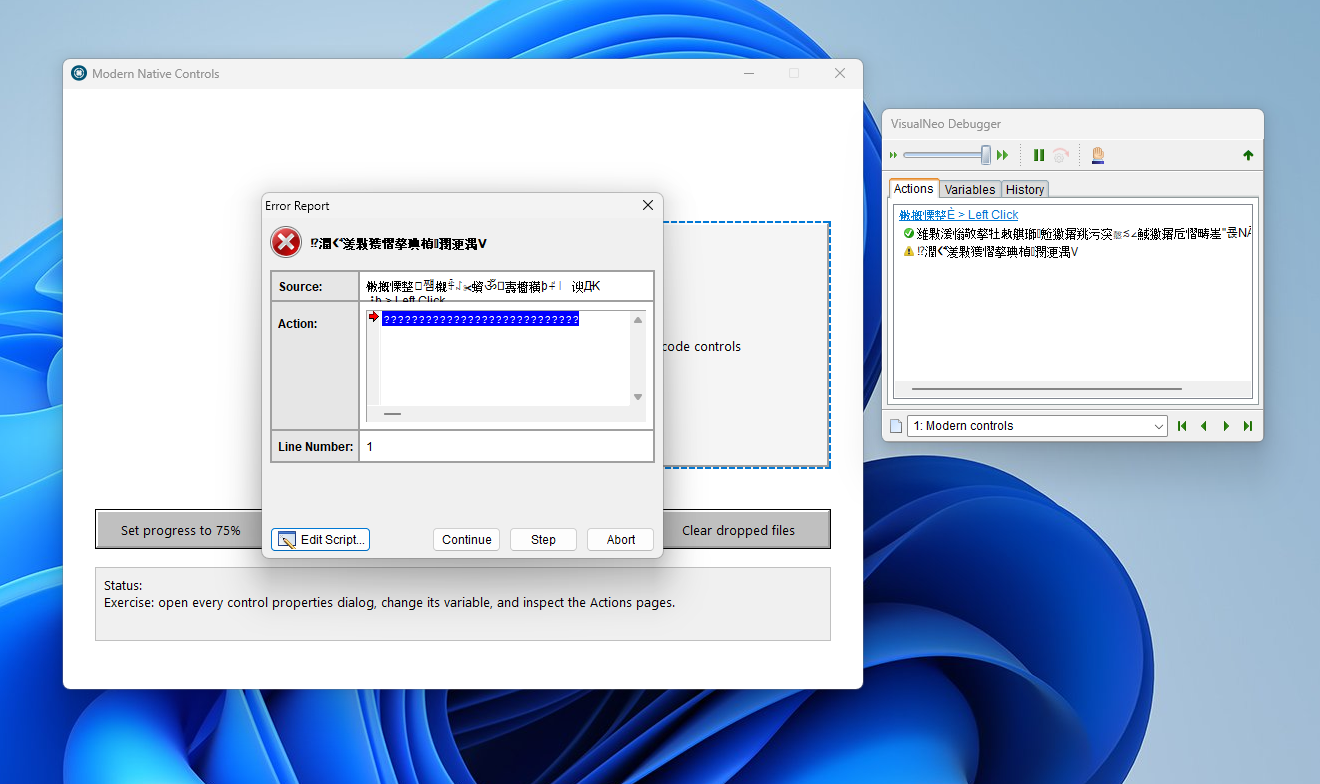

Quote from luishp on August 1, 2026, 11:51 am@sinesi-giuseppe please download and install again.
I'm still trying to improve not-english languages.
Please be pacient with me.
@sinesi-giuseppe please download and install again.
I'm still trying to improve not-english languages.
Please be pacient with me.
Quote from luishp on August 1, 2026, 12:04 pmRegarding the ModernImage sample app, please send the Container to the back.
There is a bug in the .pub that locates the image in the wrong layer.
I will fix it.
Regarding the ModernImage sample app, please send the Container to the back.
There is a bug in the .pub that locates the image in the wrong layer.
I will fix it.
Quote from Sinesi Giuseppe on August 1, 2026, 2:09 pmQuote from luishp on August 1, 2026, 11:51 am@sinesi-giuseppe please download and install again.
I'm still trying to improve not-english languages.
Please be pacient with me.No problem, take all the time you need. Thanks for all the news.
Quote from luishp on August 1, 2026, 11:51 am@sinesi-giuseppe please download and install again.
I'm still trying to improve not-english languages.
Please be pacient with me.
No problem, take all the time you need. Thanks for all the news.

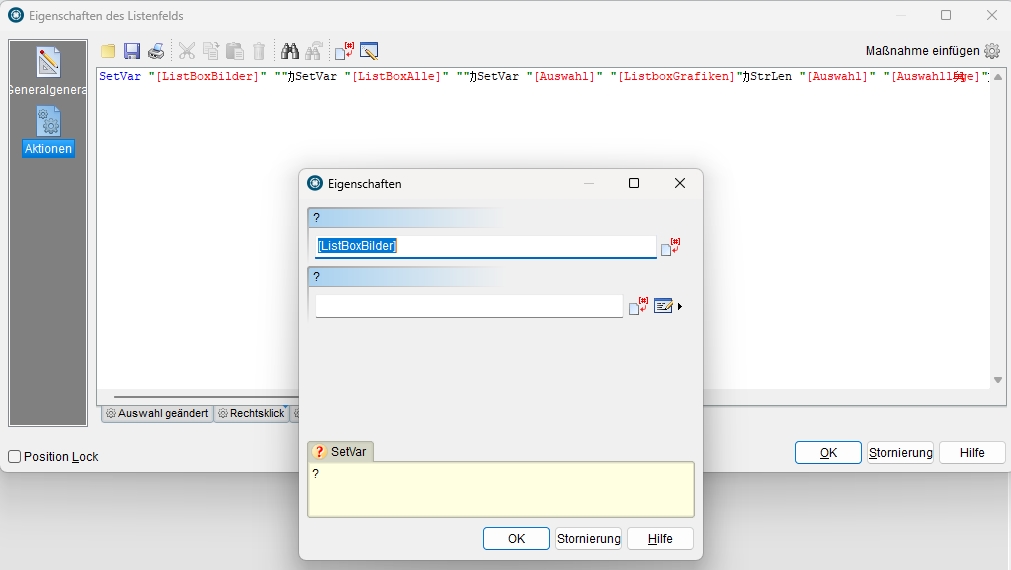
Quote from markuspr on August 1, 2026, 2:54 pmI have an existing project. This project contains a list box. Double-clicking an entry sets a variable. However, the `Setvar` command now contains special characters that I didn't create. The dialog box label is also incorrect.
I have an existing project. This project contains a list box. Double-clicking an entry sets a variable. However, the `Setvar` command now contains special characters that I didn't create. The dialog box label is also incorrect.
Uploaded files:

Quote from pandaneo on August 1, 2026, 4:30 pm@luishp
Help me sir, i cannot install plugin tmSysteminfo in Major version
"Run time error 217 at 074C8A62"
"1114 – DLL initialization routine failed"
Help me sir, i cannot install plugin tmSysteminfo in Major version
"Run time error 217 at 074C8A62"
"1114 – DLL initialization routine failed"
Quote from Anthony LaTorre on August 1, 2026, 5:17 pmtmSystemInfo I believe is an older plugin created by Tech Media aka: Alberto Myer. Unfortunately, Albert hasn't been seen on the forums for years and no longer supports his plugins...
tmSystemInfo I believe is an older plugin created by Tech Media aka: Alberto Myer. Unfortunately, Albert hasn't been seen on the forums for years and no longer supports his plugins...
Quote from luishp on August 1, 2026, 7:03 pm@markuspr please download and install again.
If it doesn't work in german choose english and please, share a sample .pub file so we can check it.
Thank you!
@markuspr please download and install again.
If it doesn't work in german choose english and please, share a sample .pub file so we can check it.
Thank you!
Quote from luishp on August 1, 2026, 7:05 pm@pandaneo we can't guarantee compatibility with all plugins.
Right now, if you really need that one, please install previous VisualNEO Win version.
Sorry!
@pandaneo we can't guarantee compatibility with all plugins.
Right now, if you really need that one, please install previous VisualNEO Win version.
Sorry!
Quote from luishp on August 2, 2026, 8:56 pmI have just updated the installer again (Date: 2016/08/02)
Includes better translations in german and russian and some interface tweaks to avoid broken texts.
Please keep reporting any problems you may find.
Thank you!
I have just updated the installer again (Date: 2016/08/02)
Includes better translations in german and russian and some interface tweaks to avoid broken texts.
Please keep reporting any problems you may find.
Thank you!


Quote from impactband4u on August 3, 2026, 6:46 am@luishp
Hi Luishp, I have a question about "ModernTabs". I have 5 pages and on Master Page I have Modern Tabs with Tab numbers 1-5. I need each Tab number to go to a certain page number. It seems there is no action for left click and no action for each tab separately. Is ModernTabs still in progress or please send demo on how or what it is used for.
Thank you
Hi Luishp, I have a question about "ModernTabs". I have 5 pages and on Master Page I have Modern Tabs with Tab numbers 1-5. I need each Tab number to go to a certain page number. It seems there is no action for left click and no action for each tab separately. Is ModernTabs still in progress or please send demo on how or what it is used for.
Thank you
Quote from luishp on August 3, 2026, 7:27 amI have updated the installer again with more language improvements (translated debugger and strings tranlations).
@impactband4u
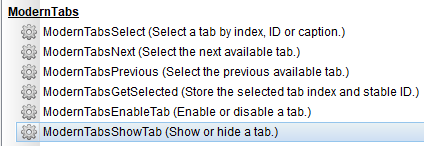
Note there are some new actions related to ModernTabs (see attached image)
Left clicking on a tab should allow the to access that tab content, there you can include buttons or any other object.Please check the included sample app:
My Documents\VisualNeoWin\Sample Apps\Modern Samples\08 ModernTabsAnd yes, right now, almost everything is still in progress.
We need to update a software that has no evolved in decades and your feeedback is very important :)
I have updated the installer again with more language improvements (translated debugger and strings tranlations).
Note there are some new actions related to ModernTabs (see attached image)
Left clicking on a tab should allow the to access that tab content, there you can include buttons or any other object.
Please check the included sample app:
My Documents\VisualNeoWin\Sample Apps\Modern Samples\08 ModernTabs
And yes, right now, almost everything is still in progress.
We need to update a software that has no evolved in decades and your feeedback is very important :)
Quote from luishp on August 3, 2026, 7:46 pmVisualNEO Win 26.7.19 — New Maintenance Update
Dated 2026/08/03
A new VisualNEO Win build is now available. This update focuses on workflow improvements, localization, stability, and new NeoScript capabilities while preserving compatibility with existing publications and classic plugins.New workflow features
- Improved InputBox: the input field now receives focus automatically and selects its initial value.
- GoSub navigation: hover over a
GoSubcommand to preview its target or double-click it to open the corresponding subroutine.- Automatic recovery: configurable autosave intervals of 1, 5, 10, 20 or 30 minutes. Recovery copies are stored safely outside the project folder and never overwrite the original PUB without confirmation.
Improved GoSub navigation
Working with subroutines in long NeoScript projects is now much easier:
- Hover over a
GoSubcommand to preview the target subroutine.- Double-click a
GoSubcommand to navigate directly to its code.- Missing targets are detected without silently creating unwanted subroutines.
- Existing NeoScript syntax and saved publications remain unchanged.
This makes navigating and maintaining larger applications considerably faster.
New
IfMatchregular-expression conditionNeoScript can now use regular expressions with
Else,EndIfand nested conditions:IfMatch "Order-2026-0042" "!^Order-[0-9]{4}-[0-9]+$" "IgnoreCase" SetVar "[ValidOrder]" "Yes" Else SetVar "[ValidOrder]" "No" EndIfPrefix literal regular expressions with
!. This prevents expressions such as[0-9]from being interpreted as NeoScript variables.Supported options include
IgnoreCase,Multiline,DotAllandExtended.ModernWebBrowser improvements
ModernWebBrowser now supports independent WebView2 user-data folders and includes new actions for:
- Clearing the browser cache
- Clearing cookies
- Setting and retrieving the user-data folder
These settings are preserved when saving, duplicating, copying or compiling a publication.
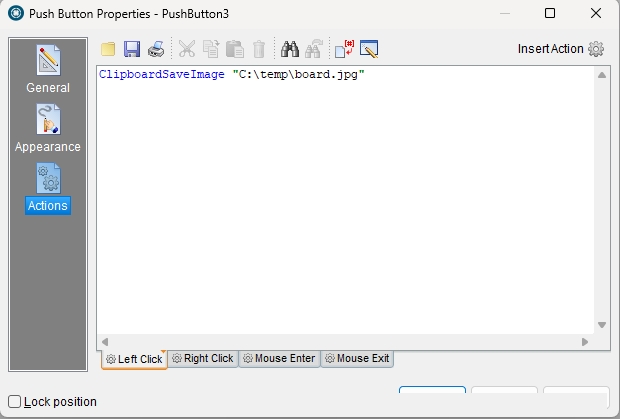
New Unicode clipboard actions
New commands make it possible to:
- Copy an image to the clipboard
- Save a clipboard image as PNG, JPEG or BMP
- Copy one or several files
- Retrieve file lists with Unicode and long-path support
Localization improvements
The universal edition includes complete language packs for:
- English
- Spanish
- Italian
- German
- Russian
The debugger now follows the selected interface language. Many untranslated dialogs, action wizards, descriptions and layout problems have also been corrected.
Technical identifiers, object IDs and other strings that must remain invariant are no longer translated, improving compatibility between publications created in different languages.
Additional fixes
- Improved startup and plugin-loading diagnostics.
- Several action-editor and wizard lifecycle fixes.
- ModernImage variable-based paths and
SetObjectFilecompatibility.- ModernImage border, opacity and scale corrections.
- More reliable multi-file handling in ModernFileDrop.
- Numerous dialog layout and translation corrections, including support for lower-resolution screens.
- Coordinated editor, runtime, debugger and publication-packaging binaries.
Existing PUB files and classic plugins do not require migration. As always, please report any issue you encounter, especially when testing older publications or third-party plugins.
Thank you to everyone who has provided examples, screenshots, translations and detailed reports. Your help is making VisualNEO Win better with every update.
VisualNEO Win 26.7.19 — New Maintenance Update
Dated 2026/08/03
A new VisualNEO Win build is now available. This update focuses on workflow improvements, localization, stability, and new NeoScript capabilities while preserving compatibility with existing publications and classic plugins.
New workflow features
- Improved InputBox: the input field now receives focus automatically and selects its initial value.
- GoSub navigation: hover over a
GoSubcommand to preview its target or double-click it to open the corresponding subroutine. - Automatic recovery: configurable autosave intervals of 1, 5, 10, 20 or 30 minutes. Recovery copies are stored safely outside the project folder and never overwrite the original PUB without confirmation.
Improved GoSub navigation
Working with subroutines in long NeoScript projects is now much easier:
- Hover over a
GoSubcommand to preview the target subroutine. - Double-click a
GoSubcommand to navigate directly to its code. - Missing targets are detected without silently creating unwanted subroutines.
- Existing NeoScript syntax and saved publications remain unchanged.
This makes navigating and maintaining larger applications considerably faster.
New IfMatch regular-expression condition
NeoScript can now use regular expressions with Else, EndIf and nested conditions:
IfMatch "Order-2026-0042" "!^Order-[0-9]{4}-[0-9]+$" "IgnoreCase"
  SetVar "[ValidOrder]" "Yes"
Else
  SetVar "[ValidOrder]" "No"
EndIf
Prefix literal regular expressions with !. This prevents expressions such as [0-9] from being interpreted as NeoScript variables.
Supported options include IgnoreCase, Multiline, DotAll and Extended.
ModernWebBrowser improvements
ModernWebBrowser now supports independent WebView2 user-data folders and includes new actions for:
- Clearing the browser cache
- Clearing cookies
- Setting and retrieving the user-data folder
These settings are preserved when saving, duplicating, copying or compiling a publication.
New Unicode clipboard actions
New commands make it possible to:
- Copy an image to the clipboard
- Save a clipboard image as PNG, JPEG or BMP
- Copy one or several files
- Retrieve file lists with Unicode and long-path support
Localization improvements
The universal edition includes complete language packs for:
- English
- Spanish
- Italian
- German
- Russian
The debugger now follows the selected interface language. Many untranslated dialogs, action wizards, descriptions and layout problems have also been corrected.
Technical identifiers, object IDs and other strings that must remain invariant are no longer translated, improving compatibility between publications created in different languages.
Additional fixes
- Improved startup and plugin-loading diagnostics.
- Several action-editor and wizard lifecycle fixes.
- ModernImage variable-based paths and
SetObjectFilecompatibility. - ModernImage border, opacity and scale corrections.
- More reliable multi-file handling in ModernFileDrop.
- Numerous dialog layout and translation corrections, including support for lower-resolution screens.
- Coordinated editor, runtime, debugger and publication-packaging binaries.
Existing PUB files and classic plugins do not require migration. As always, please report any issue you encounter, especially when testing older publications or third-party plugins.
Thank you to everyone who has provided examples, screenshots, translations and detailed reports. Your help is making VisualNEO Win better with every update.
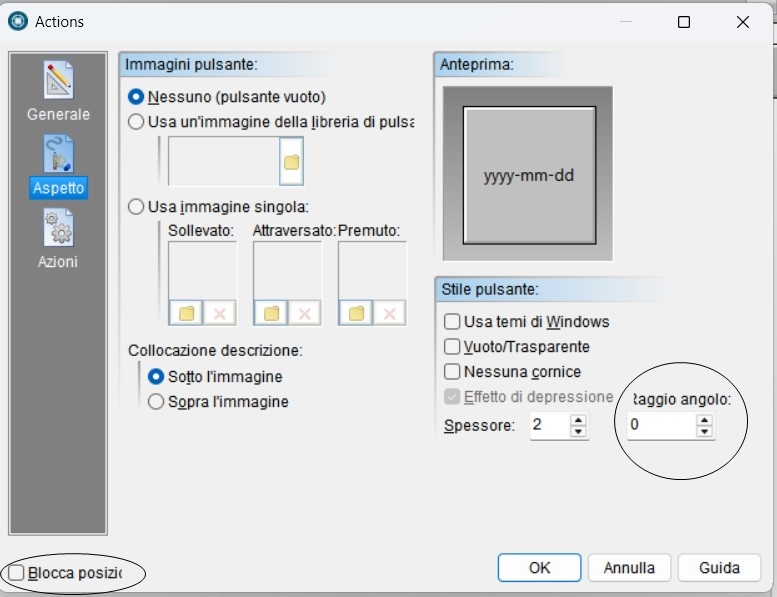
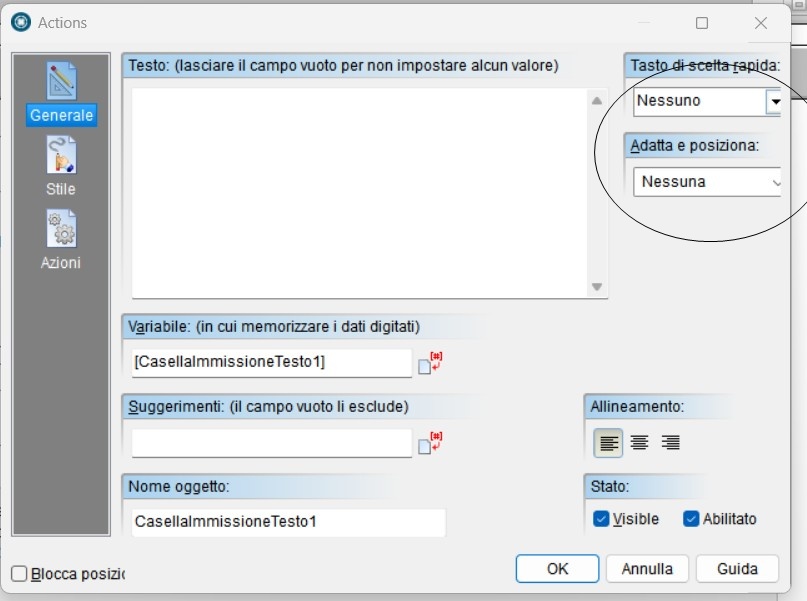
Quote from Sinesi Giuseppe on August 3, 2026, 11:16 pmHi, thanks for the bug fixes. I've included screenshots of the ones found after the last update.
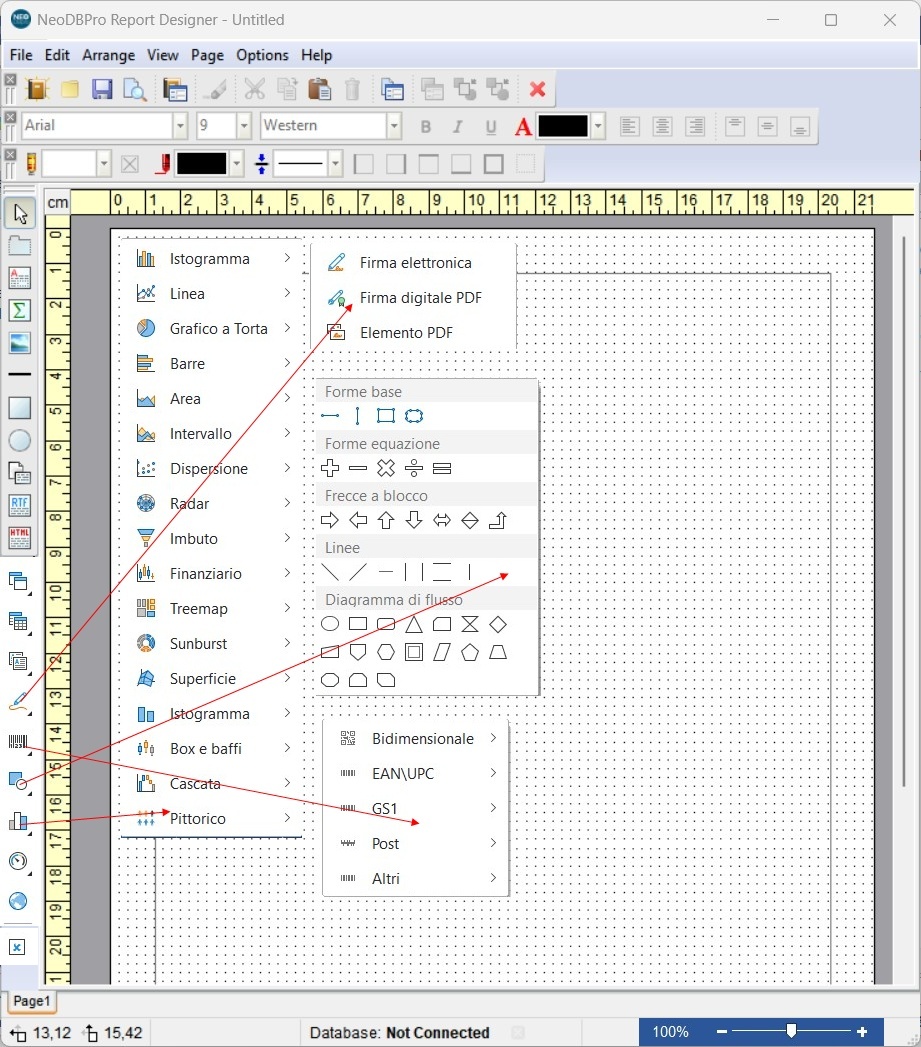
We're also planning to make improvements to Report Designer, which, aside from the program itself, was originally designed for the database, but is currently the best compromise for creating report pages. I'll send you an image that summarizes what could be improved.
- The ability to zoom the page; this request is essential for creating pages.
- The restoration of two existing but non-functional features: RTF text and HTML text.
- Barcodes
- Electronic signature allows signing a report graphically during editing or viewing. During export, it is converted into a static image.
- PDF Digital Signature - is a placeholder component. During export to a PDF file, an interactive "Unsigned Signature Field" appears in place of this component, allowing the PDF file to be signed in Adobe Acrobat.
- PDF Element - is a placeholder component. During export to a PDF file, it is replaced with a standard digital signature of the PDF document.
- The Table component is used to output data in a report. This component is similar to spreadsheets. The table consists of rows and columns in what data can be placed. See on a picture below a Table component with 5 columns and 5 rows.
- charts
- shape
-Check Box for displaying Boolean values, you can use the Check Box component.
- lastly, the possibility of saving the page in PDF.
Hi, thanks for the bug fixes. I've included screenshots of the ones found after the last update.
We're also planning to make improvements to Report Designer, which, aside from the program itself, was originally designed for the database, but is currently the best compromise for creating report pages. I'll send you an image that summarizes what could be improved.
- The ability to zoom the page; this request is essential for creating pages.
- The restoration of two existing but non-functional features: RTF text and HTML text.
- Barcodes
- Electronic signature allows signing a report graphically during editing or viewing. During export, it is converted into a static image.
- PDF Digital Signature - is a placeholder component. During export to a PDF file, an interactive "Unsigned Signature Field" appears in place of this component, allowing the PDF file to be signed in Adobe Acrobat.
- PDF Element - is a placeholder component. During export to a PDF file, it is replaced with a standard digital signature of the PDF document.
- The Table component is used to output data in a report. This component is similar to spreadsheets. The table consists of rows and columns in what data can be placed. See on a picture below a Table component with 5 columns and 5 rows.
- charts
- shape
-Check Box for displaying Boolean values, you can use the Check Box component.
- lastly, the possibility of saving the page in PDF.
Quote from luishp on August 4, 2026, 9:03 amI have just uploaded a new maintenance update (2026/08/04) with improvements in UI speed.
@sinesi-giuseppe please start a new thread for NeoDBpro plugin.
Anyway we need a new plugin engine (but keeing the old one alive) before start making changes on existing plugins.
I have just uploaded a new maintenance update (2026/08/04) with improvements in UI speed.
@sinesi-giuseppe please start a new thread for NeoDBpro plugin.
Anyway we need a new plugin engine (but keeing the old one alive) before start making changes on existing plugins.
Quote from AnthonyJones on August 4, 2026, 9:06 pmThere is still something wrong with the licensing module - quotes etc. -
There is still something wrong with the licensing module - quotes etc. -
Uploaded files: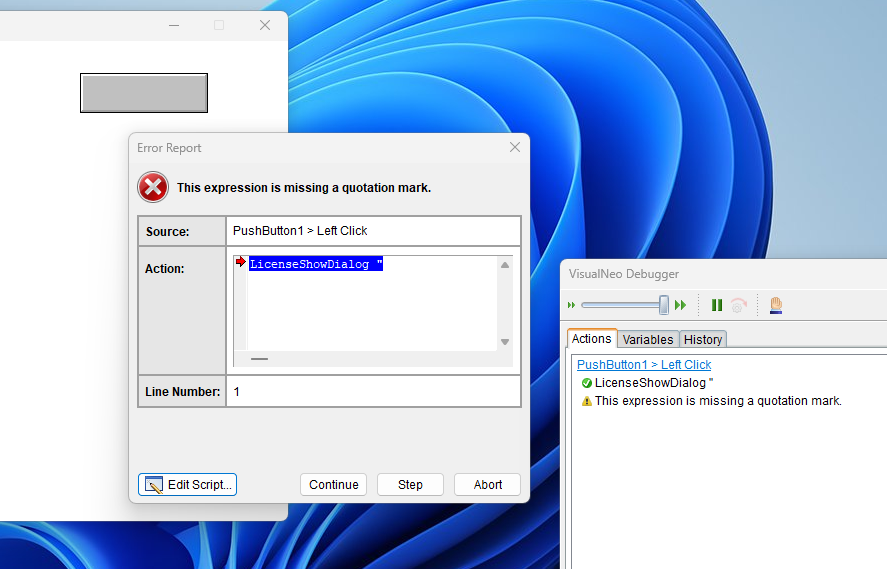
Quote from luishp on August 4, 2026, 9:40 pm@anthonyjones I will take a look but please be sure to use those actions and global variables on licensed apps.
There is an included sample app too.More info here:
https://visualneo.com/forum/topic/how-to-protect-your-visualneo-win-applications-with-licensesThank you!
@anthonyjones I will take a look but please be sure to use those actions and global variables on licensed apps.
There is an included sample app too.
More info here:
https://visualneo.com/forum/topic/how-to-protect-your-visualneo-win-applications-with-licenses
Thank you!
Quote from markuspr on August 7, 2026, 11:01 amI have a display problem in the dialog boxes. The buttons are not always visible.
I have a display problem in the dialog boxes. The buttons are not always visible.
Uploaded files: