
VisualNEO Win. Version 26.7.19 (Major version)

Quote from luishp on July 21, 2026, 6:12 pm
IMPORTANT: THIS IS A MAJOR VERSION UPDATE.
READ CAREFULLYFree update for those who bought or updated their license in the last three months:
The update is free only for users who have purchased VisualNEO Win or an update within the last three months (after 2026 april 21). If you are elegible for a free update you will get a new registration key in your email within the next days. Please be pacient. Meanwhile you will enjoy a full version 30 days free trial.50% discount code for those who already have a license:
Users who purchased previously will get a 50% discount code.
If you don't get the discount code in your email within a few days just send us an email with your Purchase ID.The new version includes a lot of new functionalities.
The most significant technical modernization of VisualNEO Win since NeoBook.
The main objective of this release has been to preserve the familiar workflow, existing projects and legacy plug-in ecosystem while updating the application’s technical foundation and preparing it for current Windows technologies.
This release is available through two separate installers: one in English and one in Spanish.
We are pleased to restore the full Spanish edition of VisualNEO Win, which has been one of the most frequently requested improvements from our Spanish-speaking community.
Main Highlights
English and Spanish Editions
VisualNEO Win 26.7.19 is distributed through two dedicated installers:
- VisualNEO Win English Edition
- VisualNEO Win Spanish Edition
Users can therefore install the application directly in their preferred language.
The return of the Spanish edition restores a fully localized working environment for Spanish-speaking users, including the main interface, dialogs, object properties, commands and action descriptions.
The Spanish translation has also been reviewed and updated, correcting several expressions and terms inherited from older NeoBook and VisualNEO versions.
Modernized Development Platform
VisualNEO Win and its main components have been migrated from Delphi 7 to Delphi 11 Alexandria, including:
- the VisualNEO Win editor;
- the application player;
- the debugger;
- the compiler and packager.
The application remains a 32-bit Windows program to preserve compatibility with existing plug-ins and legacy components.
This migration also allowed us to review and correct numerous operations related to:
- memory management;
- project opening and closing;
- clipboard handling;
- object persistence;
- resource cleanup;
- access violations and heap corruption on current Windows systems.
Although much of this work is not directly visible, it provides a considerably stronger foundation for future development.
Unicode Text Support
VisualNEO Win now supports Unicode text throughout most of the application.
Unicode characters can now be used in:
- the user interface;
- object captions;
- text strings;
- variables;
- the RTF editor;
- the NeoScript editor;
- clipboard operations;
- saved project data.
Projects can now save and restore international text without replacing unsupported characters with question marks or unreadable symbols.
Legacy Plug-in Compatibility
The interface used by classic VisualNEO Win plug-ins remains ANSI-compatible.
This preserves binary compatibility with existing plug-ins, but it also means that an older plug-in can only receive or return characters supported by its own Windows code page.
Plug-ins that exchange non-ASCII text should therefore be tested before using them in production projects.
New ModernWebBrowser Object
The new ModernWebBrowser object uses Microsoft Edge WebView2 and is designed for applications that need to display current web content.
It is available alongside the classic Internet Explorer-based browser object, which remains included for compatibility with existing projects.
ModernWebBrowser includes:
- navigation to an initial URL;
- navigation using variables and NeoScript actions;
- Back, Forward, Refresh and Stop commands;
- JavaScript execution;
- actions for retrieving the current URL and page title;
- actions for checking whether backward or forward navigation is available;
- navigation-started and navigation-completed events;
- error and document-title-change events;
- configurable JavaScript support;
- configurable context menus;
- optional developer tools;
- full support in the editor, debugger and compiled applications.
Requirements
ModernWebBrowser requires:
- Windows 10 or Windows 11;
- Microsoft Edge WebView2 Evergreen Runtime.
The VisualNEO Win installer checks whether the WebView2 runtime is available and displays a warning when it cannot be found.
WebView2Loader.dllis distributed with VisualNEO Win and is also included with compiled applications that use ModernWebBrowser.New ModernImage Object
The new ModernImage object extends the capabilities of the classic image object.
It supports:
- PNG images with alpha transparency;
- static WebP images;
- true transparency over objects positioned underneath;
- Fit mode;
- Fill and Crop mode;
- Original Size mode;
- Stretch mode;
- configurable alignment and centering;
- configurable scale;
- configurable opacity;
- left-click events;
- right-click events;
- mouse-enter and mouse-leave events;
- NeoScript actions for changing the image file during execution;
- NeoScript actions for changing display properties at runtime;
- copy, paste and duplication;
- save and load;
- one-level undo;
- support in the debugger and compiled applications.
Image File Management
ModernImage source files remain external files referenced by the project.
The.pubproject format therefore remains readable as plain text and does not embed binary image data directly.
Use the Archive command when you need to collect a project and all its external resources into a single transferable package.
When an application is compiled, the required image resources are included in the resulting application.Current Limitations
The following formats are not supported by ModernImage in this release:
- animated WebP;
- SVG.
New JSON and HTTP related commands
Better and more modern Internet communication.
Improved Object Properties Window
The object properties window has been improved to make it more practical when working with complex objects and scripts.
The window is now resizable, including the integrated NeoScript editor.
VisualNEO Win also remembers the window’s position and size between sessions, so the properties editor reopens using the layout previously selected by the user.
This is particularly useful when editing longer scripts or working on systems with large or multiple displays.Project and Object Compatibility
Existing VisualNEO Win projects remain supported.
Classic objects are still available and can continue to be edited normally.The ANSI ABI used by classic plug-ins has also been preserved. During development and stabilization, several complex plug-ins from previous VisualNEO and NeoBook generations were tested.
The following editing operations have been corrected or improved:
- copying objects;
- pasting objects;
- duplicating objects;
- copying multiple selected objects;
- preserving classic-object properties;
- preserving modern-object properties;
- saving and reopening projects containing modern objects;
- undoing the creation or modification of modern objects.
Undo remains limited to one level, as in version 21.9.9.
Compatibility with Older Versions
The new objects use the
Modernprefix so that they can be clearly distinguished from their classic equivalents.Projects that contain ModernImage or ModernWebBrowser objects should not be opened with older versions of VisualNEO Win. Older versions do not understand these object types and may not load the project correctly.
Interface and Localization Improvements
A number of interface problems caused by differences between older and current Windows display metrics have been corrected.
These include:
- oversized dialogs;
- hidden controls;
- incorrectly aligned controls;
- incorrect window dimensions;
- modern-object repainting problems;
- debugger display issues;
- tool icon problems;
- general visual inconsistencies.
The Spanish translation has been reviewed, including terminology inherited from older NeoBook versions.
In the action selector, the command name is now displayed before its description, making actions easier to identify and search.
Legacy Features
The Flash object is now hidden when creating new objects because Adobe Flash is an obsolete and discontinued technology.
Existing projects that already use legacy objects remain supported where technically possible.
The legacy spell checker is still included for compatibility, although it has not been replaced with a modern Unicode-aware implementation in this release.Compiled Applications
Applications generated with VisualNEO Win 26.7.19 include:
- the new Unicode support;
- ModernImage support;
- ModernWebBrowser support when used by the project;
- the required WebView2 loader files.
UPX executable compression remains optional.
It may be disabled:
- when UPX is not installed or available;
- when faster compilation is preferred;
- when reducing the likelihood of antivirus false positives is important.
Important Steps Before Installing
Before installing VisualNEO Win 26.7.19, we strongly recommend preserving the licensing and plug-in information from your current installation.
Please complete the following steps while your previous version is still installed:
- Make a backup copy of the
visualneowin.keyfile from your current VisualNEO Win installation.- Export the list of installed plug-ins by selecting:Options > Install Plugins > Export
Keeping the key file and exported plug-in list will make it easier to restore your existing configuration if necessary.
Recommended Steps After Upgrading
After installing VisualNEO Win 26.7.19, we recommend that you:
- Open and save a copy of each important project before adding modern objects.
- Confirm that Microsoft Edge WebView2 Evergreen Runtime is installed before using ModernWebBrowser.
- Test older plug-ins that exchange accented, international or other non-ASCII text.
- Compile and test important applications before replacing an existing production build.
- Keep an untouched backup of projects that may still need to be opened with an older version.
Stability and Feedback
This release introduces extensive internal changes across the editor, player, debugger, compiler and project system.
Although the application has undergone significant testing, changes of this scale may initially reveal minor defects, unexpected behavior or stability issues in specific projects, plug-ins or Windows configurations.
We encourage users to report any problem they encounter, including:
- unexpected errors;
- crashes or access violations;
- project compatibility issues;
- plug-in problems;
- visual or interface defects;
- differences between the editor, debugger and compiled application.
Please send your feedback through our support email address or the contact form on the VisualNEO website.
When reporting an issue, include as much information as possible, such as the affected project, the steps required to reproduce the problem, the Windows version and the plug-ins involved. User reports will help us identify and correct any remaining issues more quickly.
Summary
VisualNEO Win 26.7.19 maintains compatibility with the projects and plug-ins that existing users depend on, while introducing the first major elements of a more modern VisualNEO Win platform.
The migration to Delphi 11, Unicode support, Edge WebView2 integration, the new ModernImage object, the improved properties and script-editing window, and the restored Spanish edition provide a foundation for further development without requiring users to abandon their current projects or established workflow.
Download from:
https://visualneo.com/downloadLet us know if you encounter any issue.
Your support is very important to keep this wonderful project alive.
Thank you very much!
IMPORTANT: THIS IS A MAJOR VERSION UPDATE.
READ CAREFULLY
Free update for those who bought or updated their license in the last three months:
The update is free only for users who have purchased VisualNEO Win or an update within the last three months (after 2026 april 21). If you are elegible for a free update you will get a new registration key in your email within the next days. Please be pacient. Meanwhile you will enjoy a full version 30 days free trial.
50% discount code for those who already have a license:
Users who purchased previously will get a 50% discount code.
If you don't get the discount code in your email within a few days just send us an email with your Purchase ID.
The new version includes a lot of new functionalities.
The most significant technical modernization of VisualNEO Win since NeoBook.
The main objective of this release has been to preserve the familiar workflow, existing projects and legacy plug-in ecosystem while updating the application’s technical foundation and preparing it for current Windows technologies.
This release is available through two separate installers: one in English and one in Spanish.
We are pleased to restore the full Spanish edition of VisualNEO Win, which has been one of the most frequently requested improvements from our Spanish-speaking community.
Main Highlights
English and Spanish Editions
VisualNEO Win 26.7.19 is distributed through two dedicated installers:
- VisualNEO Win English Edition
- VisualNEO Win Spanish Edition
Users can therefore install the application directly in their preferred language.
The return of the Spanish edition restores a fully localized working environment for Spanish-speaking users, including the main interface, dialogs, object properties, commands and action descriptions.
The Spanish translation has also been reviewed and updated, correcting several expressions and terms inherited from older NeoBook and VisualNEO versions.
Modernized Development Platform
VisualNEO Win and its main components have been migrated from Delphi 7 to Delphi 11 Alexandria, including:
- the VisualNEO Win editor;
- the application player;
- the debugger;
- the compiler and packager.
The application remains a 32-bit Windows program to preserve compatibility with existing plug-ins and legacy components.
This migration also allowed us to review and correct numerous operations related to:
- memory management;
- project opening and closing;
- clipboard handling;
- object persistence;
- resource cleanup;
- access violations and heap corruption on current Windows systems.
Although much of this work is not directly visible, it provides a considerably stronger foundation for future development.
Unicode Text Support
VisualNEO Win now supports Unicode text throughout most of the application.
Unicode characters can now be used in:
- the user interface;
- object captions;
- text strings;
- variables;
- the RTF editor;
- the NeoScript editor;
- clipboard operations;
- saved project data.
Projects can now save and restore international text without replacing unsupported characters with question marks or unreadable symbols.
Legacy Plug-in Compatibility
The interface used by classic VisualNEO Win plug-ins remains ANSI-compatible.
This preserves binary compatibility with existing plug-ins, but it also means that an older plug-in can only receive or return characters supported by its own Windows code page.
Plug-ins that exchange non-ASCII text should therefore be tested before using them in production projects.
New ModernWebBrowser Object
The new ModernWebBrowser object uses Microsoft Edge WebView2 and is designed for applications that need to display current web content.
It is available alongside the classic Internet Explorer-based browser object, which remains included for compatibility with existing projects.
ModernWebBrowser includes:
- navigation to an initial URL;
- navigation using variables and NeoScript actions;
- Back, Forward, Refresh and Stop commands;
- JavaScript execution;
- actions for retrieving the current URL and page title;
- actions for checking whether backward or forward navigation is available;
- navigation-started and navigation-completed events;
- error and document-title-change events;
- configurable JavaScript support;
- configurable context menus;
- optional developer tools;
- full support in the editor, debugger and compiled applications.
Requirements
ModernWebBrowser requires:
- Windows 10 or Windows 11;
- Microsoft Edge WebView2 Evergreen Runtime.
The VisualNEO Win installer checks whether the WebView2 runtime is available and displays a warning when it cannot be found.
WebView2Loader.dll is distributed with VisualNEO Win and is also included with compiled applications that use ModernWebBrowser.
New ModernImage Object
The new ModernImage object extends the capabilities of the classic image object.
It supports:
- PNG images with alpha transparency;
- static WebP images;
- true transparency over objects positioned underneath;
- Fit mode;
- Fill and Crop mode;
- Original Size mode;
- Stretch mode;
- configurable alignment and centering;
- configurable scale;
- configurable opacity;
- left-click events;
- right-click events;
- mouse-enter and mouse-leave events;
- NeoScript actions for changing the image file during execution;
- NeoScript actions for changing display properties at runtime;
- copy, paste and duplication;
- save and load;
- one-level undo;
- support in the debugger and compiled applications.
Image File Management
ModernImage source files remain external files referenced by the project.
The .pub project format therefore remains readable as plain text and does not embed binary image data directly.
Use the Archive command when you need to collect a project and all its external resources into a single transferable package.
When an application is compiled, the required image resources are included in the resulting application.
Current Limitations
The following formats are not supported by ModernImage in this release:
- animated WebP;
- SVG.
New JSON and HTTP related commands
Better and more modern Internet communication.
Improved Object Properties Window
The object properties window has been improved to make it more practical when working with complex objects and scripts.
The window is now resizable, including the integrated NeoScript editor.
VisualNEO Win also remembers the window’s position and size between sessions, so the properties editor reopens using the layout previously selected by the user.
This is particularly useful when editing longer scripts or working on systems with large or multiple displays.
Project and Object Compatibility
Existing VisualNEO Win projects remain supported.
Classic objects are still available and can continue to be edited normally.
The ANSI ABI used by classic plug-ins has also been preserved. During development and stabilization, several complex plug-ins from previous VisualNEO and NeoBook generations were tested.
The following editing operations have been corrected or improved:
- copying objects;
- pasting objects;
- duplicating objects;
- copying multiple selected objects;
- preserving classic-object properties;
- preserving modern-object properties;
- saving and reopening projects containing modern objects;
- undoing the creation or modification of modern objects.
Undo remains limited to one level, as in version 21.9.9.
Compatibility with Older Versions
The new objects use the Modern prefix so that they can be clearly distinguished from their classic equivalents.
Projects that contain ModernImage or ModernWebBrowser objects should not be opened with older versions of VisualNEO Win. Older versions do not understand these object types and may not load the project correctly.
Interface and Localization Improvements
A number of interface problems caused by differences between older and current Windows display metrics have been corrected.
These include:
- oversized dialogs;
- hidden controls;
- incorrectly aligned controls;
- incorrect window dimensions;
- modern-object repainting problems;
- debugger display issues;
- tool icon problems;
- general visual inconsistencies.
The Spanish translation has been reviewed, including terminology inherited from older NeoBook versions.
In the action selector, the command name is now displayed before its description, making actions easier to identify and search.
Legacy Features
The Flash object is now hidden when creating new objects because Adobe Flash is an obsolete and discontinued technology.
Existing projects that already use legacy objects remain supported where technically possible.
The legacy spell checker is still included for compatibility, although it has not been replaced with a modern Unicode-aware implementation in this release.
Compiled Applications
Applications generated with VisualNEO Win 26.7.19 include:
- the new Unicode support;
- ModernImage support;
- ModernWebBrowser support when used by the project;
- the required WebView2 loader files.
UPX executable compression remains optional.
It may be disabled:
- when UPX is not installed or available;
- when faster compilation is preferred;
- when reducing the likelihood of antivirus false positives is important.
Important Steps Before Installing
Before installing VisualNEO Win 26.7.19, we strongly recommend preserving the licensing and plug-in information from your current installation.
Please complete the following steps while your previous version is still installed:
- Make a backup copy of the
visualneowin.keyfile from your current VisualNEO Win installation. - Export the list of installed plug-ins by selecting:Options > Install Plugins > Export
Keeping the key file and exported plug-in list will make it easier to restore your existing configuration if necessary.
Recommended Steps After Upgrading
After installing VisualNEO Win 26.7.19, we recommend that you:
- Open and save a copy of each important project before adding modern objects.
- Confirm that Microsoft Edge WebView2 Evergreen Runtime is installed before using ModernWebBrowser.
- Test older plug-ins that exchange accented, international or other non-ASCII text.
- Compile and test important applications before replacing an existing production build.
- Keep an untouched backup of projects that may still need to be opened with an older version.
Stability and Feedback
This release introduces extensive internal changes across the editor, player, debugger, compiler and project system.
Although the application has undergone significant testing, changes of this scale may initially reveal minor defects, unexpected behavior or stability issues in specific projects, plug-ins or Windows configurations.
We encourage users to report any problem they encounter, including:
- unexpected errors;
- crashes or access violations;
- project compatibility issues;
- plug-in problems;
- visual or interface defects;
- differences between the editor, debugger and compiled application.
Please send your feedback through our support email address or the contact form on the VisualNEO website.
When reporting an issue, include as much information as possible, such as the affected project, the steps required to reproduce the problem, the Windows version and the plug-ins involved. User reports will help us identify and correct any remaining issues more quickly.
Summary
VisualNEO Win 26.7.19 maintains compatibility with the projects and plug-ins that existing users depend on, while introducing the first major elements of a more modern VisualNEO Win platform.
The migration to Delphi 11, Unicode support, Edge WebView2 integration, the new ModernImage object, the improved properties and script-editing window, and the restored Spanish edition provide a foundation for further development without requiring users to abandon their current projects or established workflow.
Download from:
https://visualneo.com/download
Let us know if you encounter any issue.
Your support is very important to keep this wonderful project alive.
Thank you very much!

Quote from alangonzalez91 on July 22, 2026, 4:32 amOMG!
OMG!
OMG!
OMG!
OMG!
OMG!
OMG!
OMG!
OMG!
OMG!
Quote from luishp on July 22, 2026, 10:01 amHi,
I have just released a new update that fixes several minor bugs and adds support for JSON, along with new commands for working with modern HTTP requests.
I have not yet had time to update the documentation, but you will find several files containing additional information in the installation folder.
Please let me know if you encounter any problems or unexpected behavior.Thank you!
Hi,
I have just released a new update that fixes several minor bugs and adds support for JSON, along with new commands for working with modern HTTP requests.
I have not yet had time to update the documentation, but you will find several files containing additional information in the installation folder.
Please let me know if you encounter any problems or unexpected behavior.
Thank you!

Quote from Anthony LaTorre on July 22, 2026, 1:42 pmThis is fantastic news... Thanks again Luis.
This is fantastic news... Thanks again Luis.
Quote from no1g8tor96 on July 22, 2026, 2:24 pmThis is awesome news. The fact you keep making these products better and current is why im here.
I have not use WIN in a while but was wondering if these programs can be compiled to 64bit? How long is windows going to support 32 bit apps? I have read where as they move to snapdragon more and more they are going to stop support.
Thanks again. Keep up the amazing work.
This is awesome news. The fact you keep making these products better and current is why im here.
I have not use WIN in a while but was wondering if these programs can be compiled to 64bit? How long is windows going to support 32 bit apps? I have read where as they move to snapdragon more and more they are going to stop support.
Thanks again. Keep up the amazing work.

Quote from Sinesi Giuseppe on July 22, 2026, 5:32 pmHi, I'm happy with the update. I wanted to report that the window selection in the properties page is blank. I also wanted to report the slowness of launching apps.
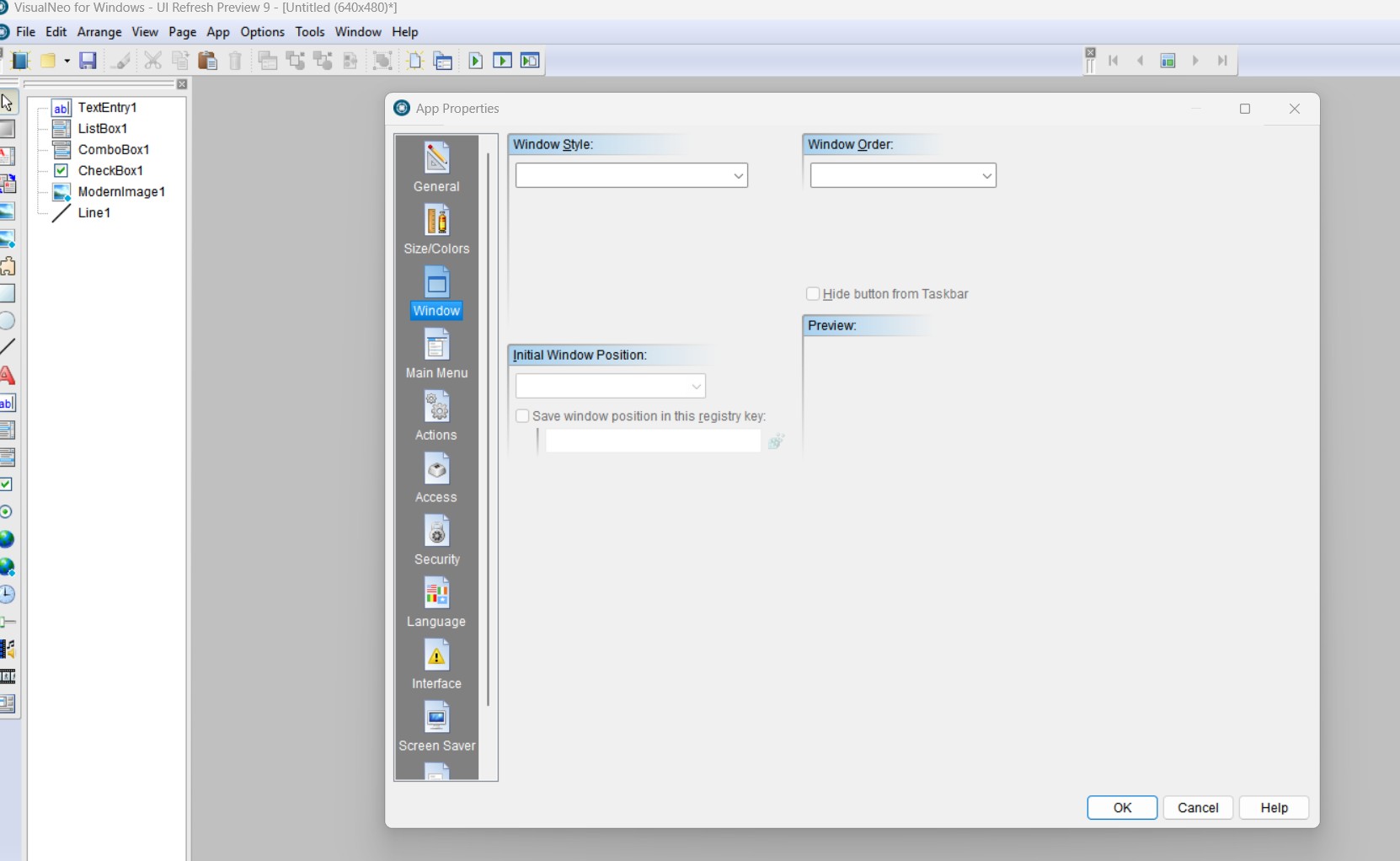
Quote from luishp on July 22, 2026, 6:29 pmThank you everyoen for your support and comments!!!
@sinesi-giuseppe
Thank you for reporting it. I'm currently fixing it.
Regarding slowness of launching it's probably due to your antivirus system. Here it's almost instant.@no1g8tor96
VisualNEO Win currently can't create 64 bits apps due to all plugins and most libraries are 32 bits.
Anyway you can be sure Windows will keep 32 bits apps for a long time due to the bunch of 32 bits enterprise apps that are necessary nowadays.
Thank you everyoen for your support and comments!!!
@sinesi-giuseppe
Thank you for reporting it. I'm currently fixing it.
Regarding slowness of launching it's probably due to your antivirus system. Here it's almost instant.
@no1g8tor96
VisualNEO Win currently can't create 64 bits apps due to all plugins and most libraries are 32 bits.
Anyway you can be sure Windows will keep 32 bits apps for a long time due to the bunch of 32 bits enterprise apps that are necessary nowadays.
Quote from luishp on July 22, 2026, 7:58 pm@sinesi-giuseppe please download and install it again.
I think it's fixed now.
Please confirm.
Thank you!
@sinesi-giuseppe please download and install it again.
I think it's fixed now.
Please confirm.
Thank you!
Quote from AnthonyJones on July 22, 2026, 8:39 pmFor the virus scan don't forget to right click the Version that you want and un block it as in the clip-
For the virus scan don't forget to right click the Version that you want and un block it as in the clip-
Uploaded files: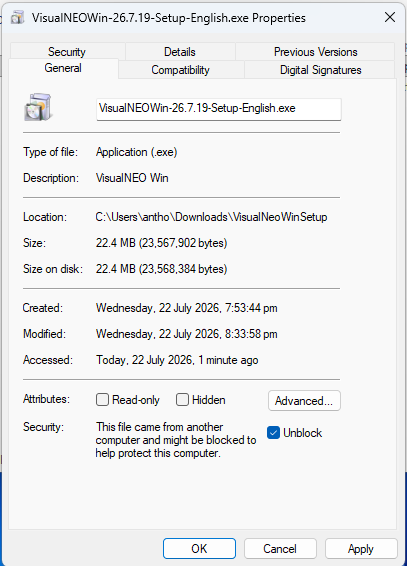
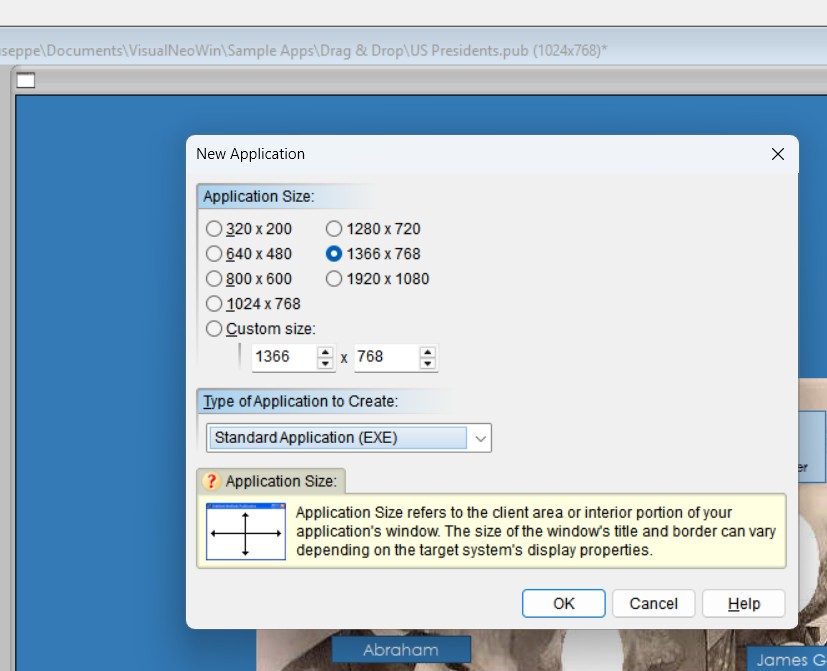
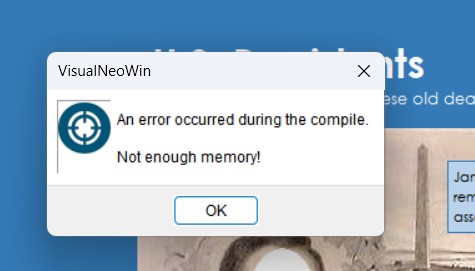
Quote from Sinesi Giuseppe on July 22, 2026, 11:55 pmYes thanks now it works, I noticed a difference in the choice of window size when creating a new program and when you just want to modify it, I encountered some memory problems when launching an application not always.
Yes thanks now it works, I noticed a difference in the choice of window size when creating a new program and when you just want to modify it, I encountered some memory problems when launching an application not always.
Uploaded files: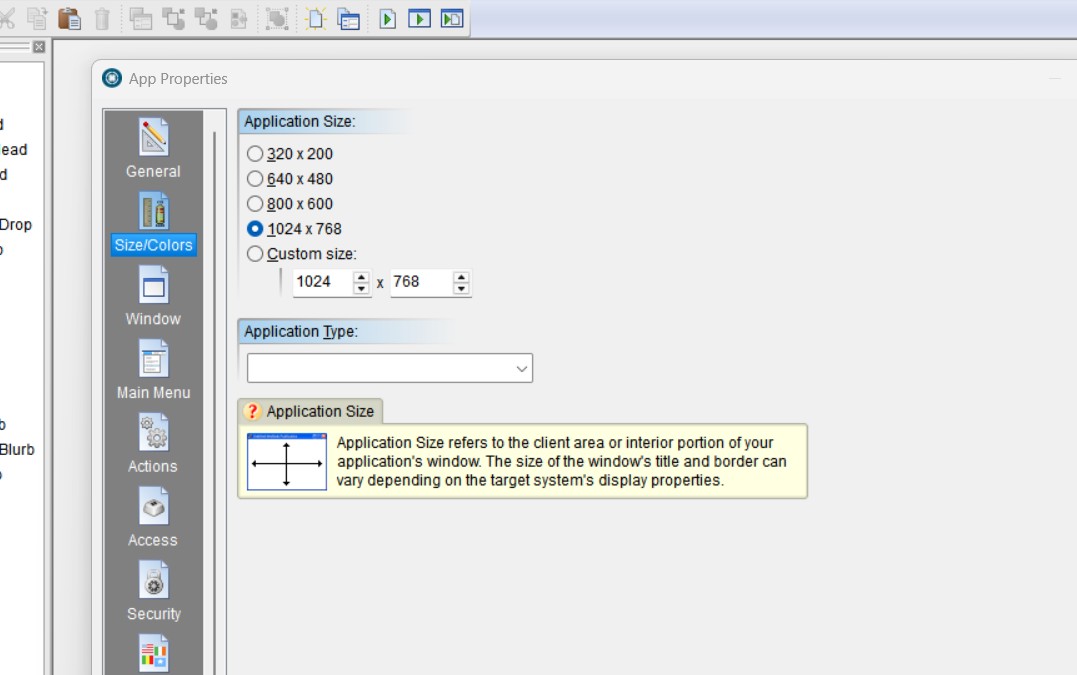
Quote from luishp on July 23, 2026, 7:54 am@sinesi-giuseppe I have updated the installer with fixes.
Please download and install again and let me know if the problems have gone.
Thank you everyone for your patience.
As this is a very large and complex update it's normal to find errors.
Please report and I will do my best to fix them ASAP.
@sinesi-giuseppe I have updated the installer with fixes.
Please download and install again and let me know if the problems have gone.
Thank you everyone for your patience.
As this is a very large and complex update it's normal to find errors.
Please report and I will do my best to fix them ASAP.
Quote from luishp on July 23, 2026, 11:22 amI have published a new update fixing Unicode / ANSI problem in File actions.
Please keep sending any error report here or by email.
Thank you all!
I have published a new update fixing Unicode / ANSI problem in File actions.
Please keep sending any error report here or by email.
Thank you all!

Quote from luishp on July 23, 2026, 4:31 pm@zhzw007 I have just sent you the discount coupon to your email.
I have also published a new update with some more bug fixes:
- Variables menu now works correctly.
- Button states when they have images now work too.
@zhzw007 I have just sent you the discount coupon to your email.
I have also published a new update with some more bug fixes:
- Variables menu now works correctly.
- Button states when they have images now work too.
Quote from luishp on July 23, 2026, 5:22 pmFixed some more problems with Images embeded in RTF files and ANSI encoded .txt files.
Fixed some more problems with Images embeded in RTF files and ANSI encoded .txt files.
Quote from xbl13638 on July 24, 2026, 6:33 amThank you for your continued support.
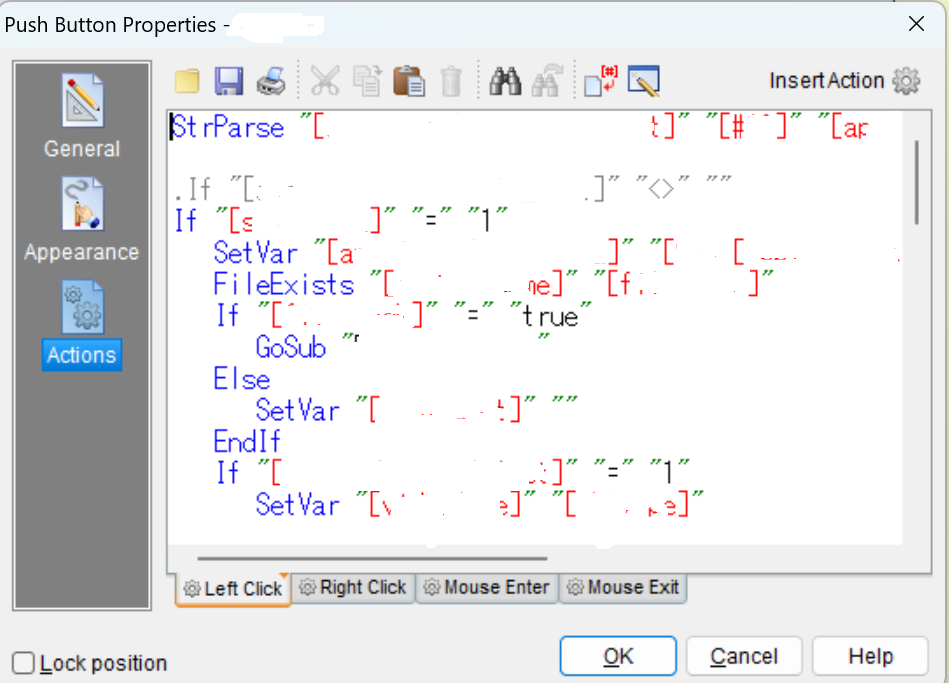
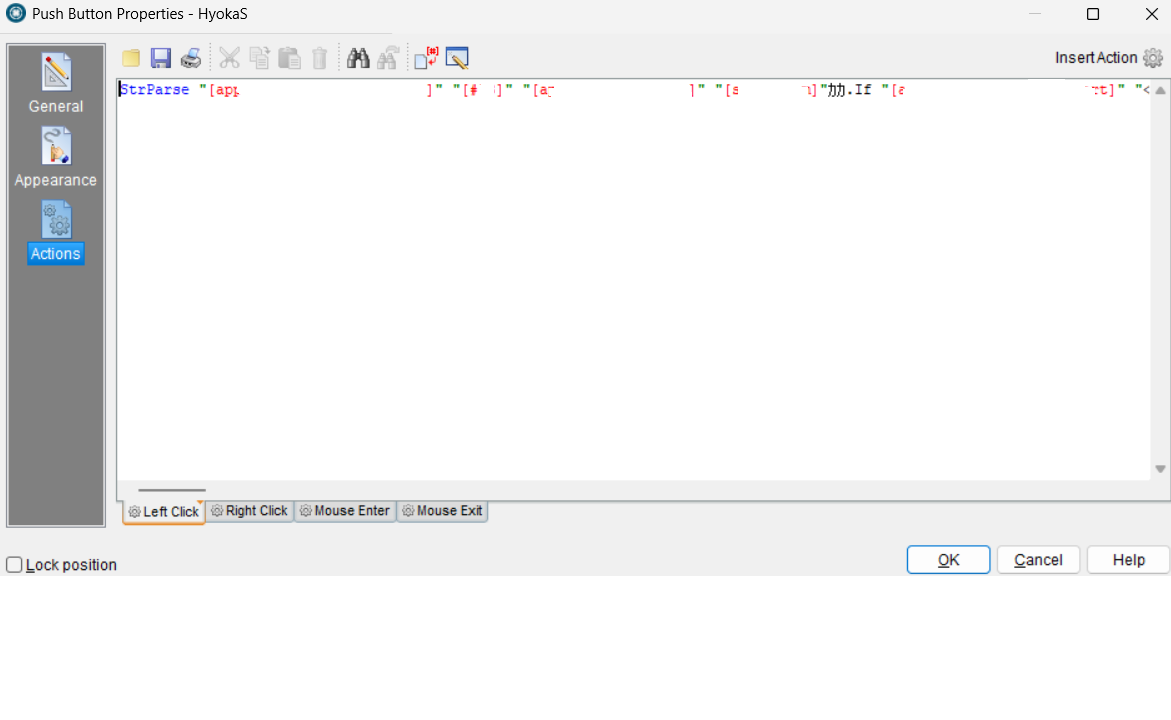
When I opened a .pub file in the new version, all the line breaks I had inserted into the program code within the objects had been removed. Furthermore, misconversion, and the code itself was altered. Please refer to the attached image(before and after).
In addition, the loading of the subroutine file is failing, and the text is displaying as garbled characters.
Please let me know how to resolve this issue.
Thank you for your continued support.
When I opened a .pub file in the new version, all the line breaks I had inserted into the program code within the objects had been removed. Furthermore, misconversion, and the code itself was altered. Please refer to the attached image(before and after).
In addition, the loading of the subroutine file is failing, and the text is displaying as garbled characters.
Please let me know how to resolve this issue.
Uploaded files:
Quote from luishp on July 24, 2026, 8:01 am@xbl13638
We can't reproduce the problem here.
Please download and install again.
If the problem remains, please share a sample .pub showing the problem so we can inspect it.
Thank you!
@xbl13638
We can't reproduce the problem here.
Please download and install again.
If the problem remains, please share a sample .pub showing the problem so we can inspect it.
Thank you!
Quote from luishp on July 24, 2026, 10:32 amI have updated the installer again.
As far as I know all the reported errors until now have been fixed.
Please don't hesitate to report any problem you may find.
Thank you for your patience and collaboration!
I have updated the installer again.
As far as I know all the reported errors until now have been fixed.
Please don't hesitate to report any problem you may find.
Thank you for your patience and collaboration!

Quote from fkapnist on July 24, 2026, 3:19 pmWow. That's great news.
The computing trend is moving away from web-hosted apps to native apps. With Net zero, carbon footprint stuff, they say web app data centers use too much electricity. I never really though smartphones were good for robust apps. Who is going to edit a two hour video on their phone while standing in a bus?
Thanks alot
Wow. That's great news.
The computing trend is moving away from web-hosted apps to native apps. With Net zero, carbon footprint stuff, they say web app data centers use too much electricity. I never really though smartphones were good for robust apps. Who is going to edit a two hour video on their phone while standing in a bus?
Thanks alot