
VisualNEO Win. Version 26.7.19 (Major version)

Quote from luishp on July 24, 2026, 6:15 pmHi have published a new installer with additional options in web browser and variables panel.
There is also better compatibility with old ANSI .txt and .rtf documents.
Thank you all for the reports you are sending me.
Hi have published a new installer with additional options in web browser and variables panel.
There is also better compatibility with old ANSI .txt and .rtf documents.
Thank you all for the reports you are sending me.
Quote from luishp on July 25, 2026, 4:55 pmNew Modern Installer Generator
More minor bugs have been fixed, and a major new feature has been added.
As you know, the previous option for creating a setup or installation package for your application had become outdated.
VisualNEO Win can now generate a modern.exeinstaller for your published applications using the free Inno Setup software.The new installer generator:
- Automatically detects whether Inno Setup is installed.
- Generates the required Inno Setup script.
- Compiles the script and creates the final installer automatically.
- Provides your users with a modern and professional installation experience.
To use this feature, you only need to install the free Inno Setup application on your computer. VisualNEO Win will handle the rest of the process.
Please test the new installer generator and let me know if you encounter any problems or unexpected behaviour.
Thank you!
New Modern Installer Generator
More minor bugs have been fixed, and a major new feature has been added.
As you know, the previous option for creating a setup or installation package for your application had become outdated.
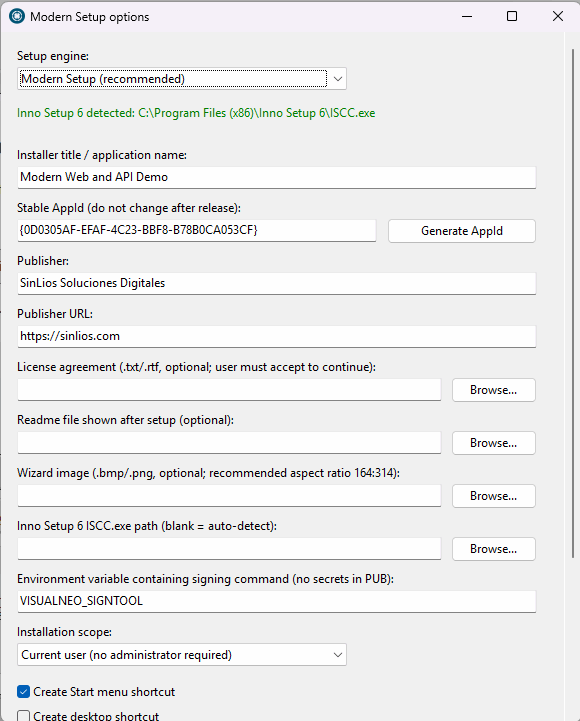
VisualNEO Win can now generate a modern .exe installer for your published applications using the free Inno Setup software.
The new installer generator:
- Automatically detects whether Inno Setup is installed.
- Generates the required Inno Setup script.
- Compiles the script and creates the final installer automatically.
- Provides your users with a modern and professional installation experience.
To use this feature, you only need to install the free Inno Setup application on your computer. VisualNEO Win will handle the rest of the process.
Please test the new installer generator and let me know if you encounter any problems or unexpected behaviour.
Thank you!

Quote from mishem on July 25, 2026, 11:14 pmDrop-down menus used to be localizable, but not anymore. Bidirectional mode disappears completely when localized. :(
I understand it's not that important, but still...
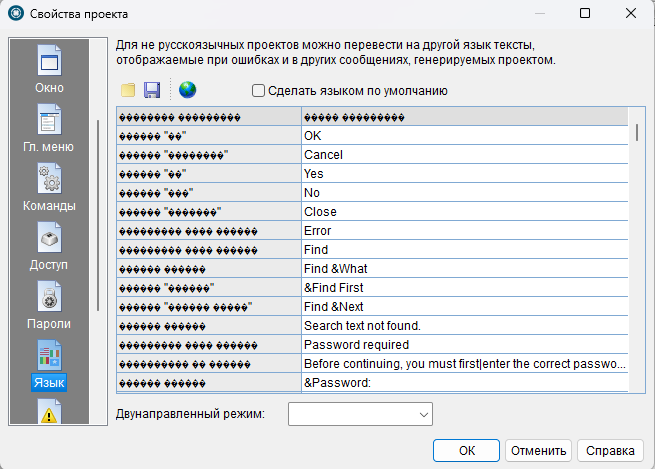
Drop-down menus used to be localizable, but not anymore. Bidirectional mode disappears completely when localized. :(
I understand it's not that important, but still...
Quote from luishp on July 26, 2026, 7:00 amEnglish
Hello @mishem,
Thank you very much for sharing the screenshots showing the different interface rendering issues. These problems have now been corrected. Please download and reinstall the latest version to display the interface correctly.
The first screenshot shows a Russian translation of the VisualNEO Win development environment itself. This is not an official VisualNEO Win language version. The current official versions are available only in English and Spanish.
The Language section in App Properties is intended to translate the messages displayed by applications created with VisualNEO Win. It does not translate the VisualNEO Win development environment itself.
The incorrectly displayed characters were caused by a text encoding issue in the application. The same problem also affected accented characters in Spanish, and it has now been fixed.
Please reinstall the latest version. It is possible that your Russian translation will now be displayed correctly. However, since the Russian interface translation is an unofficial modification of the executable, we cannot guarantee its compatibility with the new Delphi 11 version.
Your applications can still contain Russian text, and you can translate the standard application messages through App Properties > Language. If Russian text entered or saved using the official version does not work correctly, please send us a small sample project and we will investigate it.
I am also looking for a proper solution that will allow the VisualNEO Win interface to be localised into additional languages without modifying the executable. This would provide a safer and more maintainable way to support community translations in the future.
Thank you for your feedback and for helping improve VisualNEO Win.
Best regards,
Luis
Русский
Здравствуйте @mishem!
Большое спасибо за предоставленные снимки экрана, на которых были показаны различные проблемы с отображением интерфейса. Эти проблемы уже исправлены. Пожалуйста, загрузите и переустановите последнюю версию программы, чтобы интерфейс отображался корректно.
На первом снимке экрана показан интерфейс среды разработки VisualNEO Win, переведённый на русский язык. Это не официальная языковая версия VisualNEO Win. В настоящее время официальные версии доступны только на английском и испанском языках.
Раздел Language в App Properties предназначен для перевода сообщений, которые отображаются в приложениях, созданных с помощью VisualNEO Win. Он не предназначен для перевода интерфейса самой среды разработки VisualNEO Win.
Некорректное отображение символов было вызвано ошибкой кодировки текста в самом приложении. Эта же проблема также затрагивала символы с диакритическими знаками в испанском языке, и теперь она исправлена.
Пожалуйста, переустановите последнюю версию программы. Возможно, после этого ваш русский перевод интерфейса будет отображаться правильно. Однако, поскольку русская локализация интерфейса является неофициальной модификацией исполняемого файла, мы не можем гарантировать её совместимость с новой версией, созданной на Delphi 11.
Ваши приложения по-прежнему могут содержать русский текст, а стандартные сообщения приложения можно переводить в разделе App Properties > Language. Если русский текст, введённый или сохранённый в официальной версии, отображается некорректно, пожалуйста, отправьте нам небольшой пример проекта, и мы изучим проблему.
Я также ищу корректное решение, которое позволит локализовать интерфейс VisualNEO Win на дополнительные языки без изменения исполняемого файла. Это обеспечит более безопасный и удобный способ поддержки пользовательских переводов в будущих версиях.
Спасибо за ваши замечания и за помощь в улучшении VisualNEO Win.
С уважением,
Luis
English
Hello @mishem,
Thank you very much for sharing the screenshots showing the different interface rendering issues. These problems have now been corrected. Please download and reinstall the latest version to display the interface correctly.
The first screenshot shows a Russian translation of the VisualNEO Win development environment itself. This is not an official VisualNEO Win language version. The current official versions are available only in English and Spanish.
The Language section in App Properties is intended to translate the messages displayed by applications created with VisualNEO Win. It does not translate the VisualNEO Win development environment itself.
The incorrectly displayed characters were caused by a text encoding issue in the application. The same problem also affected accented characters in Spanish, and it has now been fixed.
Please reinstall the latest version. It is possible that your Russian translation will now be displayed correctly. However, since the Russian interface translation is an unofficial modification of the executable, we cannot guarantee its compatibility with the new Delphi 11 version.
Your applications can still contain Russian text, and you can translate the standard application messages through App Properties > Language. If Russian text entered or saved using the official version does not work correctly, please send us a small sample project and we will investigate it.
I am also looking for a proper solution that will allow the VisualNEO Win interface to be localised into additional languages without modifying the executable. This would provide a safer and more maintainable way to support community translations in the future.
Thank you for your feedback and for helping improve VisualNEO Win.
Best regards,
Luis
Русский
Здравствуйте @mishem!
Большое спасибо за предоставленные снимки экрана, на которых были показаны различные проблемы с отображением интерфейса. Эти проблемы уже исправлены. Пожалуйста, загрузите и переустановите последнюю версию программы, чтобы интерфейс отображался корректно.
На первом снимке экрана показан интерфейс среды разработки VisualNEO Win, переведённый на русский язык. Это не официальная языковая версия VisualNEO Win. В настоящее время официальные версии доступны только на английском и испанском языках.
Раздел Language в App Properties предназначен для перевода сообщений, которые отображаются в приложениях, созданных с помощью VisualNEO Win. Он не предназначен для перевода интерфейса самой среды разработки VisualNEO Win.
Некорректное отображение символов было вызвано ошибкой кодировки текста в самом приложении. Эта же проблема также затрагивала символы с диакритическими знаками в испанском языке, и теперь она исправлена.
Пожалуйста, переустановите последнюю версию программы. Возможно, после этого ваш русский перевод интерфейса будет отображаться правильно. Однако, поскольку русская локализация интерфейса является неофициальной модификацией исполняемого файла, мы не можем гарантировать её совместимость с новой версией, созданной на Delphi 11.
Ваши приложения по-прежнему могут содержать русский текст, а стандартные сообщения приложения можно переводить в разделе App Properties > Language. Если русский текст, введённый или сохранённый в официальной версии, отображается некорректно, пожалуйста, отправьте нам небольшой пример проекта, и мы изучим проблему.
Я также ищу корректное решение, которое позволит локализовать интерфейс VisualNEO Win на дополнительные языки без изменения исполняемого файла. Это обеспечит более безопасный и удобный способ поддержки пользовательских переводов в будущих версиях.
Спасибо за ваши замечания и за помощь в улучшении VisualNEO Win.
С уважением,
Luis
Quote from luishp on July 26, 2026, 7:10 amVisualNEO Win Application Licensing — New Feature
Status: Implemented in the current build.
Date: 26 July 2026.VisualNEO Win now includes a new optional licensing system for applications created with the platform.
This feature allows developers to distribute licensed applications without requiring an activation server or a permanent internet connection. Licensing is disabled by default, so existing projects and publications continue to work exactly as before.
What this feature provides
The new system separates licensing into three clearly defined parts:
- The developer configures the application licensing settings in:
App Properties > Security > Application Licensing- The separate VisualNEO License Manager stores the private signing key and generates customer-specific
.vnlicensefiles.- The compiled VisualNEO Win application contains only the public verification key and validates the license locally before displaying the publication.
The private key is never included in the PUB file or compiled application.
Main benefits
- Fully offline license validation.
- No activation server required.
- No permanent internet connection required.
- Customer-specific license files.
- Optional expiry dates.
- Editions and feature-based licensing.
- Unicode customer names and data.
- Portable or per-user license installation.
- NeoScript access to all license information.
- Existing applications remain unaffected unless licensing is explicitly enabled.
Security model
Licenses are signed using:
- ECDSA P-256
- SHA-256
- Windows Cryptography API: Next Generation through
bcrypt.dllEach license uses the following format:
VNL1.<base64url UTF-8 JSON payload>.<base64url ECDSA signature>The signed license payload contains:
- schema version;
- Product ID;
- License ID;
- customer name;
- customer email;
- edition;
- optional feature names;
- issue date;
- optional expiry date.
A public key can validate licenses, but it cannot create or modify them.
Developers may still use Obsidium as an additional anti-tamper or executable-protection layer, but Obsidium is not required for license authenticity.
VisualNEO License Manager
The new
VNLicenseManager.exe(Tools > License Manager Utility) application is used to:
- create author signing keys;
- display the corresponding public key;
- enter customer information;
- define editions and features;
- set issue and expiry dates;
- generate
.vnlicensefiles.The License Manager is available in the matching English and Spanish candidate builds.
Basic author workflow
1. Create the signing key
Open
VNLicenseManager.exe, select New key, and save the generated.vnkeyfile in a private and securely backed-up location.This file is the private signing key for the product.
2. Configure the application
In VisualNEO Win, open:
App Properties > Security > Application Licensing
Then:
- enable application licensing;
- create a stable Product ID;
- paste the public key generated by License Manager;
- optionally configure the license filename, dialog title and purchase URL.
The Product ID and public key should remain unchanged for future updates of the same application.
3. Generate a customer license
In License Manager, enter:
- the same Product ID;
- customer name;
- customer email;
- edition;
- optional comma-separated feature names;
- issue date;
- optional expiry date.
Then generate the
.vnlicensefile and deliver it to the customer.Important private-key warning
The
.vnkeyfile must never be included in:
- a PUB project;
- a compiled application;
- an installer;
- a ZIP archive;
- a support attachment;
- a source repository;
- a production package.
It must be protected in the same way as a code-signing key.
Date handling
Dates use the ISO format:
YYYY-MM-DDExpiry dates are inclusive.
The License Manager rejects:
- invalid dates;
- incorrectly formatted dates;
- expiry dates earlier than the issue date.
License storage
The compiled application searches for the license in two locations.
First, beside the executable:
<application-folder>\<configured-license-filename>Then in the per-user application data folder:
%LOCALAPPDATA%\VisualNeoWin\Licenses\<product-id>\<configured-license-filename>This provides two deployment models.
Portable licensing
A valid license can be placed beside the application executable.
Installed per-user licensing
A user can import or paste a license through the registration dialog. VisualNEO Win then stores it in the product-specific local application data folder.
The portable location is checked first. If that file is invalid, the runtime continues and checks the installed per-user license.
Runtime behaviour
When licensing is enabled, the compiled application validates:
- the Product ID;
- the digital signature;
- the license payload structure;
- the issue date;
- the expiry date.
This validation happens before the publication is displayed.
When the license is missing or invalid, the application opens a registration dialog that allows the user to:
- paste a license token;
- import a
.vnlicensefile;- open the configured purchase URL.
Cancelling the registration dialog closes the application.
Development and test mode
Applications tested from inside VisualNEO Win do not block the developer.
Instead, they report a development licensing status so that the project can be tested without installing a production license.
The real licensing gate is applied when running a standalone compiled EXE.NeoScript license variables
The following variables are populated automatically (new Global Variables):
[LicenseValid]
[LicenseStatus]
[LicenseName]
[LicenseEmail]
[LicenseExpires]
[LicenseID]
[LicenseEdition]
[LicenseFeatures]
These values can be used to display license information, enable or disable parts of the application, or provide different functionality depending on the licensed edition.
New NeoScript actions
The licensing system introduces the following actions:
LicenseValidate "[Result]" "[Error]"
LicenseInstall "token-or-file" "[Result]" "[Error]"
LicenseRemove "[Result]" "[Error]"
LicenseGetField "field" "[Result]"
LicenseHasFeature "feature" "[Result]"
LicenseShowDialog "[Result]"
LicenseValidateValidates the currently available license.
LicenseInstallInstalls a license from either:
- a complete license token;
- a
.vnlicensefile.
LicenseRemoveRemoves the installed per-user license.
LicenseGetFieldReturns a specific value from the current license.
Supported fields are:
product_id
license_id
name
email
edition
features
issued
expires
LicenseHasFeatureChecks whether a specific feature is included in the license.
Feature-name comparison is case-insensitive.
LicenseShowDialogOpens the application registration dialog manually.
Editions and features
Licenses can contain both an edition and a list of optional features.
For example:
Edition: Professional
Features: reports,pdf-export,cloud-sync
An application can then use:
LicenseHasFeature "pdf-export" "[Result]"to determine whether a specific function should be available.
This makes it possible to create:
- Standard and Professional editions;
- modular applications;
- customer-specific functionality;
- temporary feature access;
- trial or demonstration licences.
Compatibility notes:
- existing ANSI plug-ins are unaffected;
- PUB source files remain readable text;
- older publications behave as if
LicenseEnabled=No;- licensing is per user unless a portable licence is placed beside the EXE;
- no registry dependency is required.
Current limitations
This first version is intentionally focused on reliable offline licensing.
The following features are not included yet:
- online activation;
- server-backed subscriptions;
- licence revocation;
- floating or network licences;
- hardware or machine binding;
- concurrent-user licensing;
- central activation management;
- automatic licence renewal.
Machine binding has been deliberately omitted from the first version. It may be added later as an optional author-controlled setting.
Because validation is fully offline, expiry is based on the local Windows date. Deliberate clock rollback is not currently prevented.
Offline licensing also cannot stop a determined attacker from patching a compiled executable. Digital signatures prove that a licence is authentic, but they are not a replacement for executable protection or anti-tamper software.
Please test this functionality carefully and report any problem, unexpected behaviour or usability issue.
VisualNEO Win Application Licensing — New Feature
Status: Implemented in the current build.
Date: 26 July 2026.
VisualNEO Win now includes a new optional licensing system for applications created with the platform.
This feature allows developers to distribute licensed applications without requiring an activation server or a permanent internet connection. Licensing is disabled by default, so existing projects and publications continue to work exactly as before.
What this feature provides
The new system separates licensing into three clearly defined parts:
- The developer configures the application licensing settings in:
App Properties > Security > Application Licensing - The separate VisualNEO License Manager stores the private signing key and generates customer-specific
.vnlicensefiles. - The compiled VisualNEO Win application contains only the public verification key and validates the license locally before displaying the publication.
The private key is never included in the PUB file or compiled application.
Main benefits
- Fully offline license validation.
- No activation server required.
- No permanent internet connection required.
- Customer-specific license files.
- Optional expiry dates.
- Editions and feature-based licensing.
- Unicode customer names and data.
- Portable or per-user license installation.
- NeoScript access to all license information.
- Existing applications remain unaffected unless licensing is explicitly enabled.
Security model
Licenses are signed using:
- ECDSA P-256
- SHA-256
- Windows Cryptography API: Next Generation through
bcrypt.dll
Each license uses the following format:
VNL1.<base64url UTF-8 JSON payload>.<base64url ECDSA signature>
The signed license payload contains:
- schema version;
- Product ID;
- License ID;
- customer name;
- customer email;
- edition;
- optional feature names;
- issue date;
- optional expiry date.
A public key can validate licenses, but it cannot create or modify them.
Developers may still use Obsidium as an additional anti-tamper or executable-protection layer, but Obsidium is not required for license authenticity.
VisualNEO License Manager
The new VNLicenseManager.exe (Tools > License Manager Utility) application is used to:
- create author signing keys;
- display the corresponding public key;
- enter customer information;
- define editions and features;
- set issue and expiry dates;
- generate
.vnlicensefiles.
The License Manager is available in the matching English and Spanish candidate builds.
Basic author workflow
1. Create the signing key
Open VNLicenseManager.exe, select New key, and save the generated .vnkey file in a private and securely backed-up location.
This file is the private signing key for the product.
2. Configure the application
In VisualNEO Win, open:
App Properties > Security > Application Licensing
Then:
- enable application licensing;
- create a stable Product ID;
- paste the public key generated by License Manager;
- optionally configure the license filename, dialog title and purchase URL.
The Product ID and public key should remain unchanged for future updates of the same application.
3. Generate a customer license
In License Manager, enter:
- the same Product ID;
- customer name;
- customer email;
- edition;
- optional comma-separated feature names;
- issue date;
- optional expiry date.
Then generate the .vnlicense file and deliver it to the customer.
Important private-key warning
The .vnkey file must never be included in:
- a PUB project;
- a compiled application;
- an installer;
- a ZIP archive;
- a support attachment;
- a source repository;
- a production package.
It must be protected in the same way as a code-signing key.
Date handling
Dates use the ISO format:
YYYY-MM-DD
Expiry dates are inclusive.
The License Manager rejects:
- invalid dates;
- incorrectly formatted dates;
- expiry dates earlier than the issue date.
License storage
The compiled application searches for the license in two locations.
First, beside the executable:
<application-folder>\<configured-license-filename>
Then in the per-user application data folder:
%LOCALAPPDATA%\VisualNeoWin\Licenses\<product-id>\<configured-license-filename>
This provides two deployment models.
Portable licensing
A valid license can be placed beside the application executable.
Installed per-user licensing
A user can import or paste a license through the registration dialog. VisualNEO Win then stores it in the product-specific local application data folder.
The portable location is checked first. If that file is invalid, the runtime continues and checks the installed per-user license.
Runtime behaviour
When licensing is enabled, the compiled application validates:
- the Product ID;
- the digital signature;
- the license payload structure;
- the issue date;
- the expiry date.
This validation happens before the publication is displayed.
When the license is missing or invalid, the application opens a registration dialog that allows the user to:
- paste a license token;
- import a
.vnlicensefile; - open the configured purchase URL.
Cancelling the registration dialog closes the application.
Development and test mode
Applications tested from inside VisualNEO Win do not block the developer.
Instead, they report a development licensing status so that the project can be tested without installing a production license.
The real licensing gate is applied when running a standalone compiled EXE.
NeoScript license variables
The following variables are populated automatically (new Global Variables):
[LicenseValid]
[LicenseStatus]
[LicenseName]
[LicenseEmail]
[LicenseExpires]
[LicenseID]
[LicenseEdition]
[LicenseFeatures]
These values can be used to display license information, enable or disable parts of the application, or provide different functionality depending on the licensed edition.
New NeoScript actions
The licensing system introduces the following actions:
LicenseValidate "[Result]" "[Error]"
LicenseInstall "token-or-file" "[Result]" "[Error]"
LicenseRemove "[Result]" "[Error]"
LicenseGetField "field" "[Result]"
LicenseHasFeature "feature" "[Result]"
LicenseShowDialog "[Result]"
LicenseValidate
Validates the currently available license.
LicenseInstall
Installs a license from either:
- a complete license token;
- a
.vnlicensefile.
LicenseRemove
Removes the installed per-user license.
LicenseGetField
Returns a specific value from the current license.
Supported fields are:
product_id
license_id
name
email
edition
features
issued
expires
LicenseHasFeature
Checks whether a specific feature is included in the license.
Feature-name comparison is case-insensitive.
LicenseShowDialog
Opens the application registration dialog manually.
Editions and features
Licenses can contain both an edition and a list of optional features.
For example:
Edition: Professional
Features: reports,pdf-export,cloud-sync
An application can then use:
LicenseHasFeature "pdf-export" "[Result]"
to determine whether a specific function should be available.
This makes it possible to create:
- Standard and Professional editions;
- modular applications;
- customer-specific functionality;
- temporary feature access;
- trial or demonstration licences.
Compatibility notes:
- existing ANSI plug-ins are unaffected;
- PUB source files remain readable text;
- older publications behave as if
LicenseEnabled=No; - licensing is per user unless a portable licence is placed beside the EXE;
- no registry dependency is required.
Current limitations
This first version is intentionally focused on reliable offline licensing.
The following features are not included yet:
- online activation;
- server-backed subscriptions;
- licence revocation;
- floating or network licences;
- hardware or machine binding;
- concurrent-user licensing;
- central activation management;
- automatic licence renewal.
Machine binding has been deliberately omitted from the first version. It may be added later as an optional author-controlled setting.
Because validation is fully offline, expiry is based on the local Windows date. Deliberate clock rollback is not currently prevented.
Offline licensing also cannot stop a determined attacker from patching a compiled executable. Digital signatures prove that a licence is authentic, but they are not a replacement for executable protection or anti-tamper software.
Please test this functionality carefully and report any problem, unexpected behaviour or usability issue.

Quote from naglieri on July 26, 2026, 10:53 amFirst of all, I want to thank you for the new version of VisualNeo Win.
I’ve run some tests. Setting aside the new and excellent features, the program behaves just like the old version.
I have a folder with over 330 plugins. When I run the program, I have a loading issue with only 2 of them, and after they load, 3 of them cannot be registered (various errors and program crashes).
It’s well known that the more plugins there are to load, the longer the program takes to start up or run a project. With the new version, the time has increased by a few seconds in both cases—not a major issue, but it’s noticeable. That’s why I always work with only the plugins I need.
In a few rare cases, the program warned me upon startup as if I had exhausted system resources or was experiencing a memory problem. But from what I recall, this should also be a memory allocation issue caused by obsolete plugins or plugins that are incompatible with each other.
For a new version, this is the smallest price to pay.The only issue is that Malwarebytes flags the executable as malware (Malware.Heuristic.2038), so you have to add it to the exceptions. Another minor issue: if a program is compiled with the default program icon, that icon isn’t present in the compiled program. The generic VisualNeoWin icon isn’t displayed; instead, it shows the standard DOS-style program icon.
I’m continuing with the tests; in any case, great work
First of all, I want to thank you for the new version of VisualNeo Win.
I’ve run some tests. Setting aside the new and excellent features, the program behaves just like the old version.
I have a folder with over 330 plugins. When I run the program, I have a loading issue with only 2 of them, and after they load, 3 of them cannot be registered (various errors and program crashes).
It’s well known that the more plugins there are to load, the longer the program takes to start up or run a project. With the new version, the time has increased by a few seconds in both cases—not a major issue, but it’s noticeable. That’s why I always work with only the plugins I need.
In a few rare cases, the program warned me upon startup as if I had exhausted system resources or was experiencing a memory problem. But from what I recall, this should also be a memory allocation issue caused by obsolete plugins or plugins that are incompatible with each other.
For a new version, this is the smallest price to pay.
The only issue is that Malwarebytes flags the executable as malware (Malware.Heuristic.2038), so you have to add it to the exceptions. Another minor issue: if a program is compiled with the default program icon, that icon isn’t present in the compiled program. The generic VisualNeoWin icon isn’t displayed; instead, it shows the standard DOS-style program icon.
I’m continuing with the tests; in any case, great work
Quote from mishem on July 26, 2026, 12:56 pmHello @luishp
I downloaded it, took a quick look, and it seems to be fixed. I'll look at it further later.
I don't modify the source file. I only translate the strings and create a library that the executable uses, which automatically modifies the translated strings. To make things clearer (I hope), I quickly extracted the Spanish strings from the Spanish version and created the same file. All you need to do is install the English version and place the VisualNeoWin.ESP file next to the executable.
If your computer's regional settings are set to Spain, the executable will automatically pick up the translated strings from this file.
The only thing is, I may have misspelled the abbreviation, in which case .ESP should be replaced with the correct one.
Such files can be created for any country without modifying the source file.
But the main requirement is that all strings in the executable file be moved to string resources.
If you're interested, we can discuss this separately.
Hello @luishp
I downloaded it, took a quick look, and it seems to be fixed. I'll look at it further later.
I don't modify the source file. I only translate the strings and create a library that the executable uses, which automatically modifies the translated strings. To make things clearer (I hope), I quickly extracted the Spanish strings from the Spanish version and created the same file. All you need to do is install the English version and place the VisualNeoWin.ESP file next to the executable.
If your computer's regional settings are set to Spain, the executable will automatically pick up the translated strings from this file.
The only thing is, I may have misspelled the abbreviation, in which case .ESP should be replaced with the correct one.
Such files can be created for any country without modifying the source file.
But the main requirement is that all strings in the executable file be moved to string resources.
If you're interested, we can discuss this separately.
Quote from mishem on July 26, 2026, 1:04 pmChange the RUS extension of this file to .ESP. If your regional settings are set to Spain, this file will also be picked up, but the program will display in Russian. :)
So, even if your system settings aren't what you need, you can adjust the file extension. ;)
Change the RUS extension of this file to .ESP. If your regional settings are set to Spain, this file will also be picked up, but the program will display in Russian. :)
So, even if your system settings aren't what you need, you can adjust the file extension. ;)
Uploaded files:Quote from mishem on July 26, 2026, 1:09 pmThis is impossible to localize using this method without modifying the original VisualNeoWin.exe file. Because the strings aren't stored in string resources, and a quick inspection reveals they're actually packed into a separate file, making localization very difficult. Therefore, I request that all strings be stored in string resources.
This is impossible to localize using this method without modifying the original VisualNeoWin.exe file. Because the strings aren't stored in string resources, and a quick inspection reveals they're actually packed into a separate file, making localization very difficult. Therefore, I request that all strings be stored in string resources.
Uploaded files: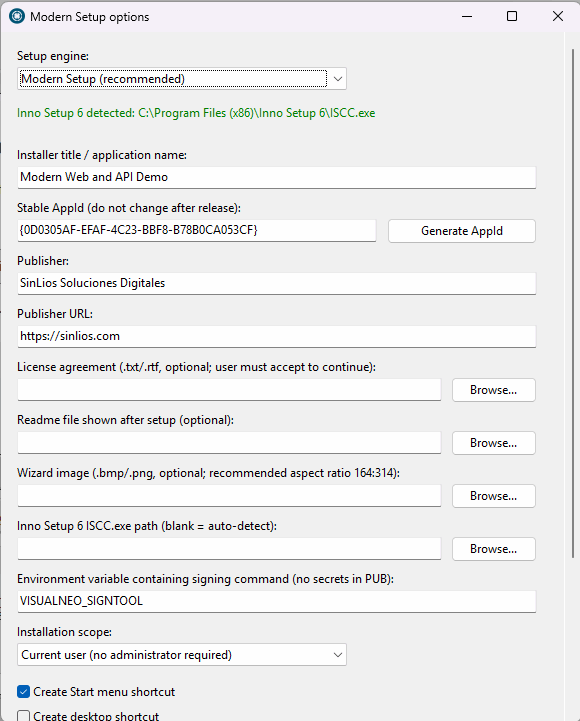
Quote from mishem on July 26, 2026, 1:14 pmAnd yes, the files I uploaded only work with the currently unmodified VisualNeoWin.exe file. That is, the one I had when I downloaded it. While I'm writing this, you might have fixed something, changed something, and uploaded a new version. :)
For the new version, you also need to recompile a new localized file. :( Because the file structure changes with a new compilation.
And yes, the files I uploaded only work with the currently unmodified VisualNeoWin.exe file. That is, the one I had when I downloaded it. While I'm writing this, you might have fixed something, changed something, and uploaded a new version. :)
For the new version, you also need to recompile a new localized file. :( Because the file structure changes with a new compilation.

Quote from luiz on July 26, 2026, 4:20 pmQuote from luishp on July 25, 2026, 4:55 pmNew Modern Installer Generator
More minor bugs have been fixed, and a major new feature has been added.
As you know, the previous option for creating a setup or installation package for your application had become outdated.
VisualNEO Win can now generate a modern.exeinstaller for your published applications using the free Inno Setup software.
Great Luis. InnoSetup is a great tool. Very good implementation for VisualNeoWin. Thanks.
Quote from luishp on July 25, 2026, 4:55 pmNew Modern Installer Generator
More minor bugs have been fixed, and a major new feature has been added.
As you know, the previous option for creating a setup or installation package for your application had become outdated.
VisualNEO Win can now generate a modern.exeinstaller for your published applications using the free Inno Setup software.
Great Luis. InnoSetup is a great tool. Very good implementation for VisualNeoWin. Thanks.

Quote from rafamacor on July 27, 2026, 8:10 amBuenos días, he instalado la nueva versión estoy probándola :
a) ¿Donde puedo encontrar la documentación para usar (NWID Companion, UI Effects Plugin, ContentBlocks) ?, he notado que insertando acciones de estos plugins a veces me echa del programa
b) ¿Sería posible integrar la opción de que creara una copia (AUTO BACKUP) incremental del PUB cada X tiempo que determine el usuario?
c) Para los usuarios tenemos muchos PlugIns, cada vez que reinstalamos y tenemos que registrarlos es una tarea muy tediosa, ¿se podría añadir un instalador que permitiera Registrarlos?, por ejemplo cogiendo la información que requiera para cada uno de los PlugIns especificándola según orden en una linea, por ejemplo:
UBICACION DEL PLUGIN;NOMBRE USUARIO;NUMERO DE SERIE;...
Buenos días, he instalado la nueva versión estoy probándola :
a) ¿Donde puedo encontrar la documentación para usar (NWID Companion, UI Effects Plugin, ContentBlocks) ?, he notado que insertando acciones de estos plugins a veces me echa del programa
b) ¿Sería posible integrar la opción de que creara una copia (AUTO BACKUP) incremental del PUB cada X tiempo que determine el usuario?
c) Para los usuarios tenemos muchos PlugIns, cada vez que reinstalamos y tenemos que registrarlos es una tarea muy tediosa, ¿se podría añadir un instalador que permitiera Registrarlos?, por ejemplo cogiendo la información que requiera para cada uno de los PlugIns especificándola según orden en una linea, por ejemplo:
UBICACION DEL PLUGIN;NOMBRE USUARIO;NUMERO DE SERIE;...
Quote from luishp on July 27, 2026, 9:04 am@rafamacor buenos días. Te respondo por partes:
a) Debes ponerte en contacto con los desarrolladores de dichos plugins. Te sugiero utilizar los hilos correspondientes en el foro.
b) Lo tendremos en cuenta. En esta versión se ha introducido File > Saved Versions que mantiene copia de las últimas tres versiones guardada spor el usuario.
c) Ya existe un sistema que permite activar, desactivar, exportar e importar instalaciones de plugins desde las version 21.9.9Saludos!
@rafamacor buenos días. Te respondo por partes:
a) Debes ponerte en contacto con los desarrolladores de dichos plugins. Te sugiero utilizar los hilos correspondientes en el foro.
b) Lo tendremos en cuenta. En esta versión se ha introducido File > Saved Versions que mantiene copia de las últimas tres versiones guardada spor el usuario.
c) Ya existe un sistema que permite activar, desactivar, exportar e importar instalaciones de plugins desde las version 21.9.9
Saludos!
Quote from luishp on July 27, 2026, 12:50 pmI have just published a new updated installer.
It fixes some more minor bugs and includes these new features:- New Modern Page Transitions.
- New Modern Messages action commands.
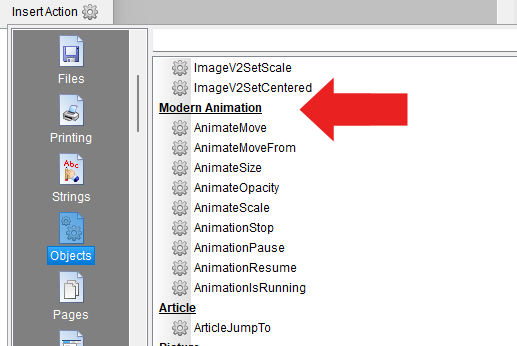
- New Modern Animation action commands.VisualNEO Win is finally evolving fast! :)
I have just published a new updated installer.
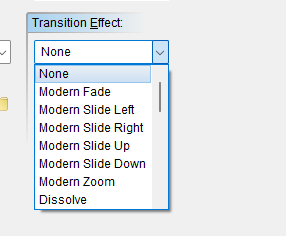
It fixes some more minor bugs and includes these new features:
- New Modern Page Transitions.
- New Modern Messages action commands.
- New Modern Animation action commands.
VisualNEO Win is finally evolving fast! :)
Uploaded files: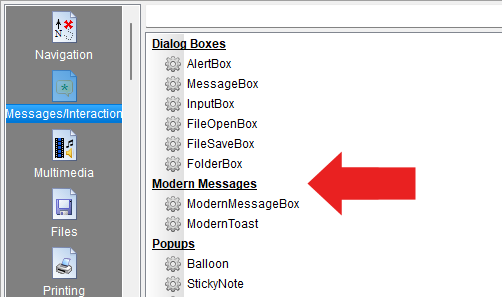

Quote from Sinesi Giuseppe on July 27, 2026, 2:26 pmHi, do you think we'll finally be able to have at least one of these objects? I know I can find them in plugins, but sometimes it's too cumbersome to insert them, at least if you manage to have the tab widget and the scrollable container. While the resizable combobox can currently only be modified by increasing the font size. Thanks for all you're doing.
Hi, do you think we'll finally be able to have at least one of these objects? I know I can find them in plugins, but sometimes it's too cumbersome to insert them, at least if you manage to have the tab widget and the scrollable container. While the resizable combobox can currently only be modified by increasing the font size. Thanks for all you're doing.
Uploaded files:
Quote from luishp on July 27, 2026, 3:04 pm@sinesi-giuseppe I have opened a new thread to disccuss new versions:
https://visualneo.com/forum/topic/visualneo-win-suggestions-and-wishes
Thank you!
@sinesi-giuseppe I have opened a new thread to disccuss new versions:
https://visualneo.com/forum/topic/visualneo-win-suggestions-and-wishes
Thank you!