
VisualNEO Win. Version 26.7.19 (Major version)

Quote from xbl13638 on July 28, 2026, 5:58 amThank you for your assistance.
When the content includes Japanese text, line breaks disappear, or garbled characters appear in the program itself. This may be due to a Unicode version update.
As this renders the programs I have created unusable, I would appreciate it if you could look into a fix for this issue.
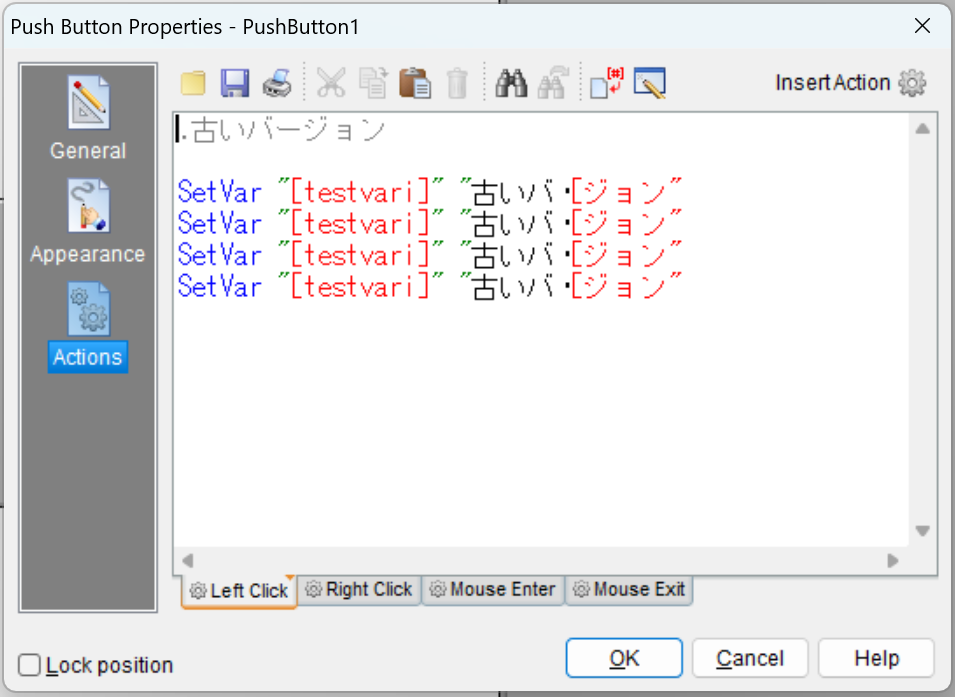
I am attaching the .pub file for investigation purposes,and The image shows the screen as it appears when opened in an older version.
@luishp
Thank you for your assistance.
When the content includes Japanese text, line breaks disappear, or garbled characters appear in the program itself. This may be due to a Unicode version update.
As this renders the programs I have created unusable, I would appreciate it if you could look into a fix for this issue.
I am attaching the .pub file for investigation purposes,and The image shows the screen as it appears when opened in an older version.
Uploaded files:

Quote from impactband4u on July 28, 2026, 6:55 amHi Luishp, don't know if it's only from my side, but I can't read a line from ListBox on Page1 to a Text Variable on Page2. If the Text Variable is on the same page as ListBox, it work, but not on a different page. Also, when I load ListBox Line1 in Text Variable on the same page and than go to Page2 and back to Page1, it cleared the Text Variable on Page 1. See example please.
Ver 26.7.19
Greetings : )
Hi Luishp, don't know if it's only from my side, but I can't read a line from ListBox on Page1 to a Text Variable on Page2. If the Text Variable is on the same page as ListBox, it work, but not on a different page. Also, when I load ListBox Line1 in Text Variable on the same page and than go to Page2 and back to Page1, it cleared the Text Variable on Page 1. See example please.
Ver 26.7.19
Greetings : )
Uploaded files:
Quote from luishp on July 28, 2026, 7:12 am@xbl13638 please download and install again.
That problem was fixed. Thank you!
@xbl13638 please download and install again.
That problem was fixed. Thank you!

Quote from Ivanes82 on July 28, 2026, 9:20 amCongratulations on this update @luishp.
I'm really happy to see this program being updated and Spanish language support being brought back. I'll definitely buy the update this week without fail.
Just a small suggestion: it would be awesome to have a built-in plugin store right inside the program, where you could install and update plugins and their licenses. It would be super convenient for installation and could also serve as another revenue stream for the project by taking a small cut from plugin sales in the store. Having everything in one place would make life easier for everyone—developers and users alike.
Thank you so much for everything, and keep up the great work!
Congratulations on this update @luishp.
I'm really happy to see this program being updated and Spanish language support being brought back. I'll definitely buy the update this week without fail.
Just a small suggestion: it would be awesome to have a built-in plugin store right inside the program, where you could install and update plugins and their licenses. It would be super convenient for installation and could also serve as another revenue stream for the project by taking a small cut from plugin sales in the store. Having everything in one place would make life easier for everyone—developers and users alike.
Thank you so much for everything, and keep up the great work!
Quote from xbl13638 on July 28, 2026, 10:24 amThank you for your assistance.
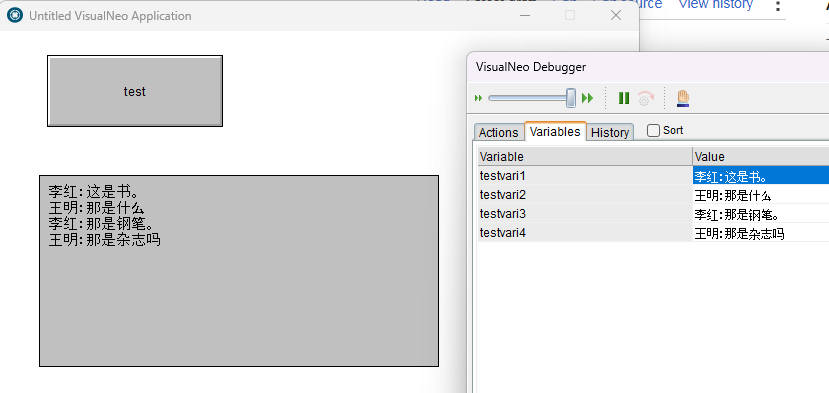
but Regarding the Japanese test.pub file, there are absolutely no changes.I can see the changes in the Chinese file you provided.
However,I provided the text in the test.pub file earlier is garbled.
@luishp
Thank you for your assistance.
but Regarding the Japanese test.pub file, there are absolutely no changes.
I can see the changes in the Chinese file you provided.
However,I provided the text in the test.pub file earlier is garbled.
Uploaded files: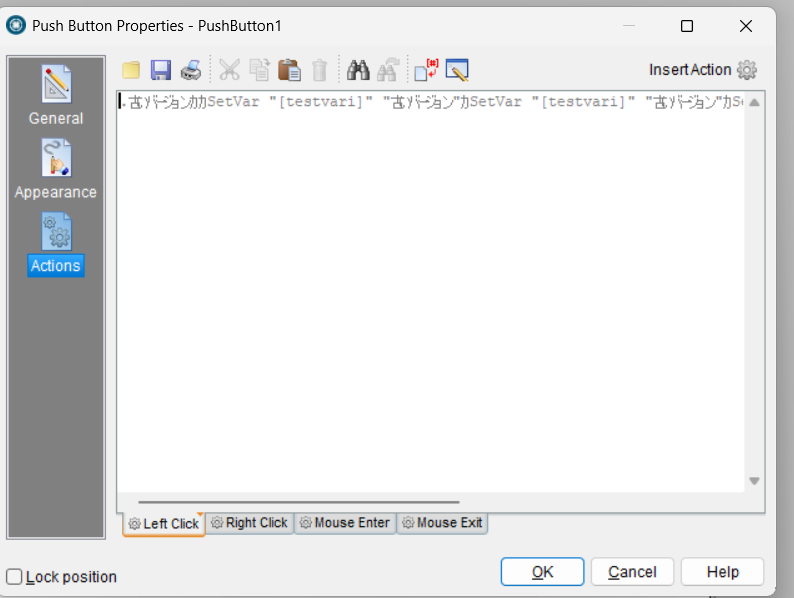
Quote from luishp on July 28, 2026, 10:26 am@xbl13638 please be sure to generate a NEW pub file with the latest update.
The file you provided is not valid becouse it was not saved properly.
Please try and let me know if it works.
@xbl13638 please be sure to generate a NEW pub file with the latest update.
The file you provided is not valid becouse it was not saved properly.
Please try and let me know if it works.
Quote from xbl13638 on July 28, 2026, 10:47 amAll the program files I’ve made so far end up in the same state. Does that mean I have to remake everything? That’s really unproductive and tough.
I re-downloaded Visualneo Win from this link, is that right?
https://visualneo.com/product/visualneo-win
@luishp
All the program files I’ve made so far end up in the same state. Does that mean I have to remake everything? That’s really unproductive and tough.
I re-downloaded Visualneo Win from this link, is that right?
Quote from luishp on July 28, 2026, 12:00 pm@xbl13638 yes, that's the correct link.
You can use your old VisualNEO Win version projects directly with the new version.
If you have created new projects using the new version and japanese characters before the bug was fixed, you will need make them again.
Sorry.
@xbl13638 yes, that's the correct link.
You can use your old VisualNEO Win version projects directly with the new version.
If you have created new projects using the new version and japanese characters before the bug was fixed, you will need make them again.
Sorry.
Quote from luishp on July 28, 2026, 12:18 pmI have just published a new update:
- New Modern Container Object with Scrollbars.
- New Modern Tabs Object.
- New action commands to manage both new objects.
- New Sample files to test and understand the new features.
@impactband4u the error you reported has been fixed.
@sinesi-giuseppe let me know what you think about the new objects.Thank you all for your support, reports and patience.
I have just published a new update:
- New Modern Container Object with Scrollbars.
- New Modern Tabs Object.
- New action commands to manage both new objects.
- New Sample files to test and understand the new features.
@impactband4u the error you reported has been fixed.
@sinesi-giuseppe let me know what you think about the new objects.
Thank you all for your support, reports and patience.
Quote from impactband4u on July 28, 2026, 2:09 pm@luishp
Thank you Luishp : )
Other errors I get is when I sometimes close a button after I edited script, the program freeze.
I will make a pub file of the ComboBox that sometimes also don't load text.
Thank You for all your hard work!
Thank you Luishp : )
Other errors I get is when I sometimes close a button after I edited script, the program freeze.
I will make a pub file of the ComboBox that sometimes also don't load text.
Thank You for all your hard work!
Quote from luishp on July 28, 2026, 2:40 pmNew minor update with fixes to buttons rollover / rollout images and ModernMessage design.
Thank you!
New minor update with fixes to buttons rollover / rollout images and ModernMessage design.
Thank you!

Quote from CSSystems on July 28, 2026, 5:28 pmIs there a newer version than
26.7.19?
I wanted to look at the installer feature, but my version shows the old setup option.
I am also interested in the License feature. I have been using a VERY old piece of software, Armadillo.
This feature sounds wonderful. Can I easily update my old pubs?
Sorry!! Reinstalled again and found and see how to use new installer and License feature. Just have to practise.
Is there a newer version than
26.7.19?
I wanted to look at the installer feature, but my version shows the old setup option.
I am also interested in the License feature. I have been using a VERY old piece of software, Armadillo.
This feature sounds wonderful. Can I easily update my old pubs?
Sorry!! Reinstalled again and found and see how to use new installer and License feature. Just have to practise.
Quote from luishp on July 28, 2026, 6:15 pm@cssystems, no that's the more new version BUT I'm publishing patches (about two or three every day) to update the same version number.
If you dont see this (see attached picture), then, download again and reinstall. Remember to install InnoSetup.Can I easily update my old pubs?
Yes, that's the idea. You can try it right now, but it will probably improve in the coming weeks.
@cssystems, no that's the more new version BUT I'm publishing patches (about two or three every day) to update the same version number.
If you dont see this (see attached picture), then, download again and reinstall. Remember to install InnoSetup.
Can I easily update my old pubs?
Yes, that's the idea. You can try it right now, but it will probably improve in the coming weeks.
Uploaded files: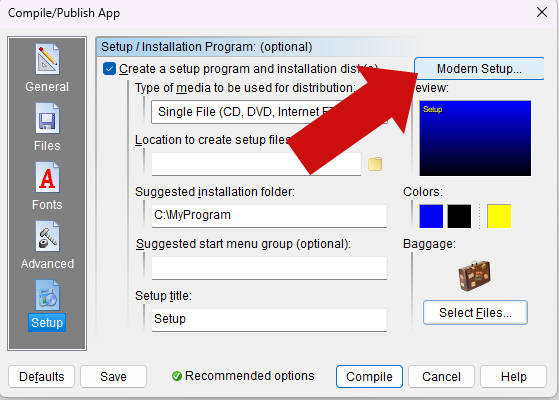
Quote from impactband4u on July 28, 2026, 7:02 pm@luishp
Hi Luishp, here are the pub file of the ComboBox problem I have. Please check and let me know if the problem is from my side. Thank You!
Hi Luishp, here are the pub file of the ComboBox problem I have. Please check and let me know if the problem is from my side. Thank You!
Uploaded files:
Quote from luishp on July 28, 2026, 7:57 pm@impactband4u thank you for the detailed sample file.
This kind of reports are really helpful!
I have already fixed the problem.
Please download and install again and then confirm everything works as expected.
Thanks!!
@impactband4u thank you for the detailed sample file.
This kind of reports are really helpful!
I have already fixed the problem.
Please download and install again and then confirm everything works as expected.
Thanks!!
Quote from impactband4u on July 28, 2026, 9:20 pm@luishp
Thank you Luishp, works perfect : ) Will let you know if I find any other problems.
Greetings
Thank you Luishp, works perfect : ) Will let you know if I find any other problems.
Greetings

Quote from Sinesi Giuseppe on July 29, 2026, 12:14 amFor moderntabs, is it possible to select each page by clicking the title without entering properties mode when in edit/create mode? It would be great to be able to include an icon or image along with the text. It's perfect for the scrollable moderncontainer. Maybe after all this time, all these updates at once is fantastic.
For moderntabs, is it possible to select each page by clicking the title without entering properties mode when in edit/create mode? It would be great to be able to include an icon or image along with the text. It's perfect for the scrollable moderncontainer. Maybe after all this time, all these updates at once is fantastic.
Quote from xbl13638 on July 29, 2026, 4:10 amHundreds of Pub files created with older versions are exhibiting the same problem: missing line breaks and garbled characters. Fixing them all is impossible.
In short, files created with older versions(2021.9.9) cannot be used with newer versions(2026.7.19).
You say, "You can use your old VisualNEO Win version projects directly with the new version,"
but this is not the case.This means we cannot use the new version for japanese. Is there any solution?
@luishp
Hundreds of Pub files created with older versions are exhibiting the same problem: missing line breaks and garbled characters. Fixing them all is impossible.
In short, files created with older versions(2021.9.9) cannot be used with newer versions(2026.7.19).
You say, "You can use your old VisualNEO Win version projects directly with the new version,"
but this is not the case.
This means we cannot use the new version for japanese. Is there any solution?

Quote from Darbdenral on July 29, 2026, 5:21 am@luishp
This is wonderful news for the VisualNEO Win community!
Porting the old Delphi code to the new code base is a large task, plus adding new features!
Yes! :)P.S. Watch out for the stray TStringList without the TEncoding.UTF8, they bite.. ;)
thanks!!
Brad
This is wonderful news for the VisualNEO Win community!
Porting the old Delphi code to the new code base is a large task, plus adding new features!
Yes! :)
P.S. Watch out for the stray TStringList without the TEncoding.UTF8, they bite.. ;)
thanks!!
Brad
Quote from luishp on July 29, 2026, 6:54 am@xbl13638 of course there must be a solution.
Please share here an affected .pub file so I can take a look.
I need to understand the problem in order to solve it.
I didn't know there was even possible to use jaaneese characters in old versions...
Regards.
@xbl13638 of course there must be a solution.
Please share here an affected .pub file so I can take a look.
I need to understand the problem in order to solve it.
I didn't know there was even possible to use jaaneese characters in old versions...
Regards.