
VisualNEO Win. Version 26.9.30 (Minor version)

Quote from luishp on September 30, 2026, 7:34 pmVisualNEO Win 26.9.30 is now available
We are pleased to announce the release of VisualNEO Win 26.9.30, a maintenance update focused on reliability, better Unicode support, data recovery and editor stability.
What’s new
- Improved automatic save and recovery, including projects opened directly from Windows Explorer.
- Fixed Find and Replace All in the action editor.
- Opening a
.pubfile now reuses the existing VisualNEO Win instance and correctly supports Unicode paths.- Fixed the occasional “A component named BookPropertiesForm already exists” error.
- Fixed corrupted Cyrillic and other Unicode text when using
SetObjectCaptionwith Simple Text objects.- ModernFileDrop now correctly preserves an intentionally empty prompt.
- Uninstalling a Modern Plugin now removes its previous disabled state, so reinstalling it activates the plugin normally.
- Improved the lifecycle and cleanup of action-editor components to address intermittent Invalid pointer operation and access-violation errors.
- Improved handling of projects opened by double-clicking them in Windows Explorer.
Compatibility
This release preserves the readable VisualNEO
.pubformat, existing NeoScript syntax and compatibility with classic plugins. The Modern Plugin API also remains compatible with the current plugin collections.
The update includes the complete Universal edition with English, Spanish, Italian, German and Russian language support.Recommended update
We recommend that all VisualNEO Win users install this version, especially anyone who has experienced autosave recovery problems, Unicode text corruption or intermittent errors while editing actions.
Version: 26.9.30
Release date: September 30, 2026Thank you to everyone who reported these issues and provided projects, screenshots and detailed reproduction information. Your feedback continues to make VisualNEO Win more reliable for everyone.
VisualNEO Win 26.9.30 is now available
We are pleased to announce the release of VisualNEO Win 26.9.30, a maintenance update focused on reliability, better Unicode support, data recovery and editor stability.
What’s new
- Improved automatic save and recovery, including projects opened directly from Windows Explorer.
- Fixed Find and Replace All in the action editor.
- Opening a
.pubfile now reuses the existing VisualNEO Win instance and correctly supports Unicode paths. - Fixed the occasional “A component named BookPropertiesForm already exists” error.
- Fixed corrupted Cyrillic and other Unicode text when using
SetObjectCaptionwith Simple Text objects. - ModernFileDrop now correctly preserves an intentionally empty prompt.
- Uninstalling a Modern Plugin now removes its previous disabled state, so reinstalling it activates the plugin normally.
- Improved the lifecycle and cleanup of action-editor components to address intermittent Invalid pointer operation and access-violation errors.
- Improved handling of projects opened by double-clicking them in Windows Explorer.
Compatibility
This release preserves the readable VisualNEO .pub format, existing NeoScript syntax and compatibility with classic plugins. The Modern Plugin API also remains compatible with the current plugin collections.
The update includes the complete Universal edition with English, Spanish, Italian, German and Russian language support.
Recommended update
We recommend that all VisualNEO Win users install this version, especially anyone who has experienced autosave recovery problems, Unicode text corruption or intermittent errors while editing actions.
Version: 26.9.30
Release date: September 30, 2026
Thank you to everyone who reported these issues and provided projects, screenshots and detailed reproduction information. Your feedback continues to make VisualNEO Win more reliable for everyone.

Quote from joferar333 on October 2, 2026, 3:44 am@luishp
GRACIAS Por la actualizacion pero debo comentarte que
- Fixed Find and Replace All in the action editor. Sigue sin funcionar
@luishp
GRACIAS Por la actualizacion pero debo comentarte que
- Fixed Find and Replace All in the action editor. Sigue sin funcionar
Quote from luishp on October 2, 2026, 8:20 pm@joferar333 efectivamente funciona con la opción uno a uno, pero al opción "Si a todo" no está funcionando correctamente.
Voy a corregirlo ahora mismo...
@joferar333 efectivamente funciona con la opción uno a uno, pero al opción "Si a todo" no está funcionando correctamente.
Voy a corregirlo ahora mismo...
Quote from luishp on October 2, 2026, 8:49 pm@joferar333 acabo de publicar una actualización donde se corrige el problema (comprobado)
Por favor descarga e instala de nuevo.
Gracias!
@joferar333 acabo de publicar una actualización donde se corrige el problema (comprobado)
Por favor descarga e instala de nuevo.
Gracias!

Quote from fkapnist on October 2, 2026, 11:10 pmModernMessageBox line breaks " | | " don't work except only for edit test, not final compiled
ModernMessageBox "No Pictures" "No Pictures Loaded.|Open any Image Folder." "Warning" "OK" "OK" "[ModernMessageResult]" "".
ModernMessageBox line breaks " | | " don't work except only for edit test, not final compiled
ModernMessageBox "No Pictures" "No Pictures Loaded.|Open any Image Folder." "Warning" "OK" "OK" "[ModernMessageResult]" ""
.
Quote from joferar333 on October 3, 2026, 3:47 am@luishp Gracias Luis, si ahora realmente funciona.
@luishp Gracias Luis, si ahora realmente funciona.


Quote from jabuckley on October 8, 2026, 12:47 amJust found this awesome application. I come from VB.net. And I wanted something more like Microsoft Infopath, where you add controls to a document, then set the properties. There was very little typing to do for basic functionality. I am very into low code, no code general purpose programming. I prefer to do little typing to set basic properties and define basic actions. Just select from a list.
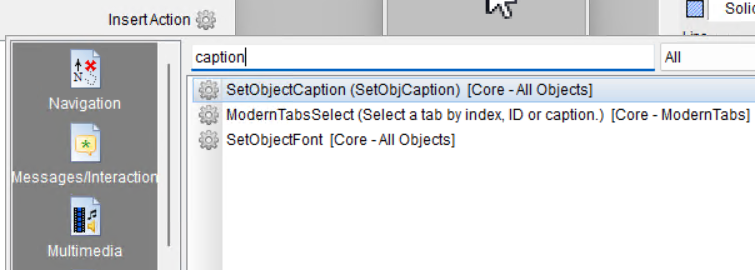
When searching for an action to insert, it would be a quality of life to have a favorites category or most used. Then I wouldn't have to search everytime. See my example for "caption". Once I find "caption", I would prefer not to search for it again.
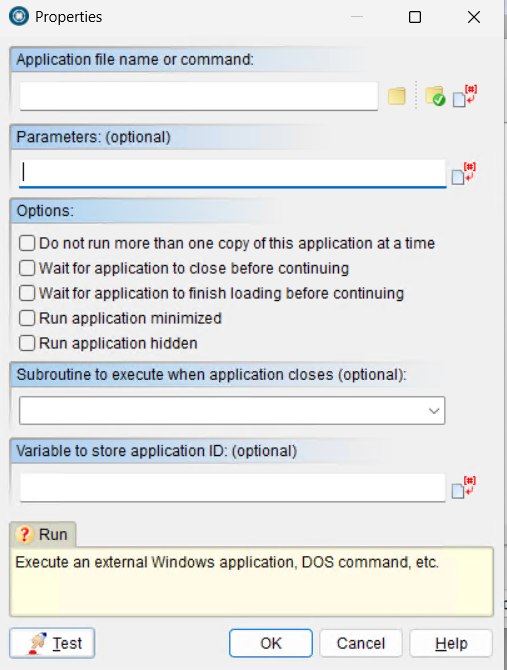
For the "Run" action, maybe have a list of common windows command line tools to choose from, like "cmd.exe".
And for the parameters section, have a list of available parameters to choose from for the selected command.
From my experience, I know where the commands are located on the system, and what the available parameters are, but for someone starting new, it would make it easier. And for us old timers whose memory is not so good any more.
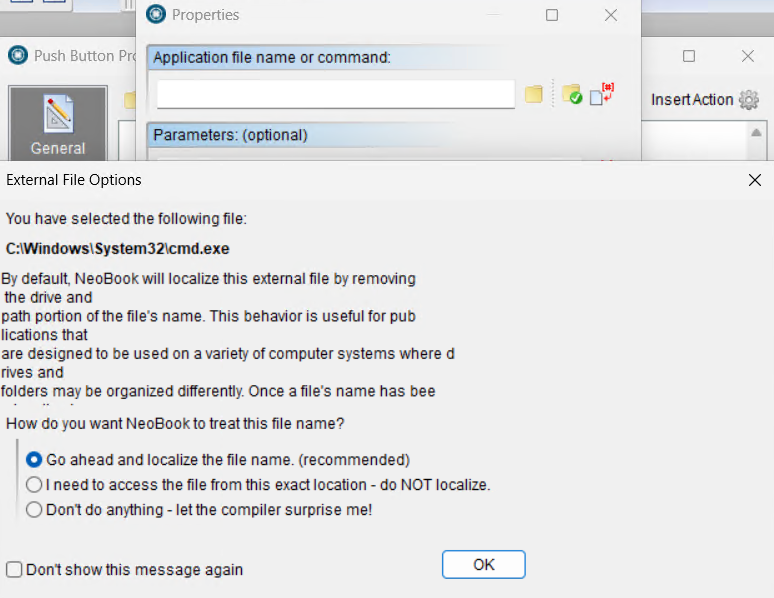
When selecting "cmd.exe". "External File Options" opens. The description has some formatting issues. And the text is cutoff at the bottom. I figured out I needed to use the up/down arrows to see the entire description. Mouse wheel did not work. If there is more to see, make mouse wheel available, and have a vertical scrollbar to indicate there is more verbiage. And the description has some older branding, "NeoBook". And I am not sure about this option: "Don't do anything - let the compiler surprise me!". Living on the edge with that one.
I will be trying out this different way of creating windows administrative utilities. Such fun.
And waiting for NeoDBpro to be updated.
Just found this awesome application. I come from VB.net. And I wanted something more like Microsoft Infopath, where you add controls to a document, then set the properties. There was very little typing to do for basic functionality. I am very into low code, no code general purpose programming. I prefer to do little typing to set basic properties and define basic actions. Just select from a list.
When searching for an action to insert, it would be a quality of life to have a favorites category or most used. Then I wouldn't have to search everytime. See my example for "caption". Once I find "caption", I would prefer not to search for it again.
For the "Run" action, maybe have a list of common windows command line tools to choose from, like "cmd.exe".
And for the parameters section, have a list of available parameters to choose from for the selected command.
From my experience, I know where the commands are located on the system, and what the available parameters are, but for someone starting new, it would make it easier. And for us old timers whose memory is not so good any more.
When selecting "cmd.exe". "External File Options" opens. The description has some formatting issues. And the text is cutoff at the bottom. I figured out I needed to use the up/down arrows to see the entire description. Mouse wheel did not work. If there is more to see, make mouse wheel available, and have a vertical scrollbar to indicate there is more verbiage. And the description has some older branding, "NeoBook". And I am not sure about this option: "Don't do anything - let the compiler surprise me!". Living on the edge with that one.
I will be trying out this different way of creating windows administrative utilities. Such fun.
And waiting for NeoDBpro to be updated.
Uploaded files:
Quote from luishp on October 8, 2026, 12:45 pm@jabuckley welcome to VisualNEO and our community!
First of all thank you for your comments and suggestions. We will check everyone.
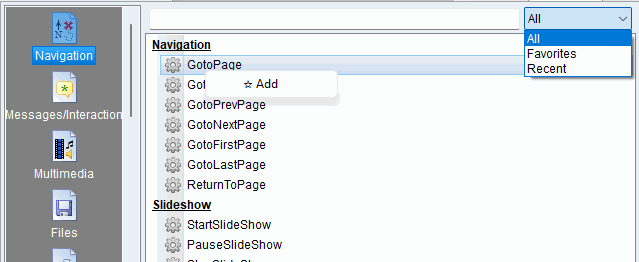
But note that you can already set a command as favourite just by right clicking it and you can select All, favourites and recent commands to be listed (see attached image).
On the other hand a new NeoDBpro modern plugin is into our top priorities. I hope it will be ready in the coming weeks.
Kind regards.
@jabuckley welcome to VisualNEO and our community!
First of all thank you for your comments and suggestions. We will check everyone.
But note that you can already set a command as favourite just by right clicking it and you can select All, favourites and recent commands to be listed (see attached image).
On the other hand a new NeoDBpro modern plugin is into our top priorities. I hope it will be ready in the coming weeks.
Kind regards.

Quote from impactband4u on October 8, 2026, 2:40 pm@luishp
Hi Luishp, is it possible to make the "Hollow" in Fill Pattern to work on TextEntry please?
Hi Luishp, is it possible to make the "Hollow" in Fill Pattern to work on TextEntry please?
Quote from no1g8tor96 on October 8, 2026, 3:59 pmI am new to VN Win and use SQL in Web but when I read this as saw NeoDBpro, what is this and is this the only way to use Databases in Win. If there is a thread about this would like to read. Thanks.
I am new to VN Win and use SQL in Web but when I read this as saw NeoDBpro, what is this and is this the only way to use Databases in Win. If there is a thread about this would like to read. Thanks.
Quote from fkapnist on October 8, 2026, 4:11 pmThe FUNCTIONS do not have a backup feature. If a script in the Functions folder gets corrupted there is no backup or roll-back option at all. Since VisuaNEO Win does not save a copy of function library scripts with each new Pub (as it does for GoSub) all Pubs using a corrupted Function file will break.
A Function backup would be useful.
.
The FUNCTIONS do not have a backup feature. If a script in the Functions folder gets corrupted there is no backup or roll-back option at all. Since VisuaNEO Win does not save a copy of function library scripts with each new Pub (as it does for GoSub) all Pubs using a corrupted Function file will break.
A Function backup would be useful.
.
Quote from impactband4u on October 11, 2026, 3:34 pmHi Luishp, when I write a [TextEntry] (Multi-Line selected) to a text (.txt) file on my PC, it does not write it correctly. I have my program to write a [TextEntry], a complete page to write to line no.5 of my Text file and then read it again. But it only show the text on line no.1 of the [TextEntry] when I read "FileRead" it. The rest is on line no.6,7,8 etc. It must write the complete [TextEntry] to line 5. Thank you
Hi Luishp, when I write a [TextEntry] (Multi-Line selected) to a text (.txt) file on my PC, it does not write it correctly. I have my program to write a [TextEntry], a complete page to write to line no.5 of my Text file and then read it again. But it only show the text on line no.1 of the [TextEntry] when I read "FileRead" it. The rest is on line no.6,7,8 etc. It must write the complete [TextEntry] to line 5. Thank you
Quote from luishp on October 11, 2026, 5:59 pmHi @impactband4u,
From your description, no text is actually being lost. This is simply how
FileWriteandFileReadhandle line breaks.When you use
FileWriteto write a multi-line TextEntry starting at line"5", the first line of text is written to line 5, while the remaining lines are written to lines 6, 7, 8, and so on.When you subsequently use
FileReadwith line"5", it retrieves only that single line, not the entire multi-line content.There are two possible solutions:
- If the text file only needs to contain the TextEntry content, use
"All"instead of"5"when writing and reading. This will preserve the entire text, including all line breaks.- If you need to store the entire TextEntry as a single record on line 5, you'll need to replace the line breaks with a special placeholder before saving, and restore them when reading the content back.
This is the expected behavior of these commands, rather than a bug. Changing it would also break compatibility with existing VisualNEO Win projects.
Hi @impactband4u,
From your description, no text is actually being lost. This is simply how FileWrite and FileRead handle line breaks.
When you use FileWrite to write a multi-line TextEntry starting at line "5", the first line of text is written to line 5, while the remaining lines are written to lines 6, 7, 8, and so on.
When you subsequently use FileRead with line "5", it retrieves only that single line, not the entire multi-line content.
There are two possible solutions:
- If the text file only needs to contain the TextEntry content, use
"All"instead of"5"when writing and reading. This will preserve the entire text, including all line breaks. - If you need to store the entire TextEntry as a single record on line 5, you'll need to replace the line breaks with a special placeholder before saving, and restore them when reading the content back.
This is the expected behavior of these commands, rather than a bug. Changing it would also break compatibility with existing VisualNEO Win projects.
Quote from luishp on October 11, 2026, 6:17 pmHi again @impactband4u,
I need to correct my previous reply, sorry for the confusion.
After reviewing the original implementation, I confirmed that this is a regression, introduced during the Unicode modernization.
Historically, writing a multi-line TextEntry to a numbered line stores the entire value as one record, internally converting line breaks to|separators. Reading that record restores the line breaks automatically.Your original code should therefore work correctly:
FileWrite "[PubDir]notes.txt" "5" "[TextEntry1]"
FileRead "[PubDir]notes.txt" "5" "[TextEntry1]"
This behavior has now been restored in the latest candidate build (I will publish it very soon). No manual placeholder conversion or changes to your code are required. Using
"All"still writes and reads the complete file as ordinary multi-line text.Thank you for reporting this, and apologies again for my initial explanation.
Hi again @impactband4u,
I need to correct my previous reply, sorry for the confusion.
After reviewing the original implementation, I confirmed that this is a regression, introduced during the Unicode modernization.
Historically, writing a multi-line TextEntry to a numbered line stores the entire value as one record, internally converting line breaks to | separators. Reading that record restores the line breaks automatically.
Your original code should therefore work correctly:
FileWrite "[PubDir]notes.txt" "5" "[TextEntry1]"
FileRead "[PubDir]notes.txt" "5" "[TextEntry1]"
This behavior has now been restored in the latest candidate build (I will publish it very soon). No manual placeholder conversion or changes to your code are required. Using "All" still writes and reads the complete file as ordinary multi-line text.
Thank you for reporting this, and apologies again for my initial explanation.
Quote from impactband4u on October 11, 2026, 7:06 pmThank you @luishp
Yes, because it use to work for my program all the time. Here is an example (picture) and script I use to write the files. As you will see that [Page1] and [Page2] was written on line 7.
FileWrite "[PubDir]Hymns/[EditorHymnTitle].txt" "1" "[EditorHymnTitle]"
FileWrite "[PubDir]Hymns/[EditorHymnTitle].txt" "2" "[EditorKey]"
FileWrite "[PubDir]Hymns/[EditorHymnTitle].txt" "3" "[Page1]"
FileWrite "[PubDir]Hymns/[EditorHymnTitle].txt" "4" "[Page2]"
FileWrite "[PubDir]Hymns/[EditorHymnTitle].txt" "5" "[FontSize]"
FileWrite "[PubDir]Hymns/[EditorHymnTitle].txt" "6" "[EditReminder]"
FileWrite "[PubDir]Hymns/[EditorHymnTitle].txt" "7" "[Page1] [Page2]"
FileWrite "[PubDir]Hymns/[EditorHymnTitle].txt" "8" "[BeatSelected]"
FileWrite "[PubDir]Hymns/[EditorHymnTitle].txt" "9" "[SongSelect]"
FileWrite "[PubDir]Hymns/[EditorHymnTitle].txt" "10" "[SongName]"
FileWrite "[PubDir]Hymns/[EditorHymnTitle].txt" "11" "[VideoPath]"
FileWrite "[PubDir]Hymns/[EditorHymnTitle].txt" "12" "[VideoName]"
FileWrite "[PubDir]Hymns/[EditorHymnTitle].txt" "13" "[PlayFileResult]"
FileWrite "[PubDir]Hymns/[EditorHymnTitle].txt" "14" "[AutoTimer]"
Thank you again
Thank you @luishp
Yes, because it use to work for my program all the time. Here is an example (picture) and script I use to write the files. As you will see that [Page1] and [Page2] was written on line 7.
FileWrite "[PubDir]Hymns/[EditorHymnTitle].txt" "1" "[EditorHymnTitle]"
FileWrite "[PubDir]Hymns/[EditorHymnTitle].txt" "2" "[EditorKey]"
FileWrite "[PubDir]Hymns/[EditorHymnTitle].txt" "3" "[Page1]"
FileWrite "[PubDir]Hymns/[EditorHymnTitle].txt" "4" "[Page2]"
FileWrite "[PubDir]Hymns/[EditorHymnTitle].txt" "5" "[FontSize]"
FileWrite "[PubDir]Hymns/[EditorHymnTitle].txt" "6" "[EditReminder]"
FileWrite "[PubDir]Hymns/[EditorHymnTitle].txt" "7" "[Page1] [Page2]"
FileWrite "[PubDir]Hymns/[EditorHymnTitle].txt" "8" "[BeatSelected]"
FileWrite "[PubDir]Hymns/[EditorHymnTitle].txt" "9" "[SongSelect]"
FileWrite "[PubDir]Hymns/[EditorHymnTitle].txt" "10" "[SongName]"
FileWrite "[PubDir]Hymns/[EditorHymnTitle].txt" "11" "[VideoPath]"
FileWrite "[PubDir]Hymns/[EditorHymnTitle].txt" "12" "[VideoName]"
FileWrite "[PubDir]Hymns/[EditorHymnTitle].txt" "13" "[PlayFileResult]"
FileWrite "[PubDir]Hymns/[EditorHymnTitle].txt" "14" "[AutoTimer]"
Thank you again
Uploaded files: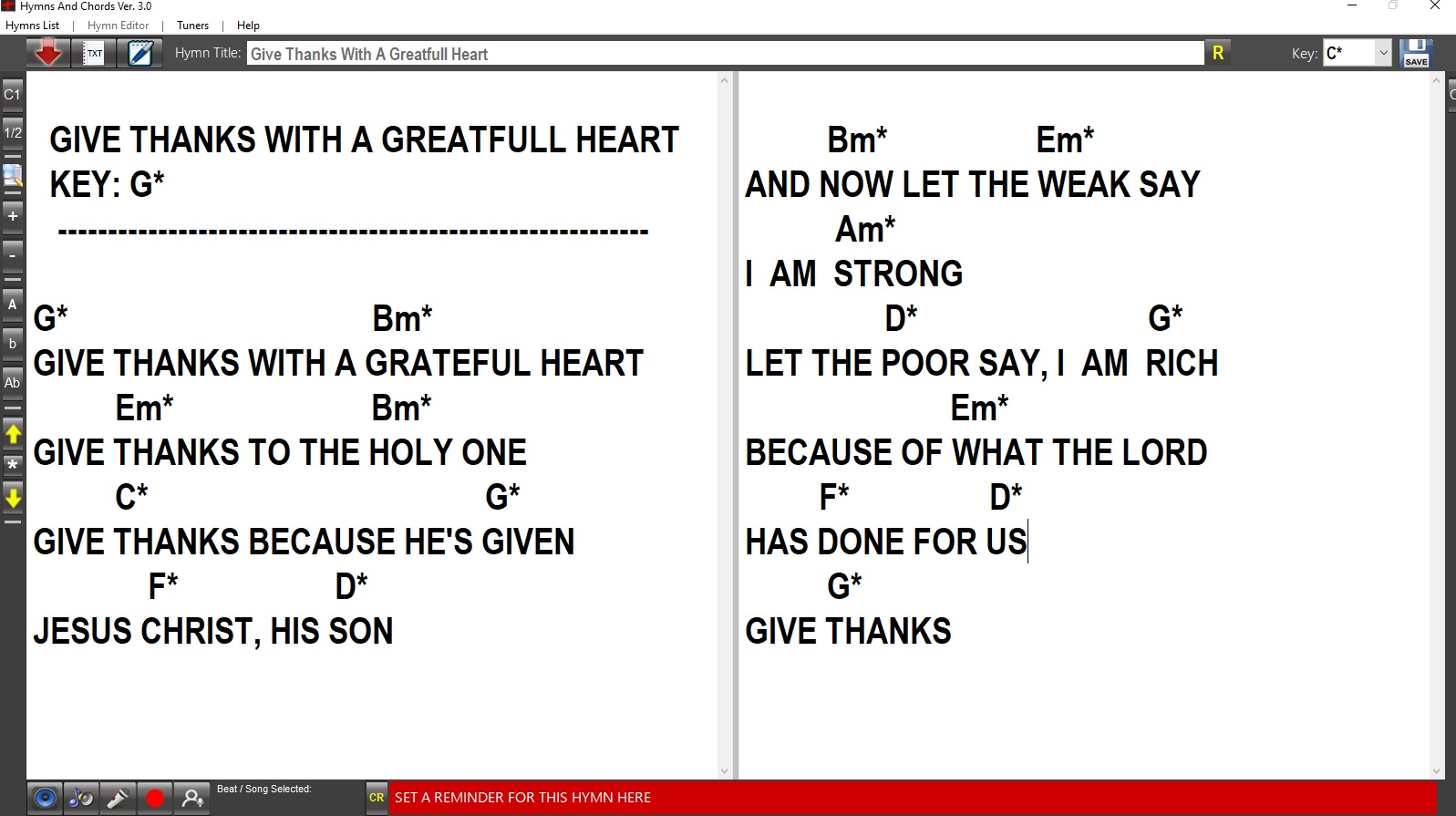
Quote from impactband4u on October 14, 2026, 6:17 pm@Luishp
Hi Luishp, about your quote "This behavior has now been restored in the latest candidate build (I will publish it very soon)". I'm not sure if you already published it because I have the same problem with the latest download. If it is still to be published it's no problem, just want to make sure :) Thank you.
Hi Luishp, about your quote "This behavior has now been restored in the latest candidate build (I will publish it very soon)". I'm not sure if you already published it because I have the same problem with the latest download. If it is still to be published it's no problem, just want to make sure :) Thank you.
Quote from luishp on October 14, 2026, 6:42 pm@impactband4u not yet, sorry.
I'm working in a quite big update with modern plugin SDK and many fixes and improvements.
Right now I'm testing the modern plugin framework with the Modern NeoDBpro plugin (in development).
I hope to release the new version and plugin in the coming days. Not fixed date yet.
By the way, it will include Hole background for TextInput and more customization options in ModernTabs, including text direction (vertical or horizontal).Thank you for your patience.
@impactband4u not yet, sorry.
I'm working in a quite big update with modern plugin SDK and many fixes and improvements.
Right now I'm testing the modern plugin framework with the Modern NeoDBpro plugin (in development).
I hope to release the new version and plugin in the coming days. Not fixed date yet.
By the way, it will include Hole background for TextInput and more customization options in ModernTabs, including text direction (vertical or horizontal).
Thank you for your patience.
Quote from impactband4u on October 14, 2026, 7:35 pm@Luishp
No problem, very excited about the new update :)
No problem, very excited about the new update :)