
VisualNeoWeb suggestions

Quote from AsleyCruz on January 13, 2022, 6:26 pmHi @luishp
These are some crazy ideas from me. Don't explain anything, just if you find any interesting idea, try to add it to VisualNeoWeb.
• Save neoEdge window size and position
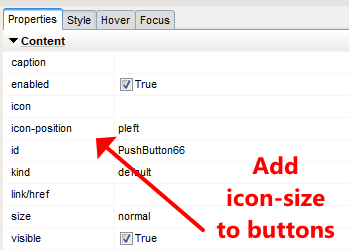
• Add icon-size option. See attached image (3)
• Run command or *.bat or *.cmd file after compiling
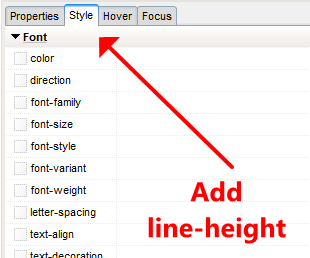
• Add line-height (Panel Style > Font) See attached image (2)
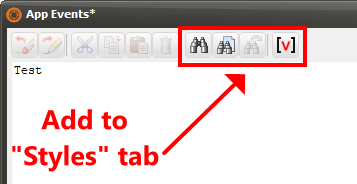
• Add option "Find" text in "Styles" tab. See attached image (1)New ideas will be posted here.
Thanks a lot.
Hi @luishp
These are some crazy ideas from me. Don't explain anything, just if you find any interesting idea, try to add it to VisualNeoWeb.
• Save neoEdge window size and position
• Add icon-size option. See attached image (3)
• Run command or *.bat or *.cmd file after compiling
• Add line-height (Panel Style > Font) See attached image (2)
• Add option "Find" text in "Styles" tab. See attached image (1)
New ideas will be posted here.
Thanks a lot.

Quote from Gaev on January 13, 2022, 7:36 pm@asleycruz
Run command or *.bat or *.cmd file after compiling
Yeah, especially if one could run an FTP script to upload the compiled files to a server.
Run command or *.bat or *.cmd file after compiling
Yeah, especially if one could run an FTP script to upload the compiled files to a server.
Quote from AsleyCruz on January 18, 2022, 5:02 pmHi @luishp
• Add new option "css-class" to page "Properties"
• Add "Apply" button in "Styles" tab
• Add "Apply" button in "Caption" and "HTML" form (I use very often html tags or svg images)The last two suggestions are to see the changes before closing the form.
Thanks a lot.
Hi @luishp
• Add new option "css-class" to page "Properties"
• Add "Apply" button in "Styles" tab
• Add "Apply" button in "Caption" and "HTML" form (I use very often html tags or svg images)
The last two suggestions are to see the changes before closing the form.
Thanks a lot.

Quote from roccocogliano on January 18, 2022, 5:28 pmQuote from Gaev on January 13, 2022, 7:36 pm@asleycruz
Run command or *.bat or *.cmd file after compiling
Yeah, especially if one could run an FTP script to upload the compiled files to a server.
Hi, I thought that to do this you can also use an application that locally mounts the ftp folder of the our application to be published on your PC. I have used raidrive (https://www.raidrive.com) and it works perfectly. It can be used for both the VisualNeo Web project folder and the Publish folder.
In this way when doing "Compile / Publish", the project output files will be automatically generated in the web folder of our domain.I hope it will be useful to someone
Greetins
Rocco
Quote from Gaev on January 13, 2022, 7:36 pmRun command or *.bat or *.cmd file after compiling
Yeah, especially if one could run an FTP script to upload the compiled files to a server.
Hi, I thought that to do this you can also use an application that locally mounts the ftp folder of the our application to be published on your PC. I have used raidrive (https://www.raidrive.com) and it works perfectly. It can be used for both the VisualNeo Web project folder and the Publish folder.
In this way when doing "Compile / Publish", the project output files will be automatically generated in the web folder of our domain.
I hope it will be useful to someone
Greetins
Rocco

Quote from luishp on January 18, 2022, 7:06 pmRun command or *.bat or *.cmd file after compiling
Yeah, especially if one could run an FTP script to upload the compiled files to a server.
I recommend to use the Tools menu. It's more powerful that it seems. You can add any tool there and execute it with two clicks adding the current folder as a parameter.
Regards.
Run command or *.bat or *.cmd file after compiling
Yeah, especially if one could run an FTP script to upload the compiled files to a server.
I recommend to use the Tools menu. It's more powerful that it seems. You can add any tool there and execute it with two clicks adding the current folder as a parameter.
Regards.
Quote from AsleyCruz on January 18, 2022, 9:29 pm@luishp
The "Tools" menu works very well, but if someone compiles its project with many files will have to wait in front of the PC and run manually the "Tools" apps .
I test many times my app in Android and have to run a .bat file, but we know that would be easier that VisualNeoWeb can run any .bat file automatically after compiling.
Regards.
The "Tools" menu works very well, but if someone compiles its project with many files will have to wait in front of the PC and run manually the "Tools" apps .
I test many times my app in Android and have to run a .bat file, but we know that would be easier that VisualNeoWeb can run any .bat file automatically after compiling.
Regards.
Quote from AsleyCruz on January 28, 2022, 6:24 pmHi,
• Add "type" property to Input control ("search" type in smartphones changes the enter icon key of the keyboard)
https://www.w3schools.com/html/html_form_input_types.asp• Ability to keep "Timer" control always on top? (at design time, optional)
Thanks, @luishp
Hi,
• Add "type" property to Input control ("search" type in smartphones changes the enter icon key of the keyboard)
https://www.w3schools.com/html/html_form_input_types.asp
• Ability to keep "Timer" control always on top? (at design time, optional)
Thanks, @luishp
Quote from luishp on January 28, 2022, 7:41 pm@asleycruz thanks for your suggestions!
I will see what I can do :)
@asleycruz thanks for your suggestions!
I will see what I can do :)
Quote from AsleyCruz on April 25, 2022, 4:45 pmHi @luishp
I have two new suggestions:
1) I would like to search actions with any text (without match case), not only by exact action name. For example: If I search for "item" in Actions tab, no actions will be shown, but with my suggestion all actions that have the word "item" will be shown. I think this is easier to access all actions needed with a custom word.
2) Drag and drop is not available in VisualNeoWeb (at least in my app). I would like to open .neoapp files dragging them to VisualNeoWeb. Or you can change the open file dialog to be like the dialog in attached .png.
Thanks a lot.
Hi @luishp
I have two new suggestions:
1) I would like to search actions with any text (without match case), not only by exact action name. For example: If I search for "item" in Actions tab, no actions will be shown, but with my suggestion all actions that have the word "item" will be shown. I think this is easier to access all actions needed with a custom word.
2) Drag and drop is not available in VisualNeoWeb (at least in my app). I would like to open .neoapp files dragging them to VisualNeoWeb. Or you can change the open file dialog to be like the dialog in attached .png.
Thanks a lot.
Uploaded files: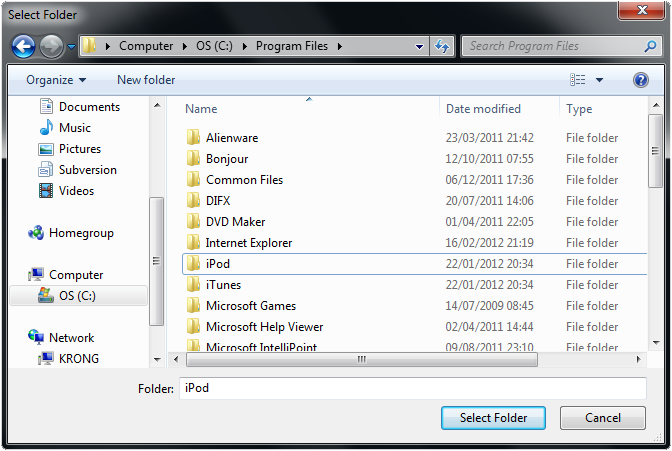
Quote from AsleyCruz on November 25, 2022, 6:56 pmHi @luishp
Please, I would be so thankful if you try to add these new indispensable features in the next update in order to work faster.Add "Search", and "Search and replace":
• In "Code" tab in "Plugin Generator"
• In "Html" window property
• In "Styles" tab in "App properties"-
• Allow drag and drop files/folder in "Libraries / Files" tab in "App properties"
Thanks, in advance.
Hi @luishp
Please, I would be so thankful if you try to add these new indispensable features in the next update in order to work faster.
Add "Search", and "Search and replace":
• In "Code" tab in "Plugin Generator"
• In "Html" window property
• In "Styles" tab in "App properties"
-
• Allow drag and drop files/folder in "Libraries / Files" tab in "App properties"
Thanks, in advance.

Quote from Patrik on November 26, 2022, 2:54 pm
- Merge properties and styles,
- Push the OOP side (object.prop / object.method) or the functional side (a function within a function within a function...)
- A single VisualNeo (win, mac, html, smartphones...)
- Directly generate an Android app (I'm lazy :))
- I agree with the proposals of AsleyCruz
- Merge properties and styles,
- Push the OOP side (object.prop / object.method) or the functional side (a function within a function within a function...)
- A single VisualNeo (win, mac, html, smartphones...)
- Directly generate an Android app (I'm lazy :))
- I agree with the proposals of AsleyCruz
Quote from Patrik on December 16, 2022, 6:15 pmJust an idea...
myAction(in1,in2,in3;out1,out2)
With in1, in2 and in3, the input arguments.
And out1 and out2, the output arguments, separated by a semicolon.
Just an idea...
myAction(in1,in2,in3;out1,out2)
With in1, in2 and in3, the input arguments.
And out1 and out2, the output arguments, separated by a semicolon.
Quote from AsleyCruz on December 22, 2022, 12:10 pmHi @luishp
A new Sortable plugin would be perfect. With 2 demos or more:
- Using regular list
- Using ng-repeat directive to reorder elements in array (this is what I need)In this link Sortablejs.github.io you can find a library with multiples options to have an idea to create the plugin, or if you find a better library would be perfect.
Looking forward to seeing the post of the major update with my suggestions (please, please). I really thank you!
PS: My new Android app "AC Tasks" will be released soon :)
Hi @luishp
A new Sortable plugin would be perfect. With 2 demos or more:
- Using regular list
- Using ng-repeat directive to reorder elements in array (this is what I need)
In this link Sortablejs.github.io you can find a library with multiples options to have an idea to create the plugin, or if you find a better library would be perfect.
Looking forward to seeing the post of the major update with my suggestions (please, please). I really thank you!
PS: My new Android app "AC Tasks" will be released soon :)
Quote from AsleyCruz on February 27, 2023, 7:19 amHi @luishp
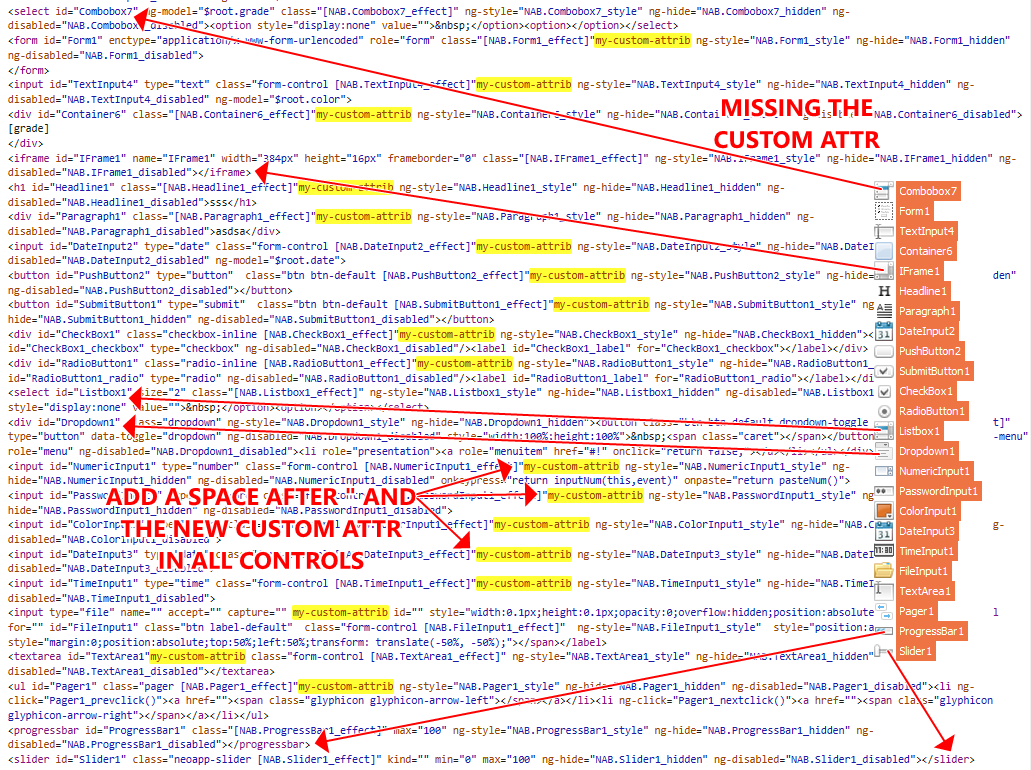
Please, take a look at the attached images and, please, try to fix them for the next major update.
It seems like that the marked controls are missing the "custom-attr" property and add a space as indicated in image #2.png.
Please, check them out. Thanks :)
PS: Can you please add a new AngularJS attribute called: ng-options in property panel for ComboBox & ListBox? So the items can also be loaded from an array, if the array items changes, the items will be automatically. Thanks
Hi @luishp
Please, take a look at the attached images and, please, try to fix them for the next major update.
It seems like that the marked controls are missing the "custom-attr" property and add a space as indicated in image #2.png.
Please, check them out. Thanks :)
PS: Can you please add a new AngularJS attribute called: ng-options in property panel for ComboBox & ListBox? So the items can also be loaded from an array, if the array items changes, the items will be automatically. Thanks
Uploaded files: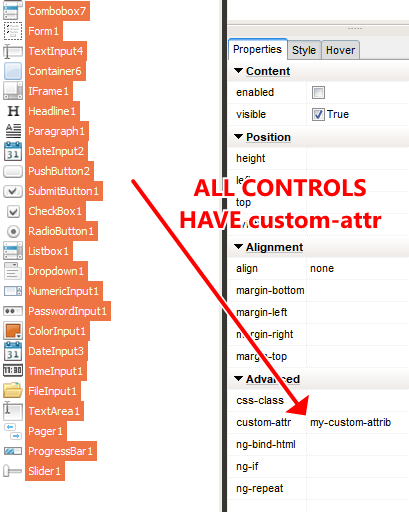
Quote from AsleyCruz on February 28, 2023, 7:01 pmHi @luishp
What about to find the actions only with a part of a string (NO matching case)?
This will be easier to get a list of all actions. Not all users know the exact name of X action.
Take a look at the attached image. Thanks and regards :D
Hi @luishp
What about to find the actions only with a part of a string (NO matching case)?
This will be easier to get a list of all actions. Not all users know the exact name of X action.
Take a look at the attached image. Thanks and regards :D
Uploaded files: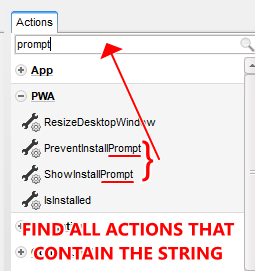
Quote from AsleyCruz on March 8, 2023, 8:52 pmHi @luishp
If we have already "SetObjectAttribute" action (to add [or change] an attribute with its value)
and "GetObjectAttribute" (to get the attribute value), then the "RemoveObjectAttribute" action
SHOULD exist (to delete an attribute with its value, so the attribute won't exist anymore).Here is the line code (super easy):
document.getElementById("objectID").removeAttribute("theAttrib");
And yes, I could create a custom plugin with this action, or code it using BeginJS, but I give this
suggestion because I think this action MUST be included in VisualNEOWeb by default.Thanks a lot :D
Hi @luishp
If we have already "SetObjectAttribute" action (to add [or change] an attribute with its value)
and "GetObjectAttribute" (to get the attribute value), then the "RemoveObjectAttribute" action
SHOULD exist (to delete an attribute with its value, so the attribute won't exist anymore).
Here is the line code (super easy):
document.getElementById("objectID").removeAttribute("theAttrib");
And yes, I could create a custom plugin with this action, or code it using BeginJS, but I give this
suggestion because I think this action MUST be included in VisualNEOWeb by default.
Thanks a lot :D
Quote from luishp on March 8, 2023, 11:02 pm"RemoveObjectAttribute" action SHOULD exist
@asleycruz thanks! I have already added it :)
"RemoveObjectAttribute" action SHOULD exist
@asleycruz thanks! I have already added it :)
Quote from AsleyCruz on March 27, 2023, 6:04 amHi @luishp
I have more little suggestions, so you can include them in the major update:
1) Add "z-index" property for every control in tab "Style".2) Add "object-fit" and "object-position" property for Image control3) All below AngularJS variables are inaccessible from plugins code, please, make them public or create a reference of each variable (unless you have a method):$scope, $rootScope, $location, $route, $modal, $window, $timeout, $interval, $http, $filter, $compile, $animateThanks a lot :-)
Hi @luishp
I have more little suggestions, so you can include them in the major update:
Thanks a lot :-)
Quote from luishp on March 28, 2023, 1:26 pm@asleycruz
To make these AngularJS variables accessible from external JavaScript files, it's possible to attach them to the global window object using the $window service provided by AngularJS. For example:
angular.module('myApp').run(function($rootScope, $window) {
  $window.$rootScope = $rootScope;
});
BUT exposing variables to the global scope can be a security risk because it makes them accessible to any script running on the page, including scripts injected by malicious third-party websites. This means that if you expose sensitive variables to the global scope, such as authentication tokens or user data, an attacker could potentially access and manipulate them.
In addition, exposing variables to the global scope can also make your code harder to maintain and debug, especially in larger applications where variable names may clash between different parts of the code.
To mitigate these risks, it's generally a good practice to avoid exposing variables to the global scope whenever possible.
To make these AngularJS variables accessible from external JavaScript files, it's possible to attach them to the global window object using the $window service provided by AngularJS. For example:
angular.module('myApp').run(function($rootScope, $window) {
  $window.$rootScope = $rootScope;
});
BUT exposing variables to the global scope can be a security risk because it makes them accessible to any script running on the page, including scripts injected by malicious third-party websites. This means that if you expose sensitive variables to the global scope, such as authentication tokens or user data, an attacker could potentially access and manipulate them.
In addition, exposing variables to the global scope can also make your code harder to maintain and debug, especially in larger applications where variable names may clash between different parts of the code.
To mitigate these risks, it's generally a good practice to avoid exposing variables to the global scope whenever possible.
Quote from Patrik on June 30, 2023, 4:35 pmJust an idea like that: imagine that there are 2 code editors, one in VisualNeo (VN) and the other in Javascript (JS).
In the JS version, we would have a "NEO" object which allows access to the different elements, a bit like the $ in JQuery, both for HTML and CSS attributes
Ex : NEO("MyText","visible") = true
Ex : w = NEO("MyButton","width")Or, this object would be available generically in the VN language...
Just an idea like that: imagine that there are 2 code editors, one in VisualNeo (VN) and the other in Javascript (JS).
In the JS version, we would have a "NEO" object which allows access to the different elements, a bit like the $ in JQuery, both for HTML and CSS attributes
Ex : NEO("MyText","visible") = true
Ex : w = NEO("MyButton","width")
Or, this object would be available generically in the VN language...