
Web browser

Quote from Feli on May 31, 2020, 9:50 pmWhen i use the web browser with BrowserGoTo "WebBrowser1" "https//www...."
It doesn't work and my message is Requires internet explorer 4+
I have windows 10 pro 64 bit and it seems that internet explorer is not there.
Does this mean that the visualneowin webbrowser will no longer work?

Thanks. Feli.
When i use the web browser with BrowserGoTo "WebBrowser1" "https//www...."
It doesn't work and my message is Requires internet explorer 4+
I have windows 10 pro 64 bit and it seems that internet explorer is not there.
Does this mean that the visualneowin webbrowser will no longer work?

Thanks. Feli.

Quote from luishp on June 1, 2020, 5:47 pm@feli as far as I know Internet Explorer is part of Windows 10 and it's expected to continue there until 2027.
Don't know why it's not present in your system.Regards.
@feli as far as I know Internet Explorer is part of Windows 10 and it's expected to continue there until 2027.
Don't know why it's not present in your system.
Regards.
Quote from Feli on June 1, 2020, 6:06 pmThanks Luis.
Explorer is no longer in windows10 pro 64 bit and if I try to install (explorer 11) there is a refusal because edge is present.
Can you please tell me why I have an error with the media player and the PlayVideoFile command? (MCI error)
Does this have any relation to your opinion with my version of windows?
It all worked perfectly before I changed my computer...Feli.
Thanks Luis.
Explorer is no longer in windows10 pro 64 bit and if I try to install (explorer 11) there is a refusal because edge is present.
Can you please tell me why I have an error with the media player and the PlayVideoFile command? (MCI error)
Does this have any relation to your opinion with my version of windows?
It all worked perfectly before I changed my computer...
Feli.
Quote from luishp on June 1, 2020, 6:25 pm@feli, please take a look here:
https://www.intowindows.com/fix-internet-explorer-missing-from-windows-10/I can't find any information regarding Internet Explorer not present in Windows 10 pro 64 bit. In fact that would be really strange as it's already a key component for many applications and Edge WebView 2, it's sucessor, is not ready yet.
Regarding PlayVideoFile, do you have the same issue using NeoDX Plugin?
Regards.
@feli, please take a look here:
https://www.intowindows.com/fix-internet-explorer-missing-from-windows-10/
I can't find any information regarding Internet Explorer not present in Windows 10 pro 64 bit. In fact that would be really strange as it's already a key component for many applications and Edge WebView 2, it's sucessor, is not ready yet.
Regarding PlayVideoFile, do you have the same issue using NeoDX Plugin?
Regards.
Quote from Feli on June 1, 2020, 6:49 pmThank you for your quick reply!
OK for the first point but if I do the manipulation it works for me but not at the customer if he does not do this manipulation.
NeoDX only reads .avi not .mp4. When I try to read with the media player or playvideofile an .mp4 file I have mci error.
If it is an .avi I have XVID decompressor fault error.
Thank you for your quick reply!
OK for the first point but if I do the manipulation it works for me but not at the customer if he does not do this manipulation.
NeoDX only reads .avi not .mp4. When I try to read with the media player or playvideofile an .mp4 file I have mci error.
If it is an .avi I have XVID decompressor fault error.
Quote from luishp on June 2, 2020, 5:19 pmHi @feli,
OK for the first point but if I do the manipulation it works for me but not at the customer if he does not do this manipulation.
Internet Explorer is installed by default. I have not found any information telling otherwise.
NeoDX only reads .avi not .mp4. When I try to read with the media player or playvideofile an .mp4 file I have mci error. If it is an .avi I have XVID decompressor fault error.
Have you try with different codecs within the same video format?
PD: Please use Ctrl-Shift-V instead of Ctrl-V to paste translated text from Google translate. Thanks!
Hi @feli,
OK for the first point but if I do the manipulation it works for me but not at the customer if he does not do this manipulation.
Internet Explorer is installed by default. I have not found any information telling otherwise.
NeoDX only reads .avi not .mp4. When I try to read with the media player or playvideofile an .mp4 file I have mci error. If it is an .avi I have XVID decompressor fault error.
Have you try with different codecs within the same video format?
PD: Please use Ctrl-Shift-V instead of Ctrl-V to paste translated text from Google translate. Thanks!

Quote from CN_Iceman on June 9, 2020, 5:16 pmHi.
Try to find the executable:
C:\Program Files\Internet Explorer\iexplore.exe
If you can't find it, you can install it with: Enable or disable Windows features.
I hope this helps.
Greetings.
Hi.
Try to find the executable:
C:\Program Files\Internet Explorer\iexplore.exe
If you can't find it, you can install it with: Enable or disable Windows features.
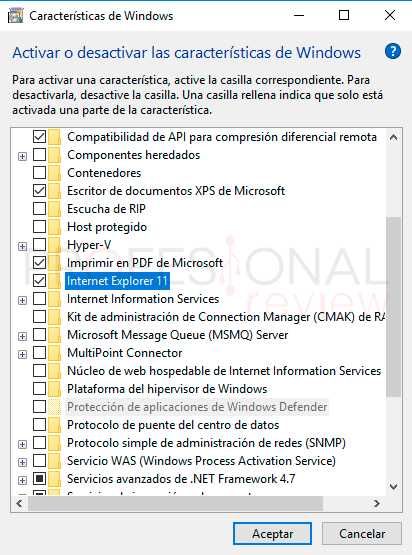
I hope this helps.
Greetings.

Quote from fkapnist on December 1, 2020, 11:54 am@feli
If "https//www...." is what you actually put in the address, no wonder it doesn't work. Your syntax is missing the ://
Is Edge WebView 2 supposed to replace the WebBrowserObject? It sure is taking them forever.
Meanwhile you can run Chrome in a rectangle, in kiosk mode, and in some ways it works better than Explorer since many websites no longer work with Explorer. Chrome has hundreds of command line switches that allow various functions.
If "https//www...." is what you actually put in the address, no wonder it doesn't work. Your syntax is missing the ://
Is Edge WebView 2 supposed to replace the WebBrowserObject? It sure is taking them forever.
Meanwhile you can run Chrome in a rectangle, in kiosk mode, and in some ways it works better than Explorer since many websites no longer work with Explorer. Chrome has hundreds of command line switches that allow various functions.
Quote from Feli on December 20, 2020, 1:33 amBonjour.
Je remonte ce topic car je ne trouve toujours pas la solution.
Comme cela se voit sur l'image, j'ai internet explorer!
Je prends toutes les idées.
Merci.
Bonjour.
Je remonte ce topic car je ne trouve toujours pas la solution.
Comme cela se voit sur l'image, j'ai internet explorer!
Je prends toutes les idées.
Merci.
Uploaded files:
- You need to login to have access to uploads.