
WebBrowse ayuda

Quote from josevdr95 on February 8, 2020, 4:44 pmDe qué forma puedo mandar algún js o algo que me permita ejecutar el botón de la web “Entrar” y que continúe la autentificación de la misma. (Lo que muestra la foto es un objeto WebBrowse)
De qué forma puedo mandar algún js o algo que me permita ejecutar el botón de la web “Entrar” y que continúe la autentificación de la misma. (Lo que muestra la foto es un objeto WebBrowse)
Uploaded files: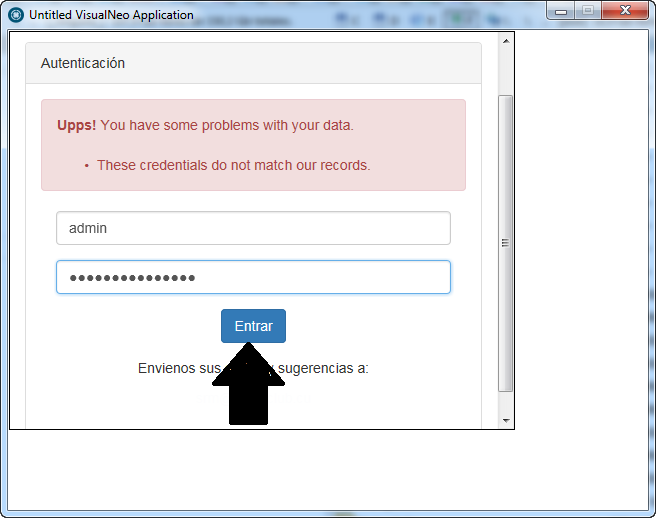
Quote from josevdr95 on February 8, 2020, 6:06 pmCreo que he encontrar la solución es un js para mandarle SendKeys ({ENTER}) al objeto” WebBrowser1” pero no he encontrado el script para que me funcione correctamente, ayuda.
Saludos
Creo que he encontrar la solución es un js para mandarle SendKeys ({ENTER}) al objeto” WebBrowser1” pero no he encontrado el script para que me funcione correctamente, ayuda.
Saludos

Quote from Gaev on February 8, 2020, 8:07 pm@ josevdr95
How can I send some js or something that allows me to execute the “Enter” web button and continue the authentication of it.
Here ... https://www.w3schools.com/howto/howto_js_trigger_button_enter.asp ... is some code that sets up the input (html) element to simulate the click of a a Button element when ever an Enter key (key code = 13) is recognized
So, if your user actually enters the password text string (i.e. not populated via some code/script), then this script can be adapted to your needs.
However, if you need the entire authentication process to be done via script (no human intervention), and assuming that the password field is already auto populated, then you need a different javascript (that you can invoke from VisualNEOWin using the BrowserExecScript command).
Please advise your specific requirement/process in detail.
@ josevdr95
How can I send some js or something that allows me to execute the “Enter” web button and continue the authentication of it.
Here ... https://www.w3schools.com/howto/howto_js_trigger_button_enter.asp ... is some code that sets up the input (html) element to simulate the click of a a Button element when ever an Enter key (key code = 13) is recognized
So, if your user actually enters the password text string (i.e. not populated via some code/script), then this script can be adapted to your needs.
However, if you need the entire authentication process to be done via script (no human intervention), and assuming that the password field is already auto populated, then you need a different javascript (that you can invoke from VisualNEOWin using the BrowserExecScript command).
Please advise your specific requirement/process in detail.
Quote from josevdr95 on February 8, 2020, 8:59 pmHola no he podido lograr nada, en realidad lo que yo quiero es autentificarme en una web de forma automática, la web que me quiero autentificarme no la puedo mostrar porque es local lo que hace es que yo me autentifico y ella me brinda internet y comienza a trascurrir el tiempo de conexión y quisiera guardar el tiempo que va trascurriendo en una variable de visualneo win . O me basta que se pueda autentificar sin interacción humana. Algún ejemplo de cómo hacerlo con esta web http://play.2moons.de/ o con cualquiera.
Hola no he podido lograr nada, en realidad lo que yo quiero es autentificarme en una web de forma automática, la web que me quiero autentificarme no la puedo mostrar porque es local lo que hace es que yo me autentifico y ella me brinda internet y comienza a trascurrir el tiempo de conexión y quisiera guardar el tiempo que va trascurriendo en una variable de visualneo win . O me basta que se pueda autentificar sin interacción humana. Algún ejemplo de cómo hacerlo con esta web http://play.2moons.de/ o con cualquiera.
Quote from Gaev on February 8, 2020, 9:50 pm@ josevdr95
Sorry, I am not able to understand the issue ... something is getting lost in translation :-(
what I want is to authenticate myself on a website automatically
OK
the website that I want to authenticate can not show it because it is local what it does is that I authenticate myself and she gives me internet and begins the connection time has elapsed and I would like to save the time that elapses in a win visualization variable.
This is the confusing part.
Or it is enough for me to authenticate without human interaction. Some example of how to do it with this website http://play.2moons.de/ or with anyone.
This web page has its functionality embedded within an iframe (which makes it even harder to access its (html) elements via javascript).
If you can confirm that the html file deployed in your WebBrowser object works when invoked directly from your (Chrome, Firefox or Edge) browsers (after you manually enter text in the required boxes, then perhaps you can attach/upload this html file (you can change any values that are sensitive for others to know) ... I would like to view the actions associated with the click of the Button object.
@ josevdr95
Sorry, I am not able to understand the issue ... something is getting lost in translation :-(
what I want is to authenticate myself on a website automatically
OK
the website that I want to authenticate can not show it because it is local what it does is that I authenticate myself and she gives me internet and begins the connection time has elapsed and I would like to save the time that elapses in a win visualization variable.
This is the confusing part.
Or it is enough for me to authenticate without human interaction. Some example of how to do it with this website http://play.2moons.de/ or with anyone.
This web page has its functionality embedded within an iframe (which makes it even harder to access its (html) elements via javascript).
If you can confirm that the html file deployed in your WebBrowser object works when invoked directly from your (Chrome, Firefox or Edge) browsers (after you manually enter text in the required boxes, then perhaps you can attach/upload this html file (you can change any values that are sensitive for others to know) ... I would like to view the actions associated with the click of the Button object.
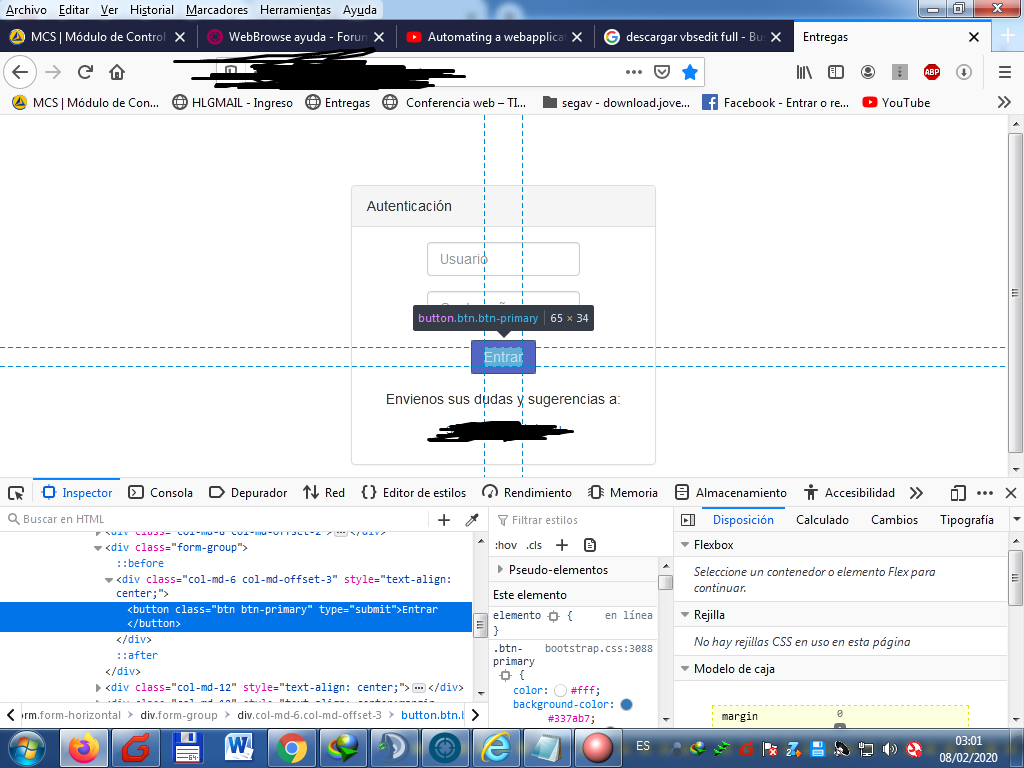
Quote from josevdr95 on February 8, 2020, 10:11 pmGracias por tu ayuda amigo mío pero creo que el traductor de google no es suficiente para esto ajaja creo que lo que me pides es lo que te adjunto en la img. En estos momentos estoy viendo un video que creo que es la solución pero con VBS.
Automating a webapplication with VBScript
Gracias por tu ayuda amigo mío pero creo que el traductor de google no es suficiente para esto ajaja creo que lo que me pides es lo que te adjunto en la img. En estos momentos estoy viendo un video que creo que es la solución pero con VBS.
Automating a webapplication with VBScript
Uploaded files:
Quote from josevdr95 on February 8, 2020, 11:11 pmNo es lo que deseaba exactamente pero estoy haciendo avances y pretendo ir compartiendo el código puede ser útil para barias personas.
VBS autentificarse de forma automática en una web sendkeys puede variar dependiendo de la web.Option Explicit Dim ie, x Set x =CreateObject("wscript.shell") Set ie = CreateObject("InternetExplorer.Application") Sub WaitForLoad Do while ie.Busy wscript.sleep 200 Loop End Sub ie.Navigate "https://www.miweb.com/" ie.Toolbar=0 ie.StatusBar=0 ie.Height=560 ie.Width=1000 ie.Top=0 ie.Left=0 ie.Resizable=0 ie.Visible=1 Call WaitForLoad x.sendkeys "USER" x.sendkeys "{tab}" x.sendkeys "PASS" x.sendkeys "{enter}"Pero no me ha funcionado en un WebBrowser de visualneo win.
No es lo que deseaba exactamente pero estoy haciendo avances y pretendo ir compartiendo el código puede ser útil para barias personas.
VBS autentificarse de forma automática en una web sendkeys puede variar dependiendo de la web.
Option Explicit
Dim ie, x

Set x =CreateObject("wscript.shell")
Set ie = CreateObject("InternetExplorer.Application")

Sub WaitForLoad
Do while ie.Busy
wscript.sleep 200
Loop
End Sub

ie.Navigate "https://www.miweb.com/"
ie.Toolbar=0
ie.StatusBar=0
ie.Height=560
ie.Width=1000
ie.Top=0
ie.Left=0
ie.Resizable=0
ie.Visible=1

Call WaitForLoad
x.sendkeys "USER"
x.sendkeys "{tab}"
x.sendkeys "PASS"
x.sendkeys "{enter}"
Pero no me ha funcionado en un WebBrowser de visualneo win.
Quote from Gaev on February 9, 2020, 4:39 am@josevdr95
I managed to ...
- create an html file that contained an authentication form
- load this file into a WebBrowser object
- using NeoScript commands attached to a Button object, login to the cPanel of my websiteHere is the "generic html file's contents" ...
<html>
<body>

<p>Example Authentication Form</p>

<form name="gkForm" id="gkForm" action="https://url.of.your.login.script/here">

<input type="text" name="user" id="user"><br/></br>
<input type="password" name="pass" id="pass"><br/></br>

<button type="submit" name="gkSend" id="gkSend">Login</button>

</form>

</body>
</html>
... I say "generic" because your html will depend on the requirements/expectations of the site you are attempting to log in to ... in particular ...
- the action= value in the < form > element
- the name= and id= values for the < input > elements that the site's script expects to see (note that you will need both name and id parameters)The NeoScript to populate the fields and send the form to the site are ...
BrowserSetElement "WebBrowser4" "gkForm:user" "myRegisteredNameHere"
BrowserSetElement "WebBrowser4" "gkForm:pass" "myPasswordHere"
BrowserExecScript "WebBrowser4" "document.getElementById([#34]gkSend[#34]).click();" "JScript"
I managed to ...
- create an html file that contained an authentication form
- load this file into a WebBrowser object
- using NeoScript commands attached to a Button object, login to the cPanel of my website
Here is the "generic html file's contents" ...
<html>
<body>

<p>Example Authentication Form</p>

<form name="gkForm" id="gkForm" action="https://url.of.your.login.script/here">

<input type="text" name="user" id="user"><br/></br>
<input type="password" name="pass" id="pass"><br/></br>

<button type="submit" name="gkSend" id="gkSend">Login</button>

</form>

</body>
</html>
... I say "generic" because your html will depend on the requirements/expectations of the site you are attempting to log in to ... in particular ...
- the action= value in the < form > element
- the name= and id= values for the < input > elements that the site's script expects to see (note that you will need both name and id parameters)
The NeoScript to populate the fields and send the form to the site are ...
BrowserSetElement "WebBrowser4" "gkForm:user" "myRegisteredNameHere"
BrowserSetElement "WebBrowser4" "gkForm:pass" "myPasswordHere"
BrowserExecScript "WebBrowser4" "document.getElementById([#34]gkSend[#34]).click();" "JScript"