
WebExeBuilder is ready

Quote from Darbdenral on April 26, 2026, 10:12 amAfter a lot of hard work, WebExeBuilder is ready and I genuinely think it's something special. It lets you take any web app (HTML, CSS, JavaScript) and package it as a proper Windows desktop executable. No Electron bloat, no Node.js runtime to bundle, no command line. Just your web app, running natively on Windows as a real .exe.
What makes it special for me is the JavaScript bridge API. From inside your web page you can read and write files, open native save/open dialogs, send Windows toast notifications, manage the window, read the clipboard, run shell commands, and more all through clean await web.* calls that feel natural alongside regular JavaScript. You're not fighting the platform; you're just building.
Whether you're a developer who wants to ship a lightweight tool to non-technical users, or someone who's been building web UIs and wishes they could turn them into desktop apps without a steep learning curve, this is for you.
Leverage your preferred AI to build something unique. Integrating this into your development workflow now will give you the perfect edge for packaging and deploying your AI applications and VisualNeo Web applications.
v1.00 is just the beginning. I can't wait to see what people build with it.
Grab it and let me know what you think!
Use the "Download Free Trial" button to download and test as long as you like, it never expires.
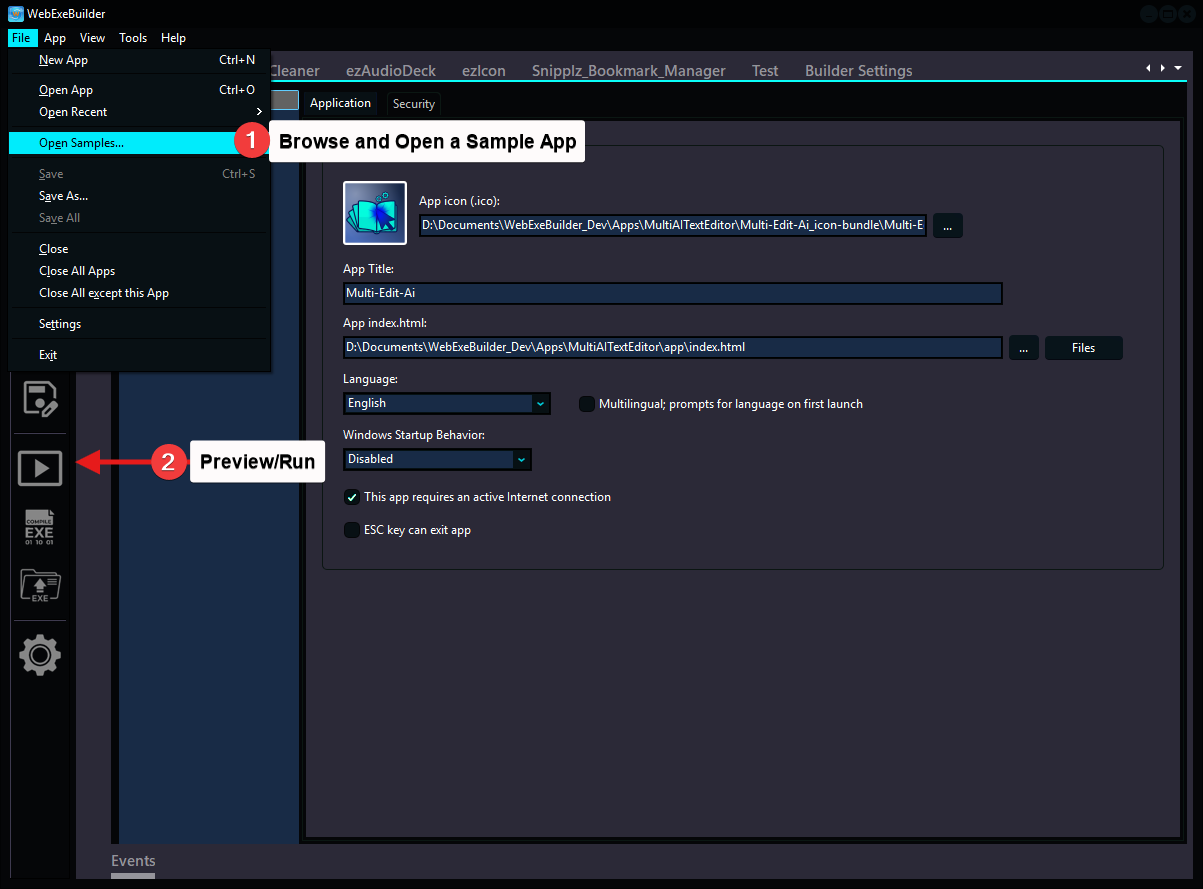
Try the sample apps. Open a sample app using the File/Open Samples.. menu selection and with one click on the Preview/Run button you can see them in action.
7-Days only: Special launch pricing ends soon🎁
More information
https://www.webexebuilder.comWebExeBuilder Documentation
https://webexebuilder.com/helpDownload or Purchase WebExeBuilder - v1.02 available 2026/04/28
https://ezwarelab.com/product/webexebuilder/26Thanks!
Brad
After a lot of hard work, WebExeBuilder is ready and I genuinely think it's something special. It lets you take any web app (HTML, CSS, JavaScript) and package it as a proper Windows desktop executable. No Electron bloat, no Node.js runtime to bundle, no command line. Just your web app, running natively on Windows as a real .exe.
What makes it special for me is the JavaScript bridge API. From inside your web page you can read and write files, open native save/open dialogs, send Windows toast notifications, manage the window, read the clipboard, run shell commands, and more all through clean await web.* calls that feel natural alongside regular JavaScript. You're not fighting the platform; you're just building.
Whether you're a developer who wants to ship a lightweight tool to non-technical users, or someone who's been building web UIs and wishes they could turn them into desktop apps without a steep learning curve, this is for you.
Leverage your preferred AI to build something unique. Integrating this into your development workflow now will give you the perfect edge for packaging and deploying your AI applications and VisualNeo Web applications.
v1.00 is just the beginning. I can't wait to see what people build with it.
Grab it and let me know what you think!
Use the "Download Free Trial" button to download and test as long as you like, it never expires.
Try the sample apps. Open a sample app using the File/Open Samples.. menu selection and with one click on the Preview/Run button you can see them in action.
7-Days only: Special launch pricing ends soon🎁
More information
https://www.webexebuilder.com
WebExeBuilder Documentation
https://webexebuilder.com/help
Download or Purchase WebExeBuilder - v1.02 available 2026/04/28
https://ezwarelab.com/product/webexebuilder/26
Thanks!
Brad

Quote from luishp on April 26, 2026, 11:06 pmAwesome!!! Thank you so much @darbdenral
Awesome!!! Thank you so much @darbdenral
Quote from luishp on April 27, 2026, 8:13 am@darbdenral I'm trying to load some of the included samples but always get the same error:
"Something is not quite right with the format of this file"
@darbdenral I'm trying to load some of the included samples but always get the same error:
"Something is not quite right with the format of this file"
Quote from Darbdenral on April 27, 2026, 8:29 amQuote from luishp on April 27, 2026, 8:13 am@darbdenral I'm trying to load some of the included samples but always get the same error:
"Something is not quite right with the format of this file"@luishp
That sounds like a problem with the file running in Windows or a disk corruption type error or something. I don't have that specific error in the application language anywhere at all and I haven't seen it before.
Is a virus scanner or something maybe messing with it during compilation?
When you say Load, are you getting the error loading the project files *.web files? Running them or compiling them, running them after compile?
Sorry, not sure on this one..
Quote from luishp on April 27, 2026, 8:13 am@darbdenral I'm trying to load some of the included samples but always get the same error:
"Something is not quite right with the format of this file"
That sounds like a problem with the file running in Windows or a disk corruption type error or something. I don't have that specific error in the application language anywhere at all and I haven't seen it before.
Is a virus scanner or something maybe messing with it during compilation?
When you say Load, are you getting the error loading the project files *.web files? Running them or compiling them, running them after compile?
Sorry, not sure on this one..
Quote from luishp on April 27, 2026, 8:59 am@darbdenral check the attached video.
If I create my own project I have not any problem opening it later.
@darbdenral check the attached video.
If I create my own project I have not any problem opening it later.
Quote from luishp on April 27, 2026, 9:03 amI have also noticed some configuration values in my project are not saved when I change them.
Like Window > App Margin.
If I set it to 0, then save, then unload, then reload project, its value is 30 again (default)
I have also noticed some configuration values in my project are not saved when I change them.
Like Window > App Margin.
If I set it to 0, then save, then unload, then reload project, its value is 30 again (default)
Quote from Darbdenral on April 27, 2026, 9:04 am@luishp
Ahh.. I see what it is.. The file associations did not take in installation. The WebExeBuilder project files (*.web) are associated with another program. Go in the Builder Settings, at the bottom of the screen, a large button, press that to associate .web projects with WebExeBuilder. You must have another program on that PC that is associated with .web extensions. I'd be curious to know what it is?
Ahh.. I see what it is.. The file associations did not take in installation. The WebExeBuilder project files (*.web) are associated with another program. Go in the Builder Settings, at the bottom of the screen, a large button, press that to associate .web projects with WebExeBuilder. You must have another program on that PC that is associated with .web extensions. I'd be curious to know what it is?
Quote from Darbdenral on April 27, 2026, 9:22 amQuote from luishp on April 27, 2026, 9:03 amI have also noticed some configuration values in my project are not saved when I change them.
Like Window > App Margin.
If I set it to 0, then save, then unload, then reload project, its value is 30 again (default)I just tried duplicating this every which way and I cannot duplicate that behavior, it always saves. I tried everything you could imagine, no saves. just exiting, etc. maybe the project was opened with another app or something?
Quote from luishp on April 27, 2026, 9:03 amI have also noticed some configuration values in my project are not saved when I change them.
Like Window > App Margin.
If I set it to 0, then save, then unload, then reload project, its value is 30 again (default)
I just tried duplicating this every which way and I cannot duplicate that behavior, it always saves. I tried everything you could imagine, no saves. just exiting, etc. maybe the project was opened with another app or something?
Quote from Darbdenral on April 27, 2026, 10:30 am@luishp
I'm pretty sure your issue was the file associations not taking during the installation. I re-packed the installer with a fix, I uploaded the new installer and I'm sure the installer now will work as intended in this situation.
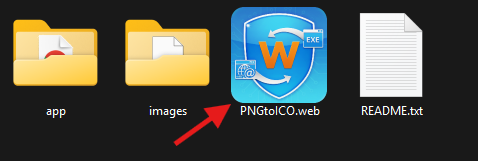
WebExeBuilder .web projects should display this image if associated
If you still have any problems with this let me know, but I'm pretty sure that is what happened.
thanks!
Brad
I'm pretty sure your issue was the file associations not taking during the installation. I re-packed the installer with a fix, I uploaded the new installer and I'm sure the installer now will work as intended in this situation.
WebExeBuilder .web projects should display this image if associated
If you still have any problems with this let me know, but I'm pretty sure that is what happened.
thanks!
Brad

Quote from Anthony LaTorre on April 27, 2026, 2:54 pmBrad was kind enough to give me a look at the WebExeBuilder.
This is a fantastic program, it has everything...
Built-in PDF, image, audio, and video support.
Native Windows task dialogs.
Full File System Access...
Directory Management.
Persistent Variable Storage.
Professional Windows UI themes...
And so much more...WebExeBuilder will be my go-to program for creating VisualNEO Web Desktop apps... WebExeBuilder is the perfect tool for outputting your VisualNEO Web apps to desktop... It opens up a whole new world of creative possibilities...
As many of you know... I have been actively developing VisualNEO Win plugins, and my NeoWin Interface Designer to extend the functionality of VisualNEO Win. WebExeBuilder will do the same for VisualNEO Web. It's that good...
So download the trial and give it a good look... It comes with 38 sample apps and a comprehensive help system to get you up and running in no time... I know you will be pleasantly surprised...
Cheers
Brad was kind enough to give me a look at the WebExeBuilder.
This is a fantastic program, it has everything...
Built-in PDF, image, audio, and video support.
Native Windows task dialogs.
Full File System Access...
Directory Management.
Persistent Variable Storage.
Professional Windows UI themes...
And so much more...
WebExeBuilder will be my go-to program for creating VisualNEO Web Desktop apps... WebExeBuilder is the perfect tool for outputting your VisualNEO Web apps to desktop... It opens up a whole new world of creative possibilities...
As many of you know... I have been actively developing VisualNEO Win plugins, and my NeoWin Interface Designer to extend the functionality of VisualNEO Win. WebExeBuilder will do the same for VisualNEO Web. It's that good...
So download the trial and give it a good look... It comes with 38 sample apps and a comprehensive help system to get you up and running in no time... I know you will be pleasantly surprised...
Cheers
Quote from luishp on April 27, 2026, 3:58 pm@darbdenral
Brad, using the latest installer I can now open the sample files :)
But the save problem persists. I have recorded another video for you to watch.
I can't also close the current project, I must close all (also shown in the video).
Thank you!
@darbdenral
Brad, using the latest installer I can now open the sample files :)
But the save problem persists. I have recorded another video for you to watch.
I can't also close the current project, I must close all (also shown in the video).
Thank you!
Quote from Darbdenral on April 28, 2026, 4:09 amQuote from luishp on April 27, 2026, 3:58 pm@darbdenral
Brad, using the latest installer I can now open the sample files :)
But the save problem persists. I have recorded another video for you to watch.
I can't also close the current project, I must close all (also shown in the video).
Thank you!@luishp Yes, I see how that was happening and I duplicated it here, thanks for the video! I applied quite a few fixes to the logic, it will track all tabs opened and updates if needed now. Let me know how this works for you. It was a rather large update, I wouldn't be shocked if there were a bump in the road.
The auto-updater inside the app should catch the update and send users to the product home page. Commercial users should download from their member dashboard not from the public page.
thanks for the help!
Brad
Quote from luishp on April 27, 2026, 3:58 pm@darbdenral
Brad, using the latest installer I can now open the sample files :)
But the save problem persists. I have recorded another video for you to watch.
I can't also close the current project, I must close all (also shown in the video).
Thank you!
@luishp Yes, I see how that was happening and I duplicated it here, thanks for the video! I applied quite a few fixes to the logic, it will track all tabs opened and updates if needed now. Let me know how this works for you. It was a rather large update, I wouldn't be shocked if there were a bump in the road.
The auto-updater inside the app should catch the update and send users to the product home page. Commercial users should download from their member dashboard not from the public page.
thanks for the help!
Brad
Quote from luishp on April 28, 2026, 11:25 am@darbdenral I will keep checking it but at first sight it looks awesome, very complete and useful.
I have noticed the compiled executable is very lightweight and does not fight any antivirus message, even without digital signing certificate.
@darbdenral I will keep checking it but at first sight it looks awesome, very complete and useful.
I have noticed the compiled executable is very lightweight and does not fight any antivirus message, even without digital signing certificate.
Quote from Darbdenral on April 28, 2026, 10:29 pmQuote from luishp on April 28, 2026, 11:25 am@darbdenral I will keep checking it but at first sight it looks awesome, very complete and useful.
I have noticed the compiled executable is very lightweight and does not fight any antivirus message, even without digital signing certificate.@luishp Yes, I'd guess the 100+ submissions I made during development helped train their filters. :) I'm not sure if it has something to do with it but I really got tired of warnings and removals that's for sure.
thanks!
Quote from luishp on April 28, 2026, 11:25 am@darbdenral I will keep checking it but at first sight it looks awesome, very complete and useful.
I have noticed the compiled executable is very lightweight and does not fight any antivirus message, even without digital signing certificate.
@luishp Yes, I'd guess the 100+ submissions I made during development helped train their filters. :) I'm not sure if it has something to do with it but I really got tired of warnings and removals that's for sure.
thanks!