
Working with Checkboxes (Help)

Quote from Thinkr8 on November 13, 2022, 11:47 amI was able to get back up and running with another 30 day trial with VNW by using a friends laptop.
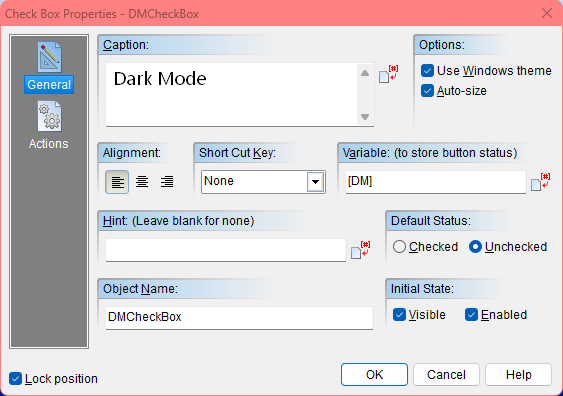
That said, I've been working with the below code for 5 days trying to get a fix, and I fail to know why I'm unable to find a solution.
./Dark Mode Skin Applied by using checkbox
:DM
If "[DM]" "=" "Checked"
hpwIniWrite "[PubDir]\Logistics\Data\Settings.ini" "DM" "Checked" "[DM]"
hpwIniRead "[PubDir]\Logistics\Data\Settings.ini" "DM" "Checked" "[DM]" "[DM]"
ShowObject "DMPic" "None" "0"
ObjectToFront "DMPic"
ObjectToFront "FooterContainer"
Else
If "[DM]" "=" ""
HideObject "DMPic" "None" "0"
ObjectToBack "DMPic"
EndIf
EndIf
ReturnThe problem is;
Checking the DM checkbox shows the Dark Mode skin and writes "Checked" in the Settings.ini, but when I Uncheck the DM checkbox (Unchecking the DM checkbox will hide the Dark Mode skin) "Checked" isn't erased in the Settings.ini and when my program shuts down with the custom close button I created, the [DM] checkbox unchecks itself even if I leave it checked (Unchecked - default).
I'd like for the checkbox to stay checked when I shut down the program and or restart the program for the user.The action command is GoSub "DM"
I really thought I would find the solution by myself, but I'm at a loss and would kindly like to ask for assistance, thank you so much.
Something so simple, yet, I just don't understand. :)
I was able to get back up and running with another 30 day trial with VNW by using a friends laptop.
That said, I've been working with the below code for 5 days trying to get a fix, and I fail to know why I'm unable to find a solution.
./Dark Mode Skin Applied by using checkbox
:DM
If "[DM]" "=" "Checked"
hpwIniWrite "[PubDir]\Logistics\Data\Settings.ini" "DM" "Checked" "[DM]"
hpwIniRead "[PubDir]\Logistics\Data\Settings.ini" "DM" "Checked" "[DM]" "[DM]"
ShowObject "DMPic" "None" "0"
ObjectToFront "DMPic"
ObjectToFront "FooterContainer"
Else
If "[DM]" "=" ""
HideObject "DMPic" "None" "0"
ObjectToBack "DMPic"
EndIf
EndIf
Return
The problem is;
Checking the DM checkbox shows the Dark Mode skin and writes "Checked" in the Settings.ini, but when I Uncheck the DM checkbox (Unchecking the DM checkbox will hide the Dark Mode skin) "Checked" isn't erased in the Settings.ini and when my program shuts down with the custom close button I created, the [DM] checkbox unchecks itself even if I leave it checked (Unchecked - default).
I'd like for the checkbox to stay checked when I shut down the program and or restart the program for the user.
The action command is GoSub "DM"
I really thought I would find the solution by myself, but I'm at a loss and would kindly like to ask for assistance, thank you so much.
Something so simple, yet, I just don't understand. :)

Quote from Vadim on November 13, 2022, 1:38 pm@thinkr8
Good day!
For the program to remember the settings you need to write them, and when you load the program, you need to read these settings into the appropriate variables. You can also write them to the ini file. Just write "Unchecked" instead of empty.
To uncheck the box programmatically you can use the command:
SetVar "[DM]" "Unchecked"
Good day!
For the program to remember the settings you need to write them, and when you load the program, you need to read these settings into the appropriate variables. You can also write them to the ini file. Just write "Unchecked" instead of empty.
To uncheck the box programmatically you can use the command:
SetVar "[DM]" "Unchecked"
Quote from Thinkr8 on November 13, 2022, 4:17 pmThanks for the reply, however, I don't understand your instructions, sorry.
Taking my best guess, do you mean I should define variables in the section "Startup" in the Actions window?
If not, then where should SetVar "[DM]" "Unchecked" go?
Thanks for the reply, however, I don't understand your instructions, sorry.
Taking my best guess, do you mean I should define variables in the section "Startup" in the Actions window?
If not, then where should SetVar "[DM]" "Unchecked" go?
Quote from Thinkr8 on November 13, 2022, 7:17 pmIf I do this:
:DM
If "[DM]" "=" "Checked"
hpwIniWrite "[PubDir]\Logistics\Data\Settings.ini" "DM" "Checked" "[DM]"
hpwIniRead "[PubDir]\Logistics\Data\Settings.ini" "DM" "Checked" "[DM]" "[DM]"
ShowObject "DMPic" "None" "0"
ObjectToFront "DMPic"
ObjectToFront "FooterContainer"
Else
If "[DM]" "=" "Unchecked"
HideObject "DMPic" "None" "0"
ObjectToBack "DMPic"
EndIf
EndIf
ReturnIt does nothing.
If I do this:
:DM
SetVar "[DM]" "Unchecked"
If "[DM]" "=" "Checked"
hpwIniWrite "[PubDir]\Logistics\Data\Settings.ini" "DM" "Checked" "[DM]"
hpwIniRead "[PubDir]\Logistics\Data\Settings.ini" "DM" "Checked" "[DM]" "[DM]"
ShowObject "DMPic" "None" "0"
ObjectToFront "DMPic"
ObjectToFront "FooterContainer"
Else
If "[DM]" "=" "Unchecked"
hpwIniWrite "[PubDir]\Logistics\Data\Settings.ini" "DM" "Unchecked" "[DM]"
hpwIniRead "[PubDir]\Logistics\Data\Settings.ini" "DM" "Unchecked" "[DM]" "[DM]"
HideObject "DMPic" "None" "0"
ObjectToBack "DMPic"
EndIf
EndIf
ReturnIt doesn't work at all. No matter how I arrange the code I can't get it to do what I want it to do. By the way, am I in the right place to be asking for help with my troubles? (The VNW community?)
If I do this:
:DM
If "[DM]" "=" "Checked"
hpwIniWrite "[PubDir]\Logistics\Data\Settings.ini" "DM" "Checked" "[DM]"
hpwIniRead "[PubDir]\Logistics\Data\Settings.ini" "DM" "Checked" "[DM]" "[DM]"
ShowObject "DMPic" "None" "0"
ObjectToFront "DMPic"
ObjectToFront "FooterContainer"
Else
If "[DM]" "=" "Unchecked"
HideObject "DMPic" "None" "0"
ObjectToBack "DMPic"
EndIf
EndIf
Return
It does nothing.
If I do this:
:DM
SetVar "[DM]" "Unchecked"
If "[DM]" "=" "Checked"
hpwIniWrite "[PubDir]\Logistics\Data\Settings.ini" "DM" "Checked" "[DM]"
hpwIniRead "[PubDir]\Logistics\Data\Settings.ini" "DM" "Checked" "[DM]" "[DM]"
ShowObject "DMPic" "None" "0"
ObjectToFront "DMPic"
ObjectToFront "FooterContainer"
Else
If "[DM]" "=" "Unchecked"
hpwIniWrite "[PubDir]\Logistics\Data\Settings.ini" "DM" "Unchecked" "[DM]"
hpwIniRead "[PubDir]\Logistics\Data\Settings.ini" "DM" "Unchecked" "[DM]" "[DM]"
HideObject "DMPic" "None" "0"
ObjectToBack "DMPic"
EndIf
EndIf
Return
It doesn't work at all. No matter how I arrange the code I can't get it to do what I want it to do. By the way, am I in the right place to be asking for help with my troubles? (The VNW community?)

Quote from Gaev on November 13, 2022, 8:12 pm@thinkr8
By the way, am I in the right place to be asking for help with my troubles? (The VNW community?)
VNW can mean VisualNEOWin or VisualNEOWeb ... you posted in the VisualNEOWin platform ... which is correct ... and hpwIniRead and hpwWrite also work on the VisualNEOWin platform.
Now to your specific issue(s) ... as stated by @vadim ...
For the program to remember the settings you need to write them, and when you load the program, you need to read these settings into the appropriate variables.
... so, here is a strategy you can follow ...
a) Since ...
I'd like for the checkbox to stay checked when I shut down the program and or restart the program for the user.
... in the Startup event section for your pub (App >>> App Properties >>> Actions), do a GoSub DarkModeOn ... which should contain these commands ...
SetVar "[DM]" "Checked"

ShowObject "DMPic" "None" "0"
ObjectToFront "DMPic"
ObjectToFront "FooterContainer"

Return
b) For the "click" event section of your Checkbox (whose "variable to store button status is [DM]) ...
If "[DM]" "=" Checked"
   GoSub "DarkModeOn"
Else
   GoSub "DarkModeOff"
Endif
... and subroutine DarkModeOff would contain ...
SetVar "[DM]" ""

HideObject "DMPic" "None" "0"
ObjectToBack "DMPic"

Return
c) you also stated that ...
I'd like for the checkbox to stay checked when I shut down the program and or restart the program for the user.
The Checkbox is controlled by its associated variable (in your case [DM]) ... it only exists while the program is running.
Since you have stated that you always want the program to start with the Checkbox in a "Checked' state, the call to the subroutine in the pub's startup section will make sure of that ... so, I am not sure why you need to store anything in the INI file ... but if you have another reason to save this information in the INI file, you can code this in the Shutdown event section of your pub ...
If "[DM]" "=" Checked"
   hpwIniWrite "[PubDir]\Logistics\Data\Settings.ini" "DM" "Checked" "Was Checked at Shutdown"
Else
   hpwIniWrite "[PubDir]\Logistics\Data\Settings.ini" "DM" "Checked" "Was Unchecked at Shutdown"
Endif
Note: I am not able to verify this last routine because I do not have the plugin installed on my machine.
BTW, I believe that when the Checkbox is unchecked, the associated variable has a null ("") value (not "Unchecked")
By the way, am I in the right place to be asking for help with my troubles? (The VNW community?)
VNW can mean VisualNEOWin or VisualNEOWeb ... you posted in the VisualNEOWin platform ... which is correct ... and hpwIniRead and hpwWrite also work on the VisualNEOWin platform.
Now to your specific issue(s) ... as stated by @vadim ...
For the program to remember the settings you need to write them, and when you load the program, you need to read these settings into the appropriate variables.
... so, here is a strategy you can follow ...
a) Since ...
I'd like for the checkbox to stay checked when I shut down the program and or restart the program for the user.
... in the Startup event section for your pub (App >>> App Properties >>> Actions), do a GoSub DarkModeOn ... which should contain these commands ...
SetVar "[DM]" "Checked"

ShowObject "DMPic" "None" "0"
ObjectToFront "DMPic"
ObjectToFront "FooterContainer"

Return
b) For the "click" event section of your Checkbox (whose "variable to store button status is [DM]) ...
If "[DM]" "=" Checked"
   GoSub "DarkModeOn"
Else
   GoSub "DarkModeOff"
Endif
... and subroutine DarkModeOff would contain ...
SetVar "[DM]" ""

HideObject "DMPic" "None" "0"
ObjectToBack "DMPic"

Return
c) you also stated that ...
I'd like for the checkbox to stay checked when I shut down the program and or restart the program for the user.
The Checkbox is controlled by its associated variable (in your case [DM]) ... it only exists while the program is running.
Since you have stated that you always want the program to start with the Checkbox in a "Checked' state, the call to the subroutine in the pub's startup section will make sure of that ... so, I am not sure why you need to store anything in the INI file ... but if you have another reason to save this information in the INI file, you can code this in the Shutdown event section of your pub ...
If "[DM]" "=" Checked"
   hpwIniWrite "[PubDir]\Logistics\Data\Settings.ini" "DM" "Checked" "Was Checked at Shutdown"
Else
   hpwIniWrite "[PubDir]\Logistics\Data\Settings.ini" "DM" "Checked" "Was Unchecked at Shutdown"
Endif
Note: I am not able to verify this last routine because I do not have the plugin installed on my machine.
BTW, I believe that when the Checkbox is unchecked, the associated variable has a null ("") value (not "Unchecked")
Quote from Thinkr8 on November 14, 2022, 4:16 pm@gaev
For the most part, what you have provided is working. However, I had to modify it and came up with this.
Since I don't want any skin applied at the program start, except for the default skin (no problems with the default skin) I went with GoSub "DMoff" (in the Startup section of App Properties), and the GoSubs are,
:DMoff
SetVar "[DM]" ""
HideObject "DMPic" "None" "0"
ObjectToBack "DMPic"
Return:DMon
SetVar "[DM]" "Checked"
ShowObject "DMPic" "None" "0"
ObjectToFront "DMPic"
ObjectToFront "FooterContainer"
ReturnHowever, if I leave the Dark Mode skin checkbox in its checked state and shut down the program, then restart the program the Dark Mode checkbox isn't checked (obvisiously). I'm now trying to use this in the "Shutdown section of App Properties"...;
If "[DM]" "=" "Checked"
hpwIniWrite "[PubDir]\Logistics\Data\Settings.ini" "DM" "Checked" "[DM]"
Else
If "[DM]" "=" ""
hpwIniWrite "[PubDir]\Logistics\Data\Settings.ini" "DM" "" "[DM]"
Endif
EndIf.... so my program remembers the checked box state when the end-user shuts down the program (Exit button), and when the program is restarted. But, because I have this learning curve I'm unable to get the shutdown section code to work.
Thank you so much @gaev this means a lot and if I was in your presence I'd like to give you a hug (no funny business though,lol :))
For the most part, what you have provided is working. However, I had to modify it and came up with this.
Since I don't want any skin applied at the program start, except for the default skin (no problems with the default skin) I went with GoSub "DMoff" (in the Startup section of App Properties), and the GoSubs are,
:DMoff
SetVar "[DM]" ""
HideObject "DMPic" "None" "0"
ObjectToBack "DMPic"
Return
:DMon
SetVar "[DM]" "Checked"
ShowObject "DMPic" "None" "0"
ObjectToFront "DMPic"
ObjectToFront "FooterContainer"
Return
However, if I leave the Dark Mode skin checkbox in its checked state and shut down the program, then restart the program the Dark Mode checkbox isn't checked (obvisiously). I'm now trying to use this in the "Shutdown section of App Properties"...;
If "[DM]" "=" "Checked"
hpwIniWrite "[PubDir]\Logistics\Data\Settings.ini" "DM" "Checked" "[DM]"
Else
If "[DM]" "=" ""
hpwIniWrite "[PubDir]\Logistics\Data\Settings.ini" "DM" "" "[DM]"
Endif
EndIf
.... so my program remembers the checked box state when the end-user shuts down the program (Exit button), and when the program is restarted. But, because I have this learning curve I'm unable to get the shutdown section code to work.
Thank you so much @gaev this means a lot and if I was in your presence I'd like to give you a hug (no funny business though,lol :))
Quote from Gaev on November 14, 2022, 5:05 pm@thinkr8
However, if I leave the Dark Mode skin checkbox in its checked state and shut down the program, then restart the program the Dark Mode checkbox isn't checked (obvisiously).
OK, I misunderstood your statement in the previous post ... you DO want to save/restore the checkbox status between program exits and subsequent starts.
For this to happen ...
a) you will need to save the checkbox status at Shutdown time and read it back in the Startup event section.
b) I am not familiar with the inner workings of the plugin by (uber plugin developer) @hpw ... in particular, what particular key/value pair is stored in the INI file when you write a "null" value.
So, to be on the safe side, I suggest that you do NOT save [DM] (whose possible values will be "Checked" or "") "as is" ... instead, save the status as some text (e.g. "was Checked' and "not Checked")
So, your Shutdown section will be ...
If "[DM]" "=" "Checked"
   hpwIniWrite "[PubDir]\Logistics\Data\Settings.ini" "DM" "DarkMode" "was Checked"
Else
   hpwIniWrite "[PubDir]\Logistics\Data\Settings.ini" "DM" "DarkMode" "not Checked"
EndIf
... and your Startup section will be ..
hpwIniRead "[PubDir]\Logistics\Data\Settings.ini" "DM" "DarkMode" "[savedDM]"

If "[savedDM]" "=" "wasChecked"
   GoSub "DMOn"
Else
   GoSub "DMOff"
Endif
Note, since the checkbox status is only one of two values, you don't need another If/Endif code block inside the Else/Endif code block.
However, if I leave the Dark Mode skin checkbox in its checked state and shut down the program, then restart the program the Dark Mode checkbox isn't checked (obvisiously).
OK, I misunderstood your statement in the previous post ... you DO want to save/restore the checkbox status between program exits and subsequent starts.
For this to happen ...
a) you will need to save the checkbox status at Shutdown time and read it back in the Startup event section.
b) I am not familiar with the inner workings of the plugin by (uber plugin developer) @hpw ... in particular, what particular key/value pair is stored in the INI file when you write a "null" value.
So, to be on the safe side, I suggest that you do NOT save [DM] (whose possible values will be "Checked" or "") "as is" ... instead, save the status as some text (e.g. "was Checked' and "not Checked")
So, your Shutdown section will be ...
If "[DM]" "=" "Checked"
   hpwIniWrite "[PubDir]\Logistics\Data\Settings.ini" "DM" "DarkMode" "was Checked"
Else
   hpwIniWrite "[PubDir]\Logistics\Data\Settings.ini" "DM" "DarkMode" "not Checked"
EndIf
... and your Startup section will be ..
hpwIniRead "[PubDir]\Logistics\Data\Settings.ini" "DM" "DarkMode" "[savedDM]"

If "[savedDM]" "=" "wasChecked"
   GoSub "DMOn"
Else
   GoSub "DMOff"
Endif
Note, since the checkbox status is only one of two values, you don't need another If/Endif code block inside the Else/Endif code block.
Quote from Thinkr8 on November 14, 2022, 6:58 pm@gaev
Yeah, I followed your Startup and Shutdown advice precisely but had to add the fifth parameter to the hpwIniRead plug-in, which now is,
hpwIniRead "[PubDir]\Logistics\Data\Settings.ini" "DM" "DarkMode" "[savedDM]" "[savedDM]"It was, hpwIniRead "[PubDir]\Logistics\Data\Settings.ini" "DM" "DarkMode" "[savedDM]" ""
But, the checkbox saved state isn't being remembered.
I'm gonna go ahead and play around with it for a few days and see if I can come up with a fix. (I might have the fifth parameter wrong)
If I'm unable to I'll be back here for further assistance.
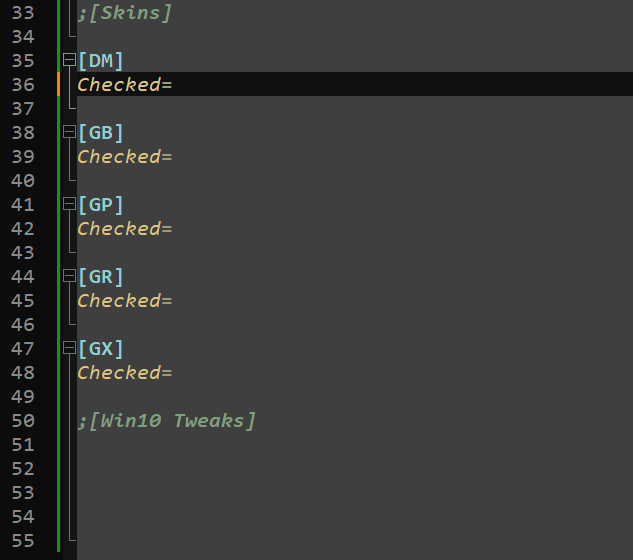
Thank you, you've been a great amount of help :)The way I had the Settings.ini working was (see screenshot)
When the DM checkbox was checked it would write Checked=Checked and when the box was Unchecked it would write Checked="" (Null) Not the Null, just empty. And it would work, but wouldn't read the saved state.
Yeah, I followed your Startup and Shutdown advice precisely but had to add the fifth parameter to the hpwIniRead plug-in, which now is,
hpwIniRead "[PubDir]\Logistics\Data\Settings.ini" "DM" "DarkMode" "[savedDM]" "[savedDM]"
It was, hpwIniRead "[PubDir]\Logistics\Data\Settings.ini" "DM" "DarkMode" "[savedDM]" ""
But, the checkbox saved state isn't being remembered.
I'm gonna go ahead and play around with it for a few days and see if I can come up with a fix. (I might have the fifth parameter wrong)
If I'm unable to I'll be back here for further assistance.
Thank you, you've been a great amount of help :)
The way I had the Settings.ini working was (see screenshot)
When the DM checkbox was checked it would write Checked=Checked and when the box was Unchecked it would write Checked="" (Null) Not the Null, just empty. And it would work, but wouldn't read the saved state.
Quote from Gaev on November 14, 2022, 8:07 pm@thinkr8
Oops, there was a small typo in my last post ... in the Shutdown section, the values "was Checked' or "not Checked" were being saved, while in the Startup section, the just read value was being compared with "wasChecked" (no space).
Just make the reads and writes consistent ... and try again.
Oops, there was a small typo in my last post ... in the Shutdown section, the values "was Checked' or "not Checked" were being saved, while in the Startup section, the just read value was being compared with "wasChecked" (no space).
Just make the reads and writes consistent ... and try again.
Quote from Thinkr8 on November 14, 2022, 10:24 pm@gaev
Wonderful, absolutely wonderful, it now works as it should. Again, thank you so much for the help. I'm pretty sure eventually I would have found the typo.
This is great, and I'm pretty sure I'll be back for more assistance. :)
Wonderful, absolutely wonderful, it now works as it should. Again, thank you so much for the help. I'm pretty sure eventually I would have found the typo.
This is great, and I'm pretty sure I'll be back for more assistance. :)