
ZipFiles

Quote from Scott_Chegg on October 2, 2021, 7:32 pmHello,
I'm having trouble with the ZipFile syntax
I have a file called "license.txt" located at:
[PubDir]license_Master\license.txtI want to zip only this file "license.txt" in a secure zip (AES_256) & place it at:
[PubDir]Then unzip the txt file add or remove text then put it back in the secure zip
No matter what I try The zip still contains the file within the folder "license_Master"
I guess it must be something to do with the "exclusion list" but it is the syntax that I cannot get right
Here is my last attempt
ZipFiles "[PubDir]license.zip" "[PubDir]" "[PubDir]license_Master\license.txt[#13]" "license_Master[#13]" "0" "mypassword" "AES_256" "[Result]"Any help would be really appreciated, thanks for looking
PS:
the zipfiles properties window has spelling mistakes relating to "Wildcards" see image
Hello,
I'm having trouble with the ZipFile syntax
I have a file called "license.txt" located at:
[PubDir]license_Master\license.txt
I want to zip only this file "license.txt" in a secure zip (AES_256) & place it at:
[PubDir]
Then unzip the txt file add or remove text then put it back in the secure zip
No matter what I try The zip still contains the file within the folder "license_Master"
I guess it must be something to do with the "exclusion list" but it is the syntax that I cannot get right
Here is my last attempt
ZipFiles "[PubDir]license.zip" "[PubDir]" "[PubDir]license_Master\license.txt[#13]" "license_Master[#13]" "0" "mypassword" "AES_256" "[Result]"
Any help would be really appreciated, thanks for looking
PS:
the zipfiles properties window has spelling mistakes relating to "Wildcards" see image
Uploaded files: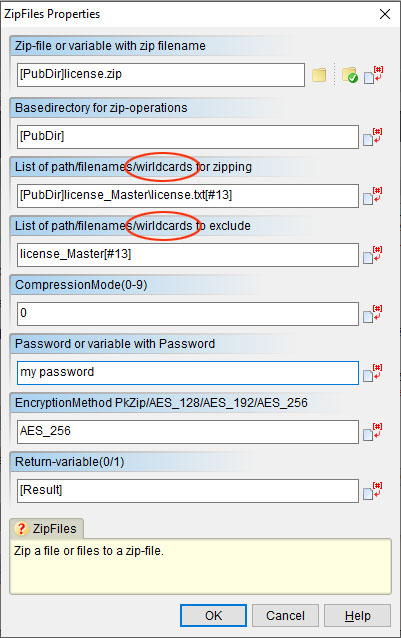

Quote from HPW on October 2, 2021, 7:58 pmHello,
Try this (untested because I am not on my system)
ZipFiles "[PubDir]license.zip" "[PubDir]license_Master\" "[PubDir]license_Master\license.txt[#13]" "" "0" "mypassword" "AES_256" "[Result]"
The basedir should be the dir which should not go into the zip.
Thanks for reporting the typo. Will be corrected in the next release.
Regards
Hans-Peter
Hello,
Try this (untested because I am not on my system)
ZipFiles "[PubDir]license.zip" "[PubDir]license_Master\" "[PubDir]license_Master\license.txt[#13]" "" "0" "mypassword" "AES_256" "[Result]"
The basedir should be the dir which should not go into the zip.
Thanks for reporting the typo. Will be corrected in the next release.
Regards
Hans-Peter
Quote from Scott_Chegg on October 2, 2021, 11:41 pmThank you so much Hans-Peter... it works perfectly !
I guess, that I will have to firstly, take a good look at my errors, to see where I was going wrong
I wasted so much time on this !
Thanks again !
Thank you so much Hans-Peter... it works perfectly !
I guess, that I will have to firstly, take a good look at my errors, to see where I was going wrong
I wasted so much time on this !
Thanks again !
Quote from HPW on October 3, 2021, 6:58 amHello,
glad to hear that it works for you.
That is programming. Debugging is part of the job. ;-)
Regards
Hans-Peter
Hello,
glad to hear that it works for you.
That is programming. Debugging is part of the job. ;-)
Regards
Hans-Peter

Quote from CN_Iceman on October 3, 2021, 8:24 amQuote from HPW on October 3, 2021, 6:58 amThat is programming. Debugging is part of the job. ;-)
Hans-Peter
You don't know how right you are my friend... or maybe you do. ;-)
It's a phrase that stuck with me many years ago.Greetings.
Quote from HPW on October 3, 2021, 6:58 amThat is programming. Debugging is part of the job. ;-)
Hans-Peter
You don't know how right you are my friend... or maybe you do. ;-)
It's a phrase that stuck with me many years ago.
Greetings.