
Adding More Fields to "Telephone Listing Database" PHP/SqLite Demo.. - Page 5 - Forum
Adding More Fields to "Telephone Listing Database" PHP/SqLite Demo..

Quote from Linda Rainey on February 21, 2023, 3:07 pmLuis..
For now I am very pleased with the way it all has turned out .. perfect for me and my systems to keep things very simple for users...
As I speak here I am whizzing off app after app.. and have completed 17 with your new "LuisRegie" system.. Love it...
I should now be able to give your head a rest .. at least for a while... But not for forever!
Regards
Linda
Luis..
For now I am very pleased with the way it all has turned out .. perfect for me and my systems to keep things very simple for users...
As I speak here I am whizzing off app after app.. and have completed 17 with your new "LuisRegie" system.. Love it...
I should now be able to give your head a rest .. at least for a while... But not for forever!
Regards
Linda
Quote from Linda Rainey on March 3, 2023, 12:13 pmHello Luis..
Sorry I am Back...
Is there a simple way to do this in pics below... it for my Horsey apps.. and any others I have that will show a prize or cup for winners...
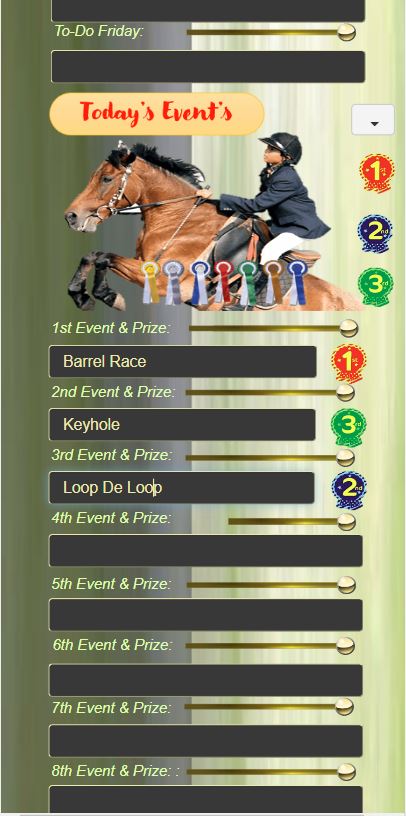
I would like a (in this case ) a Rosette 1st .. 2nd.. 3rd etc... to appear at the side of the event being held... just a nice touch to make app look better... either by a dropdown with some sort of show or hide system with the rosettes stacked on top of each other but just brought forward and not hidden..
I have looked for any thing like this but nothing jumps out for me...
So "Prof" you are always my best bet!..
Best Regards
Linda..
Hello Luis..
Sorry I am Back...
Is there a simple way to do this in pics below... it for my Horsey apps.. and any others I have that will show a prize or cup for winners...
I would like a (in this case ) a Rosette 1st .. 2nd.. 3rd etc... to appear at the side of the event being held... just a nice touch to make app look better... either by a dropdown with some sort of show or hide system with the rosettes stacked on top of each other but just brought forward and not hidden..
I have looked for any thing like this but nothing jumps out for me...
So "Prof" you are always my best bet!..
Best Regards
Linda..
Uploaded files: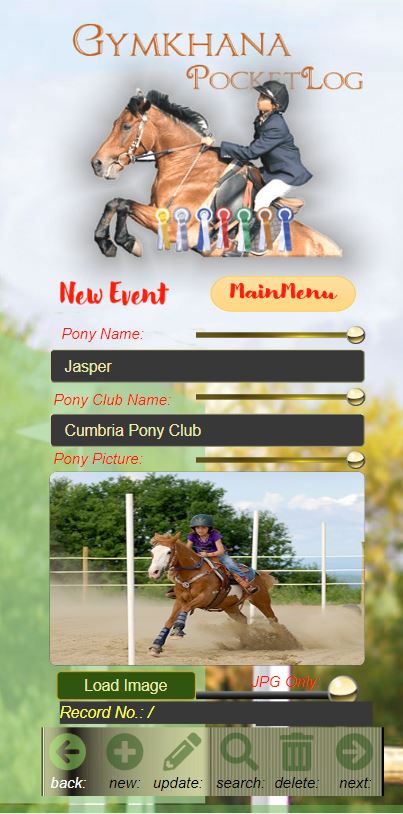

Quote from luishp on March 3, 2023, 5:44 pm@linda-rainey sorry, I don't understand your question. Do you mean something like ObjectToFront and ObjectToBack, or perhaps ShowObject and HideObject?
Regards.
@linda-rainey sorry, I don't understand your question. Do you mean something like ObjectToFront and ObjectToBack, or perhaps ShowObject and HideObject?
Regards.
Quote from Linda Rainey on March 3, 2023, 7:54 pmLuis..
Yes.. I would normally make this kind of thing with Delphi.. I have six Rosettes Stacked on top of each other 1-6
.. Hidden..
and with a simple dropdown with 1-6 in the items list... the user selecting No. 2 from dropdown ... would bring the 2nd prize rosette to the top of the hidden pile and unhide it... showing 2nd prize.. alongside the field .. as in pic... (all fields would have the hidden 1-6 fields hidden waiting for the one to be selected)...
using dropdown is just one way... tick and check boxes are to messy... can be done with a Popup.. with all six rosettes on show and user selects the one they won.. the popup would hide and rosette would be along side the field ...
All I need is the basic system for hiding and showing any object.. and a trigger device that the user selects to do it.. (buttons.. dropdown.. tick box or radio ) if there is something that can do this I will have a play and try to get it adapted to my needs...
likely have to be databased to work.. so as will stay in when viewed later on...
of the event game.. (won 2nd prize)
Regards
Linda
Luis..
Yes.. I would normally make this kind of thing with Delphi.. I have six Rosettes Stacked on top of each other 1-6
.. Hidden..
and with a simple dropdown with 1-6 in the items list... the user selecting No. 2 from dropdown ... would bring the 2nd prize rosette to the top of the hidden pile and unhide it... showing 2nd prize.. alongside the field .. as in pic... (all fields would have the hidden 1-6 fields hidden waiting for the one to be selected)...
using dropdown is just one way... tick and check boxes are to messy... can be done with a Popup.. with all six rosettes on show and user selects the one they won.. the popup would hide and rosette would be along side the field ...
All I need is the basic system for hiding and showing any object.. and a trigger device that the user selects to do it.. (buttons.. dropdown.. tick box or radio ) if there is something that can do this I will have a play and try to get it adapted to my needs...
likely have to be databased to work.. so as will stay in when viewed later on...
of the event game.. (won 2nd prize)
Regards
Linda

Quote from fkapnist on March 3, 2023, 8:34 pmHi,
If there are six Objects that need to be hidden or shown, I would create a subroutine that first of all hides all six items. Then create an Object action that shows only the selected one (myObjectX). Your trigger device should runs both functions in that order. That way you keep things simple.
HideAll
(SubRoutine HideAll:
HideObject "myObject1" "none" 0
HideObject "myObject2" "none" 0
HideObject "myObject3" "none" 0
HideObject "myObject4" "none" 0
HideObject "myObject5" "none" 0
HideObject "myObject6" "none" 0)
ShowObject "myObjectX" "slideInDown" 40.
Hi,
If there are six Objects that need to be hidden or shown, I would create a subroutine that first of all hides all six items. Then create an Object action that shows only the selected one (myObjectX). Your trigger device should runs both functions in that order. That way you keep things simple.
HideAll
(SubRoutine HideAll:
HideObject "myObject1" "none" 0
HideObject "myObject2" "none" 0
HideObject "myObject3" "none" 0
HideObject "myObject4" "none" 0
HideObject "myObject5" "none" 0
HideObject "myObject6" "none" 0)
ShowObject "myObjectX" "slideInDown" 40
.
Quote from Linda Rainey on March 5, 2023, 1:40 pmThank you "FK"
I have tried all ways to do this.. and yes.. your way works fine with "hide & show" ..
I thought I had it beat .. but the problem then is it does not stay there... when you do a new record it has gone or the same one is in that next record..
I came up with the idea of a Base64 for each of the 6 rosettes 1-6 so as to hit a trigger button and it would select one of the 6 rosettes and it would be place next to the field it represents.... unfortunately with that idea which would have been ok because it is databased adding 6 new "Pic" Text fields to the database would ensure they where always going to be working...
Only when I did a demo of adding another Base64 (copy of the one I already had) it did not work just kept putting replacing picture in my first header picture
Pic1.. even though I had checked all entries as my first base64 header... with just one Pic2 to try it...
So I will have to scrap the idea...
Thanks
Linda
Thank you "FK"
I have tried all ways to do this.. and yes.. your way works fine with "hide & show" ..
I thought I had it beat .. but the problem then is it does not stay there... when you do a new record it has gone or the same one is in that next record..
I came up with the idea of a Base64 for each of the 6 rosettes 1-6 so as to hit a trigger button and it would select one of the 6 rosettes and it would be place next to the field it represents.... unfortunately with that idea which would have been ok because it is databased adding 6 new "Pic" Text fields to the database would ensure they where always going to be working...
Only when I did a demo of adding another Base64 (copy of the one I already had) it did not work just kept putting replacing picture in my first header picture
Pic1.. even though I had checked all entries as my first base64 header... with just one Pic2 to try it...
So I will have to scrap the idea...
Thanks
Linda
Quote from fkapnist on March 5, 2023, 5:56 pmQuote from Linda Rainey on March 5, 2023, 1:40 pmThank you "FK"
I have tried all ways to do this.. and yes.. your way works fine with "hide & show" ..
I thought I had it beat .. but the problem then is it does not stay there... when you do a new record it has gone or the same one is in that next record..
I came up with the idea of a Base64 for each of the 6 rosettes 1-6 so as to hit a trigger button and it would select one of the 6 rosettes and it would be place next to the field it represents.... unfortunately with that idea which would have been ok because it is databased adding 6 new "Pic" Text fields to the database would ensure they where always going to be working...
Only when I did a demo of adding another Base64 (copy of the one I already had) it did not work just kept putting replacing picture in my first header picture
Pic1.. even though I had checked all entries as my first base64 header... with just one Pic2 to try it...
So I will have to scrap the idea...
Thanks
Linda
@linda-rainey
Don't give up.
If you are having trouble with Base64 images, you might want to look into using "rosette icon fonts" which would be easier to append to your winner title script:
Rosette Icons & Symbols (flaticon.com)
.
190 rosette icons - Iconfinder
.
(These are SVG fonts)
.
Quote from Linda Rainey on March 5, 2023, 1:40 pmThank you "FK"
I have tried all ways to do this.. and yes.. your way works fine with "hide & show" ..
I thought I had it beat .. but the problem then is it does not stay there... when you do a new record it has gone or the same one is in that next record..
I came up with the idea of a Base64 for each of the 6 rosettes 1-6 so as to hit a trigger button and it would select one of the 6 rosettes and it would be place next to the field it represents.... unfortunately with that idea which would have been ok because it is databased adding 6 new "Pic" Text fields to the database would ensure they where always going to be working...
Only when I did a demo of adding another Base64 (copy of the one I already had) it did not work just kept putting replacing picture in my first header picture
Pic1.. even though I had checked all entries as my first base64 header... with just one Pic2 to try it...
So I will have to scrap the idea...
Thanks
Linda
Don't give up.
If you are having trouble with Base64 images, you might want to look into using "rosette icon fonts" which would be easier to append to your winner title script:
Rosette Icons & Symbols (flaticon.com)
.
190 rosette icons - Iconfinder
.
(These are SVG fonts)
.