
Internet Explorer officially dumped by Microsoft

Quote from fkapnist on January 3, 2022, 4:40 amMicrosoft no longer supports the Internet Explorer browser. Unfortunately many thousands of Windows apps that were built with 3-rd party compilers, from Visual Basic to Delphi, make extensive use of the WebBrowser object and its IE commands. Will they suddenly stop working? (they sometimes don't work as it is) Or will a future Windows update automatically switch all IE commands to chromium Edge? I haven't figured it out yet....
Microsoft no longer supports the Internet Explorer browser. Unfortunately many thousands of Windows apps that were built with 3-rd party compilers, from Visual Basic to Delphi, make extensive use of the WebBrowser object and its IE commands. Will they suddenly stop working? (they sometimes don't work as it is) Or will a future Windows update automatically switch all IE commands to chromium Edge? I haven't figured it out yet....

Quote from luishp on January 3, 2022, 10:45 am@fkapnist I think there is a bit of missunderstanding here. IE retirement doesn't affect MSHTML engine (Trident) component. So all Windows Apps will continue working. More info here:
Regards.
@fkapnist I think there is a bit of missunderstanding here. IE retirement doesn't affect MSHTML engine (Trident) component. So all Windows Apps will continue working. More info here:
Regards.
Quote from fkapnist on January 3, 2022, 11:27 amQuote from luishp on January 3, 2022, 10:45 am@fkapnist I think there is a bit of missunderstanding here. IE retirement doesn't affect MSHTML engine (Trident) component. So all Windows Apps will continue working. More info here:
Regards.
This is the part I don't understand:
"Microsoft Edge with Internet Explorer mode (“IE mode”), is the only browser with built-in compatibility for legacy IE-based sites and apps."
How will legacy "apps" perform with this built-in compatibility? Will there be any difference? Will the end-user have to make Windows settings changes?
Thanks
Quote from luishp on January 3, 2022, 10:45 am@fkapnist I think there is a bit of missunderstanding here. IE retirement doesn't affect MSHTML engine (Trident) component. So all Windows Apps will continue working. More info here:
Regards.
This is the part I don't understand:
"Microsoft Edge with Internet Explorer mode (“IE mode”), is the only browser with built-in compatibility for legacy IE-based sites and apps."
How will legacy "apps" perform with this built-in compatibility? Will there be any difference? Will the end-user have to make Windows settings changes?
Thanks
Quote from luishp on January 3, 2022, 12:41 pmHow will legacy "apps" perform with this built-in compatibility? Will there be any difference? Will the end-user have to make Windows settings changes?
Legacy apps don't use Internet Explorer browser directly, but it's rendering engine Windows component. The rendering engine is unaffected (at least until 2029)
End users don't need to do any change on their systems.Regards.
How will legacy "apps" perform with this built-in compatibility? Will there be any difference? Will the end-user have to make Windows settings changes?
Legacy apps don't use Internet Explorer browser directly, but it's rendering engine Windows component. The rendering engine is unaffected (at least until 2029)
End users don't need to do any change on their systems.
Regards.
Quote from fkapnist on January 4, 2022, 3:09 amQuote from luishp on January 3, 2022, 12:41 pmHow will legacy "apps" perform with this built-in compatibility? Will there be any difference? Will the end-user have to make Windows settings changes?
Legacy apps don't use Internet Explorer browser directly, but it's rendering engine Windows component. The rendering engine is unaffected (at least until 2029)
End users don't need to do any change on their systems.Regards.
I don't know what will happen after 2029. But today if a legacy app's rendering engine tries to access some websites or to login to certain online platforms, it will be locked out... How can that be fixed I wonder f possible?
Quote from luishp on January 3, 2022, 12:41 pmHow will legacy "apps" perform with this built-in compatibility? Will there be any difference? Will the end-user have to make Windows settings changes?
Legacy apps don't use Internet Explorer browser directly, but it's rendering engine Windows component. The rendering engine is unaffected (at least until 2029)
End users don't need to do any change on their systems.Regards.
I don't know what will happen after 2029. But today if a legacy app's rendering engine tries to access some websites or to login to certain online platforms, it will be locked out... How can that be fixed I wonder f possible?
Uploaded files: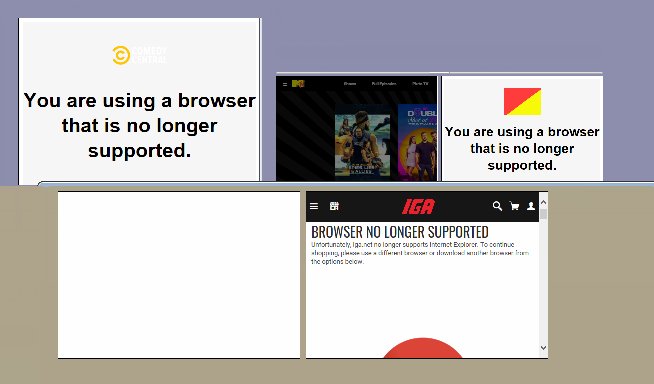
Quote from fkapnist on January 4, 2022, 3:36 am"Azure" is a cloud computing service operated by Microsoft for application management. But a legacy app's Microsoft Trident rendering engine can no longer access Azure as a platform or service. Microsoft's claims of "built-in compatibility for legacy IE-based sites and apps" with the new Edge browser hardly makes sense when it comes to legacy apps stuck forever with the old Trident engine.
"Azure" is a cloud computing service operated by Microsoft for application management. But a legacy app's Microsoft Trident rendering engine can no longer access Azure as a platform or service. Microsoft's claims of "built-in compatibility for legacy IE-based sites and apps" with the new Edge browser hardly makes sense when it comes to legacy apps stuck forever with the old Trident engine.
Uploaded files: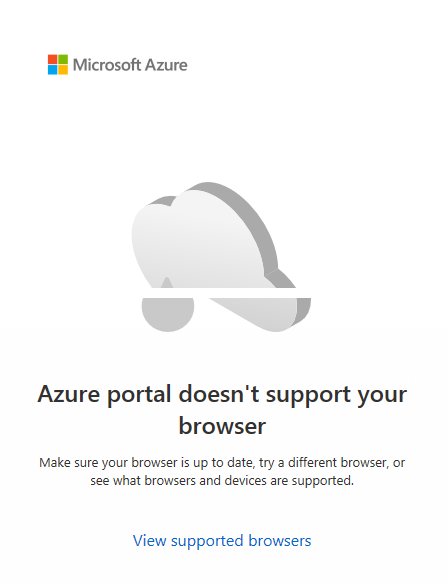
Quote from fkapnist on January 4, 2022, 3:58 amThe issue is not "when" will Microsoft stop supporting the Internet Explorer (and its legacy WebBrowser object). The real problem is that many, many websites and platforms have already dropped support for IE. And they will probably altogether banish it like they did the Flash Player.... so I think all new VisualNEO Win Pubs must consider using Edge (or Chrome) in a rectangle rather than IE in a WebBrowser object... There will certainly be plugins... I hope....
The issue is not "when" will Microsoft stop supporting the Internet Explorer (and its legacy WebBrowser object). The real problem is that many, many websites and platforms have already dropped support for IE. And they will probably altogether banish it like they did the Flash Player.... so I think all new VisualNEO Win Pubs must consider using Edge (or Chrome) in a rectangle rather than IE in a WebBrowser object... There will certainly be plugins... I hope....
Quote from fkapnist on January 4, 2022, 4:38 amIf anyone is interested in using Edge or Chrome browsers in a VisualNEO Win rectangle.... here is a sample Pub you can compile. Copy the code to "bridge" NEO Win and NEO Web scripts (with kiosk mode and other options) into a single app.
The Pub expects to find these paths (but you can change the code) :
C:\Program Files (x86)\Microsoft\Edge\Application\msedge.exe
C:\Program Files\Google\Chrome\Application\chrome.exe
CompiledName=C:\MyProgram\KioskBridge.exe
And here is the Pub:
NBW Publication Source File
(C)2016 NeoSoft Corp.
Title=Kiosk Bridge
Language=US
NeoBookVer=5.80
ScreenColors=16777216
ScreenWidth=1024
ScreenHeight=768
BkndColor=0
ScreenAutoSize=Yes
LinkColor=16711680
WindowStyle=0
WindowOrder=1
WindowPos=0
WindowProps=127
BiDiMode=0
UseUpdateTimer=Yes
ReturnTime=60
ShapeTransColor=536870912
SplashProps=3
CompiledName=C:\MyProgram\KioskBridge.exe
CompileType=0
MediaType=0
FilesIncluded=1
FontsIncluded=2
FontsToCompile=|
CopyExternalFiles=No
SetupMedia=3
SetupInstDir=C:\MyProgram
SetupTitle=Setup
SetupColors=16711680|0|65535
Variables=[ChromeApp]
VersionMajor=1
VersionMinor=0
VersionRelease=0
VersionBuild=0
ReqExLevel=1
CustomFontName=Arial
CustomFontSize=9
CustomFontStyle=0
CustomCharset=1
CacheSize=30
ExtractOp=132
L_OK=OK
L_CANCEL=Cancel
L_YES=Yes
L_NO=No
L_CLOSE=Close
L_ERRORTITLE=Error
L_FINDTITLE=Find
L_FINDPROMPT=Find &What
L_FINDFIRST=&Find First
L_FINDNEXT=Find &Next
L_FINDERROR=Search text not found.
L_PWORDTITLE=Password required
L_PWORDMSG=Before continuing, you must first|enter the correct password.
L_PWORDPROMPT=&Password:
L_PWORDERROR=That's not the right password!
L_MEDIAERROR=In order to play this type of file you must install|the appropriate multimedia hardware and/or|software.
L_INTERNETERROR=Unable to locate Internet Browser software.
L_ABORTFUNCTION=Do you want to cancel this function?
L_EXTRACTERROR=This file could not be extracted and cannot be played.
L_INSTDIRPROMPT=Please enter the drive and directory where you would like this program to be installed. To accept the default drive and directory, simply press Enter.
L_INSTFOLDERPROMPT=Do you wish to create a program folder?
L_INSTRUNPROMPT=Do you want to run
L_INSTDISKPROMPT=Please insert disk #
L_INSTDISKERROR=That's not the correct disk, try again.
L_INSTGENERROR=The installation has terminated.
L_INSTEXITPROMPT=Do you really want to cancel the installation?
L_INSTWINTITLE=Setup
L_INSTPROGTITLE=Extracting Files...
L_SENDEMAIL=Sending Mail...
L_MAILSERVER=Please enter the name of your outgoing email server:
L_COPY=Copy to Clipboard
L_SELECTALL=Select All
L_DONWLOADFILE=Downloading: %s
L_PLEASEWAIT=Please wait...
MenuBegin
MenuName=MenuHeading1
MenuText=Home
MenuState=3
MenuKey=0
MenuAction=GotoPage "Intro Page"
MenuName=MenuHeading2
MenuText=Chrome
MenuState=3
MenuKey=0
MenuAction=GotoPage "New Page"
MenuName=MenuHeading3
MenuText=Edge
MenuState=3
MenuKey=0
MenuAction=GotoPage "New Page 1"
MenuName=MenuHeading4
MenuText=Blob
MenuState=3
MenuKey=0
MenuAction=GotoPage "New Page 2"
MenuName=MenuHeading5
MenuText=Window
MenuState=3
MenuKey=0
MenuBegin
MenuName=MenuItem1
MenuText=OnTop      (sets window order)
MenuState=15
MenuVar=[MenuItem1]
MenuKey=0
MenuAction=Setvar "[WindowOrder]" "OnTop"¶SetVar "[MenuItem1]" "Checked"¶SetVar "[MenuItem2]" ""
MenuName=MenuItem2
MenuText=Normal  (Ctrl+W closes popups)
MenuState=11
MenuVar=[MenuItem2]
MenuKey=0
MenuAction=Setvar "[WindowOrder]" "Normal"¶SetVar "[MenuItem1]" ""¶SetVar "[MenuItem2]" "Checked"
MenuEnd
MenuEnd
TrayMenuBegin
MenuName=TrayOpen
MenuText=Open
MenuState=3
MenuKey=0
MenuAction=SetVar "[WindowState]" "Normal"
MenuName=TrayExit
MenuText=Exit
MenuState=3
MenuKey=0
MenuAction=Exit "" ""
MenuEnd
MasterPage
NewPage=Intro Page
PageStyle=0
PageColor=12632256
PageGradient1=16711680
PageGradient2=255
PageGradientDir=1
WallpaperStyle=0
EffectSpeed=0
PgEnterAction=.SetVar "[WindowState]" "Normal"
ObjectType=8
Name=Text11
X=22
Y=11
W=981
H=58
Anchor=0
Font=MS Sans Serif
FontSize=30
FontStyle=1
FontCharset=1
TextColor=16777215
Text={\rtf1\ansi\deff0\deftab254{\fonttbl{\f0\fnil\fcharset1 MS Sans Serif;}}{\pard{\qc\li0\fi0\ri0\sb0\sl\sa0 \plain\f0\fs60\cf0\b Kiosk Bridge}}¶}
HMargin=4
VMargin=4
LineColor=0
LineWidth=0
LineStyle=0
FillColor=0
FillPattern=0
TabOrder=1
ObjectType=8
Name=Text12
X=914
Y=472
W=55
H=24
Anchor=0
Font=MS Sans Serif
FontSize=10
FontStyle=1
FontCharset=1
TextColor=0
Text={\rtf1\ansi\deff0\deftab254{\fonttbl{\f0\fnil\fcharset1 MS Sans Serif;}}{\pard{\qr\li0\fi0\ri0\sb0\sl\sa0 \plain\f0\fs20\cf0\b Next \plain\f0\fs20\cf0\b >}}¶}
HMargin=4
VMargin=4
LineColor=0
LineWidth=0
LineStyle=0
FillColor=14075333
FillPattern=1
FillMode=Yes
TabOrder=3
ObjectType=8
Name=Text16
X=22
Y=282
W=981
H=190
Anchor=0
Font=@Arial Unicode MS
FontSize=14
FontStyle=1
FontCharset=1
TextColor=0
Text={\rtf1\ansi\deff0\deftab254{\fonttbl{\f0\fnil\fcharset1 @Arial Unicode MS;}}{\pard{\ql\li0\fi0\ri0\sb0\sl\sa0 \plain\f0\fs28\cf0\b "Kiosk Mode" scripts embedded in \plain\f0\fs28\cf0\b NEO-win rectangles provide a bridge \plain\f0\fs28\cf0\b between VisualNEO Web and VisualNEO \plain\f0\fs28\cf0\b Win applications without requiring the \plain\f0\fs28\cf0\b Internet Explorer (IE WebBrowser \plain\f0\fs28\cf0\b object) which is no longer supported by \plain\f0\fs28\cf0\b major online services. \par\ql\li0\fi0\ri0\sb0\sl\sa0 \plain\f0\fs28\cf0\b \par\ql\li0\fi0\ri0\sb0\sl\sa0 \plain\f0\fs28\cf0\b Kiosk Mode is offered by browsers \plain\f0\fs28\cf0\b (Chrome, Edge etc) to run an \plain\f0\fs28\cf0\b application full screen without any user \plain\f0\fs28\cf0\b interface such as toolbars and menus.}}}
HMargin=20
VMargin=20
LineColor=0
LineWidth=0
LineStyle=0
FillColor=16777215
FillPattern=1
TabOrder=5
ObjectType=8
Name=Text17
X=22
Y=528
W=981
H=81
Anchor=0
Font=@Arial Unicode MS
FontSize=10
FontStyle=1
FontCharset=1
TextColor=0
Text={\rtf1\ansi\deff0\deftab254{\fonttbl{\f0\fnil\fcharset1 @Arial Unicode MS;}}{\pard{\ql\li0\fi0\ri0\sb0\sl\sa0 \plain\f0\fs20\cf0\b The Mozilla Firefox browser also offers Kiosk Mode settings. \plain\f0\fs20\cf0\b But the current version of Firefox is not compatible with \plain\f0\fs20\cf0\b NEO-win rectangles. RunInRectangle launching may not work \plain\f0\fs20\cf0\b with some types of applications.}}}
HMargin=20
VMargin=20
LineColor=0
LineWidth=0
LineStyle=0
FillColor=16777215
FillPattern=1
TabOrder=6
ObjectType=8
Name=Text22
X=22
Y=73
W=981
H=198
Anchor=0
Font=Arial Black
FontSize=28
FontStyle=1
FontCharset=1
TextColor=0
Text={\rtf1\ansi\deff0\deftab254{\fonttbl{\f0\fnil\fcharset1 @Arial Unicode MS;}{\f1\fnil\fcharset1 Arial Black;}}{\pard{\qc\li0\fi0\ri0\sb0\sl\sa0 \plain\f1\fs56\cf0\b Using Chrome or Edge \par¶\qc\li0\fi0\ri0\sb0\sl\sa0 \plain\f1\fs56\cf0\b to navigate VisualNEO Win \par¶\qc\li0\fi0\ri0\sb0\sl\sa0 \plain\f1\fs56\cf0\b without IE WebBrowser objects}}¶}
HMargin=20
VMargin=20
LineColor=0
LineWidth=0
LineStyle=0
FillColor=16777215
FillPattern=1
TabOrder=4
ObjectType=3
Name=PushButton71
X=978
Y=446
W=25
H=77
Anchor=0
Text=>
Align=2
ImageStyle=0
XPTheme=Yes
ObjAction=GotoNextPage
LineColor=0
LineWidth=0
LineStyle=0
FillColor=11373965
FillPattern=0
Font=MS Sans Serif
FontSize=14
FontStyle=1
FontCharset=1
TextColor=0
TabOrder=2
NewPage=New Page
PageStyle=0
PageColor=16777215
PageGradient1=16711680
PageGradient2=255
PageGradientDir=1
WallpaperStyle=0
EffectSpeed=0
PgEnterAction=SetVar "[WindowState]" "Maximized"
PgExitAction=ShowErrors "False"¶CloseApp "[ChromeApp]" "RequestClose"¶Delay "100"¶CloseApp "[ChromeApp]" "ForceClose"¶BrowserGoTo "WebBrowser1" "about:blank"
ObjectType=21
Name=Container2
X=0
Y=0
W=1024
H=768
Anchor=5
LineColor=0
LineWidth=0
LineStyle=0
FillColor=11373965
FillPattern=0
TabOrder=2
HMargin=0
VMargin=0
ObjAction=MoveObject "Container2" "-1" "-1"
ContainerBegin
ObjectType=5
Name=Rectangle1
X=21
Y=101
W=485
H=335
Anchor=0
LineColor=16777215
LineWidth=1
LineStyle=0
FillColor=16777215
FillPattern=0
TabOrder=0
ObjectType=3
Name=PushButton2
X=523
Y=488
W=352
H=36
Anchor=0
Text=https://www.reuters.com/
Align=2
ImageStyle=0
XPTheme=Yes
ObjAction=.Setvar "[WindowOrder]" "OnTop"¶IsAppRunning "[ChromeApp]" "[i]"¶If "[i]" "=" "True"¶ShowErrors "False"¶CloseApp "[ChromeApp]" "RequestClose"¶Delay "100"¶CloseApp "[ChromeApp]" "ForceClose"¶ShowErrors "True"¶EndIf¶SetVar "[WindowState]" "Maximized"¶RunInRectangle "Rectangle1" "C:\Program Files\Google\Chrome\Application\chrome.exe" "--start-fullscreen --disable-features=TranslateUI --disable-notifications --app=https://www.reuters.com/" "" "" "[ChromeApp]"¶Delay "100"¶BrowserGoTo "WebBrowser1" "about:blank"¶Delay "100"¶BrowserGoTo "WebBrowser1" "https://www.reuters.com/"¶¶Return¶................ an error patch if Kiosk mode breaks out of Rectangle1 into full screen¶GetWindowPos "C:\Program Files\Google\Chrome\Application\chrome.exe" "" "" "[Swid]" ""¶             If "[Swid]" ">" "[PubWidth]"¶             BringAppToFront "C:\Program Files\Google\Chrome\Application\chrome.exe"¶             Delay "1000"¶             SendKeys "C:\Program Files\Google\Chrome\Application\chrome" "{CtrlDn}W"¶             BringAppToFront "C:\Program Files\Google\Chrome\Application\chrome.exe"¶             Delay "1000"¶             SendKeys "C:\Program Files\Google\Chrome\Application\chrome" "{CtrlDn}W"¶             BringAppToFront "C:\Program Files\Google\Chrome\Application\chrome.exe"¶             Delay "1000"¶             SendKeys "C:\Program Files\Google\Chrome\Application\chrome" "{CtrlDn}W"¶             BringAppToFront "C:\Program Files\Google\Chrome\Application\chrome.exe"¶             Delay "1000"¶             SendKeys "C:\Program Files\Google\Chrome\Application\chrome" "{CtrlDn}W"¶             BringAppToFront "C:\Program Files\Google\Chrome\Application\chrome.exe"¶             Delay "1000"¶             SendKeys "C:\Program Files\Google\Chrome\Application\chrome" "{CtrlDn}W"¶             TimerStop "Timer1"¶             RunInRectangle "Rectangle1" "C:\Program Files\Google\Chrome\Application\chrome.exe" "--kiosk --private-window -–window-size=485,335 --app=https://www.reuters.com/" "" "" "[ChromeApp]"¶             EndIf¶.................end of error patch¶.TimerStop "Timer1"¶ShowErrors "True"¶BrowserGoTo "WebBrowser1" "about:blank"¶Delay "500"¶BrowserGoTo "WebBrowser1" "https://www.reuters.com/"
LineColor=0
LineWidth=0
LineStyle=0
FillColor=11373965
FillPattern=0
Font=MS Sans Serif
FontSize=10
FontStyle=1
FontCharset=1
TextColor=0
TabOrder=1
ObjectType=14
Name=WebBrowser1
X=517
Y=101
W=485
H=335
Anchor=0
VarName=[WebBrowser1Status]
TitleVarName=[WebBrowser1Title]
URLVarName=[WebBrowser1Addr]
EnhSecurity=No
LineColor=0
LineWidth=1
LineStyle=0
FillColor=11373965
FillPattern=0
Font=MS Sans Serif
FontSize=8
FontStyle=0
FontCharset=1
TextColor=16777215
TabOrder=2
ObjectType=3
Name=PushButton13
X=159
Y=488
W=352
H=36
Anchor=0
Text=https://www.mtv.com/
Align=2
ImageStyle=0
XPTheme=Yes
ObjAction=.Setvar "[WindowOrder]" "OnTop"¶IsAppRunning "[ChromeApp]" "[i]"¶If "[i]" "=" "True"¶ShowErrors "False"¶CloseApp "[ChromeApp]" "RequestClose"¶Delay "100"¶CloseApp "[ChromeApp]" "ForceClose"¶ShowErrors "True"¶EndIf¶SetVar "[WindowState]" "Maximized"¶RunInRectangle "Rectangle1" "C:\Program Files\Google\Chrome\Application\chrome.exe" "--kiosk --private-window --window-size=485,335 --app-shell-host-window-size=485x335 --disable-features=TranslateUI --disable-notifications --app=https://www.mtv.com/" "" "" "[ChromeApp]"¶Delay "3000"¶FocusObject "Timer1"¶SendKeys "" "{CtrlDn}W"¶Delay "500"¶BrowserGoTo "WebBrowser1" "about:blank"¶Delay "500"¶BrowserGoTo "WebBrowser1" "https://www.mtv.com/"¶¶Return¶¶¶¶Delay "1000"¶.TimerStart "Timer1" "700"¶ShowErrors "False"¶................ an error patch if Kiosk mode breaks out of Rectangle1 into full screen¶GetWindowPos "C:\Program Files\Google\Chrome\Application\chrome.exe" "" "" "[Swid]" ""¶             If "[Swid]" ">" "[PubWidth]"¶             BringAppToFront "C:\Program Files\Google\Chrome\Application\chrome.exe"¶             Delay "1000"¶             SendKeys "C:\Program Files\Google\Chrome\Application\chrome" "{CtrlDn}W"¶             BringAppToFront "C:\Program Files\Google\Chrome\Application\chrome.exe"¶             Delay "1000"¶             SendKeys "C:\Program Files\Google\Chrome\Application\chrome" "{CtrlDn}W"¶             BringAppToFront "C:\Program Files\Google\Chrome\Application\chrome.exe"¶             Delay "1000"¶             SendKeys "C:\Program Files\Google\Chrome\Application\chrome" "{CtrlDn}W"¶             BringAppToFront "C:\Program Files\Google\Chrome\Application\chrome.exe"¶             Delay "1000"¶             SendKeys "C:\Program Files\Google\Chrome\Application\chrome" "{CtrlDn}W"¶             BringAppToFront "C:\Program Files\Google\Chrome\Application\chrome.exe"¶             Delay "1000"¶             SendKeys "C:\Program Files\Google\Chrome\Application\chrome" "{CtrlDn}W"¶             TimerStop "Timer1"¶             RunInRectangle "Rectangle1" "C:\Program Files\Google\Chrome\Application\chrome.exe" "--kiosk --private-window -–window-size=485,335 --app=https://www.mtv.com/" "" "" "[ChromeApp]"¶             EndIf¶.................end of error patch¶.TimerStop "Timer1"¶ShowErrors "True"¶BrowserGoTo "WebBrowser1" "about:blank"¶Delay "500"¶BrowserGoTo "WebBrowser1" "https://www.mtv.com/"
LineColor=0
LineWidth=0
LineStyle=0
FillColor=11373965
FillPattern=0
Font=MS Sans Serif
FontSize=10
FontStyle=1
FontCharset=1
TextColor=0
TabOrder=3
ObjectType=3
Name=PushButton14
X=158
Y=448
W=352
H=36
Anchor=0
Text=https://www.cc.com/
Align=2
ImageStyle=0
XPTheme=Yes
ObjAction=.Setvar "[WindowOrder]" "OnTop"¶IsAppRunning "[ChromeApp]" "[i]"¶If "[i]" "=" "True"¶CloseApp "[ChromeApp]" "ForceClose"¶Delay "900"¶EndIf¶SetVar "[WindowState]" "Maximized"¶.RunInRectangle "Rectangle1" "C:\Program Files\Google\Chrome\Application\chrome.exe" "--window-size=485,335 --app-shell-host-window-size=485x335 --disable-features=TranslateUI --disable-notifications --app=https://www.cc.com/" "HideMenu" "" "[ChromeApp]"¶RunInRectangle "Rectangle1" "C:\Program Files\Google\Chrome\Application\chrome.exe" "--ash-force-desktop --kiosk --app=https://www.cc.com/" "" "" "[ChromeApp]"¶¶ShowErrors "True"¶BrowserGoTo "WebBrowser1" "about:blank"¶Delay "500"¶BrowserGoTo "WebBrowser1" "https://www.cc.com/"¶¶Return¶¶..........................................¶IsAppRunning "[ChromeApp]" "[i]"¶If "[i]" "=" "True"¶CloseApp "[ChromeApp]" "ForceClose"¶Delay "500"¶EndIf¶.RunInRectangle "Rectangle1" "C:\Program Files\Google\Chrome\Application\chrome.exe" "--kiosk https://www.cc.com/" "" "" "[ChromeApp]"¶RunInRectangle "Rectangle1" "C:\Program Files\Google\Chrome\Application\chrome.exe" "-–window-size=485,335 --app=https://www.cc.com/" "" "" "[ChromeApp]"¶¶BrowserGoTo "WebBrowser1" "about:blank"¶Delay "500"¶BrowserGoTo "WebBrowser1" "https://www.cc.com/"
LineColor=0
LineWidth=0
LineStyle=0
FillColor=11373965
FillPattern=0
Font=MS Sans Serif
FontSize=10
FontStyle=1
FontCharset=1
TextColor=0
TabOrder=4
ObjectType=3
Name=PushButton15
X=522
Y=448
W=352
H=36
Anchor=0
Text=https://fortune.com/
Align=2
ImageStyle=0
XPTheme=Yes
ObjAction=.Setvar "[WindowOrder]" "OnTop"¶IsAppRunning "[ChromeApp]" "[i]"¶If "[i]" "=" "True"¶ShowErrors "False"¶CloseApp "[ChromeApp]" "RequestClose"¶Delay "100"¶CloseApp "[ChromeApp]" "ForceClose"¶ShowErrors "True"¶EndIf¶SetVar "[WindowState]" "Maximized"¶.RunInRectangle "Rectangle1" "C:\Program Files\Google\Chrome\Application\chrome.exe" "--kiosk https://fortune.com/" "" "" "[ChromeApp]"¶RunInRectangle "Rectangle1" "C:\Program Files\Google\Chrome\Application\chrome.exe" "--window-size=485,335 --app-shell-host-window-size=485x335 --disable-features=TranslateUI --disable-notifications --app=https://www.fortune.com/" "" "" "[ChromeApp]"¶..SendKeys "[Self]" "{CtrlDn}W"¶Delay "100"¶BrowserGoTo "WebBrowser1" "about:blank"¶Delay "100"¶BrowserGoTo "WebBrowser1" "https://fortune.com/"¶Delay "500"¶ShowObject "Rectangle1" "Page Turn" "9"¶ShowObject "WebBrowser1" "Page Turn" "9"¶return¶¶¶.TimerStart "Timer1" "700"¶ShowErrors "False"¶................ an error patch if Kiosk mode breaks out of Rectangle1 into full screen¶GetWindowPos "C:\Program Files\Google\Chrome\Application\chrome.exe" "" "" "[Swid]" ""¶             If "[Swid]" ">" "[PubWidth]"¶             BringAppToFront "C:\Program Files\Google\Chrome\Application\chrome.exe"¶             Delay "1000"¶             SendKeys "C:\Program Files\Google\Chrome\Application\chrome" "{CtrlDn}W"¶             BringAppToFront "C:\Program Files\Google\Chrome\Application\chrome.exe"¶             Delay "1000"¶             SendKeys "C:\Program Files\Google\Chrome\Application\chrome" "{CtrlDn}W"¶             BringAppToFront "C:\Program Files\Google\Chrome\Application\chrome.exe"¶             Delay "1000"¶             SendKeys "C:\Program Files\Google\Chrome\Application\chrome" "{CtrlDn}W"¶             BringAppToFront "C:\Program Files\Google\Chrome\Application\chrome.exe"¶             Delay "1000"¶             SendKeys "C:\Program Files\Google\Chrome\Application\chrome" "{CtrlDn}W"¶             BringAppToFront "C:\Program Files\Google\Chrome\Application\chrome.exe"¶             Delay "1000"¶             SendKeys "C:\Program Files\Google\Chrome\Application\chrome" "{CtrlDn}W"¶             TimerStop "Timer1"¶             RunInRectangle "Rectangle1" "C:\Program Files\Google\Chrome\Application\chrome.exe" "--kiosk https://fortune.com/" "" "" "[ChromeApp]"¶             EndIf¶.................end of error patch¶.TimerStop "Timer1"¶ShowErrors "True"¶BrowserGoTo "WebBrowser1" "about:blank"¶Delay "500"¶BrowserGoTo "WebBrowser1" "https://fortune.com/"
LineColor=0
LineWidth=0
LineStyle=0
FillColor=11373965
FillPattern=0
Font=MS Sans Serif
FontSize=10
FontStyle=1
FontCharset=1
TextColor=0
TabOrder=5
ObjectType=15
Name=Timer1
X=-71
Y=470
W=32
H=32
Anchor=0
AutoStart=No
AutoStop=No
Interval=1000
ObjAction=SendKeys "" "{CtrlDn}W"
ObjectType=3
Name=PushButton16
X=21
Y=59
W=485
H=36
Anchor=0
Text=Google Chrome Browser (click here to clear process)
Align=2
ImageStyle=0
XPTheme=Yes
ObjAction=ShowErrors "False"¶MessageBox "Clear Chrome Process" "Force Task Kill or Close App?" "Force|Close|Cancel" "[i]"¶If "[i]" "=" "1"¶.Run "cmd.exe" "tasklist" "Wait+LoadComplete" "" ""¶Run "cmd.exe" "/c taskkill /f /im chrome.exe" "Normal" "" ""¶EndIf¶If "[i]" "=" "3"¶Return¶EndIf¶CloseApp "[ChromeApp]" "RequestClose"¶Delay "100"¶CloseApp "[ChromeApp]" "ForceClose"¶.SetVar "[WindowState]" "Normal"¶.Setvar "[WindowOrder]" "Normal"
LineColor=0
LineWidth=0
LineStyle=0
FillColor=11373965
FillPattern=0
Font=MS Sans Serif
FontSize=10
FontStyle=1
FontCharset=1
TextColor=4210816
TabOrder=7
ObjectType=3
Name=PushButton17
X=517
Y=59
W=485
H=36
Anchor=0
Text=IE WebBrowser object (click here to close page)
Align=2
ImageStyle=0
XPTheme=Yes
ObjAction=BrowserGoTo "WebBrowser1" "about:blank"¶.SetVar "[WindowState]" "Normal"¶.Setvar "[WindowOrder]" "Normal"
LineColor=0
LineWidth=0
LineStyle=0
FillColor=11373965
FillPattern=0
Font=MS Sans Serif
FontSize=10
FontStyle=1
FontCharset=1
TextColor=0
TabOrder=8
ObjectType=9
Name=TextEntry1
X=22
Y=530
W=981
H=219
Anchor=0
Text=  ¶¶Kiosk mode implies a device is locked to single or multiple applications to act as a kiosk. In this way, a Chrome or Edge kiosk application can be locked into a NEO-win rectangle of any size like a WebBrowser object.¶¶When embedded in a NEO-win rectangle, the Chrome browser in kiosk mode may sometimes break out of its rectangle while loading and pop up to a full screen display. This is distracting. Since it is not in real full-screen mode "F11" will not close it. But "Ctrl+W" will close it. This popup bug occurs because kiosk mode is a lockdown mechanism to a single application. So, in order to embed a Chrome kiosk app into a NEO-win rectangle, your Publication Menu > Book Properties > Window Order > must be set to "Always on top." (or: Setvar "[WindowOrder]" "OnTop") Get familiar with Chrome kiosk mode by copying code from this sample publication.
VarName=[TextEntry1]
Align=2
EditMultiLine=Yes
EditLen=0
LineColor=0
LineWidth=0
LineStyle=0
FillColor=14075333
FillPattern=0
Font=@Arial Unicode MS
FontSize=9
FontStyle=1
FontCharset=1
TextColor=0
TabOrder=9
ObjectType=8
Name=Text1
X=22
Y=11
W=981
H=37
Anchor=0
Font=MS Sans Serif
FontSize=14
FontStyle=1
FontCharset=1
TextColor=16777215
Text={\rtf1\ansi\deff0\deftab254{\fonttbl{\f0\fnil\fcharset1 MS Sans Serif;}}{\pard{\qc\li0\fi0\ri0\sb0\sl\sa0 \plain\f0\fs28\cf0\b Kiosk Bridge - Google Chrome}}}
HMargin=4
VMargin=4
LineColor=0
LineWidth=0
LineStyle=0
FillColor=0
FillPattern=0
TabOrder=10
ObjectType=8
Name=Text5
X=59
Y=472
W=65
H=24
Anchor=0
Font=MS Sans Serif
FontSize=10
FontStyle=1
FontCharset=1
TextColor=16777215
Text={\rtf1\ansi\deff0\deftab254{\fonttbl{\f0\fnil\fcharset1 MS Sans Serif;}}{\pard{\ql\li0\fi0\ri0\sb0\sl\sa0 \plain\f0\fs20\cf0\b < Bac\plain\f0\fs20\cf0\b k}}¶}
HMargin=4
VMargin=4
LineColor=0
LineWidth=0
LineStyle=0
FillColor=14075333
FillPattern=1
FillMode=Yes
TabOrder=11
ObjectType=8
Name=Text6
X=914
Y=472
W=55
H=24
Anchor=0
Font=MS Sans Serif
FontSize=10
FontStyle=1
FontCharset=1
TextColor=16777215
Text={\rtf1\ansi\deff0\deftab254{\fonttbl{\f0\fnil\fcharset1 MS Sans Serif;}}{\pard{\qr\li0\fi0\ri0\sb0\sl\sa0 \plain\f0\fs20\cf0\b Next \plain\f0\fs20\cf0\b >}}¶}
HMargin=4
VMargin=4
LineColor=0
LineWidth=0
LineStyle=0
FillColor=14075333
FillPattern=1
FillMode=Yes
TabOrder=12
ContainerEnd
ObjectType=3
Name=PushButton66
X=978
Y=446
W=25
H=77
Anchor=0
Text=>
Align=2
ImageStyle=0
XPTheme=Yes
ObjAction=.Setvar "[WindowOrder]" "Normal"¶GotoNextPage
LineColor=0
LineWidth=0
LineStyle=0
FillColor=11373965
FillPattern=0
Font=MS Sans Serif
FontSize=14
FontStyle=1
FontCharset=1
TextColor=0
TabOrder=3
ObjectType=3
Name=PushButton67
X=22
Y=445
W=25
H=77
Anchor=0
Text=<
Align=2
ImageStyle=0
XPTheme=Yes
ObjAction=.Setvar "[WindowOrder]" "Normal"¶GotoPrevPage
LineColor=0
LineWidth=0
LineStyle=0
FillColor=11373965
FillPattern=0
Font=MS Sans Serif
FontSize=14
FontStyle=1
FontCharset=1
TextColor=0
TabOrder=4
ObjectType=3
Name=PushButton70
X=483
Y=60
W=58
H=33
Anchor=0
Text=Ctrl+W
Align=2
ImageStyle=0
BevelWidth=3
ObjAction=SendKeys "C:\Program Files\Google\Chrome\Application\chrome.exe" "{CtrlDn}w"
LineColor=0
LineWidth=0
LineStyle=0
FillColor=16777215
FillPattern=0
Font=MS Sans Serif
FontSize=8
FontStyle=0
FontCharset=1
TextColor=0
TabOrder=1
ObjectType=8
Name=Text14
X=342
Y=534
W=354
H=23
Anchor=0
Font=MS Sans Serif
FontSize=8
FontStyle=0
FontCharset=1
TextColor=4210816
Text={\rtf1\ansi\deff0\deftab254{\fonttbl{\f0\fnil\fcharset1 MS Sans Serif;}}{\pard{\qc\li0\fi0\ri0\sb0\sl\sa0 \plain\f0\fs16\cf0 Forced clearing of browser processes may logout from some websites}}}
HMargin=4
VMargin=4
LineColor=0
LineWidth=0
LineStyle=0
FillColor=14075333
FillPattern=1
FillMode=Yes
TabOrder=5
NewPage=New Page 1
PageStyle=0
PageColor=16777215
PageGradient1=16711680
PageGradient2=255
PageGradientDir=1
WallpaperStyle=0
EffectSpeed=0
PgEnterAction=SetVar "[WindowState]" "Maximized"
PgExitAction=ShowErrors "False"¶CloseApp "[EdgeApp]" "RequestClose"¶Delay "100"¶CloseApp "[EdgeApp]" "ForceClose"¶BrowserGoTo "WebBrowser7" "about:blank"
ObjectType=21
Name=Container4
X=0
Y=0
W=1024
H=768
Anchor=5
LineColor=0
LineWidth=0
LineStyle=0
FillColor=9217198
FillPattern=0
TabOrder=2
HMargin=0
VMargin=0
ObjAction=MoveObject "Container2" "-1" "-1"
ContainerBegin
ObjectType=5
Name=Rectangle7
X=21
Y=101
W=485
H=335
Anchor=0
LineColor=0
LineWidth=1
LineStyle=0
FillColor=16777215
FillPattern=0
TabOrder=0
ObjectType=3
Name=PushButton34
X=523
Y=488
W=352
H=36
Anchor=0
Text=https://facebook.com/
Align=2
ImageStyle=0
XPTheme=Yes
ObjAction=IsAppRunning "[EdgeApp]" "[i]"¶If "[i]" "=" "True"¶ShowErrors "False"¶CloseApp "[EdgeApp]" "RequestClose"¶Delay "100"¶CloseApp "[EdgeApp]" "ForceClose"¶ShowErrors "True"¶EndIf¶SetVar "[WindowState]" "Maximized"¶RunInRectangle "Rectangle7" "C:\Program Files (x86)\Microsoft\Edge\Application\msedge.exe" "--start-fullscreen --disable-features=TranslateUI --disable-notifications --app=https://facebook.com/" "HideMenu+HideSizeBox" "" "[EdgeApp]"¶Delay "100"¶BrowserGoTo "WebBrowser7" "about:blank"¶Delay "100"¶BrowserGoTo "WebBrowser7" "https://facebook.com/"¶¶Return¶................ an error patch if Kiosk mode breaks out of Rectangle1 into full screen¶GetWindowPos "C:\Program Files\Google\Chrome\Application\chrome.exe" "" "" "[Swid]" ""¶             If "[Swid]" ">" "[PubWidth]"¶             BringAppToFront "C:\Program Files\Google\Chrome\Application\chrome.exe"¶             Delay "1000"¶             SendKeys "C:\Program Files\Google\Chrome\Application\chrome" "{CtrlDn}W"¶             BringAppToFront "C:\Program Files\Google\Chrome\Application\chrome.exe"¶             Delay "1000"¶             SendKeys "C:\Program Files\Google\Chrome\Application\chrome" "{CtrlDn}W"¶             BringAppToFront "C:\Program Files\Google\Chrome\Application\chrome.exe"¶             Delay "1000"¶             SendKeys "C:\Program Files\Google\Chrome\Application\chrome" "{CtrlDn}W"¶             BringAppToFront "C:\Program Files\Google\Chrome\Application\chrome.exe"¶             Delay "1000"¶             SendKeys "C:\Program Files\Google\Chrome\Application\chrome" "{CtrlDn}W"¶             BringAppToFront "C:\Program Files\Google\Chrome\Application\chrome.exe"¶             Delay "1000"¶             SendKeys "C:\Program Files\Google\Chrome\Application\chrome" "{CtrlDn}W"¶             TimerStop "Timer1"¶             RunInRectangle "Rectangle1" "C:\Program Files\Google\Chrome\Application\chrome.exe" "--kiosk --private-window -–window-size=485,335 --app=https://www.reuters.com/" "" "" "[ChromeApp]"¶             EndIf¶.................end of error patch¶.TimerStop "Timer1"¶ShowErrors "True"¶BrowserGoTo "WebBrowser1" "about:blank"¶Delay "500"¶BrowserGoTo "WebBrowser1" "https://www.reuters.com/"
LineColor=0
LineWidth=0
LineStyle=0
FillColor=11373965
FillPattern=0
Font=MS Sans Serif
FontSize=10
FontStyle=1
FontCharset=1
TextColor=0
TabOrder=1
ObjectType=14
Name=WebBrowser7
X=517
Y=101
W=485
H=335
Anchor=0
VarName=[WebBrowser7Status]
TitleVarName=[WebBrowser7Title]
URLVarName=[WebBrowser7Addr]
EnhSecurity=No
LineColor=0
LineWidth=1
LineStyle=0
FillColor=11373965
FillPattern=0
Font=MS Sans Serif
FontSize=8
FontStyle=0
FontCharset=1
TextColor=16777215
TabOrder=2
ObjectType=3
Name=PushButton37
X=159
Y=488
W=352
H=36
Anchor=0
Text=http://www.netflix.com/
Align=2
ImageStyle=0
XPTheme=Yes
ObjAction=IsAppRunning "[EdgeApp]" "[i]"¶If "[i]" "=" "True"¶ShowErrors "False"¶CloseApp "[EdgeApp]" "RequestClose"¶Delay "100"¶CloseApp "[EdgeApp]" "ForceClose"¶ShowErrors "True"¶EndIf¶SetVar "[WindowState]" "Maximized"¶RunInRectangle "Rectangle7" "C:\Program Files (x86)\Microsoft\Edge\Application\msedge.exe" "--kiosk --private-window -–window-size=485,335 --disable-features=TranslateUI --disable-notifications --app-shell-host-window-size=485x335 --app=https://www.netflix.com/" "" "" "[EdgeApp]"¶Delay "100"¶BrowserGoTo "WebBrowser7" "about:blank"¶Delay "100"¶BrowserGoTo "WebBrowser7" "https://www.netflix.com/"¶¶Return¶................ an error patch if Kiosk mode breaks out of Rectangle1 into full screen¶GetWindowPos "C:\Program Files\Google\Chrome\Application\chrome.exe" "" "" "[Swid]" ""¶             If "[Swid]" ">" "[PubWidth]"¶             BringAppToFront "C:\Program Files\Google\Chrome\Application\chrome.exe"¶             Delay "1000"¶             SendKeys "C:\Program Files\Google\Chrome\Application\chrome" "{CtrlDn}W"¶             BringAppToFront "C:\Program Files\Google\Chrome\Application\chrome.exe"¶             Delay "1000"¶             SendKeys "C:\Program Files\Google\Chrome\Application\chrome" "{CtrlDn}W"¶             BringAppToFront "C:\Program Files\Google\Chrome\Application\chrome.exe"¶             Delay "1000"¶             SendKeys "C:\Program Files\Google\Chrome\Application\chrome" "{CtrlDn}W"¶             BringAppToFront "C:\Program Files\Google\Chrome\Application\chrome.exe"¶             Delay "1000"¶             SendKeys "C:\Program Files\Google\Chrome\Application\chrome" "{CtrlDn}W"¶             BringAppToFront "C:\Program Files\Google\Chrome\Application\chrome.exe"¶             Delay "1000"¶             SendKeys "C:\Program Files\Google\Chrome\Application\chrome" "{CtrlDn}W"¶             TimerStop "Timer1"¶             RunInRectangle "Rectangle1" "C:\Program Files\Google\Chrome\Application\chrome.exe" "--kiosk --private-window -–window-size=485,335 --app=https://www.reuters.com/" "" "" "[ChromeApp]"¶             EndIf¶.................end of error patch¶.TimerStop "Timer1"¶ShowErrors "True"¶BrowserGoTo "WebBrowser1" "about:blank"¶Delay "500"¶BrowserGoTo "WebBrowser1" "https://www.reuters.com/"
LineColor=0
LineWidth=0
LineStyle=0
FillColor=11373965
FillPattern=0
Font=MS Sans Serif
FontSize=10
FontStyle=1
FontCharset=1
TextColor=0
TabOrder=3
ObjectType=3
Name=PushButton38
X=158
Y=448
W=352
H=36
Anchor=0
Text=https://iga.net/
Align=2
ImageStyle=0
XPTheme=Yes
ObjAction=IsAppRunning "[EdgeApp]" "[i]"¶If "[i]" "=" "True"¶ShowErrors "False"¶CloseApp "[EdgeApp]" "RequestClose"¶Delay "100"¶CloseApp "[EdgeApp]" "ForceClose"¶ShowErrors "True"¶EndIf¶SetVar "[WindowState]" "Maximized"¶RunInRectangle "Rectangle7" "C:\Program Files (x86)\Microsoft\Edge\Application\msedge.exe" "--kiosk --private-window -–window-size=485,335 --disable-features=TranslateUI --disable-notifications --app-shell-host-window-size=485x335 --app=https://iga.net/" "" "" "[EdgeApp]"¶Delay "100"¶BrowserGoTo "WebBrowser7" "about:blank"¶Delay "100"¶BrowserGoTo "WebBrowser7" "https://iga.net/"¶¶Return¶................ an error patch if Kiosk mode breaks out of Rectangle1 into full screen¶GetWindowPos "C:\Program Files\Google\Chrome\Application\chrome.exe" "" "" "[Swid]" ""¶             If "[Swid]" ">" "[PubWidth]"¶             BringAppToFront "C:\Program Files\Google\Chrome\Application\chrome.exe"¶             Delay "1000"¶             SendKeys "C:\Program Files\Google\Chrome\Application\chrome" "{CtrlDn}W"¶             BringAppToFront "C:\Program Files\Google\Chrome\Application\chrome.exe"¶             Delay "1000"¶             SendKeys "C:\Program Files\Google\Chrome\Application\chrome" "{CtrlDn}W"¶             BringAppToFront "C:\Program Files\Google\Chrome\Application\chrome.exe"¶             Delay "1000"¶             SendKeys "C:\Program Files\Google\Chrome\Application\chrome" "{CtrlDn}W"¶             BringAppToFront "C:\Program Files\Google\Chrome\Application\chrome.exe"¶             Delay "1000"¶             SendKeys "C:\Program Files\Google\Chrome\Application\chrome" "{CtrlDn}W"¶             BringAppToFront "C:\Program Files\Google\Chrome\Application\chrome.exe"¶             Delay "1000"¶             SendKeys "C:\Program Files\Google\Chrome\Application\chrome" "{CtrlDn}W"¶             TimerStop "Timer1"¶             RunInRectangle "Rectangle1" "C:\Program Files\Google\Chrome\Application\chrome.exe" "--kiosk --private-window -–window-size=485,335 --app=https://www.reuters.com/" "" "" "[ChromeApp]"¶             EndIf¶.................end of error patch¶.TimerStop "Timer1"¶ShowErrors "True"¶BrowserGoTo "WebBrowser1" "about:blank"¶Delay "500"¶BrowserGoTo "WebBrowser1" "https://www.reuters.com/"
LineColor=0
LineWidth=0
LineStyle=0
FillColor=11373965
FillPattern=0
Font=MS Sans Serif
FontSize=10
FontStyle=1
FontCharset=1
TextColor=0
TabOrder=4
ObjectType=3
Name=PushButton39
X=522
Y=448
W=352
H=36
Anchor=0
Text=https://portal.azure.com/
Align=2
ImageStyle=0
XPTheme=Yes
ObjAction=IsAppRunning "[EdgeApp]" "[i]"¶If "[i]" "=" "True"¶ShowErrors "False"¶CloseApp "[EdgeApp]" "RequestClose"¶Delay "100"¶CloseApp "[EdgeApp]" "ForceClose"¶ShowErrors "True"¶EndIf¶SetVar "[WindowState]" "Maximized"¶.RunInRectangle "Rectangle1" "C:\Program Files\Google\Chrome\Application\chrome.exe" "--kiosk https://fortune.com/" "" "" "[ChromeApp]"¶RunInRectangle "Rectangle7" "C:\Program Files (x86)\Microsoft\Edge\Application\msedge.exe" "--window-size=485,335 --app-shell-host-window-size=485x335 --disable-features=TranslateUI --disable-notifications --app=https://portal.azure.com/" "HideMenu+HideSizeBox" "" "[EdgeApp]"¶..SendKeys "[Self]" "{CtrlDn}W"¶Delay "100"¶BrowserGoTo "WebBrowser7" "about:blank"¶Delay "100"¶BrowserGoTo "WebBrowser7" "https://portal.azure.com/"¶Delay "500"¶ShowObject "Rectangle7" "Page Turn" "9"¶ShowObject "WebBrowser7" "Page Turn" "9"¶return¶¶¶.TimerStart "Timer1" "700"¶ShowErrors "False"¶................ an error patch if Kiosk mode breaks out of Rectangle1 into full screen¶GetWindowPos "C:\Program Files\Google\Chrome\Application\chrome.exe" "" "" "[Swid]" ""¶             If "[Swid]" ">" "[PubWidth]"¶             BringAppToFront "C:\Program Files\Google\Chrome\Application\chrome.exe"¶             Delay "1000"¶             SendKeys "C:\Program Files\Google\Chrome\Application\chrome" "{CtrlDn}W"¶             BringAppToFront "C:\Program Files\Google\Chrome\Application\chrome.exe"¶             Delay "1000"¶             SendKeys "C:\Program Files\Google\Chrome\Application\chrome" "{CtrlDn}W"¶             BringAppToFront "C:\Program Files\Google\Chrome\Application\chrome.exe"¶             Delay "1000"¶             SendKeys "C:\Program Files\Google\Chrome\Application\chrome" "{CtrlDn}W"¶             BringAppToFront "C:\Program Files\Google\Chrome\Application\chrome.exe"¶             Delay "1000"¶             SendKeys "C:\Program Files\Google\Chrome\Application\chrome" "{CtrlDn}W"¶             BringAppToFront "C:\Program Files\Google\Chrome\Application\chrome.exe"¶             Delay "1000"¶             SendKeys "C:\Program Files\Google\Chrome\Application\chrome" "{CtrlDn}W"¶             TimerStop "Timer1"¶             RunInRectangle "Rectangle1" "C:\Program Files\Google\Chrome\Application\chrome.exe" "--kiosk https://fortune.com/" "" "" "[ChromeApp]"¶             EndIf¶.................end of error patch¶.TimerStop "Timer1"¶ShowErrors "True"¶BrowserGoTo "WebBrowser1" "about:blank"¶Delay "500"¶BrowserGoTo "WebBrowser1" "https://fortune.com/"
LineColor=0
LineWidth=0
LineStyle=0
FillColor=11373965
FillPattern=0
Font=MS Sans Serif
FontSize=10
FontStyle=1
FontCharset=1
TextColor=0
TabOrder=5
ObjectType=15
Name=Timer4
X=-71
Y=470
W=32
H=32
Anchor=0
AutoStart=No
AutoStop=No
Interval=1000
ObjAction=SendKeys "" "{CtrlDn}W"
ObjectType=3
Name=PushButton40
X=21
Y=59
W=485
H=36
Anchor=0
Text=Microsoft Edge Browser (click here to clear process)
Align=2
ImageStyle=0
XPTheme=Yes
ObjAction=ShowErrors "False"¶MessageBox "Clear Edge Process" "Force Task Kill or Close App?" "Force|Close|Cancel" "[i]"¶If "[i]" "=" "1"¶.Run "cmd.exe" "tasklist" "Wait+LoadComplete" "" ""¶Run "cmd.exe" "/c taskkill /f /im msedge.exe" "Normal" "" ""¶EndIf¶If "[i]" "=" "3"¶Return¶EndIf¶CloseApp "[EdgeApp]" "RequestClose"¶Delay "100"¶CloseApp "[EdgeApp]" "ForceClose"¶.FocusObject "Rectangle7"¶.SendKeys "[EdgeApp]" "{CtrlDn}w"¶.SetVar "[WindowState]" "Normal"
LineColor=0
LineWidth=0
LineStyle=0
FillColor=11373965
FillPattern=0
Font=MS Sans Serif
FontSize=10
FontStyle=1
FontCharset=1
TextColor=4210816
TabOrder=7
ObjectType=3
Name=PushButton41
X=520
Y=59
W=485
H=36
Anchor=0
Text=IE WebBrowser object (click here to close page)
Align=2
ImageStyle=0
XPTheme=Yes
ObjAction=BrowserGoTo "WebBrowser7" "about:blank"¶.SetVar "[WindowState]" "Normal"
LineColor=0
LineWidth=0
LineStyle=0
FillColor=11373965
FillPattern=0
Font=MS Sans Serif
FontSize=10
FontStyle=1
FontCharset=1
TextColor=0
TabOrder=8
ObjectType=9
Name=TextEntry2
X=25
Y=530
W=981
H=219
Anchor=0
Text=  ¶¶The Edge browser in kiosk mode does not need to be "Always on top." An Edge page that breaks out of its rectangle will probably appear as a thumbnail on the Windows taksbar instead of a full screen popup. In order to embed an Edge kiosk app into a NEO-win rectangle, previous processes of Edge must first be closed. There are a few ways to do so. Pressing "Ctrl+W" will close Edge in a rectangle. The CloseApp action will request a normal shutdown routine. A command line "taskkill" of all running processes may logout from some websites. ¶¶The Edge browser has additional user settings to switch from IE to Edge rendering.
VarName=[TextEntry2]
Align=2
EditMultiLine=Yes
EditLen=0
LineColor=0
LineWidth=0
LineStyle=0
FillColor=11912394
FillPattern=0
Font=@Arial Unicode MS
FontSize=9
FontStyle=1
FontCharset=1
TextColor=0
TabOrder=9
ObjectType=8
Name=Text2
X=22
Y=11
W=981
H=37
Anchor=0
Font=MS Sans Serif
FontSize=14
FontStyle=1
FontCharset=1
TextColor=16777215
Text={\rtf1\ansi\deff0\deftab254{\fonttbl{\f0\fnil\fcharset1 MS Sans Serif;}}{\pard{\qc\li0\fi0\ri0\sb0\sl\sa0 \plain\f0\fs28\cf0\b Kiosk Bridge - Microsoft Edge}}}
HMargin=4
VMargin=4
LineColor=0
LineWidth=0
LineStyle=0
FillColor=0
FillPattern=0
TabOrder=10
ContainerEnd
ObjectType=3
Name=PushButton62
X=483
Y=60
W=58
H=33
Anchor=0
Text=Ctrl+W
Align=2
ImageStyle=0
ObjAction=SendKeys "C:\Program Files (x86)\Microsoft\Edge\Application\msedge.exe" "{CtrlDn}w"
LineColor=0
LineWidth=0
LineStyle=0
FillColor=16777215
FillPattern=0
Font=MS Sans Serif
FontSize=8
FontStyle=0
FontCharset=1
TextColor=0
TabOrder=1
ObjectType=3
Name=PushButton65
X=22
Y=446
W=25
H=77
Anchor=0
Text=<
Align=2
ImageStyle=0
XPTheme=Yes
ObjAction=GotoPrevPage
LineColor=0
LineWidth=0
LineStyle=0
FillColor=11373965
FillPattern=0
Font=MS Sans Serif
FontSize=14
FontStyle=1
FontCharset=1
TextColor=0
TabOrder=3
ObjectType=8
Name=Text7
X=59
Y=472
W=70
H=24
Anchor=0
Font=MS Sans Serif
FontSize=10
FontStyle=1
FontCharset=1
TextColor=16777215
Text={\rtf1\ansi\deff0\deftab254{\fonttbl{\f0\fnil\fcharset1 MS Sans Serif;}}{\pard{\ql\li0\fi0\ri0\sb0\sl\sa0 \plain\f0\fs20\cf0\b < Bac\plain\f0\fs20\cf0\b k}}¶}
HMargin=4
VMargin=4
LineColor=0
LineWidth=0
LineStyle=0
FillColor=14075333
FillPattern=1
FillMode=Yes
TabOrder=5
ObjectType=8
Name=Text23
X=342
Y=534
W=354
H=23
Anchor=0
Font=MS Sans Serif
FontSize=8
FontStyle=0
FontCharset=1
TextColor=4210816
Text={\rtf1\ansi\deff0\deftab254{\fonttbl{\f0\fnil\fcharset1 MS Sans Serif;}}{\pard{\qc\li0\fi0\ri0\sb0\sl\sa0 \plain\f0\fs16\cf0 Forced clearing of browser processes may logout from some websites}}}
HMargin=4
VMargin=4
LineColor=0
LineWidth=0
LineStyle=0
FillColor=14075333
FillPattern=1
FillMode=Yes
TabOrder=4
If anyone is interested in using Edge or Chrome browsers in a VisualNEO Win rectangle.... here is a sample Pub you can compile. Copy the code to "bridge" NEO Win and NEO Web scripts (with kiosk mode and other options) into a single app.
The Pub expects to find these paths (but you can change the code) :
C:\Program Files (x86)\Microsoft\Edge\Application\msedge.exe
C:\Program Files\Google\Chrome\Application\chrome.exe
CompiledName=C:\MyProgram\KioskBridge.exe
And here is the Pub:
NBW Publication Source File
(C)2016 NeoSoft Corp.
Title=Kiosk Bridge
Language=US
NeoBookVer=5.80
ScreenColors=16777216
ScreenWidth=1024
ScreenHeight=768
BkndColor=0
ScreenAutoSize=Yes
LinkColor=16711680
WindowStyle=0
WindowOrder=1
WindowPos=0
WindowProps=127
BiDiMode=0
UseUpdateTimer=Yes
ReturnTime=60
ShapeTransColor=536870912
SplashProps=3
CompiledName=C:\MyProgram\KioskBridge.exe
CompileType=0
MediaType=0
FilesIncluded=1
FontsIncluded=2
FontsToCompile=|
CopyExternalFiles=No
SetupMedia=3
SetupInstDir=C:\MyProgram
SetupTitle=Setup
SetupColors=16711680|0|65535
Variables=[ChromeApp]
VersionMajor=1
VersionMinor=0
VersionRelease=0
VersionBuild=0
ReqExLevel=1
CustomFontName=Arial
CustomFontSize=9
CustomFontStyle=0
CustomCharset=1
CacheSize=30
ExtractOp=132
L_OK=OK
L_CANCEL=Cancel
L_YES=Yes
L_NO=No
L_CLOSE=Close
L_ERRORTITLE=Error
L_FINDTITLE=Find
L_FINDPROMPT=Find &What
L_FINDFIRST=&Find First
L_FINDNEXT=Find &Next
L_FINDERROR=Search text not found.
L_PWORDTITLE=Password required
L_PWORDMSG=Before continuing, you must first|enter the correct password.
L_PWORDPROMPT=&Password:
L_PWORDERROR=That's not the right password!
L_MEDIAERROR=In order to play this type of file you must install|the appropriate multimedia hardware and/or|software.
L_INTERNETERROR=Unable to locate Internet Browser software.
L_ABORTFUNCTION=Do you want to cancel this function?
L_EXTRACTERROR=This file could not be extracted and cannot be played.
L_INSTDIRPROMPT=Please enter the drive and directory where you would like this program to be installed. To accept the default drive and directory, simply press Enter.
L_INSTFOLDERPROMPT=Do you wish to create a program folder?
L_INSTRUNPROMPT=Do you want to run
L_INSTDISKPROMPT=Please insert disk #
L_INSTDISKERROR=That's not the correct disk, try again.
L_INSTGENERROR=The installation has terminated.
L_INSTEXITPROMPT=Do you really want to cancel the installation?
L_INSTWINTITLE=Setup
L_INSTPROGTITLE=Extracting Files...
L_SENDEMAIL=Sending Mail...
L_MAILSERVER=Please enter the name of your outgoing email server:
L_COPY=Copy to Clipboard
L_SELECTALL=Select All
L_DONWLOADFILE=Downloading: %s
L_PLEASEWAIT=Please wait...
MenuBegin
MenuName=MenuHeading1
MenuText=Home
MenuState=3
MenuKey=0
MenuAction=GotoPage "Intro Page"
MenuName=MenuHeading2
MenuText=Chrome
MenuState=3
MenuKey=0
MenuAction=GotoPage "New Page"
MenuName=MenuHeading3
MenuText=Edge
MenuState=3
MenuKey=0
MenuAction=GotoPage "New Page 1"
MenuName=MenuHeading4
MenuText=Blob
MenuState=3
MenuKey=0
MenuAction=GotoPage "New Page 2"
MenuName=MenuHeading5
MenuText=Window
MenuState=3
MenuKey=0
MenuBegin
MenuName=MenuItem1
MenuText=OnTop      (sets window order)
MenuState=15
MenuVar=[MenuItem1]
MenuKey=0
MenuAction=Setvar "[WindowOrder]" "OnTop"¶SetVar "[MenuItem1]" "Checked"¶SetVar "[MenuItem2]" ""
MenuName=MenuItem2
MenuText=Normal  (Ctrl+W closes popups)
MenuState=11
MenuVar=[MenuItem2]
MenuKey=0
MenuAction=Setvar "[WindowOrder]" "Normal"¶SetVar "[MenuItem1]" ""¶SetVar "[MenuItem2]" "Checked"
MenuEnd
MenuEnd
TrayMenuBegin
MenuName=TrayOpen
MenuText=Open
MenuState=3
MenuKey=0
MenuAction=SetVar "[WindowState]" "Normal"
MenuName=TrayExit
MenuText=Exit
MenuState=3
MenuKey=0
MenuAction=Exit "" ""
MenuEnd
MasterPage
NewPage=Intro Page
PageStyle=0
PageColor=12632256
PageGradient1=16711680
PageGradient2=255
PageGradientDir=1
WallpaperStyle=0
EffectSpeed=0
PgEnterAction=.SetVar "[WindowState]" "Normal"
ObjectType=8
Name=Text11
X=22
Y=11
W=981
H=58
Anchor=0
Font=MS Sans Serif
FontSize=30
FontStyle=1
FontCharset=1
TextColor=16777215
Text={\rtf1\ansi\deff0\deftab254{\fonttbl{\f0\fnil\fcharset1 MS Sans Serif;}}{\pard{\qc\li0\fi0\ri0\sb0\sl\sa0 \plain\f0\fs60\cf0\b Kiosk Bridge}}¶}
HMargin=4
VMargin=4
LineColor=0
LineWidth=0
LineStyle=0
FillColor=0
FillPattern=0
TabOrder=1
ObjectType=8
Name=Text12
X=914
Y=472
W=55
H=24
Anchor=0
Font=MS Sans Serif
FontSize=10
FontStyle=1
FontCharset=1
TextColor=0
Text={\rtf1\ansi\deff0\deftab254{\fonttbl{\f0\fnil\fcharset1 MS Sans Serif;}}{\pard{\qr\li0\fi0\ri0\sb0\sl\sa0 \plain\f0\fs20\cf0\b Next \plain\f0\fs20\cf0\b >}}¶}
HMargin=4
VMargin=4
LineColor=0
LineWidth=0
LineStyle=0
FillColor=14075333
FillPattern=1
FillMode=Yes
TabOrder=3
ObjectType=8
Name=Text16
X=22
Y=282
W=981
H=190
Anchor=0
Font=@Arial Unicode MS
FontSize=14
FontStyle=1
FontCharset=1
TextColor=0
Text={\rtf1\ansi\deff0\deftab254{\fonttbl{\f0\fnil\fcharset1 @Arial Unicode MS;}}{\pard{\ql\li0\fi0\ri0\sb0\sl\sa0 \plain\f0\fs28\cf0\b "Kiosk Mode" scripts embedded in \plain\f0\fs28\cf0\b NEO-win rectangles provide a bridge \plain\f0\fs28\cf0\b between VisualNEO Web and VisualNEO \plain\f0\fs28\cf0\b Win applications without requiring the \plain\f0\fs28\cf0\b Internet Explorer (IE WebBrowser \plain\f0\fs28\cf0\b object) which is no longer supported by \plain\f0\fs28\cf0\b major online services. \par\ql\li0\fi0\ri0\sb0\sl\sa0 \plain\f0\fs28\cf0\b \par\ql\li0\fi0\ri0\sb0\sl\sa0 \plain\f0\fs28\cf0\b Kiosk Mode is offered by browsers \plain\f0\fs28\cf0\b (Chrome, Edge etc) to run an \plain\f0\fs28\cf0\b application full screen without any user \plain\f0\fs28\cf0\b interface such as toolbars and menus.}}}
HMargin=20
VMargin=20
LineColor=0
LineWidth=0
LineStyle=0
FillColor=16777215
FillPattern=1
TabOrder=5
ObjectType=8
Name=Text17
X=22
Y=528
W=981
H=81
Anchor=0
Font=@Arial Unicode MS
FontSize=10
FontStyle=1
FontCharset=1
TextColor=0
Text={\rtf1\ansi\deff0\deftab254{\fonttbl{\f0\fnil\fcharset1 @Arial Unicode MS;}}{\pard{\ql\li0\fi0\ri0\sb0\sl\sa0 \plain\f0\fs20\cf0\b The Mozilla Firefox browser also offers Kiosk Mode settings. \plain\f0\fs20\cf0\b But the current version of Firefox is not compatible with \plain\f0\fs20\cf0\b NEO-win rectangles. RunInRectangle launching may not work \plain\f0\fs20\cf0\b with some types of applications.}}}
HMargin=20
VMargin=20
LineColor=0
LineWidth=0
LineStyle=0
FillColor=16777215
FillPattern=1
TabOrder=6
ObjectType=8
Name=Text22
X=22
Y=73
W=981
H=198
Anchor=0
Font=Arial Black
FontSize=28
FontStyle=1
FontCharset=1
TextColor=0
Text={\rtf1\ansi\deff0\deftab254{\fonttbl{\f0\fnil\fcharset1 @Arial Unicode MS;}{\f1\fnil\fcharset1 Arial Black;}}{\pard{\qc\li0\fi0\ri0\sb0\sl\sa0 \plain\f1\fs56\cf0\b Using Chrome or Edge \par¶\qc\li0\fi0\ri0\sb0\sl\sa0 \plain\f1\fs56\cf0\b to navigate VisualNEO Win \par¶\qc\li0\fi0\ri0\sb0\sl\sa0 \plain\f1\fs56\cf0\b without IE WebBrowser objects}}¶}
HMargin=20
VMargin=20
LineColor=0
LineWidth=0
LineStyle=0
FillColor=16777215
FillPattern=1
TabOrder=4
ObjectType=3
Name=PushButton71
X=978
Y=446
W=25
H=77
Anchor=0
Text=>
Align=2
ImageStyle=0
XPTheme=Yes
ObjAction=GotoNextPage
LineColor=0
LineWidth=0
LineStyle=0
FillColor=11373965
FillPattern=0
Font=MS Sans Serif
FontSize=14
FontStyle=1
FontCharset=1
TextColor=0
TabOrder=2
NewPage=New Page
PageStyle=0
PageColor=16777215
PageGradient1=16711680
PageGradient2=255
PageGradientDir=1
WallpaperStyle=0
EffectSpeed=0
PgEnterAction=SetVar "[WindowState]" "Maximized"
PgExitAction=ShowErrors "False"¶CloseApp "[ChromeApp]" "RequestClose"¶Delay "100"¶CloseApp "[ChromeApp]" "ForceClose"¶BrowserGoTo "WebBrowser1" "about:blank"
ObjectType=21
Name=Container2
X=0
Y=0
W=1024
H=768
Anchor=5
LineColor=0
LineWidth=0
LineStyle=0
FillColor=11373965
FillPattern=0
TabOrder=2
HMargin=0
VMargin=0
ObjAction=MoveObject "Container2" "-1" "-1"
ContainerBegin
ObjectType=5
Name=Rectangle1
X=21
Y=101
W=485
H=335
Anchor=0
LineColor=16777215
LineWidth=1
LineStyle=0
FillColor=16777215
FillPattern=0
TabOrder=0
ObjectType=3
Name=PushButton2
X=523
Y=488
W=352
H=36
Anchor=0
Text=https://www.reuters.com/
Align=2
ImageStyle=0
XPTheme=Yes
ObjAction=.Setvar "[WindowOrder]" "OnTop"¶IsAppRunning "[ChromeApp]" "[i]"¶If "[i]" "=" "True"¶ShowErrors "False"¶CloseApp "[ChromeApp]" "RequestClose"¶Delay "100"¶CloseApp "[ChromeApp]" "ForceClose"¶ShowErrors "True"¶EndIf¶SetVar "[WindowState]" "Maximized"¶RunInRectangle "Rectangle1" "C:\Program Files\Google\Chrome\Application\chrome.exe" "--start-fullscreen --disable-features=TranslateUI --disable-notifications --app=https://www.reuters.com/" "" "" "[ChromeApp]"¶Delay "100"¶BrowserGoTo "WebBrowser1" "about:blank"¶Delay "100"¶BrowserGoTo "WebBrowser1" "https://www.reuters.com/"¶¶Return¶................ an error patch if Kiosk mode breaks out of Rectangle1 into full screen¶GetWindowPos "C:\Program Files\Google\Chrome\Application\chrome.exe" "" "" "[Swid]" ""¶             If "[Swid]" ">" "[PubWidth]"¶             BringAppToFront "C:\Program Files\Google\Chrome\Application\chrome.exe"¶             Delay "1000"¶             SendKeys "C:\Program Files\Google\Chrome\Application\chrome" "{CtrlDn}W"¶             BringAppToFront "C:\Program Files\Google\Chrome\Application\chrome.exe"¶             Delay "1000"¶             SendKeys "C:\Program Files\Google\Chrome\Application\chrome" "{CtrlDn}W"¶             BringAppToFront "C:\Program Files\Google\Chrome\Application\chrome.exe"¶             Delay "1000"¶             SendKeys "C:\Program Files\Google\Chrome\Application\chrome" "{CtrlDn}W"¶             BringAppToFront "C:\Program Files\Google\Chrome\Application\chrome.exe"¶             Delay "1000"¶             SendKeys "C:\Program Files\Google\Chrome\Application\chrome" "{CtrlDn}W"¶             BringAppToFront "C:\Program Files\Google\Chrome\Application\chrome.exe"¶             Delay "1000"¶             SendKeys "C:\Program Files\Google\Chrome\Application\chrome" "{CtrlDn}W"¶             TimerStop "Timer1"¶             RunInRectangle "Rectangle1" "C:\Program Files\Google\Chrome\Application\chrome.exe" "--kiosk --private-window -–window-size=485,335 --app=https://www.reuters.com/" "" "" "[ChromeApp]"¶             EndIf¶.................end of error patch¶.TimerStop "Timer1"¶ShowErrors "True"¶BrowserGoTo "WebBrowser1" "about:blank"¶Delay "500"¶BrowserGoTo "WebBrowser1" "https://www.reuters.com/"
LineColor=0
LineWidth=0
LineStyle=0
FillColor=11373965
FillPattern=0
Font=MS Sans Serif
FontSize=10
FontStyle=1
FontCharset=1
TextColor=0
TabOrder=1
ObjectType=14
Name=WebBrowser1
X=517
Y=101
W=485
H=335
Anchor=0
VarName=[WebBrowser1Status]
TitleVarName=[WebBrowser1Title]
URLVarName=[WebBrowser1Addr]
EnhSecurity=No
LineColor=0
LineWidth=1
LineStyle=0
FillColor=11373965
FillPattern=0
Font=MS Sans Serif
FontSize=8
FontStyle=0
FontCharset=1
TextColor=16777215
TabOrder=2
ObjectType=3
Name=PushButton13
X=159
Y=488
W=352
H=36
Anchor=0
Text=https://www.mtv.com/
Align=2
ImageStyle=0
XPTheme=Yes
ObjAction=.Setvar "[WindowOrder]" "OnTop"¶IsAppRunning "[ChromeApp]" "[i]"¶If "[i]" "=" "True"¶ShowErrors "False"¶CloseApp "[ChromeApp]" "RequestClose"¶Delay "100"¶CloseApp "[ChromeApp]" "ForceClose"¶ShowErrors "True"¶EndIf¶SetVar "[WindowState]" "Maximized"¶RunInRectangle "Rectangle1" "C:\Program Files\Google\Chrome\Application\chrome.exe" "--kiosk --private-window --window-size=485,335 --app-shell-host-window-size=485x335 --disable-features=TranslateUI --disable-notifications --app=https://www.mtv.com/" "" "" "[ChromeApp]"¶Delay "3000"¶FocusObject "Timer1"¶SendKeys "" "{CtrlDn}W"¶Delay "500"¶BrowserGoTo "WebBrowser1" "about:blank"¶Delay "500"¶BrowserGoTo "WebBrowser1" "https://www.mtv.com/"¶¶Return¶¶¶¶Delay "1000"¶.TimerStart "Timer1" "700"¶ShowErrors "False"¶................ an error patch if Kiosk mode breaks out of Rectangle1 into full screen¶GetWindowPos "C:\Program Files\Google\Chrome\Application\chrome.exe" "" "" "[Swid]" ""¶             If "[Swid]" ">" "[PubWidth]"¶             BringAppToFront "C:\Program Files\Google\Chrome\Application\chrome.exe"¶             Delay "1000"¶             SendKeys "C:\Program Files\Google\Chrome\Application\chrome" "{CtrlDn}W"¶             BringAppToFront "C:\Program Files\Google\Chrome\Application\chrome.exe"¶             Delay "1000"¶             SendKeys "C:\Program Files\Google\Chrome\Application\chrome" "{CtrlDn}W"¶             BringAppToFront "C:\Program Files\Google\Chrome\Application\chrome.exe"¶             Delay "1000"¶             SendKeys "C:\Program Files\Google\Chrome\Application\chrome" "{CtrlDn}W"¶             BringAppToFront "C:\Program Files\Google\Chrome\Application\chrome.exe"¶             Delay "1000"¶             SendKeys "C:\Program Files\Google\Chrome\Application\chrome" "{CtrlDn}W"¶             BringAppToFront "C:\Program Files\Google\Chrome\Application\chrome.exe"¶             Delay "1000"¶             SendKeys "C:\Program Files\Google\Chrome\Application\chrome" "{CtrlDn}W"¶             TimerStop "Timer1"¶             RunInRectangle "Rectangle1" "C:\Program Files\Google\Chrome\Application\chrome.exe" "--kiosk --private-window -–window-size=485,335 --app=https://www.mtv.com/" "" "" "[ChromeApp]"¶             EndIf¶.................end of error patch¶.TimerStop "Timer1"¶ShowErrors "True"¶BrowserGoTo "WebBrowser1" "about:blank"¶Delay "500"¶BrowserGoTo "WebBrowser1" "https://www.mtv.com/"
LineColor=0
LineWidth=0
LineStyle=0
FillColor=11373965
FillPattern=0
Font=MS Sans Serif
FontSize=10
FontStyle=1
FontCharset=1
TextColor=0
TabOrder=3
ObjectType=3
Name=PushButton14
X=158
Y=448
W=352
H=36
Anchor=0
Text=https://www.cc.com/
Align=2
ImageStyle=0
XPTheme=Yes
ObjAction=.Setvar "[WindowOrder]" "OnTop"¶IsAppRunning "[ChromeApp]" "[i]"¶If "[i]" "=" "True"¶CloseApp "[ChromeApp]" "ForceClose"¶Delay "900"¶EndIf¶SetVar "[WindowState]" "Maximized"¶.RunInRectangle "Rectangle1" "C:\Program Files\Google\Chrome\Application\chrome.exe" "--window-size=485,335 --app-shell-host-window-size=485x335 --disable-features=TranslateUI --disable-notifications --app=https://www.cc.com/" "HideMenu" "" "[ChromeApp]"¶RunInRectangle "Rectangle1" "C:\Program Files\Google\Chrome\Application\chrome.exe" "--ash-force-desktop --kiosk --app=https://www.cc.com/" "" "" "[ChromeApp]"¶¶ShowErrors "True"¶BrowserGoTo "WebBrowser1" "about:blank"¶Delay "500"¶BrowserGoTo "WebBrowser1" "https://www.cc.com/"¶¶Return¶¶..........................................¶IsAppRunning "[ChromeApp]" "[i]"¶If "[i]" "=" "True"¶CloseApp "[ChromeApp]" "ForceClose"¶Delay "500"¶EndIf¶.RunInRectangle "Rectangle1" "C:\Program Files\Google\Chrome\Application\chrome.exe" "--kiosk https://www.cc.com/" "" "" "[ChromeApp]"¶RunInRectangle "Rectangle1" "C:\Program Files\Google\Chrome\Application\chrome.exe" "-–window-size=485,335 --app=https://www.cc.com/" "" "" "[ChromeApp]"¶¶BrowserGoTo "WebBrowser1" "about:blank"¶Delay "500"¶BrowserGoTo "WebBrowser1" "https://www.cc.com/"
LineColor=0
LineWidth=0
LineStyle=0
FillColor=11373965
FillPattern=0
Font=MS Sans Serif
FontSize=10
FontStyle=1
FontCharset=1
TextColor=0
TabOrder=4
ObjectType=3
Name=PushButton15
X=522
Y=448
W=352
H=36
Anchor=0
Text=https://fortune.com/
Align=2
ImageStyle=0
XPTheme=Yes
ObjAction=.Setvar "[WindowOrder]" "OnTop"¶IsAppRunning "[ChromeApp]" "[i]"¶If "[i]" "=" "True"¶ShowErrors "False"¶CloseApp "[ChromeApp]" "RequestClose"¶Delay "100"¶CloseApp "[ChromeApp]" "ForceClose"¶ShowErrors "True"¶EndIf¶SetVar "[WindowState]" "Maximized"¶.RunInRectangle "Rectangle1" "C:\Program Files\Google\Chrome\Application\chrome.exe" "--kiosk https://fortune.com/" "" "" "[ChromeApp]"¶RunInRectangle "Rectangle1" "C:\Program Files\Google\Chrome\Application\chrome.exe" "--window-size=485,335 --app-shell-host-window-size=485x335 --disable-features=TranslateUI --disable-notifications --app=https://www.fortune.com/" "" "" "[ChromeApp]"¶..SendKeys "[Self]" "{CtrlDn}W"¶Delay "100"¶BrowserGoTo "WebBrowser1" "about:blank"¶Delay "100"¶BrowserGoTo "WebBrowser1" "https://fortune.com/"¶Delay "500"¶ShowObject "Rectangle1" "Page Turn" "9"¶ShowObject "WebBrowser1" "Page Turn" "9"¶return¶¶¶.TimerStart "Timer1" "700"¶ShowErrors "False"¶................ an error patch if Kiosk mode breaks out of Rectangle1 into full screen¶GetWindowPos "C:\Program Files\Google\Chrome\Application\chrome.exe" "" "" "[Swid]" ""¶             If "[Swid]" ">" "[PubWidth]"¶             BringAppToFront "C:\Program Files\Google\Chrome\Application\chrome.exe"¶             Delay "1000"¶             SendKeys "C:\Program Files\Google\Chrome\Application\chrome" "{CtrlDn}W"¶             BringAppToFront "C:\Program Files\Google\Chrome\Application\chrome.exe"¶             Delay "1000"¶             SendKeys "C:\Program Files\Google\Chrome\Application\chrome" "{CtrlDn}W"¶             BringAppToFront "C:\Program Files\Google\Chrome\Application\chrome.exe"¶             Delay "1000"¶             SendKeys "C:\Program Files\Google\Chrome\Application\chrome" "{CtrlDn}W"¶             BringAppToFront "C:\Program Files\Google\Chrome\Application\chrome.exe"¶             Delay "1000"¶             SendKeys "C:\Program Files\Google\Chrome\Application\chrome" "{CtrlDn}W"¶             BringAppToFront "C:\Program Files\Google\Chrome\Application\chrome.exe"¶             Delay "1000"¶             SendKeys "C:\Program Files\Google\Chrome\Application\chrome" "{CtrlDn}W"¶             TimerStop "Timer1"¶             RunInRectangle "Rectangle1" "C:\Program Files\Google\Chrome\Application\chrome.exe" "--kiosk https://fortune.com/" "" "" "[ChromeApp]"¶             EndIf¶.................end of error patch¶.TimerStop "Timer1"¶ShowErrors "True"¶BrowserGoTo "WebBrowser1" "about:blank"¶Delay "500"¶BrowserGoTo "WebBrowser1" "https://fortune.com/"
LineColor=0
LineWidth=0
LineStyle=0
FillColor=11373965
FillPattern=0
Font=MS Sans Serif
FontSize=10
FontStyle=1
FontCharset=1
TextColor=0
TabOrder=5
ObjectType=15
Name=Timer1
X=-71
Y=470
W=32
H=32
Anchor=0
AutoStart=No
AutoStop=No
Interval=1000
ObjAction=SendKeys "" "{CtrlDn}W"
ObjectType=3
Name=PushButton16
X=21
Y=59
W=485
H=36
Anchor=0
Text=Google Chrome Browser (click here to clear process)
Align=2
ImageStyle=0
XPTheme=Yes
ObjAction=ShowErrors "False"¶MessageBox "Clear Chrome Process" "Force Task Kill or Close App?" "Force|Close|Cancel" "[i]"¶If "[i]" "=" "1"¶.Run "cmd.exe" "tasklist" "Wait+LoadComplete" "" ""¶Run "cmd.exe" "/c taskkill /f /im chrome.exe" "Normal" "" ""¶EndIf¶If "[i]" "=" "3"¶Return¶EndIf¶CloseApp "[ChromeApp]" "RequestClose"¶Delay "100"¶CloseApp "[ChromeApp]" "ForceClose"¶.SetVar "[WindowState]" "Normal"¶.Setvar "[WindowOrder]" "Normal"
LineColor=0
LineWidth=0
LineStyle=0
FillColor=11373965
FillPattern=0
Font=MS Sans Serif
FontSize=10
FontStyle=1
FontCharset=1
TextColor=4210816
TabOrder=7
ObjectType=3
Name=PushButton17
X=517
Y=59
W=485
H=36
Anchor=0
Text=IE WebBrowser object (click here to close page)
Align=2
ImageStyle=0
XPTheme=Yes
ObjAction=BrowserGoTo "WebBrowser1" "about:blank"¶.SetVar "[WindowState]" "Normal"¶.Setvar "[WindowOrder]" "Normal"
LineColor=0
LineWidth=0
LineStyle=0
FillColor=11373965
FillPattern=0
Font=MS Sans Serif
FontSize=10
FontStyle=1
FontCharset=1
TextColor=0
TabOrder=8
ObjectType=9
Name=TextEntry1
X=22
Y=530
W=981
H=219
Anchor=0
Text=  ¶¶Kiosk mode implies a device is locked to single or multiple applications to act as a kiosk. In this way, a Chrome or Edge kiosk application can be locked into a NEO-win rectangle of any size like a WebBrowser object.¶¶When embedded in a NEO-win rectangle, the Chrome browser in kiosk mode may sometimes break out of its rectangle while loading and pop up to a full screen display. This is distracting. Since it is not in real full-screen mode "F11" will not close it. But "Ctrl+W" will close it. This popup bug occurs because kiosk mode is a lockdown mechanism to a single application. So, in order to embed a Chrome kiosk app into a NEO-win rectangle, your Publication Menu > Book Properties > Window Order > must be set to "Always on top." (or: Setvar "[WindowOrder]" "OnTop") Get familiar with Chrome kiosk mode by copying code from this sample publication.
VarName=[TextEntry1]
Align=2
EditMultiLine=Yes
EditLen=0
LineColor=0
LineWidth=0
LineStyle=0
FillColor=14075333
FillPattern=0
Font=@Arial Unicode MS
FontSize=9
FontStyle=1
FontCharset=1
TextColor=0
TabOrder=9
ObjectType=8
Name=Text1
X=22
Y=11
W=981
H=37
Anchor=0
Font=MS Sans Serif
FontSize=14
FontStyle=1
FontCharset=1
TextColor=16777215
Text={\rtf1\ansi\deff0\deftab254{\fonttbl{\f0\fnil\fcharset1 MS Sans Serif;}}{\pard{\qc\li0\fi0\ri0\sb0\sl\sa0 \plain\f0\fs28\cf0\b Kiosk Bridge - Google Chrome}}}
HMargin=4
VMargin=4
LineColor=0
LineWidth=0
LineStyle=0
FillColor=0
FillPattern=0
TabOrder=10
ObjectType=8
Name=Text5
X=59
Y=472
W=65
H=24
Anchor=0
Font=MS Sans Serif
FontSize=10
FontStyle=1
FontCharset=1
TextColor=16777215
Text={\rtf1\ansi\deff0\deftab254{\fonttbl{\f0\fnil\fcharset1 MS Sans Serif;}}{\pard{\ql\li0\fi0\ri0\sb0\sl\sa0 \plain\f0\fs20\cf0\b < Bac\plain\f0\fs20\cf0\b k}}¶}
HMargin=4
VMargin=4
LineColor=0
LineWidth=0
LineStyle=0
FillColor=14075333
FillPattern=1
FillMode=Yes
TabOrder=11
ObjectType=8
Name=Text6
X=914
Y=472
W=55
H=24
Anchor=0
Font=MS Sans Serif
FontSize=10
FontStyle=1
FontCharset=1
TextColor=16777215
Text={\rtf1\ansi\deff0\deftab254{\fonttbl{\f0\fnil\fcharset1 MS Sans Serif;}}{\pard{\qr\li0\fi0\ri0\sb0\sl\sa0 \plain\f0\fs20\cf0\b Next \plain\f0\fs20\cf0\b >}}¶}
HMargin=4
VMargin=4
LineColor=0
LineWidth=0
LineStyle=0
FillColor=14075333
FillPattern=1
FillMode=Yes
TabOrder=12
ContainerEnd
ObjectType=3
Name=PushButton66
X=978
Y=446
W=25
H=77
Anchor=0
Text=>
Align=2
ImageStyle=0
XPTheme=Yes
ObjAction=.Setvar "[WindowOrder]" "Normal"¶GotoNextPage
LineColor=0
LineWidth=0
LineStyle=0
FillColor=11373965
FillPattern=0
Font=MS Sans Serif
FontSize=14
FontStyle=1
FontCharset=1
TextColor=0
TabOrder=3
ObjectType=3
Name=PushButton67
X=22
Y=445
W=25
H=77
Anchor=0
Text=<
Align=2
ImageStyle=0
XPTheme=Yes
ObjAction=.Setvar "[WindowOrder]" "Normal"¶GotoPrevPage
LineColor=0
LineWidth=0
LineStyle=0
FillColor=11373965
FillPattern=0
Font=MS Sans Serif
FontSize=14
FontStyle=1
FontCharset=1
TextColor=0
TabOrder=4
ObjectType=3
Name=PushButton70
X=483
Y=60
W=58
H=33
Anchor=0
Text=Ctrl+W
Align=2
ImageStyle=0
BevelWidth=3
ObjAction=SendKeys "C:\Program Files\Google\Chrome\Application\chrome.exe" "{CtrlDn}w"
LineColor=0
LineWidth=0
LineStyle=0
FillColor=16777215
FillPattern=0
Font=MS Sans Serif
FontSize=8
FontStyle=0
FontCharset=1
TextColor=0
TabOrder=1
ObjectType=8
Name=Text14
X=342
Y=534
W=354
H=23
Anchor=0
Font=MS Sans Serif
FontSize=8
FontStyle=0
FontCharset=1
TextColor=4210816
Text={\rtf1\ansi\deff0\deftab254{\fonttbl{\f0\fnil\fcharset1 MS Sans Serif;}}{\pard{\qc\li0\fi0\ri0\sb0\sl\sa0 \plain\f0\fs16\cf0 Forced clearing of browser processes may logout from some websites}}}
HMargin=4
VMargin=4
LineColor=0
LineWidth=0
LineStyle=0
FillColor=14075333
FillPattern=1
FillMode=Yes
TabOrder=5
NewPage=New Page 1
PageStyle=0
PageColor=16777215
PageGradient1=16711680
PageGradient2=255
PageGradientDir=1
WallpaperStyle=0
EffectSpeed=0
PgEnterAction=SetVar "[WindowState]" "Maximized"
PgExitAction=ShowErrors "False"¶CloseApp "[EdgeApp]" "RequestClose"¶Delay "100"¶CloseApp "[EdgeApp]" "ForceClose"¶BrowserGoTo "WebBrowser7" "about:blank"
ObjectType=21
Name=Container4
X=0
Y=0
W=1024
H=768
Anchor=5
LineColor=0
LineWidth=0
LineStyle=0
FillColor=9217198
FillPattern=0
TabOrder=2
HMargin=0
VMargin=0
ObjAction=MoveObject "Container2" "-1" "-1"
ContainerBegin
ObjectType=5
Name=Rectangle7
X=21
Y=101
W=485
H=335
Anchor=0
LineColor=0
LineWidth=1
LineStyle=0
FillColor=16777215
FillPattern=0
TabOrder=0
ObjectType=3
Name=PushButton34
X=523
Y=488
W=352
H=36
Anchor=0
Text=https://facebook.com/
Align=2
ImageStyle=0
XPTheme=Yes
ObjAction=IsAppRunning "[EdgeApp]" "[i]"¶If "[i]" "=" "True"¶ShowErrors "False"¶CloseApp "[EdgeApp]" "RequestClose"¶Delay "100"¶CloseApp "[EdgeApp]" "ForceClose"¶ShowErrors "True"¶EndIf¶SetVar "[WindowState]" "Maximized"¶RunInRectangle "Rectangle7" "C:\Program Files (x86)\Microsoft\Edge\Application\msedge.exe" "--start-fullscreen --disable-features=TranslateUI --disable-notifications --app=https://facebook.com/" "HideMenu+HideSizeBox" "" "[EdgeApp]"¶Delay "100"¶BrowserGoTo "WebBrowser7" "about:blank"¶Delay "100"¶BrowserGoTo "WebBrowser7" "https://facebook.com/"¶¶Return¶................ an error patch if Kiosk mode breaks out of Rectangle1 into full screen¶GetWindowPos "C:\Program Files\Google\Chrome\Application\chrome.exe" "" "" "[Swid]" ""¶             If "[Swid]" ">" "[PubWidth]"¶             BringAppToFront "C:\Program Files\Google\Chrome\Application\chrome.exe"¶             Delay "1000"¶             SendKeys "C:\Program Files\Google\Chrome\Application\chrome" "{CtrlDn}W"¶             BringAppToFront "C:\Program Files\Google\Chrome\Application\chrome.exe"¶             Delay "1000"¶             SendKeys "C:\Program Files\Google\Chrome\Application\chrome" "{CtrlDn}W"¶             BringAppToFront "C:\Program Files\Google\Chrome\Application\chrome.exe"¶             Delay "1000"¶             SendKeys "C:\Program Files\Google\Chrome\Application\chrome" "{CtrlDn}W"¶             BringAppToFront "C:\Program Files\Google\Chrome\Application\chrome.exe"¶             Delay "1000"¶             SendKeys "C:\Program Files\Google\Chrome\Application\chrome" "{CtrlDn}W"¶             BringAppToFront "C:\Program Files\Google\Chrome\Application\chrome.exe"¶             Delay "1000"¶             SendKeys "C:\Program Files\Google\Chrome\Application\chrome" "{CtrlDn}W"¶             TimerStop "Timer1"¶             RunInRectangle "Rectangle1" "C:\Program Files\Google\Chrome\Application\chrome.exe" "--kiosk --private-window -–window-size=485,335 --app=https://www.reuters.com/" "" "" "[ChromeApp]"¶             EndIf¶.................end of error patch¶.TimerStop "Timer1"¶ShowErrors "True"¶BrowserGoTo "WebBrowser1" "about:blank"¶Delay "500"¶BrowserGoTo "WebBrowser1" "https://www.reuters.com/"
LineColor=0
LineWidth=0
LineStyle=0
FillColor=11373965
FillPattern=0
Font=MS Sans Serif
FontSize=10
FontStyle=1
FontCharset=1
TextColor=0
TabOrder=1
ObjectType=14
Name=WebBrowser7
X=517
Y=101
W=485
H=335
Anchor=0
VarName=[WebBrowser7Status]
TitleVarName=[WebBrowser7Title]
URLVarName=[WebBrowser7Addr]
EnhSecurity=No
LineColor=0
LineWidth=1
LineStyle=0
FillColor=11373965
FillPattern=0
Font=MS Sans Serif
FontSize=8
FontStyle=0
FontCharset=1
TextColor=16777215
TabOrder=2
ObjectType=3
Name=PushButton37
X=159
Y=488
W=352
H=36
Anchor=0
Text=http://www.netflix.com/
Align=2
ImageStyle=0
XPTheme=Yes
ObjAction=IsAppRunning "[EdgeApp]" "[i]"¶If "[i]" "=" "True"¶ShowErrors "False"¶CloseApp "[EdgeApp]" "RequestClose"¶Delay "100"¶CloseApp "[EdgeApp]" "ForceClose"¶ShowErrors "True"¶EndIf¶SetVar "[WindowState]" "Maximized"¶RunInRectangle "Rectangle7" "C:\Program Files (x86)\Microsoft\Edge\Application\msedge.exe" "--kiosk --private-window -–window-size=485,335 --disable-features=TranslateUI --disable-notifications --app-shell-host-window-size=485x335 --app=https://www.netflix.com/" "" "" "[EdgeApp]"¶Delay "100"¶BrowserGoTo "WebBrowser7" "about:blank"¶Delay "100"¶BrowserGoTo "WebBrowser7" "https://www.netflix.com/"¶¶Return¶................ an error patch if Kiosk mode breaks out of Rectangle1 into full screen¶GetWindowPos "C:\Program Files\Google\Chrome\Application\chrome.exe" "" "" "[Swid]" ""¶             If "[Swid]" ">" "[PubWidth]"¶             BringAppToFront "C:\Program Files\Google\Chrome\Application\chrome.exe"¶             Delay "1000"¶             SendKeys "C:\Program Files\Google\Chrome\Application\chrome" "{CtrlDn}W"¶             BringAppToFront "C:\Program Files\Google\Chrome\Application\chrome.exe"¶             Delay "1000"¶             SendKeys "C:\Program Files\Google\Chrome\Application\chrome" "{CtrlDn}W"¶             BringAppToFront "C:\Program Files\Google\Chrome\Application\chrome.exe"¶             Delay "1000"¶             SendKeys "C:\Program Files\Google\Chrome\Application\chrome" "{CtrlDn}W"¶             BringAppToFront "C:\Program Files\Google\Chrome\Application\chrome.exe"¶             Delay "1000"¶             SendKeys "C:\Program Files\Google\Chrome\Application\chrome" "{CtrlDn}W"¶             BringAppToFront "C:\Program Files\Google\Chrome\Application\chrome.exe"¶             Delay "1000"¶             SendKeys "C:\Program Files\Google\Chrome\Application\chrome" "{CtrlDn}W"¶             TimerStop "Timer1"¶             RunInRectangle "Rectangle1" "C:\Program Files\Google\Chrome\Application\chrome.exe" "--kiosk --private-window -–window-size=485,335 --app=https://www.reuters.com/" "" "" "[ChromeApp]"¶             EndIf¶.................end of error patch¶.TimerStop "Timer1"¶ShowErrors "True"¶BrowserGoTo "WebBrowser1" "about:blank"¶Delay "500"¶BrowserGoTo "WebBrowser1" "https://www.reuters.com/"
LineColor=0
LineWidth=0
LineStyle=0
FillColor=11373965
FillPattern=0
Font=MS Sans Serif
FontSize=10
FontStyle=1
FontCharset=1
TextColor=0
TabOrder=3
ObjectType=3
Name=PushButton38
X=158
Y=448
W=352
H=36
Anchor=0
Text=https://iga.net/
Align=2
ImageStyle=0
XPTheme=Yes
ObjAction=IsAppRunning "[EdgeApp]" "[i]"¶If "[i]" "=" "True"¶ShowErrors "False"¶CloseApp "[EdgeApp]" "RequestClose"¶Delay "100"¶CloseApp "[EdgeApp]" "ForceClose"¶ShowErrors "True"¶EndIf¶SetVar "[WindowState]" "Maximized"¶RunInRectangle "Rectangle7" "C:\Program Files (x86)\Microsoft\Edge\Application\msedge.exe" "--kiosk --private-window -–window-size=485,335 --disable-features=TranslateUI --disable-notifications --app-shell-host-window-size=485x335 --app=https://iga.net/" "" "" "[EdgeApp]"¶Delay "100"¶BrowserGoTo "WebBrowser7" "about:blank"¶Delay "100"¶BrowserGoTo "WebBrowser7" "https://iga.net/"¶¶Return¶................ an error patch if Kiosk mode breaks out of Rectangle1 into full screen¶GetWindowPos "C:\Program Files\Google\Chrome\Application\chrome.exe" "" "" "[Swid]" ""¶             If "[Swid]" ">" "[PubWidth]"¶             BringAppToFront "C:\Program Files\Google\Chrome\Application\chrome.exe"¶             Delay "1000"¶             SendKeys "C:\Program Files\Google\Chrome\Application\chrome" "{CtrlDn}W"¶             BringAppToFront "C:\Program Files\Google\Chrome\Application\chrome.exe"¶             Delay "1000"¶             SendKeys "C:\Program Files\Google\Chrome\Application\chrome" "{CtrlDn}W"¶             BringAppToFront "C:\Program Files\Google\Chrome\Application\chrome.exe"¶             Delay "1000"¶             SendKeys "C:\Program Files\Google\Chrome\Application\chrome" "{CtrlDn}W"¶             BringAppToFront "C:\Program Files\Google\Chrome\Application\chrome.exe"¶             Delay "1000"¶             SendKeys "C:\Program Files\Google\Chrome\Application\chrome" "{CtrlDn}W"¶             BringAppToFront "C:\Program Files\Google\Chrome\Application\chrome.exe"¶             Delay "1000"¶             SendKeys "C:\Program Files\Google\Chrome\Application\chrome" "{CtrlDn}W"¶             TimerStop "Timer1"¶             RunInRectangle "Rectangle1" "C:\Program Files\Google\Chrome\Application\chrome.exe" "--kiosk --private-window -–window-size=485,335 --app=https://www.reuters.com/" "" "" "[ChromeApp]"¶             EndIf¶.................end of error patch¶.TimerStop "Timer1"¶ShowErrors "True"¶BrowserGoTo "WebBrowser1" "about:blank"¶Delay "500"¶BrowserGoTo "WebBrowser1" "https://www.reuters.com/"
LineColor=0
LineWidth=0
LineStyle=0
FillColor=11373965
FillPattern=0
Font=MS Sans Serif
FontSize=10
FontStyle=1
FontCharset=1
TextColor=0
TabOrder=4
ObjectType=3
Name=PushButton39
X=522
Y=448
W=352
H=36
Anchor=0
Text=https://portal.azure.com/
Align=2
ImageStyle=0
XPTheme=Yes
ObjAction=IsAppRunning "[EdgeApp]" "[i]"¶If "[i]" "=" "True"¶ShowErrors "False"¶CloseApp "[EdgeApp]" "RequestClose"¶Delay "100"¶CloseApp "[EdgeApp]" "ForceClose"¶ShowErrors "True"¶EndIf¶SetVar "[WindowState]" "Maximized"¶.RunInRectangle "Rectangle1" "C:\Program Files\Google\Chrome\Application\chrome.exe" "--kiosk https://fortune.com/" "" "" "[ChromeApp]"¶RunInRectangle "Rectangle7" "C:\Program Files (x86)\Microsoft\Edge\Application\msedge.exe" "--window-size=485,335 --app-shell-host-window-size=485x335 --disable-features=TranslateUI --disable-notifications --app=https://portal.azure.com/" "HideMenu+HideSizeBox" "" "[EdgeApp]"¶..SendKeys "[Self]" "{CtrlDn}W"¶Delay "100"¶BrowserGoTo "WebBrowser7" "about:blank"¶Delay "100"¶BrowserGoTo "WebBrowser7" "https://portal.azure.com/"¶Delay "500"¶ShowObject "Rectangle7" "Page Turn" "9"¶ShowObject "WebBrowser7" "Page Turn" "9"¶return¶¶¶.TimerStart "Timer1" "700"¶ShowErrors "False"¶................ an error patch if Kiosk mode breaks out of Rectangle1 into full screen¶GetWindowPos "C:\Program Files\Google\Chrome\Application\chrome.exe" "" "" "[Swid]" ""¶             If "[Swid]" ">" "[PubWidth]"¶             BringAppToFront "C:\Program Files\Google\Chrome\Application\chrome.exe"¶             Delay "1000"¶             SendKeys "C:\Program Files\Google\Chrome\Application\chrome" "{CtrlDn}W"¶             BringAppToFront "C:\Program Files\Google\Chrome\Application\chrome.exe"¶             Delay "1000"¶             SendKeys "C:\Program Files\Google\Chrome\Application\chrome" "{CtrlDn}W"¶             BringAppToFront "C:\Program Files\Google\Chrome\Application\chrome.exe"¶             Delay "1000"¶             SendKeys "C:\Program Files\Google\Chrome\Application\chrome" "{CtrlDn}W"¶             BringAppToFront "C:\Program Files\Google\Chrome\Application\chrome.exe"¶             Delay "1000"¶             SendKeys "C:\Program Files\Google\Chrome\Application\chrome" "{CtrlDn}W"¶             BringAppToFront "C:\Program Files\Google\Chrome\Application\chrome.exe"¶             Delay "1000"¶             SendKeys "C:\Program Files\Google\Chrome\Application\chrome" "{CtrlDn}W"¶             TimerStop "Timer1"¶             RunInRectangle "Rectangle1" "C:\Program Files\Google\Chrome\Application\chrome.exe" "--kiosk https://fortune.com/" "" "" "[ChromeApp]"¶             EndIf¶.................end of error patch¶.TimerStop "Timer1"¶ShowErrors "True"¶BrowserGoTo "WebBrowser1" "about:blank"¶Delay "500"¶BrowserGoTo "WebBrowser1" "https://fortune.com/"
LineColor=0
LineWidth=0
LineStyle=0
FillColor=11373965
FillPattern=0
Font=MS Sans Serif
FontSize=10
FontStyle=1
FontCharset=1
TextColor=0
TabOrder=5
ObjectType=15
Name=Timer4
X=-71
Y=470
W=32
H=32
Anchor=0
AutoStart=No
AutoStop=No
Interval=1000
ObjAction=SendKeys "" "{CtrlDn}W"
ObjectType=3
Name=PushButton40
X=21
Y=59
W=485
H=36
Anchor=0
Text=Microsoft Edge Browser (click here to clear process)
Align=2
ImageStyle=0
XPTheme=Yes
ObjAction=ShowErrors "False"¶MessageBox "Clear Edge Process" "Force Task Kill or Close App?" "Force|Close|Cancel" "[i]"¶If "[i]" "=" "1"¶.Run "cmd.exe" "tasklist" "Wait+LoadComplete" "" ""¶Run "cmd.exe" "/c taskkill /f /im msedge.exe" "Normal" "" ""¶EndIf¶If "[i]" "=" "3"¶Return¶EndIf¶CloseApp "[EdgeApp]" "RequestClose"¶Delay "100"¶CloseApp "[EdgeApp]" "ForceClose"¶.FocusObject "Rectangle7"¶.SendKeys "[EdgeApp]" "{CtrlDn}w"¶.SetVar "[WindowState]" "Normal"
LineColor=0
LineWidth=0
LineStyle=0
FillColor=11373965
FillPattern=0
Font=MS Sans Serif
FontSize=10
FontStyle=1
FontCharset=1
TextColor=4210816
TabOrder=7
ObjectType=3
Name=PushButton41
X=520
Y=59
W=485
H=36
Anchor=0
Text=IE WebBrowser object (click here to close page)
Align=2
ImageStyle=0
XPTheme=Yes
ObjAction=BrowserGoTo "WebBrowser7" "about:blank"¶.SetVar "[WindowState]" "Normal"
LineColor=0
LineWidth=0
LineStyle=0
FillColor=11373965
FillPattern=0
Font=MS Sans Serif
FontSize=10
FontStyle=1
FontCharset=1
TextColor=0
TabOrder=8
ObjectType=9
Name=TextEntry2
X=25
Y=530
W=981
H=219
Anchor=0
Text=  ¶¶The Edge browser in kiosk mode does not need to be "Always on top." An Edge page that breaks out of its rectangle will probably appear as a thumbnail on the Windows taksbar instead of a full screen popup. In order to embed an Edge kiosk app into a NEO-win rectangle, previous processes of Edge must first be closed. There are a few ways to do so. Pressing "Ctrl+W" will close Edge in a rectangle. The CloseApp action will request a normal shutdown routine. A command line "taskkill" of all running processes may logout from some websites. ¶¶The Edge browser has additional user settings to switch from IE to Edge rendering.
VarName=[TextEntry2]
Align=2
EditMultiLine=Yes
EditLen=0
LineColor=0
LineWidth=0
LineStyle=0
FillColor=11912394
FillPattern=0
Font=@Arial Unicode MS
FontSize=9
FontStyle=1
FontCharset=1
TextColor=0
TabOrder=9
ObjectType=8
Name=Text2
X=22
Y=11
W=981
H=37
Anchor=0
Font=MS Sans Serif
FontSize=14
FontStyle=1
FontCharset=1
TextColor=16777215
Text={\rtf1\ansi\deff0\deftab254{\fonttbl{\f0\fnil\fcharset1 MS Sans Serif;}}{\pard{\qc\li0\fi0\ri0\sb0\sl\sa0 \plain\f0\fs28\cf0\b Kiosk Bridge - Microsoft Edge}}}
HMargin=4
VMargin=4
LineColor=0
LineWidth=0
LineStyle=0
FillColor=0
FillPattern=0
TabOrder=10
ContainerEnd
ObjectType=3
Name=PushButton62
X=483
Y=60
W=58
H=33
Anchor=0
Text=Ctrl+W
Align=2
ImageStyle=0
ObjAction=SendKeys "C:\Program Files (x86)\Microsoft\Edge\Application\msedge.exe" "{CtrlDn}w"
LineColor=0
LineWidth=0
LineStyle=0
FillColor=16777215
FillPattern=0
Font=MS Sans Serif
FontSize=8
FontStyle=0
FontCharset=1
TextColor=0
TabOrder=1
ObjectType=3
Name=PushButton65
X=22
Y=446
W=25
H=77
Anchor=0
Text=<
Align=2
ImageStyle=0
XPTheme=Yes
ObjAction=GotoPrevPage
LineColor=0
LineWidth=0
LineStyle=0
FillColor=11373965
FillPattern=0
Font=MS Sans Serif
FontSize=14
FontStyle=1
FontCharset=1
TextColor=0
TabOrder=3
ObjectType=8
Name=Text7
X=59
Y=472
W=70
H=24
Anchor=0
Font=MS Sans Serif
FontSize=10
FontStyle=1
FontCharset=1
TextColor=16777215
Text={\rtf1\ansi\deff0\deftab254{\fonttbl{\f0\fnil\fcharset1 MS Sans Serif;}}{\pard{\ql\li0\fi0\ri0\sb0\sl\sa0 \plain\f0\fs20\cf0\b < Bac\plain\f0\fs20\cf0\b k}}¶}
HMargin=4
VMargin=4
LineColor=0
LineWidth=0
LineStyle=0
FillColor=14075333
FillPattern=1
FillMode=Yes
TabOrder=5
ObjectType=8
Name=Text23
X=342
Y=534
W=354
H=23
Anchor=0
Font=MS Sans Serif
FontSize=8
FontStyle=0
FontCharset=1
TextColor=4210816
Text={\rtf1\ansi\deff0\deftab254{\fonttbl{\f0\fnil\fcharset1 MS Sans Serif;}}{\pard{\qc\li0\fi0\ri0\sb0\sl\sa0 \plain\f0\fs16\cf0 Forced clearing of browser processes may logout from some websites}}}
HMargin=4
VMargin=4
LineColor=0
LineWidth=0
LineStyle=0
FillColor=14075333
FillPattern=1
FillMode=Yes
TabOrder=4
Uploaded files:
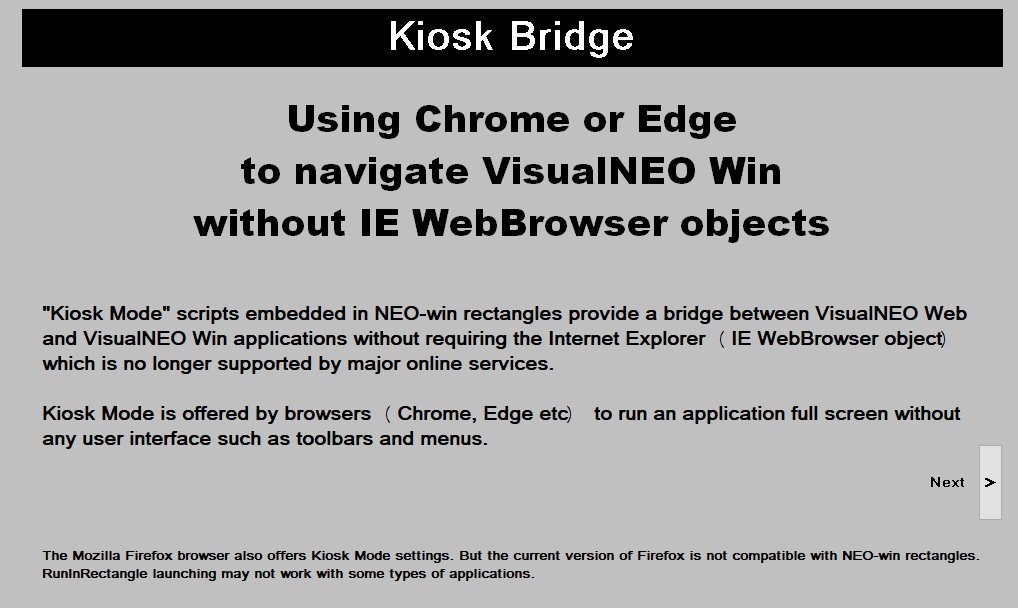
Quote from fkapnist on January 4, 2022, 4:56 amNOTICE: If you copy and paste the above Pub, please be sure to save it as ANSI in notepad before compiling it, or there will be errors.
I hope it is useful.
Thanks
NOTICE: If you copy and paste the above Pub, please be sure to save it as ANSI in notepad before compiling it, or there will be errors.
I hope it is useful.
Thanks
Uploaded files:
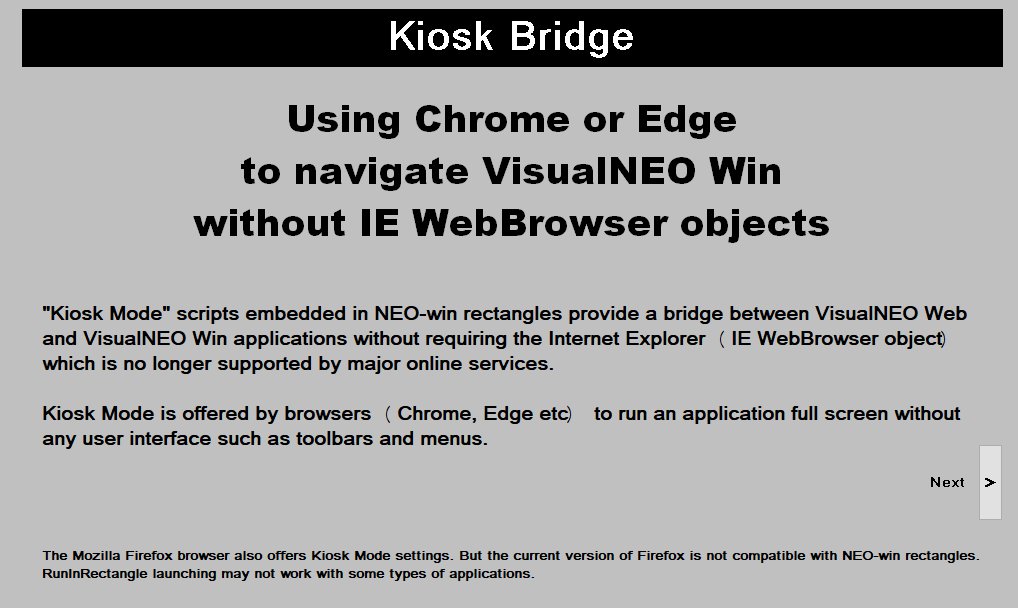
Quote from fkapnist on January 4, 2022, 5:56 amIn the above Pub example, Chrome works the best as long as the Pub is always on top. Edge has many processes that must be closed (with Task Manager, etc.) for the Pub to work. The Microsoft Edge WebView2 Runtime (msedgewebview2.exe) is a subprocess of Edge that can be used by apps, presumably without closing or effecting the main browser settings. The npEdge Plugin from David Esperalta loads any VisualNEO Web app so it can execute any VisualNEO Win command.
In the above Pub example, Chrome works the best as long as the Pub is always on top. Edge has many processes that must be closed (with Task Manager, etc.) for the Pub to work. The Microsoft Edge WebView2 Runtime (msedgewebview2.exe) is a subprocess of Edge that can be used by apps, presumably without closing or effecting the main browser settings. The npEdge Plugin from David Esperalta loads any VisualNEO Web app so it can execute any VisualNEO Win command.
Quote from fkapnist on January 4, 2022, 6:12 amneoEdge.exe is a simple VisualNEO Win application. It includes an Edge web browser (WebView2) to load any VisualNEO Web app so it can execute any VisualNEO Win command. You can customize, improve and add additional plugins to neoEdge by compiling it using VisualNEO Win. Requirements: Last VisualNEO Win version.
neoEdge.exe is a simple VisualNEO Win application. It includes an Edge web browser (WebView2) to load any VisualNEO Web app so it can execute any VisualNEO Win command. You can customize, improve and add additional plugins to neoEdge by compiling it using VisualNEO Win. Requirements: Last VisualNEO Win version.