
VisualNeo Win Line Object - Rotate a line 360, 180, 90 ???

Quote from Kriscall on July 1, 2023, 9:46 amI need help I'm trying to program a line to point to a specific angle (Like a clock arm) as I'm finding it hard to rotate an image as per my previous post request. It seems to be difficult to rotate any simple object now even having trouble with a simple line object. What's bad is the variables are there this time to do it but how can I alter then by code and ask this request to Visualneo Win when my program is compiled. I can't see access to alter these variables via a command. I have MoveObject that's one set I tried Size object that's not it? How can I request to change them? variables? sorry if the questions seem stupid, I'm just struggling to rotate anything Surprised there is not an option for an image that I can find too easily. Now this line is giving me trouble as it was a possible solution.
I need help I'm trying to program a line to point to a specific angle (Like a clock arm) as I'm finding it hard to rotate an image as per my previous post request. It seems to be difficult to rotate any simple object now even having trouble with a simple line object. What's bad is the variables are there this time to do it but how can I alter then by code and ask this request to Visualneo Win when my program is compiled. I can't see access to alter these variables via a command. I have MoveObject that's one set I tried Size object that's not it? How can I request to change them? variables? sorry if the questions seem stupid, I'm just struggling to rotate anything Surprised there is not an option for an image that I can find too easily. Now this line is giving me trouble as it was a possible solution.
Uploaded files: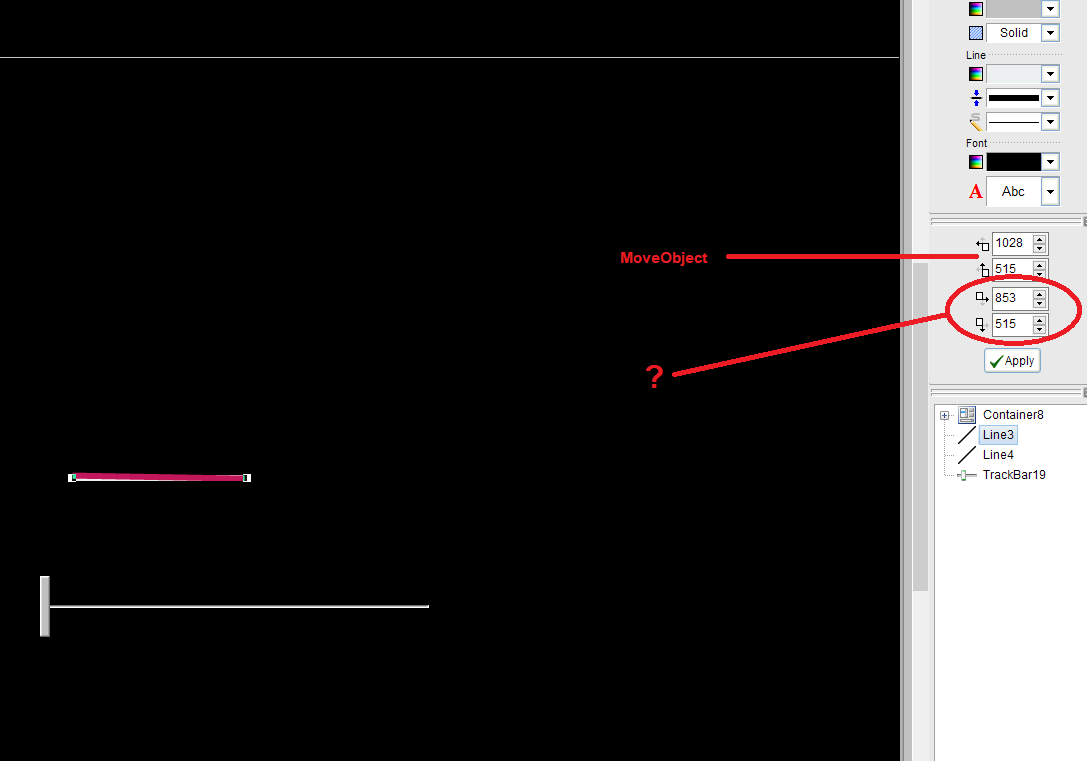

Quote from Vadim on July 1, 2023, 12:12 pm@kriscall
You can try special plugins for drawing. For example, asPicture 3.0 (Andrei Solodyankin).
You can try special plugins for drawing. For example, asPicture 3.0 (Andrei Solodyankin).
Quote from Kriscall on July 1, 2023, 2:36 pmThank you Vadim nothing there in that plug in already had it. Something so simple can't believe how hard it is to find something or something I can manipulate. Nothing just even a line in Visualneo Win can't be rotated the picture object is the same, the line is worst that has the variables there I can't edit them or access through global variables or any command I can see. Crazy! Any other suggestions?
Thank you Vadim nothing there in that plug in already had it. Something so simple can't believe how hard it is to find something or something I can manipulate. Nothing just even a line in Visualneo Win can't be rotated the picture object is the same, the line is worst that has the variables there I can't edit them or access through global variables or any command I can see. Crazy! Any other suggestions?

Quote from DaviddeArgentina on July 1, 2023, 6:03 pmhttps://archive.visualneo.com/viewtopic.php?p=11219595&hilit=rotate#p11219595
My 0.01
https://archive.visualneo.com/viewtopic.php?p=11219595&hilit=rotate#p11219595
My 0.01

Quote from Gaev on July 1, 2023, 6:19 pm@kriscall
The information about the Line Tool can be found here ... https://winhelp.visualneo.com/LineTool.html
The key thing to know about a Line object is that it acts like a (transparent) Rectangle with the Line having one end at the top-left corner and the other end at the bottom-right corner.
You can obtain the co-ordinate attributes (and other info) using the GetObjectInfo command.
And you can position it with a combination of MoveObject and SizeObject commands; but you will have to do the heavy lifting (Math) in order to transform the length/angle into the bottom-right corner.
P.S. You might also find it useful to check out the SetObjectLine command.
The information about the Line Tool can be found here ... https://winhelp.visualneo.com/LineTool.html
The key thing to know about a Line object is that it acts like a (transparent) Rectangle with the Line having one end at the top-left corner and the other end at the bottom-right corner.
You can obtain the co-ordinate attributes (and other info) using the GetObjectInfo command.
And you can position it with a combination of MoveObject and SizeObject commands; but you will have to do the heavy lifting (Math) in order to transform the length/angle into the bottom-right corner.
P.S. You might also find it useful to check out the SetObjectLine command.

Quote from CN_Iceman on July 2, 2023, 9:31 amnpImgs plugin from David Esperalta on DecSoft NeoPlugins (decsoftutils.com)
npImgRotate
This action can rotate the specified input image with the specified angle, and then save the result to the specified image output. The result variable return "True" if everything is OK, or "False" when not. See [LastError] variable in this last case for details.
npImgs plugin from David Esperalta on DecSoft NeoPlugins (decsoftutils.com)
npImgRotate
This action can rotate the specified input image with the specified angle, and then save the result to the specified image output. The result variable return "True" if everything is OK, or "False" when not. See [LastError] variable in this last case for details.
Quote from Vadim on July 2, 2023, 11:59 am@kriscall
If you need to rotate the image by a certain angle, there is also the ksRotImg plugin (Igor R), ksRotatePicture command.
If you need to rotate the image by a certain angle, there is also the ksRotImg plugin (Igor R), ksRotatePicture command.
Quote from Kriscall on July 2, 2023, 12:21 pmFirst of all you guys are all amazing to thank you for taking time to reply. Thanks all for your help and suggestions so far, I have tried Dec soft plugins (I have all of them) I have not tried the Ks Plugin but all the plug-in's seem to have an issue it's not what I'm after. I need to rotate the image on than application on the screen live make it turn however way I want similar to a gauge but not a gauge rotate angle left or right or 360 like a clock dial. Not load an image from a file and rotate the file save it then reload it these solutions will require me to rotate the image outside application and import is back in way to slow and too much reading and writing and don't work like you are imagining. What I am after is simpler than that, basically enter coordinates and the image will just turn from the object it is in? . But it looks like there is no command to do this or a plugin. Is there a drawing plugin that allows me to import and image and then rotate on screen to coordinates / angles. So, when a user performs a button press the image like an animation will rotate and stop at a desired angle.
As for the line suggestion I'm trialing some math but again looks like the functions I have to work with will not do it from a small test I performed.
A little bit about my project:
What I'm trying to do is make a program for a robot which shows the legs moving 1:1 to the output and desired angle .. So the operator will enter data the servo will move to that angle (LEGS) and the image on screen will Rotate to the same location reflecting true to what the operator's output is in the real world. I just want to rotate an Image lol !!! is it this tricky.
First of all you guys are all amazing to thank you for taking time to reply. Thanks all for your help and suggestions so far, I have tried Dec soft plugins (I have all of them) I have not tried the Ks Plugin but all the plug-in's seem to have an issue it's not what I'm after. I need to rotate the image on than application on the screen live make it turn however way I want similar to a gauge but not a gauge rotate angle left or right or 360 like a clock dial. Not load an image from a file and rotate the file save it then reload it these solutions will require me to rotate the image outside application and import is back in way to slow and too much reading and writing and don't work like you are imagining. What I am after is simpler than that, basically enter coordinates and the image will just turn from the object it is in? . But it looks like there is no command to do this or a plugin. Is there a drawing plugin that allows me to import and image and then rotate on screen to coordinates / angles. So, when a user performs a button press the image like an animation will rotate and stop at a desired angle.
As for the line suggestion I'm trialing some math but again looks like the functions I have to work with will not do it from a small test I performed.
A little bit about my project:
What I'm trying to do is make a program for a robot which shows the legs moving 1:1 to the output and desired angle .. So the operator will enter data the servo will move to that angle (LEGS) and the image on screen will Rotate to the same location reflecting true to what the operator's output is in the real world. I just want to rotate an Image lol !!! is it this tricky.
Quote from Vadim on July 2, 2023, 1:12 pm@kriscall
Perhaps I am misunderstanding the task. Can you make two images - before and after the desired turn? In order to understand exactly which rotation is required.
Perhaps I am misunderstanding the task. Can you make two images - before and after the desired turn? In order to understand exactly which rotation is required.