
Problem with renaming plugin to dll and not compiling them - Page 2 - Forum
Problem with renaming plugin to dll and not compiling them

Quote from Ivanes82 on October 9, 2022, 11:22 amVery good @hpw @vadim, here I leave you a test application that uses two plugins, one that works fine and another that gives me a hash error. This is the exe and source code, with the original plugin and also renamed.
I have also included another folder with 3 plugins that give me a hash error when compiling with them.
@vadim I can't download your file.
@hpw The sample application works perfectly on my PC, but if I make another test application with your plugins, it works fine. It's other plugins that don't work.Thank you all very much for your time.
Very good @hpw @vadim, here I leave you a test application that uses two plugins, one that works fine and another that gives me a hash error. This is the exe and source code, with the original plugin and also renamed.
I have also included another folder with 3 plugins that give me a hash error when compiling with them.
@vadim I can't download your file.
@hpw The sample application works perfectly on my PC, but if I make another test application with your plugins, it works fine. It's other plugins that don't work.
Thank you all very much for your time.
Uploaded files:
Quote from Vadim on October 9, 2022, 12:11 pm@ivanes82
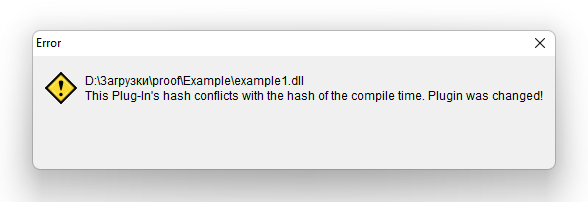
Yes, you're right, I got a hash error when running your test exe.
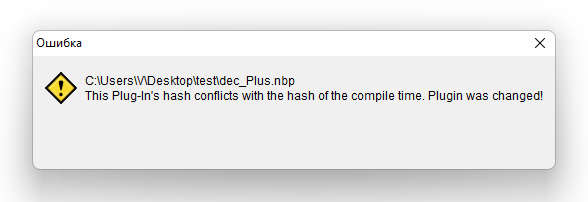
And when using dec_Plus plugin too (see screenshots).
Yes, you're right, I got a hash error when running your test exe.
And when using dec_Plus plugin too (see screenshots).
Uploaded files:

Quote from HPW on October 9, 2022, 1:22 pmHello,
When I start your exe I got your error.
But when I recompile it on my WIN7 with the dec_Plus installed the error has gone.
I am not sure if dec_Plus was runtimepacked but rlFunctions is upx packed.
Both are very old and unsupported plugins.
So VN on WIN10 seems to produce a different result on those old plugins.
What to do? Drop this security feature?
When old unsupported plugins starts to have problems on newer OS versions, what can a VN-developer do?
Regards
Hans-Peter
Hello,
When I start your exe I got your error.
But when I recompile it on my WIN7 with the dec_Plus installed the error has gone.
I am not sure if dec_Plus was runtimepacked but rlFunctions is upx packed.
Both are very old and unsupported plugins.
So VN on WIN10 seems to produce a different result on those old plugins.
What to do? Drop this security feature?
When old unsupported plugins starts to have problems on newer OS versions, what can a VN-developer do?
Regards
Hans-Peter
Quote from HPW on October 9, 2022, 1:25 pmQuestion: Does anyone use the old dec_Plus on a VN installed on a Windows 10 PC without problems?
Question: Does anyone use the old dec_Plus on a VN installed on a Windows 10 PC without problems?
Quote from Ivanes82 on October 9, 2022, 1:31 pmHi @hpw
all these plugins are new and the same thing is happening to me.
zmwOnTheEdge
zmwClipTricks
zmwSelfControl
NeoDBPro
acPagesControl
npTalk
npEdge
npFile
npUtilAnd these are just some of the ones I've tried, I haven't tried the whole collection of plugins that exist, but I'm sure there are many more.
Hi @hpw
all these plugins are new and the same thing is happening to me.
zmwOnTheEdge
zmwClipTricks
zmwSelfControl
NeoDBPro
acPagesControl
npTalk
npEdge
npFile
npUtil
And these are just some of the ones I've tried, I haven't tried the whole collection of plugins that exist, but I'm sure there are many more.
Quote from Vadim on October 9, 2022, 1:52 pm@hpw
I use it, no problem. I used to on Windows 10 as well. But I always compile plugins inside the EXE. So I've never encountered the problem indicated by @ivanes82
I use it, no problem. I used to on Windows 10 as well. But I always compile plugins inside the EXE. So I've never encountered the problem indicated by @ivanes82
Quote from Ivanes82 on October 9, 2022, 2:03 pm@vadim @hpw
I have no idea how this works internally in visualneo, but if it were the case that the plugin hash is calculated before compiling and then copied, if you reverse the order of this operation, maybe it could work.
First you copy the compiled plugins and then calculate the hash
of the copied plugins to the folder of the exe, not of the "original" ones, and then with the correct hashes we compile the exe of our application.Just a suggestion, I don't know if it is possible.
Thank you both very much for your time.
I have no idea how this works internally in visualneo, but if it were the case that the plugin hash is calculated before compiling and then copied, if you reverse the order of this operation, maybe it could work.
First you copy the compiled plugins and then calculate the hash
of the copied plugins to the folder of the exe, not of the "original" ones, and then with the correct hashes we compile the exe of our application.
Just a suggestion, I don't know if it is possible.
Thank you both very much for your time.
Quote from HPW on October 9, 2022, 2:13 pmHello,
The hash of a file is not dependend of its folder.
Has to be further researched.
Regards
Hans-Peter
Hello,
The hash of a file is not dependend of its folder.
Has to be further researched.
Regards
Hans-Peter
Quote from Ivanes82 on October 9, 2022, 2:17 pmAnyway in my case I would prefer to disable this protection depending on user preferences, and I myself take care of the protection of the application, because for example one of the plugins that I have weighs more than 100mb and takes quite a long time to calculate the hash, and slows down the start of the application. In addition to not having the ability to give custom error messages. If I had control over that I could manage to protect the application, and depending on the needs of the application do it in one way or another.
Just a suggestion
Anyway in my case I would prefer to disable this protection depending on user preferences, and I myself take care of the protection of the application, because for example one of the plugins that I have weighs more than 100mb and takes quite a long time to calculate the hash, and slows down the start of the application. In addition to not having the ability to give custom error messages. If I had control over that I could manage to protect the application, and depending on the needs of the application do it in one way or another.
Just a suggestion
Quote from Ivanes82 on October 9, 2022, 2:18 pmQuote from HPW on October 9, 2022, 2:13 pmHello,
The hash of a file is not dependend of its folder.
Has to be further researched.
Regards
Hans-Peter
Thank you very much for everything.
Quote from HPW on October 9, 2022, 2:13 pmHello,
The hash of a file is not dependend of its folder.
Has to be further researched.
Regards
Hans-Peter
Thank you very much for everything.
Quote from HPW on October 10, 2022, 10:05 amHello,
Would it be an option to use Windows XP mode (Virtual) in Windows 11 to install VN?
Or an Virtual Win7?
Regards
Hans-Peter
Hello,
Would it be an option to use Windows XP mode (Virtual) in Windows 11 to install VN?
Or an Virtual Win7?
Regards
Hans-Peter
Quote from Ivanes82 on October 10, 2022, 5:18 pmQuote from HPW on October 10, 2022, 10:05 amHello,
Would it be an option to use Windows XP mode (Virtual) in Windows 11 to install VN?
Or an Virtual Win7?
Regards
Hans-Peter
Hi @hpw, yes I tried that too, but defurtunately no luck.
Quote from HPW on October 10, 2022, 10:05 amHello,
Would it be an option to use Windows XP mode (Virtual) in Windows 11 to install VN?
Or an Virtual Win7?
Regards
Hans-Peter
Hi @hpw, yes I tried that too, but defurtunately no luck.

Quote from noyzen on June 5, 2024, 7:53 pmHi there guys,
Has anyone solved this problem?
I'm also using 3-4 plugins and don't like to put everything on my exe (because it's slow and will be detected more by antiviruses that way)For me everything is fine until I start to use DB Pro plugin! then errors come... (Hash conflict and such)
I tried both original names and rename to .dllsI tested everything and I have read this topic, no luck! and I'm using Windows 11 also.
(I'm going to test it on a Windows 10 virtual machine...)Regards.
Hi there guys,
Has anyone solved this problem?
I'm also using 3-4 plugins and don't like to put everything on my exe (because it's slow and will be detected more by antiviruses that way)
For me everything is fine until I start to use DB Pro plugin! then errors come... (Hash conflict and such)
I tried both original names and rename to .dlls
I tested everything and I have read this topic, no luck! and I'm using Windows 11 also.
(I'm going to test it on a Windows 10 virtual machine...)
Regards.

Quote from alangonzalez91 on June 8, 2024, 7:08 pmWindows 11 handles dynamic folder routing differently... while Windows 10 focuses the root management on the same folder from which an application is run, Windows 11 gives the application the reference of another folder, I think it's c:\Windows\system32. That affects the calling of the files, I really wouldn't know how to solve that, but it could be the problem; that is not directly relating the real path of the files.
Windows 11 handles dynamic folder routing differently... while Windows 10 focuses the root management on the same folder from which an application is run, Windows 11 gives the application the reference of another folder, I think it's c:\Windows\system32. That affects the calling of the files, I really wouldn't know how to solve that, but it could be the problem; that is not directly relating the real path of the files.