
PWA Progressive Web Apps

Quote from luishp on July 30, 2019, 6:11 pmProgressive Web Apps or PWA are getting more importance as a standard way to create and distribute Web based applications.
Although we plan to add a better support for this standard, it's possible to generate a PWA from any VisualNEO Web HTML compiled App quite easily thanks to this online service from Microsoft:Once your App in installed on a server It takes just a few minutes to add a manifest.json and a service worker.
Soon it will be possible to publish you apps to the Android Play Store, and even as a Windows or Mac executable.More information here:
https://docs.pwabuilder.com/
https://developer.microsoft.com/en-us/windows/pwaLet me know if you try it or need assistance.
I have succesfully transformed two WebApps into PWA in just some minutes.
Progressive Web Apps or PWA are getting more importance as a standard way to create and distribute Web based applications.
Although we plan to add a better support for this standard, it's possible to generate a PWA from any VisualNEO Web HTML compiled App quite easily thanks to this online service from Microsoft:
Once your App in installed on a server It takes just a few minutes to add a manifest.json and a service worker.
Soon it will be possible to publish you apps to the Android Play Store, and even as a Windows or Mac executable.
More information here:
https://docs.pwabuilder.com/
https://developer.microsoft.com/en-us/windows/pwa
Let me know if you try it or need assistance.
I have succesfully transformed two WebApps into PWA in just some minutes.
Quote from luishp on August 1, 2019, 6:43 amVery good news!
New Chrome version includes a "one click" installation button for all PWA websites (autodetected) on every platform.
Take a look here for more info:
https://www.howtogeek.com/434592/what%E2%80%99s-new-in-chrome-76-arriving-july-30th/
(Got to Progressive Web Apps Are Easier to Install section).You can test it by visiting cinencia.org with latest Chrome version (Desktop or mobile).
Very good news!
New Chrome version includes a "one click" installation button for all PWA websites (autodetected) on every platform.
Take a look here for more info:
https://www.howtogeek.com/434592/what%E2%80%99s-new-in-chrome-76-arriving-july-30th/
(Got to Progressive Web Apps Are Easier to Install section).
You can test it by visiting cinencia.org with latest Chrome version (Desktop or mobile).

Quote from noyzen on September 19, 2019, 9:18 pmHi Luis!
can you help me to create pwa for my web app at https://upnote.ir in https://www.pwabuilder.com or any other place?
i tried but failed to do, im confused...
it says in last step i need to downlaod and use android studio
Have you successfuly made a pwa of your sites?
Thanks :)
Hi Luis!
can you help me to create pwa for my web app at https://upnote.ir in https://www.pwabuilder.com or any other place?
i tried but failed to do, im confused...
it says in last step i need to downlaod and use android studio
Have you successfuly made a pwa of your sites?
Thanks :)
Quote from luishp on September 20, 2019, 12:28 pmWell @noizen, lets proceed step by step:
- Create and include a "manifest.webmanifest" file.
Just use this one as a template and change the information according to your project. Then save it with name "manifest.webmanifest" as a plain text format file and add it to your project in Project > Properties > Libraries/Files
File content should be shothing like this (note that you can easily generate your own in pwabuilder.com).{"dir" : "ltr", "lang" : "Spanish; Castilian", "name" : "Cinencia", "scope" : "/", "display" : "fullscreen", "start_url" : "https://cinencia.org/index.html", "short_name" : "Cinencia", "theme_color" : "transparent", "description" : "El cine, la ciencia y la ciencia del cine.", "orientation" : "landscape", "background_color" : "transparent", "related_applications" : "", "prefer_related_applications" : "false", "generated" : "undefined", "icons" : [ { "src": "https://www.cinencia.org/img/asecic.png", "sizes": "256x256" } ]}Now go to Project > Properties > Advanced > Custom Metadata > Head and add this code line:
<link rel='manifest' href='/manifest.webmanifest'>
- Add a Service Worker
Just copy this content in a text editor and save it with name "pwabuilder-sw.js" and again add it to your project in Project > Properties > Libraries/Filesconst CACHE = "pwabuilder-offline"; const offlineFallbackPage = "index.html"; self.addEventListener("install", function (event) { console.log("[PWA Builder] Install Event processing"); event.waitUntil( caches.open(CACHE).then(function (cache) { console.log("[PWA Builder] Cached offline page during install"); if (offlineFallbackPage === "index.html") { return cache.add(new Response("TODO: Update the value of the offlineFallbackPage constant in the serviceworker.")); } return cache.add(offlineFallbackPage); }) ); }); self.addEventListener("fetch", function (event) { if (event.request.method !== "GET") return; event.respondWith( fetch(event.request) .then(function (response) { console.log("[PWA Builder] add page to offline cache: " + response.url); event.waitUntil(updateCache(event.request, response.clone())); return response; }) .catch(function (error) { console.log("[PWA Builder] Network request Failed. Serving content from cache: " + error); return fromCache(event.request); }) ); }); function fromCache(request) { return caches.open(CACHE).then(function (cache) { return cache.match(request).then(function (matching) { if (!matching || matching.status === 404) { return Promise.reject("no-match"); } return matching; }); }); } function updateCache(request, response) { return caches.open(CACHE).then(function (cache) { return cache.put(request, response); }); }Again go to Project > Properties > Advanced > Custom Metadata > Head and add this code in between SCRIPT tags.
<script>
if ("serviceWorker" in navigator) {
  if (navigator.serviceWorker.controller) {
    console.log("[PWA Builder] active service worker found, no need to register");
  } else {
    // Register the service worker
    navigator.serviceWorker
      .register("pwabuilder-sw.js", {
        scope: "./"
      })
      .then(function (reg) {
        console.log("[PWA Builder] Service worker has been registered for scope: " + reg.scope);
      });
  }
}
</script>
- Republish your project and upload it to your server.
You must have a SSL certificate already installed in your server (https protocol) and a Project icon of at least 256x256 pixels.If everything is ok, your WebApp should be installable in Android and Windows Desktop using Google Chrome.
I have successfully converted three different WebApps following these steps:https://aprendiendo.top
https://cinencia.org
https://www.evaluadordeseguridad.com
Well @noizen, lets proceed step by step:
- Create and include a "manifest.webmanifest" file.
Just use this one as a template and change the information according to your project. Then save it with name "manifest.webmanifest" as a plain text format file and add it to your project in Project > Properties > Libraries/Files
File content should be shothing like this (note that you can easily generate your own in pwabuilder.com).{"dir" : "ltr", "lang" : "Spanish; Castilian", "name" : "Cinencia", "scope" : "/", "display" : "fullscreen", "start_url" : "https://cinencia.org/index.html", "short_name" : "Cinencia", "theme_color" : "transparent", "description" : "El cine, la ciencia y la ciencia del cine.", "orientation" : "landscape", "background_color" : "transparent", "related_applications" : "", "prefer_related_applications" : "false", "generated" : "undefined", "icons" : [ { "src": "https://www.cinencia.org/img/asecic.png", "sizes": "256x256" } ]}Now go to Project > Properties > Advanced > Custom Metadata > Head and add this code line:
<link rel='manifest' href='/manifest.webmanifest'>
- Add a Service Worker
Just copy this content in a text editor and save it with name "pwabuilder-sw.js" and again add it to your project in Project > Properties > Libraries/Filesconst CACHE = "pwabuilder-offline"; const offlineFallbackPage = "index.html"; self.addEventListener("install", function (event) { console.log("[PWA Builder] Install Event processing"); event.waitUntil( caches.open(CACHE).then(function (cache) { console.log("[PWA Builder] Cached offline page during install"); if (offlineFallbackPage === "index.html") { return cache.add(new Response("TODO: Update the value of the offlineFallbackPage constant in the serviceworker.")); } return cache.add(offlineFallbackPage); }) ); }); self.addEventListener("fetch", function (event) { if (event.request.method !== "GET") return; event.respondWith( fetch(event.request) .then(function (response) { console.log("[PWA Builder] add page to offline cache: " + response.url); event.waitUntil(updateCache(event.request, response.clone())); return response; }) .catch(function (error) { console.log("[PWA Builder] Network request Failed. Serving content from cache: " + error); return fromCache(event.request); }) ); }); function fromCache(request) { return caches.open(CACHE).then(function (cache) { return cache.match(request).then(function (matching) { if (!matching || matching.status === 404) { return Promise.reject("no-match"); } return matching; }); }); } function updateCache(request, response) { return caches.open(CACHE).then(function (cache) { return cache.put(request, response); }); }Again go to Project > Properties > Advanced > Custom Metadata > Head and add this code in between SCRIPT tags.
<script> if ("serviceWorker" in navigator) { if (navigator.serviceWorker.controller) { console.log("[PWA Builder] active service worker found, no need to register"); } else { // Register the service worker navigator.serviceWorker .register("pwabuilder-sw.js", { scope: "./" }) .then(function (reg) { console.log("[PWA Builder] Service worker has been registered for scope: " + reg.scope); }); } } </script> - Republish your project and upload it to your server.
You must have a SSL certificate already installed in your server (https protocol) and a Project icon of at least 256x256 pixels.
If everything is ok, your WebApp should be installable in Android and Windows Desktop using Google Chrome.
I have successfully converted three different WebApps following these steps:
https://aprendiendo.top
https://cinencia.org
https://www.evaluadordeseguridad.com
Quote from noyzen on September 20, 2019, 6:41 pmi got it now... i did exactly same steps before...
Thank you for info
but that's not my case. i want to make APK of my website
after this steps, what else i have to do to get APK? i need to convert my pwa site to android APK or iOS (not exporting in VisualNEO Web)
sorry for poor English
i got it now... i did exactly same steps before...
Thank you for info
but that's not my case. i want to make APK of my website
after this steps, what else i have to do to get APK? i need to convert my pwa site to android APK or iOS (not exporting in VisualNEO Web)
sorry for poor English
Quote from luishp on September 21, 2019, 6:31 am@noyzen, PWA and APK applications are not the same.
PWAs do not need an App Store for distribution as they are distributed fron your own hosting.
VisualNEO Web APKs need to use PhoneGap Build for generation.
To generate an APK just select the Mobile Application option in Project > Compile > Target Platform and follow the on screen instructions.
If you need additional help, please open a new thread in the forum.
@noyzen, PWA and APK applications are not the same.
PWAs do not need an App Store for distribution as they are distributed fron your own hosting.
VisualNEO Web APKs need to use PhoneGap Build for generation.
To generate an APK just select the Mobile Application option in Project > Compile > Target Platform and follow the on screen instructions.
If you need additional help, please open a new thread in the forum.
Quote from luishp on February 12, 2020, 11:12 pmIt seems Microsoft is taking PWAs very seriously. They can even use the Windows API:
https://docs.microsoft.com/en-us/microsoft-edge/progressive-web-apps/
It seems Microsoft is taking PWAs very seriously. They can even use the Windows API:
https://docs.microsoft.com/en-us/microsoft-edge/progressive-web-apps/

Quote from CDY@44 on February 19, 2020, 1:10 pmI am convinced that PWA is the future for the next applications! VisualNeo Web is the key that guides us to this future. I can't wait to see what the next update will offer us.
I am convinced that PWA is the future for the next applications! VisualNeo Web is the key that guides us to this future. I can't wait to see what the next update will offer us.
Quote from luishp on February 19, 2020, 7:34 pmPWA compilation will be done with no command at all, just a check-box in:
Project > Properties > Platform Options > WebIt will be mandatory an app icon, title and description.
PWA compilation will be done with no command at all, just a check-box in:
Project > Properties > Platform Options > Web
It will be mandatory an app icon, title and description.
Uploaded files: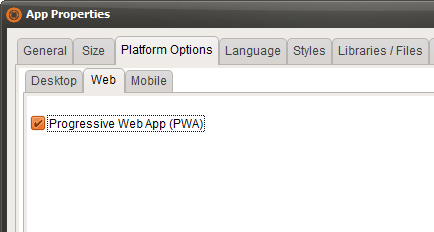

Quote from Darbdenral on February 19, 2020, 11:50 pmSounds good! Will this allow setting serviceworker caching options or will we need to generate that separately?
I made a simple website PWA with Microsoft Edge beta a while back, the app is just for the online visualneo help. Because, more than once your site was unreachable and the online help was not available. But I'm not sure what caching options Edge is using and without having server access, cannot change.
It would be nice if you made the VisualNeo online help to PWA, so it's available offline too. ;)
Meanwhile, this is what I did..
- Open up the any website (https://webhelp.visualneo.com/) in your installation of Microsoft Edge Beta.
- Click on the 3 Horizontal Dots on the top right of the menu and scroll to Apps and then click on Install this site as an app.
- Click on the Install App in the Center of your screen and select any app name..
Sounds good! Will this allow setting serviceworker caching options or will we need to generate that separately?
I made a simple website PWA with Microsoft Edge beta a while back, the app is just for the online visualneo help. Because, more than once your site was unreachable and the online help was not available. But I'm not sure what caching options Edge is using and without having server access, cannot change.
It would be nice if you made the VisualNeo online help to PWA, so it's available offline too. ;)
Meanwhile, this is what I did..
- Open up the any website (https://webhelp.visualneo.com/) in your installation of Microsoft Edge Beta.
- Click on the 3 Horizontal Dots on the top right of the menu and scroll to Apps and then click on Install this site as an app.
- Click on the Install App in the Center of your screen and select any app name..
Quote from luishp on February 20, 2020, 9:29 amHi @darbdenral, please take a look at this thread:
https://visualneo.com/forum/topic/coming-soon-compile-as-pwa-progressive-web-appA service worker for offline running is included automatically.
About the site being unreachable I hope that problem is over, our site was getting attacks from a server in Ukraine but I have finally disallow access to the full range of IP's from that server.Regards.
Hi @darbdenral, please take a look at this thread:
https://visualneo.com/forum/topic/coming-soon-compile-as-pwa-progressive-web-app
A service worker for offline running is included automatically.
About the site being unreachable I hope that problem is over, our site was getting attacks from a server in Ukraine but I have finally disallow access to the full range of IP's from that server.
Regards.

Quote from Vadim on February 29, 2020, 12:10 pm@luishp Hi Luis!
Can VisualNEO Web for the purpose of creating PWA help to obtain, install and then renew the free SSL certificate Let's Encrypt?
https://letsencrypt.org/getting-started/
Or maybe another similar service.
@luishp Hi Luis!
Can VisualNEO Web for the purpose of creating PWA help to obtain, install and then renew the free SSL certificate Let's Encrypt?
https://letsencrypt.org/getting-started/
Or maybe another similar service.
Quote from luishp on February 29, 2020, 12:23 pmHi @vadim. Most modern hosting services (including CloudNEO) offer free Let's Encrypt SSL certificates. Usually it takes less than 5 minutes to activate.
Hi @vadim. Most modern hosting services (including CloudNEO) offer free Let's Encrypt SSL certificates. Usually it takes less than 5 minutes to activate.

Quote from Entony on October 22, 2020, 10:54 amIn addition to your discussion, I would draw your attention to the choice between pwa and native aps. As statistics have shown, this is a difficult question for most businessmen who want their own application. I can recommend the article "progressive web apps vs native app". The pros and cons of each type of application are very well described here, which will help you make a choice.
In addition to your discussion, I would draw your attention to the choice between pwa and native aps. As statistics have shown, this is a difficult question for most businessmen who want their own application. I can recommend the article "progressive web apps vs native app". The pros and cons of each type of application are very well described here, which will help you make a choice.

Quote from Palamar on October 24, 2020, 8:24 pmHe estado viendo lo de las PWA y lo que aún no me cierra (y supongo que es porque no le agarro la mano) es el hecho que debamos tenerla en un servidor. Un Apk nativo por ejemplo, esto no es necesario. En mi caso estoy haciendo pruebas pero imagino que muchas App se nutren de sitios ya creados, no veo la necesidad de tenerla funcionando en un server. No sé si me explico bien. Por otro lado, la única forma de generar un APK es a través de Phonegap o habrá una alternativa en el futuro para VisualNeo?.
He estado viendo lo de las PWA y lo que aún no me cierra (y supongo que es porque no le agarro la mano) es el hecho que debamos tenerla en un servidor. Un Apk nativo por ejemplo, esto no es necesario. En mi caso estoy haciendo pruebas pero imagino que muchas App se nutren de sitios ya creados, no veo la necesidad de tenerla funcionando en un server. No sé si me explico bien. Por otro lado, la única forma de generar un APK es a través de Phonegap o habrá una alternativa en el futuro para VisualNeo?.
Quote from luishp on October 24, 2020, 10:05 pm@palamar efectivamente una PWA es una forma de convertir una aplicación web en una aplicación para móviles y necesita, como cualquier web, estar alojada en un servidor. Para mi es muchísimo más cómodo ya que una vez publicada en la tienda de aplicaciones las nuevas versiones simplemente las subes al servidor y listo. No hay necesidad de volverlas a enviar a la tienda ni esperar la aprobación etc. Además basta con un solo dominio: yo instalo las apps en diferentes subdominios.
Es posible compilar con Cordova también en lugar de PhoneGap, realizando algunas modificaciones en el archivo .xml. Pero te obliga a instalar el Android SDK en tu ordenador para poder hacerlo. PhoneGap lo han cerrado porque cada vez tenía menos sentido existiendo las PWA y Cordova es posible que vaya perdiendo tracción también a medida que puedan hacerse más y más cosas desde las PWA.
@palamar efectivamente una PWA es una forma de convertir una aplicación web en una aplicación para móviles y necesita, como cualquier web, estar alojada en un servidor. Para mi es muchísimo más cómodo ya que una vez publicada en la tienda de aplicaciones las nuevas versiones simplemente las subes al servidor y listo. No hay necesidad de volverlas a enviar a la tienda ni esperar la aprobación etc. Además basta con un solo dominio: yo instalo las apps en diferentes subdominios.
Es posible compilar con Cordova también en lugar de PhoneGap, realizando algunas modificaciones en el archivo .xml. Pero te obliga a instalar el Android SDK en tu ordenador para poder hacerlo. PhoneGap lo han cerrado porque cada vez tenía menos sentido existiendo las PWA y Cordova es posible que vaya perdiendo tracción también a medida que puedan hacerse más y más cosas desde las PWA.
Quote from Palamar on October 24, 2020, 10:48 pmClaro, lo que no termino de entender es eso. Es posible publicar una PWA en el PlayStore? porque ahí vamos justamente, la gente muchas veces va y baja una app para probar y si esto depende de salir de la tienda pues, es demasiado lio. Por otro lado, la app si o si debe de tener la web alojada en el server, lo cual para algunas app es directamente inútil. Para que me sirve duplicar a mí si el objetivo es que la persona no entre al navegador?.
La verdad creo que el mercado pretende acabar con lo nativo y evolucionar a algo más estándar para todo, y ahí entran las PWA, pero yo aún no le veo bien asentada.
Voy a seguir leyendo sobre esto.
Claro, lo que no termino de entender es eso. Es posible publicar una PWA en el PlayStore? porque ahí vamos justamente, la gente muchas veces va y baja una app para probar y si esto depende de salir de la tienda pues, es demasiado lio. Por otro lado, la app si o si debe de tener la web alojada en el server, lo cual para algunas app es directamente inútil. Para que me sirve duplicar a mí si el objetivo es que la persona no entre al navegador?.
La verdad creo que el mercado pretende acabar con lo nativo y evolucionar a algo más estándar para todo, y ahí entran las PWA, pero yo aún no le veo bien asentada.
Voy a seguir leyendo sobre esto.
Quote from Palamar on October 24, 2020, 10:49 pmPor otro lado, si queremos un APK, si o si necesitamos el procedimiento con Cordova y el sdk?. Gracias!
Por otro lado, si queremos un APK, si o si necesitamos el procedimiento con Cordova y el sdk?. Gracias!
Quote from luishp on October 25, 2020, 12:30 pm@palamar
Es posible publicar una PWA en el PlayStore?
Si! Ese es el quid de la cuestión. Utilizando pwabuilder.com es muy sencillo crear una .apk ya firmada y todo para subir a Google Play Store.
Para que me sirve duplicar a mí si el objetivo es que la persona no entre al navegador?.
Es que no entra al navegador y no duplicas nada, solo lo que hay en el servidor es lo que vale. Para el usuaro es totalmente transparente. Él ni siquiera sabe que está utilizando una PWA, porque son indistiguibles.
Ejemplos:
VisualNEO Analog Clock:
En Google Play: https://play.google.com/store/apps/details?id=com.vnclock.twa&gl=ES
En la web: https://analogclock.visualneo.com/Bibliotecas Collado Villalba:
En Google Play: https://play.google.com/store/apps/details?id=com.bibliotecas.twa&gl=ES
En la web: https://bibliotecascolladovillalba.orgPor otro lado, si queremos un APK, si o si necesitamos el procedimiento con Cordova y el sdk?
No!, puedes crear una PWA y generar el APK con pwabuilder.com
Es posible publicar una PWA en el PlayStore?
Si! Ese es el quid de la cuestión. Utilizando pwabuilder.com es muy sencillo crear una .apk ya firmada y todo para subir a Google Play Store.
Para que me sirve duplicar a mí si el objetivo es que la persona no entre al navegador?.
Es que no entra al navegador y no duplicas nada, solo lo que hay en el servidor es lo que vale. Para el usuaro es totalmente transparente. Él ni siquiera sabe que está utilizando una PWA, porque son indistiguibles.
Ejemplos:
VisualNEO Analog Clock:
En Google Play: https://play.google.com/store/apps/details?id=com.vnclock.twa&gl=ES
En la web: https://analogclock.visualneo.com/
Bibliotecas Collado Villalba:
En Google Play: https://play.google.com/store/apps/details?id=com.bibliotecas.twa&gl=ES
En la web: https://bibliotecascolladovillalba.org
Por otro lado, si queremos un APK, si o si necesitamos el procedimiento con Cordova y el sdk?
No!, puedes crear una PWA y generar el APK con pwabuilder.com