
TextToClipboard

Quote from Andy Marshman on August 30, 2021, 11:21 amHi,
I am trying to copy a variables text to the clipboard when a button is pressed.
I have the following in the click event of the button.
SetVar [ctext] "This is the text to copy"
TextToClipboard [ctext]
In the console I get the following error.
angular.min.js:129 TypeError: Cannot read property 'writeText' of undefined
    at b.$scope.PushButton8_click (main.js:759)
    at fn (eval at compile (angular.min.js:253), <anonymous>:4:176)
    at e (angular.min.js:200)
    at b.$eval (angular.min.js:156)
    at b.$apply (angular.min.js:156)
    at HTMLButtonElement.<anonymous> (angular.min.js:200)
    at HTMLButtonElement.dispatch (jquery.min.js:2)
    at HTMLButtonElement.v.handle (jquery.min.js:2)
(anonymous) @ angular.min.js:129
(anonymous) @ angular.min.js:100
$apply @ angular.min.js:156
(anonymous) @ angular.min.js:200
dispatch @ jquery.min.js:2
v.handle @ jquery.min.js:2
Can someone please tell me where I might be going wrong. If it helps I do have DisableTextSelection set at the beginning of the app as I do not want the text content to be directly copied.
Regards
Andy
Hi,
I am trying to copy a variables text to the clipboard when a button is pressed.
I have the following in the click event of the button.
SetVar [ctext] "This is the text to copy"
TextToClipboard [ctext]
In the console I get the following error.
angular.min.js:129 TypeError: Cannot read property 'writeText' of undefined
    at b.$scope.PushButton8_click (main.js:759)
    at fn (eval at compile (angular.min.js:253), <anonymous>:4:176)
    at e (angular.min.js:200)
    at b.$eval (angular.min.js:156)
    at b.$apply (angular.min.js:156)
    at HTMLButtonElement.<anonymous> (angular.min.js:200)
    at HTMLButtonElement.dispatch (jquery.min.js:2)
    at HTMLButtonElement.v.handle (jquery.min.js:2)
(anonymous) @ angular.min.js:129
(anonymous) @ angular.min.js:100
$apply @ angular.min.js:156
(anonymous) @ angular.min.js:200
dispatch @ jquery.min.js:2
v.handle @ jquery.min.js:2
Can someone please tell me where I might be going wrong. If it helps I do have DisableTextSelection set at the beginning of the app as I do not want the text content to be directly copied.
Regards
Andy

Quote from luishp on August 31, 2021, 10:16 pmHi @andy-marshman
Your code works fine for me under FireFox, Edge and Chrome when placed on a Button click event.
Where have you placed the code and what's the web browser firing the error?Thanks!
Your code works fine for me under FireFox, Edge and Chrome when placed on a Button click event.
Where have you placed the code and what's the web browser firing the error?
Thanks!
Quote from Andy Marshman on September 1, 2021, 9:08 amHi @luishp,
I have the code in a button click and get the error in the latest Edge and Chrome
Edge Version 92.0.902.84 (Official build) (64-bit)
Chrome Version 93.0.4577.63 (Official Build) (64-bit)
Regards
Andy
Hi @luishp,
I have the code in a button click and get the error in the latest Edge and Chrome
Edge Version 92.0.902.84 (Official build) (64-bit)
Chrome Version 93.0.4577.63 (Official Build) (64-bit)
Regards
Andy
Quote from luishp on September 1, 2021, 9:19 am@andy-marshman please test the attached sample. What VisualNEO Web version are you using?
Regards.
@andy-marshman please test the attached sample. What VisualNEO Web version are you using?
Regards.
Uploaded files:Quote from Andy Marshman on September 1, 2021, 9:34 am@luishp that works fine. I'm using version 21.7.9 of VisualNeo Web.
It just does not work in my web app at all. I have tried adding a button to all of my pages with just
TextToClipboard "Here is the text"I get the same error everytime.
Regards
Andy
@luishp that works fine. I'm using version 21.7.9 of VisualNeo Web.
It just does not work in my web app at all. I have tried adding a button to all of my pages with just
TextToClipboard "Here is the text"
I get the same error everytime.
Regards
Andy
Quote from luishp on September 1, 2021, 9:39 am@andy-marshman if my sample works for you but not in your app, then it's something related to your app. Impossible to say what's going wrong, sorry.
@andy-marshman if my sample works for you but not in your app, then it's something related to your app. Impossible to say what's going wrong, sorry.
Quote from Andy Marshman on September 1, 2021, 12:09 pm@luishp Thanks for trying. I will try and work out whats happening in the app. The problem with trying to debug using VisualNeo web is once you start using the php related plugins you can no longer use the internal debugger.
One thing I do get when using neoPhp Server is the errors/warnings in the attached screenshot every time I run the app.
Regards
Andy
@luishp Thanks for trying. I will try and work out whats happening in the app. The problem with trying to debug using VisualNeo web is once you start using the php related plugins you can no longer use the internal debugger.
One thing I do get when using neoPhp Server is the errors/warnings in the attached screenshot every time I run the app.
Regards
Andy
Uploaded files: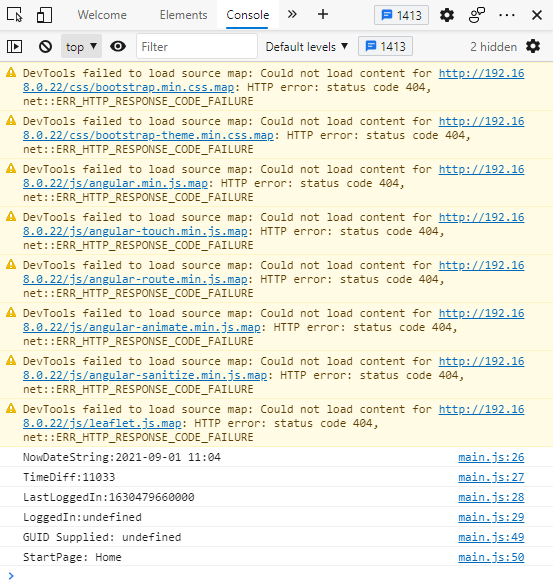
Quote from luishp on September 1, 2021, 4:26 pm@andy-marshman you only need source maps if you want to use them to debug the original code libraries (AngularJS and BootStrap) so don't worry about those warnings.
Chrome and other web browsers added support for source maps:
Go to the developer tools (F12 in the browser), then select the three dots in the upper right corner, and go to Settings.
Then, look for Sources, and disable the options: "Enable javascript source maps" "Enable CSS source maps"
If you do that, that would get rid of the warnings. It has nothing to do with your code. Check the developer tools in other pages and you will see the same warning.Regards
@andy-marshman you only need source maps if you want to use them to debug the original code libraries (AngularJS and BootStrap) so don't worry about those warnings.
Chrome and other web browsers added support for source maps:
Go to the developer tools (F12 in the browser), then select the three dots in the upper right corner, and go to Settings.
Then, look for Sources, and disable the options: "Enable javascript source maps" "Enable CSS source maps"
If you do that, that would get rid of the warnings. It has nothing to do with your code. Check the developer tools in other pages and you will see the same warning.
Regards
Quote from Andy Marshman on September 7, 2021, 5:43 pm@luishp Just in case anyone else has the same problems with copying text to the clipboard, I have found the following works.
I created a JS subroutine called DbiCopyToClipboard with the following code.
const el = document.createElement('textarea');
el.value = pStr;
el.setAttribute('readonly', '');
el.style.position = 'absolute';
el.style.left = '-9999px';
document.body.appendChild(el);
el.select();
document.execCommand('copy');
document.body.removeChild(el);
pStr is a STRING parameter.
Called using DbiCopyToClipboard "This is the Text, and this is a variable [aVar]"
Regards
Andy
@luishp Just in case anyone else has the same problems with copying text to the clipboard, I have found the following works.
I created a JS subroutine called DbiCopyToClipboard with the following code.
const el = document.createElement('textarea');
el.value = pStr;
el.setAttribute('readonly', '');
el.style.position = 'absolute';
el.style.left = '-9999px';
document.body.appendChild(el);
el.select();
document.execCommand('copy');
document.body.removeChild(el);
pStr is a STRING parameter.
Called using DbiCopyToClipboard "This is the Text, and this is a variable [aVar]"
Regards
Andy
Quote from kazem on September 7, 2021, 9:33 pmQuote from Andy Marshman on September 1, 2021, 9:34 am@luishp that works fine. I'm using version 21.7.9 of VisualNeo Web.
It just does not work in my web app at all. I have tried adding a button to all of my pages with just
TextToClipboard "Here is the text"TextToClipboard "Here is the text"TextToClipboard "Here is the text"I get the same error everytime.
Regards
Andy
Quote from luishp on September 1, 2021, 9:19 am@andy-marshman please test the attached sample. What VisualNEO Web version are you using?
Regards.
hi, Luishp. In your app alert you mentioned to use ctrl-c but it should be ctrl-v to be shown.
thanks
Quote from Andy Marshman on September 1, 2021, 9:34 am@luishp that works fine. I'm using version 21.7.9 of VisualNeo Web.
It just does not work in my web app at all. I have tried adding a button to all of my pages with just
TextToClipboard "Here is the text"TextToClipboard "Here is the text"TextToClipboard "Here is the text"I get the same error everytime.
Regards
Andy
Quote from luishp on September 1, 2021, 9:19 am@andy-marshman please test the attached sample. What VisualNEO Web version are you using?
Regards.
hi, Luishp. In your app alert you mentioned to use ctrl-c but it should be ctrl-v to be shown.
thanks

Quote from fkapnist on February 1, 2022, 8:01 pmQuote from Andy Marshman on September 1, 2021, 9:34 am@luishp that works fine. I'm using version 21.7.9 of VisualNeo Web.
It just does not work in my web app at all. I have tried adding a button to all of my pages with just
TextToClipboard "Here is the text"TextToClipboard "Here is the text"TextToClipboard "Here is the text"I get the same error everytime.
Regards
Andy
I have the same problem as Andy... It does not recognize TextToClipboard and will not compile.
Quote from Andy Marshman on September 1, 2021, 9:34 am@luishp that works fine. I'm using version 21.7.9 of VisualNeo Web.
It just does not work in my web app at all. I have tried adding a button to all of my pages with just
TextToClipboard "Here is the text"TextToClipboard "Here is the text"TextToClipboard "Here is the text"I get the same error everytime.
Regards
Andy
I have the same problem as Andy... It does not recognize TextToClipboard and will not compile.
Uploaded files:
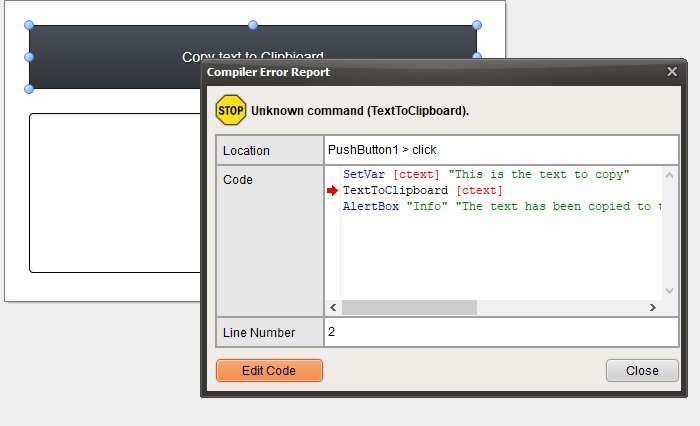
Quote from luishp on February 1, 2022, 9:55 pm@fkapnist TextToClipboard command was introduced in version 21.7.9.
If you are using an older version it will not be recognized.Regards.
@fkapnist TextToClipboard command was introduced in version 21.7.9.
If you are using an older version it will not be recognized.
Regards.
Quote from fkapnist on February 2, 2022, 2:53 pmQuote from luishp on February 1, 2022, 9:55 pm@fkapnist TextToClipboard command was introduced in version 21.7.9.
If you are using an older version it will not be recognized.Regards.
I used your "copy-to-clipboard.neoapp" example and it works fine with older versions.
<?xml version="1.0" encoding="utf-8"?> <Application> <AppTitle>Untitled Application</AppTitle> <AppShortName>MyApp</AppShortName> <Author>Author name</Author> <Version>1.0</Version> <VariablesScanned>False</VariablesScanned> <PageWidth>500</PageWidth> <PageHeight>300</PageHeight> <AutoSizeWidth>False</AutoSizeWidth> <AutoSizeHeight>False</AutoSizeHeight> <HideScrollbars>False</HideScrollbars> <ResponsiveSize>False</ResponsiveSize> <PublishPlatform>WebApp</PublishPlatform> <EmptyBuildFolder>False</EmptyBuildFolder> <AppIcon>C:\Users\sinli\OneDrive\Documentos\VisualNeoWeb\Libraries\img\default-icon.png</AppIcon> <LanguageCode>en</LanguageCode> <DisplayMode>standalone</DisplayMode> <ServiceWorker>OfflineCopyOfPages</ServiceWorker> <ThemeColor>#000000</ThemeColor> <MobileOSTypes>[AndroidOS,iOS,WindowsPhoneOS]</MobileOSTypes> <WindowState>normal</WindowState> <TitleBar>True</TitleBar> <Sizeable>True</Sizeable> <MaximizeBtn>False</MaximizeBtn> <MinimizeBtn>True</MinimizeBtn> <SystemMenu>True</SystemMenu> <ContextMenu>False</ContextMenu> <AlwaysOnTop>False</AlwaysOnTop> <ShowInTaskbar>True</ShowInTaskbar> <SingleInstance>False</SingleInstance> <ChromeKioskMode>False</ChromeKioskMode> <Components> <FunctionList name="Subroutines"/> <LibraryList name="Libraries"/> <PageList name="Main"> <Components> <Page id="NewPage"> <Components> <PushButton id="PushButton1"> <left>24px</left> <top>24px</top> <width>448px</width> <height>64px</height> <caption>Copy text to Clipbioard</caption> <click>SetVar [ctext] "This is the text to copy" TextToClipboard [ctext] AlertBox "Info" "The text has been copied to the Clipboard.<br>Plese paste it below using Ctrl-C" ""</click> </PushButton> <TextArea id="TextArea1"> <left>24px</left> <top>112px</top> <width>448px</width> <height>160px</height> </TextArea> </Components> </Page> </Components> </PageList> <PageList name="Master"> <Components> <Page id="MasterPage"/> </Components> </PageList> <PageList name="Dialog"> <Components> <Page id="NewDialog"> <Components> <DialogContainer id="DialogContainer1"> <left>0px</left> <top>0px</top> <width>500px</width> <height>300px</height> <close_button>False</close_button> <kind>custom</kind> </DialogContainer> </Components> </Page> </Components> </PageList> </Components> </Application>
Quote from luishp on February 1, 2022, 9:55 pm@fkapnist TextToClipboard command was introduced in version 21.7.9.
If you are using an older version it will not be recognized.Regards.
I used your "copy-to-clipboard.neoapp" example and it works fine with older versions.
<?xml version="1.0" encoding="utf-8"?>
<Application>
<AppTitle>Untitled Application</AppTitle>
<AppShortName>MyApp</AppShortName>
<Author>Author name</Author>
<Version>1.0</Version>
<VariablesScanned>False</VariablesScanned>
<PageWidth>500</PageWidth>
<PageHeight>300</PageHeight>
<AutoSizeWidth>False</AutoSizeWidth>
<AutoSizeHeight>False</AutoSizeHeight>
<HideScrollbars>False</HideScrollbars>
<ResponsiveSize>False</ResponsiveSize>
<PublishPlatform>WebApp</PublishPlatform>
<EmptyBuildFolder>False</EmptyBuildFolder>
<AppIcon>C:\Users\sinli\OneDrive\Documentos\VisualNeoWeb\Libraries\img\default-icon.png</AppIcon>
<LanguageCode>en</LanguageCode>
<DisplayMode>standalone</DisplayMode>
<ServiceWorker>OfflineCopyOfPages</ServiceWorker>
<ThemeColor>#000000</ThemeColor>
<MobileOSTypes>[AndroidOS,iOS,WindowsPhoneOS]</MobileOSTypes>
<WindowState>normal</WindowState>
<TitleBar>True</TitleBar>
<Sizeable>True</Sizeable>
<MaximizeBtn>False</MaximizeBtn>
<MinimizeBtn>True</MinimizeBtn>
<SystemMenu>True</SystemMenu>
<ContextMenu>False</ContextMenu>
<AlwaysOnTop>False</AlwaysOnTop>
<ShowInTaskbar>True</ShowInTaskbar>
<SingleInstance>False</SingleInstance>
<ChromeKioskMode>False</ChromeKioskMode>
<Components>
<FunctionList name="Subroutines"/>
<LibraryList name="Libraries"/>
<PageList name="Main">
<Components>
<Page id="NewPage">
<Components>
<PushButton id="PushButton1">
<left>24px</left>
<top>24px</top>
<width>448px</width>
<height>64px</height>
<caption>Copy text to Clipbioard</caption>
<click>SetVar [ctext] "This is the text to copy"
TextToClipboard [ctext]
AlertBox "Info" "The text has been copied to the Clipboard.<br>Plese paste it below using Ctrl-C" ""</click>
</PushButton>
<TextArea id="TextArea1">
<left>24px</left>
<top>112px</top>
<width>448px</width>
<height>160px</height>
</TextArea>
</Components>
</Page>
</Components>
</PageList>
<PageList name="Master">
<Components>
<Page id="MasterPage"/>
</Components>
</PageList>
<PageList name="Dialog">
<Components>
<Page id="NewDialog">
<Components>
<DialogContainer id="DialogContainer1">
<left>0px</left>
<top>0px</top>
<width>500px</width>
<height>300px</height>
<close_button>False</close_button>
<kind>custom</kind>
</DialogContainer>
</Components>
</Page>
</Components>
</PageList>
</Components>
</Application>