
Using Apache Cordova Plugins and Cordova Build APK

Quote from CDY@44 on March 12, 2021, 12:39 amHi @shahram,
I found these 2 scripts : I tried 'script 2' in a button, compile as APK, load codova plugin. when I click the button it launches the camera program of the smartphone ! OK ! So I can take a picture !
But I don't know how to interconnect these scripts and VisualNeo ( I mean : where is the result of the photo done with the camera ?) so I can see the result inside of Visualneo...
I do hope you can help me.
Best regards,
Hi @shahram,
I found these 2 scripts : I tried 'script 2' in a button, compile as APK, load codova plugin. when I click the button it launches the camera program of the smartphone ! OK ! So I can take a picture !
But I don't know how to interconnect these scripts and VisualNeo ( I mean : where is the result of the photo done with the camera ?) so I can see the result inside of Visualneo...
I do hope you can help me.
Best regards,
Uploaded files:
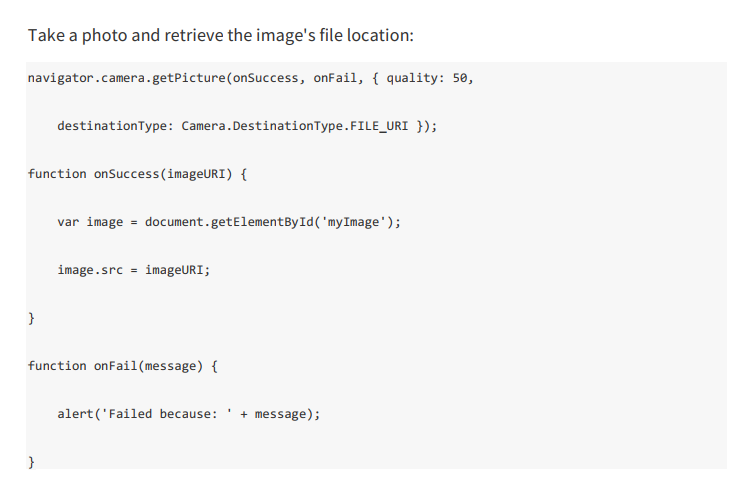
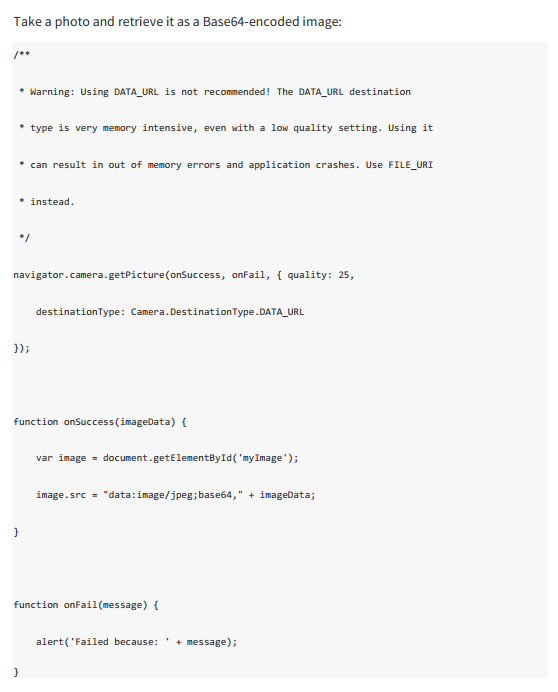

Quote from shahram on March 12, 2021, 7:22 amQuote from CDY@44 on March 12, 2021, 12:39 amHi @shahram,
I found these 2 scripts : I tried 'script 2' in a button, compile as APK, load codova plugin. when I click the button it launches the camera program of the smartphone ! OK ! So I can take a picture !
But I don't know how to interconnect these scripts and VisualNeo ( I mean : where is the result of the photo done with the camera ?) so I can see the result inside of Visualneo...
I do hope you can help me.
Best regards,
Hi @cdy44-2
About first script:
To display the captured images, just put an Image on the Page. Set the desired id for the image. Then inside the camera code, set the value getElementById equal to the Image id.

Now after taking the photo, it will be displayed in Image.
Quote from CDY@44 on March 12, 2021, 12:39 amHi @shahram,
I found these 2 scripts : I tried 'script 2' in a button, compile as APK, load codova plugin. when I click the button it launches the camera program of the smartphone ! OK ! So I can take a picture !
But I don't know how to interconnect these scripts and VisualNeo ( I mean : where is the result of the photo done with the camera ?) so I can see the result inside of Visualneo...
I do hope you can help me.
Best regards,
Hi @cdy44-2
About first script:
To display the captured images, just put an Image on the Page. Set the desired id for the image. Then inside the camera code, set the value getElementById equal to the Image id.


Now after taking the photo, it will be displayed in Image.

Quote from Jlash on March 14, 2021, 10:11 pmGracias por la ayuda y por los tutoriales, ya he conseguido mi APK, sin vuestra ayuda me hubiera sido imposible ya mis conocimientos son escasos.
Un saludo, GRACIAS!!!
Gracias por la ayuda y por los tutoriales, ya he conseguido mi APK, sin vuestra ayuda me hubiera sido imposible ya mis conocimientos son escasos.
Un saludo, GRACIAS!!!