
VisualNEO Win. Version 26.8.8 (Major version)

Quote from no1g8tor96 on August 31, 2026, 4:03 amSomething Weird happening with this build. Im getting Windows defender going crazy deleting as soon as i install. Have tired several times. Deletes and says trojan.
This did not happen with other builds. Just gave warning before dowload.
Did something change. I cant run it.
Something Weird happening with this build. Im getting Windows defender going crazy deleting as soon as i install. Have tired several times. Deletes and says trojan.
This did not happen with other builds. Just gave warning before dowload.
Did something change. I cant run it.

Quote from luishp on August 31, 2026, 8:30 am@no1g8tor96 please download and install again.
The protection system sometimes produces that behaviour in antivirus systems.
Let me know if this compilation solves the issue.
Sorry for the inconvenience.
@no1g8tor96 please download and install again.
The protection system sometimes produces that behaviour in antivirus systems.
Let me know if this compilation solves the issue.
Sorry for the inconvenience.
Quote from Anthony LaTorre on August 31, 2026, 12:43 pmLuis, I used the AI Development Kit to help me create a new Listbox plugin and the demo pub for the plugin... It worked incredibly well with Claude AI.
Normally creating a plugin and demo pub like this would have taken me days... The complete plugin was created in under 4 hrs...
There were a few errors initially, but Claude with the help of the AI Kit, quickly identified and corrected them...
This is the future App creation...
Thanks for incorporating this into VNW. It's a game changer...
Luis, I used the AI Development Kit to help me create a new Listbox plugin and the demo pub for the plugin... It worked incredibly well with Claude AI.
Normally creating a plugin and demo pub like this would have taken me days... The complete plugin was created in under 4 hrs...
There were a few errors initially, but Claude with the help of the AI Kit, quickly identified and corrected them...
This is the future App creation...
Thanks for incorporating this into VNW. It's a game changer...
Quote from luishp on September 9, 2026, 7:44 pmVisualNEO Win 26.8.8 — Maintenance Update
This build improves object selection and text searching when working with containers and custom windows:
- Object selection: Action dialogs now correctly list objects inside groups, classic Containers and ModernContainers. Nested ListBox objects can be selected directly, without typing their names manually.
- CustomWindow searches: Find, FindFirst and FindNext now include objects inside open CustomWindows, including nested windows, while respecting the selected page scope.
- FindNext reliability: Improved handling of consecutive matches when searching through containers.
- Nested content: Objects are no longer excluded from searches simply because their coordinates fall outside the page viewport. Explicitly hidden objects remain excluded.
Existing action syntax is unchanged—no script modifications are required.
Thank you to everyone who reported these issues!
The version remains 26.8.8. Please check the build date under Help > About VisualNEO (F2) to identify your installed build.
VisualNEO Win 26.8.8 — Maintenance Update
This build improves object selection and text searching when working with containers and custom windows:
- Object selection: Action dialogs now correctly list objects inside groups, classic Containers and ModernContainers. Nested ListBox objects can be selected directly, without typing their names manually.
- CustomWindow searches: Find, FindFirst and FindNext now include objects inside open CustomWindows, including nested windows, while respecting the selected page scope.
- FindNext reliability: Improved handling of consecutive matches when searching through containers.
- Nested content: Objects are no longer excluded from searches simply because their coordinates fall outside the page viewport. Explicitly hidden objects remain excluded.
Existing action syntax is unchanged—no script modifications are required.
Thank you to everyone who reported these issues!
The version remains 26.8.8. Please check the build date under Help > About VisualNEO (F2) to identify your installed build.
Quote from luishp on September 12, 2026, 11:28 amNew VisualNEO Win 26.8.8 build – Simple Text clipboard and stability fix
A new VisualNEO Win 26.8.8 build is now available, dated September 12, 2026.
This maintenance build corrects a core clipboard problem in the Simple Text properties editor. In some situations, copying and pasting text between different Text Properties dialogs could cause missing lines, corrupted text or Access Violation errors after repeated editing.
The clipboard handling has been corrected to properly support:
- Multiline text.
- Unicode characters.
- Rich text formatting.
- Copying between different properties dialogs.
- Repeated copy, close and paste operations.
This is a core editor fix.
Download the new build here:
https://visualneo.com/download
Please close VisualNEO Win before installing it. After installation, use Help > About VisualNEO (F2) to confirm that the build date is 2026-09-12.
Existing
.pubprojects remain compatible and do not need to be modified. If you still experience an Access Violation, please report the exact steps to reproduce it and, whenever possible, include all external files required by the project.
New VisualNEO Win 26.8.8 build – Simple Text clipboard and stability fix
A new VisualNEO Win 26.8.8 build is now available, dated September 12, 2026.
This maintenance build corrects a core clipboard problem in the Simple Text properties editor. In some situations, copying and pasting text between different Text Properties dialogs could cause missing lines, corrupted text or Access Violation errors after repeated editing.
The clipboard handling has been corrected to properly support:
- Multiline text.
- Unicode characters.
- Rich text formatting.
- Copying between different properties dialogs.
- Repeated copy, close and paste operations.
This is a core editor fix.
Download the new build here:
https://visualneo.com/download
Please close VisualNEO Win before installing it. After installation, use Help > About VisualNEO (F2) to confirm that the build date is 2026-09-12.
Existing .pub projects remain compatible and do not need to be modified. If you still experience an Access Violation, please report the exact steps to reproduce it and, whenever possible, include all external files required by the project.
Quote from Joerg on September 14, 2026, 9:22 amHi Luis,
The file vnplay.exe is being blocked by Bitdefender and apparently deleted as a threat. The file cannot be found in quarantine. Is anyone else having the same problem?
Kind regards,
Joerg
Hi Luis,
The file vnplay.exe is being blocked by Bitdefender and apparently deleted as a threat. The file cannot be found in quarantine. Is anyone else having the same problem?
Kind regards,
Joerg
Quote from Anthony LaTorre on September 14, 2026, 10:44 amJoerg, I had the same problem with McAffee. So after installing VNW, but before running it... I had to exclude vnplay.exe and VisualNeoWin.exe from being scanned by the McAffee real-time virus scanner...
Joerg, I had the same problem with McAffee. So after installing VNW, but before running it... I had to exclude vnplay.exe and VisualNeoWin.exe from being scanned by the McAffee real-time virus scanner...
Quote from luishp on September 14, 2026, 5:18 pm@joerg @anthony-latorre
I have recompiled VisualNEO Win again.
Not sure why sometimes it gets blocked and sometimes not.
Please download and reinstall again and let me know if it solves the problem.
Thank you!
I have recompiled VisualNEO Win again.
Not sure why sometimes it gets blocked and sometimes not.
Please download and reinstall again and let me know if it solves the problem.
Thank you!

Quote from Sinesi Giuseppe on September 15, 2026, 2:36 pmI installed the latest update and I'm getting this error.
I installed the latest update and I'm getting this error.
Uploaded files: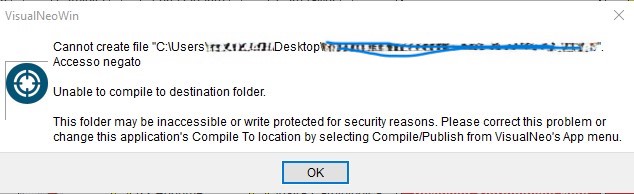
Quote from luishp on September 16, 2026, 5:39 pm@sinesi-giuseppe it seems VisualNEO Win has permission problems to write into the folder you try to compile your app.
Please just chose another folder in "App > Compile / Publish > Genral > Compile to" menu.
Regards.
@sinesi-giuseppe it seems VisualNEO Win has permission problems to write into the folder you try to compile your app.
Please just chose another folder in "App > Compile / Publish > Genral > Compile to" menu.
Regards.
Quote from Joerg on September 17, 2026, 7:34 amLuis,
Setup is working fine now with the updated version. Thank you!! :-)Kind regards,
Joerg
Luis,
Setup is working fine now with the updated version. Thank you!! :-)
Kind regards,
Joerg

Quote from luiz on September 18, 2026, 4:04 pmQuote from Sinesi Giuseppe on September 15, 2026, 2:36 pmI installed the latest update and I'm getting this error.
Try do configure the EXE to "Run as Administrator".
Quote from Sinesi Giuseppe on September 15, 2026, 2:36 pmI installed the latest update and I'm getting this error.
Try do configure the EXE to "Run as Administrator".
Quote from Sinesi Giuseppe on September 18, 2026, 4:23 pmHo installato l'ultimo aggiornamento e ricevo questo errore.
Prova a configurare l'EXE in modo che venga eseguito come amministratore.
Hi, I installed the previous version and it started working again; I don't understand what the issue might be. I should mention that this only happened on this PC, not on others. Thanks everyone for the support.
Ho installato l'ultimo aggiornamento e ricevo questo errore.
Prova a configurare l'EXE in modo che venga eseguito come amministratore.
Hi, I installed the previous version and it started working again; I don't understand what the issue might be. I should mention that this only happened on this PC, not on others. Thanks everyone for the support.